
Forum Widgets
Latest Discussions
Update: You can now control Teams Meeting Recording expiration notification emails
Hey Teams community, We've heard the feedback. For admins and users managing a high volume of meetings, TMR expiration emails can pile up fast. We've been working on giving you control, and that control is now here. What's new Tenant admins can now use a PowerShell cmdlet to suppress Teams Meeting Recording expiration and deletion notification emails across their organization. Notifications stay on by default (no change if you do nothing), but if you'd like to turn them off, here's how. Prerequisites Latest version of SharePoint Online Management Shell (download here). Note, it's Windows-only, so you'll need a Windows machine or Azure Virtual Desktop SharePoint Admin or Global Admin permissions Steps 1. Connect to your tenant powershell Connect-SPOService -Url https://<your-tenant>-admin.sharepoint.com 2. Check the current value powershell Get-SPOTenant | Format-List *Recording* False = notifications currently on (default). True = notifications suppressed. 3. Suppress notifications powershell Set-SPOTenant -DisableTeamsMeetingRecordingDeletedNotification $true You'll see a confirmation prompt — enter Y to proceed. 4. Verify powershell (Get-SPOTenant).DisableTeamsMeetingRecordingDeletedNotification True means you're all set. No more expiration emails for your tenant. Want to turn them back on later? Just run the same command with $false. What doesn't change Recordings still expire and delete on the same schedule No per-user settings, no UI changes. This is purely a tenant-level admin toggle We'll keep monitoring feedback, and as always, drop your questions below.Eddie_HarmonJun 05, 2026Microsoft16Views0likes0Comments
How much should Teams presence influence call routing
One thing I've noticed recently is that many Teams Phone environments still treat presence as a destination state rather than a routing input. A typical flow might look like: Caller selects an option Call is transferred User is unavailable Caller ends up in voicemail or another queue Technically the routing worked. From the caller's perspective, it often didn't. I'm curious how others are approaching this. Are you using Teams presence as part of your call-routing logic? For example: Available → transfer immediately Busy → offer an alternative path In a meeting → capture context Offline → route elsewhere Or are traditional queues and escalation paths still sufficient for most scenarios? Interested to hear what people are doing in real deployments.Mefteh_WJun 03, 2026Copper Contributor23Views1like0Comments
Is anyone building individual development plans inside Teams?
So hear me out. I discovered that if something is in a live document, sharepoint, etc, I've found that employees dont really check up on it or follow through with it unless they are regularly reminded. Same goes for any software we try to implement that requires a seperate login and lives in another app completely. Our employees spend most of their time communicating in Teams so I want to take our IDP process into Teams. Are there any decent talent or employee development apps for Teams that anyone can recommend for IDPs?JordanT86Jun 02, 2026Brass Contributor17Views0likes0CommentsStop Automatic Calling when Screensharing
I screenshare a lot in my position; I call the coworker (Phone/Headset) and train them on what I need them to look at. I am in a large office building, and the automatic calling of the receivers' PC is disruptive, as I do not was the whole office to hear my conversation or have people hear my trainee. I see no way to disable the team auto-call once I start to screen share or in the Options. All my coworkers feel this frustration as well. I do use the computer microphone/speaks aspect when working from home, but would disable it totally, if it would stop the auto-call. I do not want it to affect meeting invites to others, as others around the country can use their PC speak/microphone, if they want. Please advise.6Views0likes0Comments
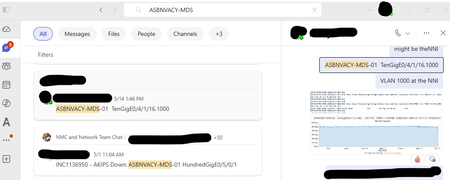
No option to go to message from search without opening side panel
When I search for a term (whether using All or Messages) and click on a result, I intend to go to that message in the chat or direct message with the whole window, just as if I had navigated there manually. I do NOT want to open an awkward side panel with that conversation. There are no right click options on the search results. How can I get rid of the side panel and just [Go to message]?BobFromITMay 28, 2026Copper Contributor40Views0likes1Comment
Teams for Android Auto - Receive Messages but Replies always Fail
I have a Pixel 10 with all latest OS and Patches as well as latest MS Teams App. For months now I've had a problem where all my incoming work messages on Teams come through fine, but when I attempt to reply it never sends the message. When I look at my Teams App there is a red retry icon because the message failed to send. When I send a new message in the app it works fine but the previous reply through Android auto remains in retry status ie Failed. Is anyone able to reply to a Work account teams message using Android Auto? It has never worked for me.KevinInKyMay 26, 2026Copper Contributor55Views0likes1Comment
Microsoft teams personal package
Dear community I am looking for a Microsoft package with Teams that supports 300 users. Can the personal package work out for this? I was trying to pay for one month, but it was not allowing me to change the country, only the US. Kindly help out if anyone can.James26May 23, 2026Copper Contributor37Views0likes1Commentsmall white window that opens during sharing in a meeting
Hi, I've Teams vers. 26120.3106.4722.3411. For some time when I access to a meeting and sharing the screen, a window or a presentation, a small white windows appears at the bottom right and I cannot close it. To close this window and to prevent it from opening again I need to disconnect to Teams also for 2-3 times. Well, how could I solve a such issue permanently? Thanks This is the window image that I can capture:pmscorca69May 21, 2026Copper Contributor135Views1like1CommentAnyone found a good way to run performance reviews inside Teams?
Our company just switched to doing everything in Teams and the one thing that still lives outside is performance reviews. We use a separate web app that nobody logs into until the last minute and managers hate it. Is there anything that actually handles the full review cycle with self assessments, manager ratings, maybe even 360 feedback? Our IT team said they'd prefer something that uses our existing M365 directory so we dont have to manage another user list.HarryPMay 21, 2026Copper Contributor76Views0likes2Comments
Anything inside Teams for people management you use and can recommend?
We currently have to use one tool for goals, another for feedback, a spreadsheet for review tracking, Teams for 1:1s, and then some shared doc for engagement notes. Leadership asked me if theres anything that does all of this inside Teams so they dont have to keep jumping around. We're a mid-size company (around 200 people) fully on Microsoft 365. Anyone found a good all-in-one solution that actually works inside Teams?AliceAtLangenMay 12, 2026Copper Contributor120Views0likes4Comments


Tags
- microsoft teams13,509 Topics
- How-to2,944 Topics
- Administrator2,657 Topics
- meetings2,566 Topics
- Settings2,307 Topics
- User Interface1,657 Topics
- tips & tricks1,507 Topics
- calling1,256 Topics
- teams1,039 Topics
- best practices999 Topics