User Profile

Spudgun
Brass Contributor
Joined May 21, 2019


User Widgets
Recent Discussions
What happened?
I am the Viva Engage admin for my company. Out of the blue on Friday I received a number of "Welcome to "X" community. It turns out I recevied this "welcome" from every single community we have, despite them being in existance for over 3 years. Fortunately it seems that only myself received these emails (phew) Today though I have been in to SharePoint Admin (also a SP Admin for my sins) and I have noticed that every community we have has had a new SP site created for them! Now, I know that at some point things changed and when creating a community it then created an M365 group. But in this case, I have made NO changes to instigate these creations. They all were in existance already. What could have possibly happened to trigger this? I can't find any information for upcoming changes or any blog post, road map item etc. I'm baffled! TIA863Views0likes3CommentsRe: Teams Meetings and Delegate - Audio Conferencing
Alextt_x8 we were fortunate enough to move to E5 not long after this post, which solved the issues as the audio conference is included. However I do remember finding out that both need the licence. I think Weirdly I have a similar query now about the teams premium licence!1KViews0likes0CommentsRe: Teams Premium - Delegates
Hi, Thanks for that response. Been using Premium now for a bit but I still can't fathom as to how/whether a delegate can get to use the benefits. Firstly, afaik, you can't view another users calendar in Teams. So if say for example an exec assistant needed to see the "AI notes", or any other feature in the delegate calendar, they wouldn't be able to. Is this correct?1.4KViews1like1Comment"All Company" Viva Engage group
Hi, It's been a few years since we deployed Yammer so apologies if this is a basic question. I've been asked about notifications and a department in the business would simply like their group notifications to behave in the same way that the "All Company" group receives them. New starters for example get notifications from All Company by default. However, I can't seem to find any info that states where the settings for the "all company" notifications and how they get sent. I can only see that end users are able to control the notification emails notifications themselves within their settings. Is there a some config I'm missing somewhere to "force" email summary/notification emails on a group and mirror those settings that we have on our "All Company"? Or have things changes in regard to the All Company group recently? Thank you1.2KViews0likes0CommentsTeams Premium - Delegates
When assigning the Premium licence (in this example to an exec, who has an assistant control their calendar). 1) does the delegate require a licence also? 2)if not, does the delegate get access to all the post meeting features/notes etc? 3)does the delegate also need the same policy assigned to them? 4)anything else we'd need to be aware of? Thank you!1.9KViews1like3CommentsForms error in Teams Chat
Hi, Hope you're well. I've managed to find a way to bulk-add 50 users into a chat (in Teams, obvs), in order to send a poll via Forms. Idea being that this one question gets asked in a chat and answered by the user real easily and quickly rather than an email and being taken to Forms via a link. However, I've added the question via forms but now getting the attached error: "Unfortunately, it looks like your chat settings don't allow adding bots right now. Talk to the chat owner about adjusting your settings" I've tested this on a smaller group chat and it works, so I'm stumped as to why it's not working with 50? Probably a real simple answer to this but can't find it. thanks!1.6KViews0likes0Comments- 1.8KViews0likes0Comments
Re: Recordings Expiry
Thanks for the reply. That's for deleted users though? Although anyway, ours is set way higher than 30 days. So I'm one of the people this has happened to hence the post. I have a recording that was created on 3rd March. I received the email "This file is expired and deleted" on the 5th July (124 days. random number). Worth noting that I THINK I changed the Admin setting to turn expiry OFF around April time. Would files before then ignore the expiry setting change? Another question I have is the fact that you receive only one email regarding expiry. No warning like "your file will expire in 10 days" or something. is that correct? I don't understand what's happening here at all Cheers1.4KViews0likes2CommentsRecordings Expiry
Hi All, Our current setting for "Recordings automatically expire" is set to "OFF". However, people are still getting emails to advise that their recordings have been deleted in OD. Is there something I'm missing in regard to a retention policy or overriding config somewhere?? thanks!1.7KViews0likes4CommentsRe: Custom App on Logi Scheduler
Thank you Steven! This was a big help, I hadn't considered creating policies for the panels themselves but this has worked. Just created a separate, very basic policy and removed the offending app. Cheers! (Although now I'm curious as to how far this can go and will look at creating/looking for nice apps to go on the panels!)1.5KViews0likes0CommentsCustom App on Logi Scheduler
We've just released an app and I've stuck it in the Global App Policy as well as the Global Setup Policy to place it on the rail. However, not long after we did that, the custom app is appearing as an icon on our Logitech Tap Schedulers! How has that happened and how can I stop it! Wasn't expecting that one! ThanksSolved1.8KViews0likes2CommentsLogitech Tap Scheduler
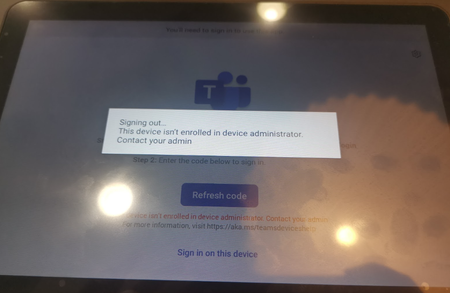
Hi, We're currently unable to log in to our Logi Schedulers with the attached error. We've previously been able to log in to these without having to do anything in Intune. Our config allows Azure device registration from Android devices. Are there any current issues that's affecting this or is there a fix? Logging in with MTR account with Team Room Pro licence. Thanks!6.8KViews0likes8CommentsTransferring VM to another tenant
Hi! we're working on a file migration to SharePoint with a third party. (fun) the third party are using their own Azure VM to accomplish this and will have around 12TB of data (Azure resource discs) with a SQL db containing only metadata. we want to move that VM with the attached discs in its entirety to our own tenant. so that we're not paying them to store it etc etc Is this achievable? Thanks!4.2KViews0likes2Comments
Recent Blog Articles
No content to show