User Profile

Rajath_Krishna
Copper Contributor
Joined Feb 16, 2022


User Widgets
Recent Discussions
Re: Recepient list not auto populating
ccsadmin22 We tried some steps from internet, but it didn't work. But after some days it started popping up automatically. I am glad it resolved by itself. . Also, if you keep sending E-mails to that person frequently then it will show I think so but not sure.1.3KViews0likes1CommentCreating Cascaded fields in SharePoint
Hi all, I have a requirement where I should create a cascading field in SharePoint online. I have two fields one is city and other one is state. If I select city from dropdown, then automatically state should fetch for respective city. For eg: - If I select city as Bangalore, then State - Karnataka If I select city as Chennai, then State - Tamil Nadu Can anyone help me out how to do this?752Views0likes2CommentsIntegrate SharePoint site into Teams
Hi all, My org has a Communication SharePoint home site and global navigation has been enabled. I need help in adding the site to org Teams. It should be published for global org level and the site should appear above all other icons like (Activity, Chat, Meetings). Can anyone let me know how to do this?940Views0likes3CommentsBlock scheduling meeting to a particular channel
Hi all, I need to block the users to schedule meeting to a particular channel in Teams. Except the users I select all others should not have access to schedule meeting to the "All Company" channel. I tried to setup policies but couldn't find relevant option, can anyone help me in this?2KViews0likes2CommentsRecepient list not auto populating
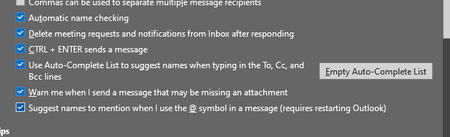
Hi all For one of the user in my organization employee's mail ID is not auto populating in recipient sections. Every time he has to enter the mail address fully. We have enabled the auto complete option still its not happening. In Outlook web its populating but in desktop Outlook its not. Can anyone help me out?2.3KViews0likes4CommentsEmbed code - Refused to connect
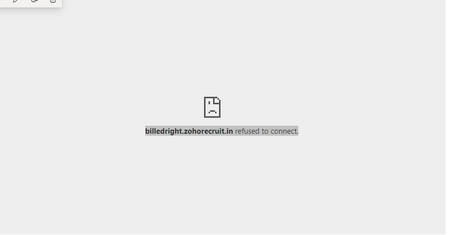
I am embedding a job portal website "Zoho jobs" in SharePoint site. Embed code is correct but the website is refusing to connect. Receiving error as "Refused to connect". Can anyone help me how to fix this? Embed Code: - <iframe width="560" height="315" src="https://billedright.zohorecruit.in" frameborder="0" allow="accelerometer; autoplay; clipboard-write; encrypted-media; gyroscope; picture-in-picture" allowfullscreen></iframe> Error: -16KViews0likes3CommentsAdd custom font type and colour in SharePoint site
Hi all, I am developing a SharePoint site and using default font type and font color. Is there any method to change the font type as "Open Sans", "Times New Roman" like that? I referred many documents we can add only custom theme but for custom font size and color I couldn't find necessary articles. Can anyone help me out?4.7KViews0likes3Comments"Send test email" function failed
When trying to setup outlook account in POP3, the step "Send test email" is failing and showing as "Kindly contact system admin or Internet service Provider (ISP)". My username and password is correct and SMTP server and port number is also correct, but still its failing. Kindly let me know is there any other methods that can resolve this issue.2.9KViews0likes4Comments
Recent Blog Articles
No content to show