Forum Widgets
Latest Discussions

Collapsible Headings Changed
Hello, Is it possible to make collapsible headings next to the arrow? A recent change (very recent) has shift it to either be below or above, when it used to be next to the heading: This new "Expand/collapse icon alignment" is causing issues with how we have styled our entire SharePoint site. Is it possible to rid of this feature or have a "Middle" alignment?DillonJSJan 08, 2026Copper Contributor22Views0likes2Comments
Conditional formatting in lists using JSON condition is between numbers
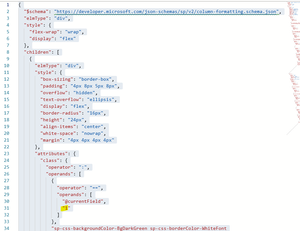
I'm trying to use JSON to conditional format a color based on the number in the cell. This code works if the number is one in the cell. I would like to apply the same color if the number is 2 or less and also apply a different color if the number is between 3 and 5. I've tried replacing the "1" above with "=IF (<=2)" and "=IF(@currentField <=2)" with no luck. Thanksdmann1Jan 08, 2026Copper Contributor28Views0likes1Comment
SharePoint LISTS - @ mention Comment
Hello all. I have started a TEAMS and Sharepoint and LIST for our user group. Some of the members are outside the organization, and are listed as guests. I have added all the members in TEAMS, Sharepoint and LISTS... The LIST is for us to collaborate. When I use the comment field and use the @ mention for someone who is a guest or outside the organization, their name does not show up to select them. How can I get these folks to work with the @ mention function. Thank you for your help. JulieSolveddtjbMontanaJan 07, 2026Copper Contributor2KViews0likes3Comments
Multilangual sites - how to link pages as an language version
Hello everyone, before the introduction of multilingualism in SharePoint we started to build 2 independent site collections to represent two languages. With the multilingualism these are to be integrated now to a common Site. In the page properties I could not yet find a property that links the page of the default language with the respective translation page. Is it also possible to copy existing pages into a page library and then assign them manually as language variants of a site?nrJan 07, 2026Copper Contributor3.1KViews0likes3Comments
SharePoint Online Subsite Feature - Is it going to deprecate
Hi Team, When will MS deprecate subsite feature from SPO? and what will happen to the existing subsites if deprecated? Also, could you please share SPO roadmap for subsite. Note that we are aware of flat structure and its recommendation from MS. Thanks & Regards, Shanthi.ShanthiM0408Jan 07, 2026Copper Contributor248Views0likes6CommentsPeople Picker Fields Not Displaying Correctly in Microsoft Edge (SharePoint List)
Hello, I'm experiencing an issue with a SharePoint list containing approximately 300 items. Each item includes 5 People Picker (PP) fields. In Microsoft Edge, some of these People Picker fields do not display their values correctly—this happens regardless of whether I'm viewing the list in list view, item view, or while editing an item. However, the values are stored correctly, and everything displays as expected when using Google Chrome. There is some JSON formatting applied to the list, but the issue persists even in new views without any custom formatting. The behavior is inconsistent: sometimes an entire row of People Picker fields is empty, and other times only one or two fields are missing. This issue affects multiple users. Here are the relevant environment details: OS: Windows 11 Enterprise Version: 23H2 Build: 22631.5335 Experience Pack: 1000.22700.1081.0 Microsoft Edge: Version 137.0.3296.62 (Official Build) Stable + Beta Channel (64-bit) SharePoint Online (E5 License) Has anyone encountered this issue or found a workaround? Thanks in advance! wit4r7wit4r7Jan 07, 2026Brass Contributor247Views0likes6CommentsSharepoint Library Folder Depth - filename/path limits
I have two questions regarding SharePoint library limits (or best practices?). A couple of years ago we were advised to limit our folder depth in SharePoint libraries to no more than 3 folder/subfolders deep. We were told there wasn't a folder limit specifically, but either there was a limit (or maybe just issues) if the filename/path was too long. As I said it's been at least two years since we were advised this and I didn't know if this was still an issue. 1. We now have a use case where a department is moving several thousand files into a SP Library and the documents are in a nested folder structure that's definitely more than 3 folders deep. There's nothing to prevent them from doing this. What are the potential consequences/issues of this type of a library? 2. And on a related note, is there an update to the recommended limitation of 5000 docs in a library (or is it a limit per folder)? And what are the potential consequences/issues of a library with more than 5000 docs?TandyWineJan 06, 2026Iron Contributor649Views0likes4CommentsHelp creating a link that opens OneNote in the APP that is hosted on SharePoint
I have a notebook that is hosted on a SharePoint site. I have several coworkers that have to move around from PC to PC depending on where they are assigned each week. Currently each time they move to a different area they are required to open the hyperlink to the OneNote and then select the "Open In App" to get it to populate in the regular app for them. Does anyone have a solution where I can leave a shortcut that opens directly to the app so they can skip the "open in app" step. My co-workers aren't particularly computer savvy and that one extra step is hanging a lot of them up.SolvedccmccaugheyJan 06, 2026Copper Contributor18KViews0likes3Comments
Can a Library hierarchy be limited to just 2 or 3 layers?
With SharePoint, our users aren't happy yet with a metadata architecture and demand their folders. Management doesn't want 10+ layers of folders. Users aren't convinced using Views with 2 groups. Is it then possible to have a limit on the number of layers in a folder hierarchy, to have a hybrid approach with only 2 layers or less? The end-result might allow the users to configure their folders: Documents library Folder 1 Folder 1.1 File 1.1.1.txt Folder 1.2 File 1.2.1.txt Folder 1.3 File 1.3.1.txt But the user wouldn't be permitted to create subfolders below that. I am not sure if it's possible to have a Layer 1 Document Set, and a Layer 2 document set, but with no further layers possible by the user.SolvedMaximusDecimusMeridiusJan 06, 2026Copper Contributor41Views1like1Comment



Resources
Tags
- SharePoint Online18,187 Topics
- Document Library3,194 Topics
- Lists3,116 Topics
- Sites2,580 Topics
- admin2,236 Topics
- sharepoint server2,038 Topics
- Permissions1,976 Topics
- files1,711 Topics
- developer1,596 Topics
- microsoft lists1,558 Topics