sites
2602 Topics
Is it possible to add a Power Automate button to Form view
Hello! Is it possible to add a Power Automate button from the list view in a SharePoint list to the Form view? I was hoping that when a line item is open to view, we may be able to add this button onto the Form view as well somehow? Even just as a hyperlink and not a button? Just something clickable.23Views0likes2CommentsDesperate for Help: Access Issues with Draft Site on SharePoint
Hello, community! I really need your help. I have been working hard on a site in SharePoint, using Microsoft 365 for Business, which is currently in draft mode, and to my frustration, I can no longer access it. After months of dedication and effort, I feel completely powerless in this situation. When I try to click on the site link, I am redirected to a different page, and to make matters worse, an irrelevant file starts downloading automatically. This is extremely frustrating for me, as the site was almost ready to be launched, and now it feels like all my work is at stake. Here are the details of the situation: - Site Link: Accessing the link I used previously simply doesn’t work anymore. - Redirection: When I click, I’m taken to a completely different page. - Automatic Download: A file unrelated to the site is being downloaded to my computer. - Site Status: Everything was finalized and ready for publication, but now I feel out of options. If anyone has experienced something similar or has any idea how I can resolve this issue, I would be eternally grateful. I’m desperate for a solution, and any help would be very much appreciated! Thank you so much for your attention!38Views1like1Comment
Quick Links “Button” layout drawers stuck open on modern SharePoint page
We’re using the Quick Links web part in Button layout on a modern SharePoint Online page. Normally, the label “drawer” only appears when you hover over the button. Recently, the drawers under all buttons are stuck permanently open (see red lines below marking the title drawers that I want to disappear). We must use the Button layout for our design standards, so switching to another layout is not an option Our IT team says there’s no HTML/CSS toggle to control this, and publishing an older page version would undo recent changes without guaranteeing a fix Rebuilding the web part isn’t realistic since we don’t have all the original links and images. This has happened before, but usually it “clears up” after some time — this time it’s persistent. Has anyone else run into this? Is this a known regression with Button layout, and is there a fix? Any guidance would be appreciated.97Views0likes2CommentsHow to get a custom Site Page content type to show in the Site Pages Library New dropdown?
I have created a new Site Pages content type from the SharePoint Admin Center Content Type hub. The parent content type is Site Pages. When I add the content type to the Site Pages library on a site, the new content type does not appear in the New dropdown. I have verified the new Content Type shows in the Site Pages Library Settings: I have also confirmed the new button order: How do I get the new Site Pages Content Type to show in the New dropdown of Site Pages Library?Solved956Views0likes3CommentsIntermittent failures when creating new libraries in modern SharePoint
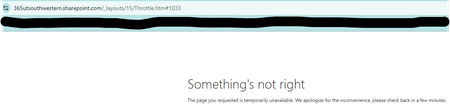
Hi everyone, I’m seeing an issue in our modern SharePoint Online site collection where creating new document libraries has started failing. This site has worked normally for years, but over the past week, most library creation attempts haven't worked. 1) The page briefly flashes or glitches during the creation process. and 2) A non‑ending spinning wheel when I hit "create" or 3) Creation attempts return “Something's not right.” error page. The failures happen across all subsites, in multiple browsers, and I’m a Site Collection Administrator. No permission changes were made recently. Has anyone seen similar intermittent library creation failures in a modern site collection, or know what might cause this kind of inconsistent behavior? Any guidance would be appreciated. Thanks! Meagan246Views1like6Comments
Document libraries added programmatically as tabs to Shared Channels are not visible
With the recent Teams UX updates, any document libraries added programmatically to Shared Channels no longer appear in the Teams interface even though they do show up when queried through PowerShell. Following the guidance in https://learn.microsoft.com/en-us/graph/teams-configuring-builtin-tabs%22https://learn.microsoft.com/en-us/graph/teams-configuring-builtin-tabs%22https://learn.microsoft.com/en-us/graph/teams-configuring-builtin-tabs%22https://learn.microsoft.com/en-us/graph/teams-configuring-builtin-tabs%22as well as the approaches I outlined in my blog post https://reshmeeauckloo.com/posts/powershell-teams-add-documentlibrary-as-tab/%22https://reshmeeauckloo.com/posts/powershell-teams-add-documentlibrary-as-tab/%22 using Microsoft Graph or PnP PowerShell, the tabs still fail to surface in the new Teams experience. The behaviour is inconsistent: The same tab‑creation methods work perfectly in standard channels. They also work for users who haven’t yet received the new Teams UX. And if the document libraries are added manually, they appear as expected in shared channels. At the moment, I’m trying to determine whether there is a supported way to add document library tabs to shared channels programmatically so that they remain visible in the new Teams interface. Any insights or confirmed workarounds would be appreciated.51Views0likes0CommentsHow get a report where "everyone except external users" group is used in my site collections
Hi all, I'm searching a way to get a report, via powershell, to all sites collections that “Everyone except external users” group is existing Someone could help me to build an efficient script? every suggestion is appreciated Massimo469Views0likes2Comments
Sharepoint logo not changing
Hey everyone, Like many other users, I can't seem to change the logo on my SPO site. I created this site via Team -> go to Sharepoint site. I've tried the many solutions: change the look change logo in site information replaced logo file with __siteIcon__.png in site assets, gets automatically re-written by system I get this error when I try to upload the picture via site information. Does anyone recognize how to adjust this setting? Thanks!48KViews1like25CommentsClassic SharePoint features appearing on a Modern Site
I have a modern SharePoint site, with a modern list that has never been associated with classic SharePoint features. But today, two users have experienced intermittent instances of the list appearing in the classic interface. They have not accessed this site before now so I do not believe there should be a cache issue. Does anyone know why this is happening and how it's possible when this site has no association with Classic features? They are using the same browser, same permissions across the site but sometimes the list opens in Classic mode, sometimes it opens in Modern. It also is happening in incognito mode. They are unable to use the site while in Classic Interface at all - the people pickers deny them access ("Error: Sorry, you do not have permission to query for users" and they cannot edit anything because of this error.54Views0likes0Comments