sites
2666 Topics
I don't want 100 different SharePoint sites. How to create private teams w/o a new site?
Guys. WTF. I've inherited a problem where a company of 50 people has 100 sharepoint sites - because users created different Teams for different projects, and Microsoft makes it incredibly opaque what this actually means. Now we have 100 SharePoint sites, many of which are unused, but all of which appear in the list of sites in 365AC. The structure we WANT is 1 Sharepoint site for our 1 org, but multiple locations within that site, and multiple groups for multiple projects. I THOUGHT what could work was converting the excess Teams into Private Channels. But I have now learned that private channels ALSO create SharePoint sites, because _______. Most confusingly, all of these sharepoint 'sites' DO exist within our main SharePoint website - they're just pages (but not 'pages') pretending to be a fresh sharepoint website. This confuses the **** out of people, the way they've redefined what a 'site' is, what a 'team' is, etc. This is genuinely hot garbage, and it's suddenly clear to me why people always push back on using SharePoint over OneDrive. Recommendations for... not having this disaster? Making a structure that is intuitive and doesn't redefine what a site and page are, and allows you to have private locations for management or projects, but DOESN'T create a 'site' within the main 'site', with it's OWN 'documents', and it's own 'Notebook' (which isn't a document) and it's own 'Conversations' (which are NOT conversations), and it's own 'pages'? I don't work with dumb people - these are very technical people. But even our main SharePoint guy is mystified by these interactions. Does it make more sense in another language? If anyone at Microsoft is reading - the english term 'site', comes from the word 'website', which generally refers to a distinct web service with a distinct domain name. These contained different webPAGES.. When websites started existing off a shared domain name, like company1.sharepoint.com and company2.sharepoint.com - this confused people, but they put up with it, because it was relatively easy to explain the tech behind this - having websites under a single site, that wasn't too hard to understand. But what SharePoint seems to do, is extend this practice into absolute hysteria, where a particular webPAGE of a webSITE is ALSO a site, but also is a TEAM, or COULD be a CHANNEL. OR it could be a PAGE - WHO knows? If it's a TEAM, that TEAM could have CONVERSATIONS, which aren't actually Team Conversations - they're EMAILS. But this is fine, because all CONVERSATIONS of a TEAM done in TEAMS are actually stored as EMAILS so really those, CONVERSATIONS should be CONVERSATIONS... So why aren't these conversations in Teams between a Team that are stored as Emails not showing in the Conversations which show emails within that Team? aefggaddadsfasd731Views4likes7Comments
Unable to change "tab title" of SharePoint site
Hello, We are setting up a new SharePoint site, and I am unable to figure out how to change the "tab title" of the site itself. We utilized a template for setting up the site, and the words "RESEARCH & DEVELOPMENT" still appear in browser tabs (shown below). There does not seem to be a way to adjust this, despite changing the Site name in Site Information, we still see the unwanted text:Solved15KViews0likes12Comments
Recycle Bin and Site Content Hidden for Site Members and Site Visitors
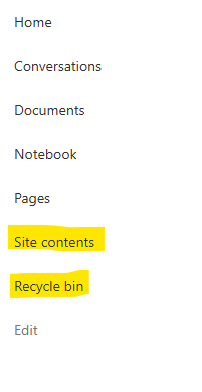
I posted this before but made a mistake with my write up, so I am reposting. I have a requirement that the Recycle bin and Site Contents should be be hidden from the Site Members and Site Visitors. Please how can I achieve this because the Server Infrastructure activation is not working for me. Any workarounds? Please help254Views0likes1Comment
SharePoint modern page, can you adjust responsive design?
Specifically, is there any way to control the window width at which webparts start to stack? My specific situation is similar to the one in this discussion. In my case, I have 3 tall, thin photos that need to display on a page. I have placed 3 image webparts, one in each column of a 3-column section. This looks fine in a wide window. But as I narrow the window, at far too wide of a window width, the section switches to stack the "columns," leaving the user looking at the top 25% of the first photo only. (Which not surprisingly is pretty useless; one needs to see all of a photo.) In both my case and the previous discussion, the problem is that the responsive design thresholds are far too wide (often wider than the physical computer monitor that some are using). Is it possible to fix the thresholds?408Views0likes2Comments
Copilot answers in Sharepoint search results?
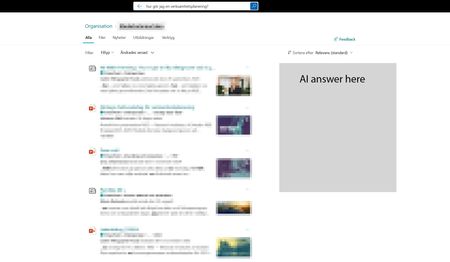
I would really like to add a copilot AI answer in the Sharepoint search result page, mainly for the intranet hub, to help our users better find answers across the intranet and also make the search bar a more complete search experience. Something we could toggle on and maybe we could point out a specific agent we've created for the intranet. I feel people are quickly starting to expect to have an AI summary in their search. Would also make sense when so many use the search bar i Sharepoint to incorporate it there, instead of having to go to a different place to use Copilot. It would make search easier.259Views0likes1CommentSharePoint Permissions Management
Over the last 3 years of managing permissions across a suite of sites, I have uncovered more new issues with the way SharePoint permissioning is designed at every turn. A few examples, before the question: If I "Share" a file or folder somewhere on the site (breaking permissions inheritance), it is very inconvenient to find it again. If I "copy link" in this one particular way, permissions inheritance is broken. When looking at site-level permissions, I see site-level permissions groups, but there could be hundreds of other users who have been added to my site(s) without my knowing. If I want to reset permissions in an area (set of folders or library), I have to do it file-by-file or folder-by folder. If I want to get an excel snapshot of - anything really - IT has to pull it and it takes a couple days. Not to mention the permissions interface is incredibly clunky. All-in-all, there seem to be a million ways to break permissions inheritance, creating an access tracking and security nightmare. AND there's no easy way to truly see and understand who has access to what or what is broken, without spending hours with IT to pull a bunch of narrow-visibility reports. So my question is: what is the best way to navigate full permissions visibility? Am I doing something wrong? Is anyone else experiencing these issues? We have resorted to having a very strict "no outsides besides a few exceptions" policy and only managing permissions at the site-level, which really hampers on the collaboration benefits that SharePoint is trying to enable. It is also very administratively intensive. One of the benefits to SharePoint is that users don't really need to understand how it works to use it, but that's becoming less and less true with the increasing lack of security we feel in the platform.527Views3likes4CommentsSharepoint Site News Links not populating like before
Hello, everyone! Has anyone else had an issues within SharePoint and posting news links? Previously, on our SharePoint site we would add news links from sources and the article title, image, and description would autopopulate and then allow users to go click the link to that article. However, since November, SharePoint does not do this anymore and is not pulling in the information. Any assistance would be appreciated.749Views7likes1Comment
Is it possible to disconnect a site from an O365 group?
I'm interested in keeping a site collection that is connected to an Office 365 group, but I want to delete the group and "disconnect" it from the site (basically the opposite of what is possible when you "groupify" a team site). Does anyone know if this is a PowerShell command?41KViews0likes13CommentsSharePoint list dynamic filtering on a multi-choice column
Hello, I was wondering if anyone has a solution/work around for a limitation I'm running into with using dynamic filtering on one of my SharePoint lists. The way I have it set up: there is a "Tags" column that has multi-selectible choices like "x", "y", "z", etc. The problem I'm running into is when you try doing dynamic filtering on the list webpart and want to view every item with tags "x AND y", it filters using the logic "x OR y". So, the output contains way too many unrelated items and the filtering is pretty much pointless. This is on top of the limitation that you can only dynamically filter by 1 column at a time, which is why I needed to add every tag to a multi-selectable choice column in the first place. Has anyone found a way around this? Or is there some solution I'm not seeing?Solved336Views0likes1Comment