Forum Widgets
Latest Discussions

Multiple Page Libraries on site
Hi everyone I have a strange issue that I haven't come across before. A customer has got an old subsite on SharePoint Online that was created with the STS#0 template (classic Team Site with no group) and they want to modernise their old wiki pages. This should have been straightforward as I was planning on using the https://learn.microsoft.com/en-us/sharepoint/dev/transform/modernize-userinterface-site-pages-powershell. However, on this site they have two page libraries - the standard Site Pages library and then what looks like a custom page library (I've blanked out the name of the custom library as it contains the company name): All of the pages they want to modernize are in the custom library but the issue with this is that the only content type available is Wiki Page: This means that although the PnP PowerShell runs successfully against pages in this library, the new versions don't actually appear in the library. I assume this is because the modern Site Page content type isn't available in the library. I was under the impression that a site could only have one page library so I'm not sure how this site has the two. On a more urgent note I need to work out the best way of modernizing these pages. Currently the only way I can see is using Power Automate to copy the pages to the Site Pages library and then convert them there. The only issue with that is that there are links within the pages to other pages so I'd need to go through them and fix these once they've been moved. here are over 300 pages so I don't really want to do this. Does anyone have any ideas on the best way forward with this. Also, if you know how there are multiple page libraries I'd be keen to hear it as I haven't come across this before. Thanks in advance for your help.gjayne84Feb 03, 2026Brass Contributor17Views0likes0Comments
Active Site Usage Not Matching Storage Used?
At my new position our SharePoint storage is getting used quickly. As of right now we have 69GB available of 11.75TB. When look at the active sites the total Storage Used only adds up to 2TB. Where is the other 8.75TB coming from? Version history was changed to 100 major versions and to delete versions after 1 year. Is it possible that the versions still being retained could add up to 8.75TB? I archived a site that was 13GB but it's still showing 69GB available. How long does it take to reclaim that storage?vis-mesFeb 02, 2026Copper Contributor57Views0likes1Comment
Trimming SharePoint Version History - Minor Versions
Hello, I am a SharePoint Admin at my organization and I have been asked to reduce our total storage usage by reducing the number of versions and minor versions in our environment on all SharePoint sites. I have written a simple PowerShell script that loops through a csv file with site addresses, and runs this command per site -> New-SPOSiteFileVersionBatchDeleteJob -Identity $site.siteURL -MajorVersionLimit 100 -MajorWithMinorVersionsLimit 5 It was my understanding that for all sites in the csv file, for all document libraries on the site, and for all files in the libraries this command will reduce the file to the last 100 Major versions, and the last 5 minor versions of each major version. Unfortunately, this command is not actually reducing the minor versions. It is working with the Major versions just fine, but all minor versions are being retained for each major version retained. Is my understanding of this command wrong, or is it not working? Are there other factors to consider? Does anyone know of an alternative that can fit my needs? The overall plan is to trim the current version history, then apply the automatic version setting to each library in our tenant. Here is the MS guide I referenced, maybe I missed something -> https://learn.microsoft.com/en-us/sharepoint/tutorial-queue-a-trim-job Any help is greatly appreciated, Cam21Views0likes0Comments
Syntex not processing files
48 hours ago, Syntex stopped processing files in our libraries, across several SharePoint sites and models. Processing Status is currently “In Progress” for over 36 hours in some cases. No errors are shown in the “Processing status” column. We've tried removing the models and applying again, adding new files, manually choosing to Classify & Extract. This occurred 3 months ago, and Microsoft had a SharePoint service degradation issue at the time, but current nothing showing on 365 Health. Anyone else experiencing this or have ideas? We logged a support request but current they cannot find an issue.Tech18Feb 02, 2026Copper Contributor456Views0likes3CommentsSharePoint Online filename restrictions - and SharePoint Autofill
Hi everyone, I'm working with SharePoint Online and trying autofill to generate SPO file titles so I can eventually use them a filename. As you might know SPO filenames know a few restrictions (invalid characters like `/ \ : * ? " < > |`, reserved names, path length limits, etc.), unfortunately syntex autofil is not aware of this. Has anyone ever tried the same, come around the same problem and how did you solve it. Especially since including all SPO restrictions, and filename limitations is not a feasible solution.31Views0likes0CommentsAI Photo Search sharepoint
I am looking for a photo storage system that can specifically search through our photos and auto-tag them using AI. We are a school, so we have thousands of pictures of students. AI Search within the SharePoint system for photos? Thanks!DonheadFeb 02, 2026Copper Contributor174Views0likes1Comment
Syntex creates only Single line text fields for each piece of information.
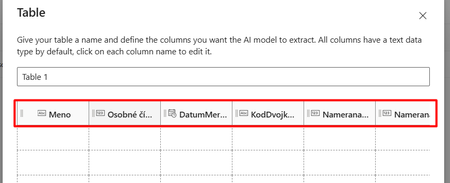
I have deployed and applied "Structured document processing" model to one of my libraries in SharePoint. I chose two pieces of information to extract: Date (type date) Table, which had 6 columns (with types : text, number, date) The training of the model and the extraction itself seems fine, but after applying the model to the library, all the columns, that Syntex creates in the library for the new content type are "Single lines of text". No number, no date... Is there something I am missing or is this the Syntex situation right now? Similar problem is with longer strings, where I would like the Syntex to grap the whole string, but since he is not able to create Multi line column, he just cuts the string after the character limit is reached. Any advice for how to proceed would be highly appreciated. Thanks!vladoesFeb 02, 2026Copper Contributor219Views0likes1CommentSyntex Failing
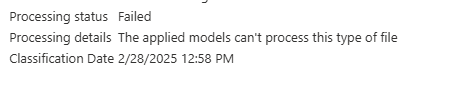
Starting around 10PM EST last night all my files stopped getting processed by Syntex. All show "Failed". With the error: "The applied models can't process this type of file" These are all PDF and Excel files. Nothing new there. I suspect it is related to the general O365 issue on the Health Portal. https://admin.microsoft.com/?login_hint=nthoman%40bmic.com&source=applauncher#servicehealth/:/alerts/MO1009364NThomanFeb 02, 2026Iron Contributor438Views2likes6Comments
Syntex suddenly unable to process pdf files.
We are having issues with Microsoft prebuilt and custom models processing any document types. We get this error: The applied models can't process this type of file. These models were working fine for over a year.Jcook1095Feb 02, 2026Copper Contributor1.5KViews0likes2Comments
Issues with Microsoft Syntex Document Processing Model: Incomplete Extraction for Multi-Page PDFs
I'm facing several challenges with the Microsoft Syntex document processing model, particularly when dealing with multi-page PDFs and large tables. I'd appreciate any insights or suggestions from fellow users or Microsoft experts who may have encountered similar issues. Below are the specific problems I'm experiencing: Unsupported PDF Formats & Multiple Tables on a Single Page: Some PDFs that I try to process seem to be in unsupported formats. In addition, pages containing multiple tables often result in extraction errors or incomplete data. Has anyone else encountered this with complex table layouts in PDFs, and what approaches have you used to resolve it? Data Extraction from Multi-Page PDFs: When processing PDFs longer than two pages (e.g., six-page PDFs), the model often extracts data correctly from only the first two or three pages. The remaining pages, particularly those with tables spanning multiple pages, are either incomplete or entirely missing. Additionally, large tables (100+ rows) in multi-page PDFs tend to result in inaccurate extraction. Are there any best practices for handling these multi-page table scenarios? Automatic Processing Issues: Sometimes, the Syntex model doesn't process files automatically. I have to manually select the file and click "Classify" to trigger processing. Is this a known issue, or is there something I might be missing in my setup? Model Publishing Delays: After publishing changes to the model, it often takes an extended period (up to 30 minutes or more) for the new model to start processing files. In some cases, the files aren't processed at all. Has anyone experienced similar delays after publishing a model, and what could be causing this? Low Confidence Scores for Multi-Page PDFs: When processing multi-page PDFs with tables, the model returns low confidence scores (below 60%). What steps can I take to improve these accuracy scores, particularly for documents with complex table structures?Swami_NawaleFeb 02, 2026Copper Contributor323Views0likes3Comments


Resources
Tags
- SharePoint Online18,219 Topics
- Document Library3,203 Topics
- Lists3,123 Topics
- Sites2,595 Topics
- admin2,241 Topics
- sharepoint server2,041 Topics
- Permissions1,978 Topics
- files1,718 Topics
- developer1,600 Topics
- microsoft lists1,567 Topics