Forum Widgets
Latest Discussions
Quick steps disappear from SharePoint list
I have 4 quick steps set up for my sharepoint list. Each one executes a flow. Twice now they have disappeared. I don't see them when I go to Automate or when I go to manage quick steps. Refreshing the page didn't help. The only way I could get them back was to add a new quick step, save it. Refresh the page and go back into manage quick steps and they were all there again.jellybeancooperFeb 20, 2026Brass Contributor93Views1like2Comments
SharePoint not refreshing file date
SharePoint is not refreshing the file date but it is refreshing the versions and date properly within the “Version History” tab. Can you tell me what I can do on my end to fix? I tried to add screenshots but, the file upload did not work. My apologies.sharongwilliams7511Feb 20, 2026Copper Contributor7Views0likes0CommentsUnable to create document from custom content type, using document template
If we create a content type in the Content Type Gallery and specify a document template URL, the content type cannot be used to create a new document in a library using the "New" menu (after pulling the content type in to the libary). The users have read access to the document template. When selecting the content type from the "New" menu, a tab is opened and then immediately closed. Upon inspection, the following error is found in the console: The document template is stored in a different site, to the site in which the content type is being used e.g. Template URL: /sites/Templates/Shared Documents/Short document template.dotx Library: /sites/Testteam/Shared Documents The content type is pulled from the Content Type Gallery, with the document template URL property already filled in. This also occurs if you https://learn.microsoft.com/en-us/sharepoint/create-customize-content-type#associate-a-document-template-with-a-content-type and then pull that content type down to the site. This leads to a synchronisation error which can be found in the Content type publishing error log: When using the "New" menu it seems that the GetListUsingPath API call, is unable to handle a server relative URL that refers to a document template in another SharePoint site. The alternative of uploading the document template to the content type via the gallery, doesn't seem to work because the file is not synchronised to sites when the content type is pulled down. Steps to reproduce Create a custom content type in the Content Type Gallery, inheriting from the Document content type. Open the content type in the Gallery and click Settings and then Advanced settings Enter a URL of document template stored in a SharePoint site in your tenant. Ensure that you have access to this site and document template. Navigate to a library in a separate site to where your template is stored. Click the "+Add column", scroll to the bottom and click "Add a content type", then click Next. Choose the content type you created in step 1 and apply. Use the New menu and attempt to create a document using the content type. Expected behavior After clicking the content type from the "New" menu, a new document will be created using the document template for that content type.CallumCrowleyFeb 20, 2026Copper Contributor4.3KViews0likes15Comments
Integrated - PowerApps Customized Form - not working
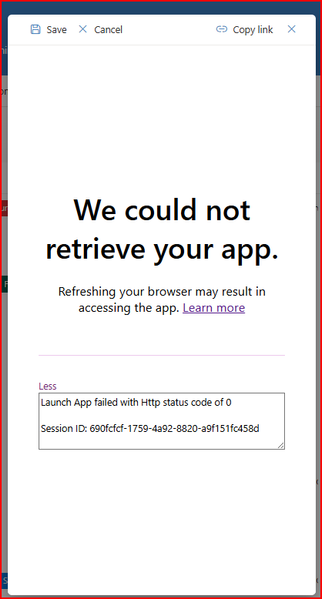
Hi, The Power App customised form is not being retrieved. When the user selects the 'Add new item' button a customised form should open, but getting this pop up. Does anyone know if there are any issues with SharePoint Online and this will hopefully resolve itself or any other potential solution as to why this is occurring. It was working yesterdayChris_Clark1968Feb 20, 2026Brass Contributor4Views0likes0Comments
Creating a form linked with excel sheet on Sharepoint online.
Hello Team, I want to create many forms with similar content but slight changes. And all these forms should have Reponses stored in excel format on SharePoint online site. But I can not use below features at the same time, 1) SharePoint online-> New -> Forms for Excel-> Create form. 2) Forms - Duplicate the form. I need to create approx. 32 forms for different targets but have to use both features mentioned above. But system limits me to only use one feature at a time. Otherwise if i use Duplicate form feature, I have to create 32 Flows to store responses in an excel sheet in SharePoint which is not feasible. Please suggest. Thanks.GauravSDFeb 19, 2026Copper Contributor3KViews0likes1CommentUnable to filter embedded list
OMG- could they f up sharepoint any more. It used to be such a powerful tool. It is harder than ever now. So- embed a lits in a page with a list part. I am showing controls and on default view-no search. there is now also NO FILTER PART so i go to github patterns and practices to download. Butttttt, I can't upload because while I am global admin, I am not sharepoint admin and cannot change my permissions. Create second admin account with all permissions. Tr to update my normal account permissions, and it says "you do not have permission to save." SO- do you know any other way to get a search of a list on a page? And - any thoughts on my permissions hell?bmw-hagitudeFeb 19, 2026Occasional Reader4Views0likes0Comments
SharePoint Online List: Filtered List View Not Refreshing After Change
Before recently, any time a change was made to a list row column that a view filter was based on, the items in view would automatically refresh to show the changes. Now the list view doesn't update unless the user refreshes the page in their browser. This is a consistent issue across all lists in the tenant. Our organization has SharePoint lists with a 'Status' column that impacts what items are shown in a view and its hurting productivity when these views aren't updating with new items unless the page is manually refreshed. Is there a new setting that is impacting the ability for filtered views to auto-refresh?guy12Feb 19, 2026Copper Contributor251Views1like3CommentsSharePoint Library - Invisibile Metadata
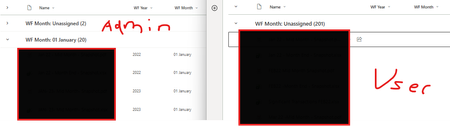
Hi All, Strange issue I'm running into on a library Left is my Admin profile where files are grouped by WF Year (metadata column) Right is a couple users with the issue where its showing Unassigned due to blank Year and Month I've exported the data from both accounts and both have the Year and Month Tried going to Properties on User account and the Year field appears like this ...very strange, any help would be appreciated :)VIP234Feb 19, 2026Copper Contributor52Views0likes0Comments
Hero and Quick Links web parts not supporting library and folder links
In the last few days, I noticed the "picker" modal used by the Hero and Quick Links visually changed. I didn't think anything of it at first until I realized the Hero web part was no longer allowing me to select libraries or folders to serve as the link. This was using the "Site" blade, which appropriately shows all the libraries and lets me drill into each and see the contents, but the ability to select a library or folder doesn't work. To make matters much worse, the "From a link" blade doesn't work either. "From a link" now seems to have a new validation component, so when I attempt to paste in a library or folder URL (i.e. https://tenant.sharepoint.com/sites/HR/Benefits) it detects that it's a SharePoint resource and displays a folder for me to select before I'm allowed to commit it - problem is, I still can't select this. I've tried pointing to the .aspx page that correlates to a library/folder view - doesn't work. I tried creating a Link in the library/folder that points to itself - I can't select these either. The Quick Links web part, on the other hand, does allow me to select these - same exact UI but allows for selecting libraries and folders. This does work for folders, but does not work for libraries. It visually looks like it works for libraries, but when you save the change is not really committed. I'm genuinely surprised to not have found this issue reported elsewhere so far. I assume this has to be a bug and hope it's fixed soon - allowing your most popular web parts to link to the root of content in your own platform is one of the most basic feature requirements and for this to break and not be noticed is pretty alarming.Jordan_PowerFeb 19, 2026Occasional Reader2Views0likes0CommentsIs it possible to add a Power Automate button to Form view
Hello! Is it possible to add a Power Automate button from the list view in a SharePoint list to the Form view? I was hoping that when a line item is open to view, we may be able to add this button onto the Form view as well somehow? Even just as a hyperlink and not a button? Just something clickable.RMDUser1Feb 19, 2026Iron Contributor37Views0likes2Comments




Tags
- SharePoint Online18,244 Topics
- Document Library3,209 Topics
- Lists3,132 Topics
- Sites2,602 Topics
- admin2,245 Topics
- sharepoint server2,042 Topics
- Permissions1,981 Topics
- files1,722 Topics
- developer1,604 Topics
- microsoft lists1,572 Topics