Recent Discussions

Share Macro enabled workbook(s)
I have a folder with a macro enabled workbook which I want to share. I followed the share routine with success in getting the folder shared. However, when I try to open the workbook on the shared computer, I get messages saying it is not a "trusted site" and can't enable content. I have tried the widely published suggestions to fix this with no success. Why does OneDrive not work with macro enabled workbooks?? Is there a solution I have not seen??15Views0likes0Comments
Mac: OneDrive Couldn't Start: Please restart your computer and try again
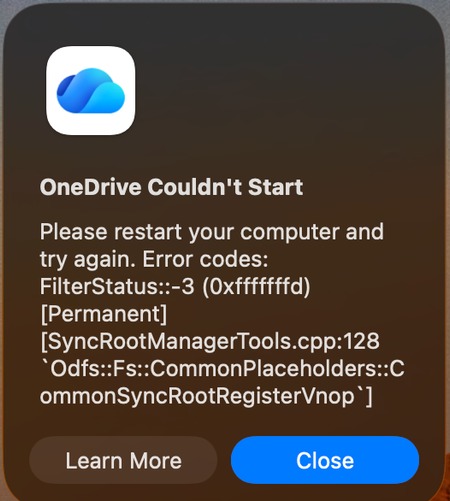
When OneDrive updated on 9/11, with build 26158.0816, I started to get this error: OneDrive Couldn't Start: Please restart your computer and try again. Error codes: FilterStatus::-3 (0xfffffffd) [Permanent] [SyncRootManagerTools.cpp:128 `Odfs::Fs::CommonPlaceholders::CommonSyncRootRegisterVnop`] I have powered off my Mac and rebooted. Restarting OneDrive does nothing. It keeps giving me this error and as a result, I also cannot live edit docs using the thick clients (Word, Excel, etc). Files I have modified with them are stuck on my Mac. I am looking for tips. Please do not ask me to unlink/de-register all of my Onedrive sync'd shares.890Views3likes6CommentsOnedrive not showing files!
Hi! I'm having big problem with OneDrive. Today my C drive was low on space and i read that you could change the location of OneDrive. I did change the location from C drive to I drive and decided to move OneDrive back to C drive location again to start reformat my pc. But my files are missing after synced with the OneDrive and my total usage was 34GB now it shows 43GB and at the OneDrive settings under account it shows only 430KB used on this pc. I'm having headache and I hope my documents didn't get lost. I did chat with one Microsoft agent and did reset OneDrive and said could thing but after I restarted my PC nothing happened. Pictures are missing and had a folder in the picture folder having documents plus other pictures in the screen folders are all missing. Thanks for the help.81Views0likes4CommentsWindows automatically moves my custom Snipping Tool screenshots folder into the OneDrive folder.
This is a privacy concern. I never chose to back up or sync my screenshots with OneDrive, but Windows/OneDrive automatically changes the location of my Screenshots folder. I manually set the folder path to: `C:\Users\%USERNAME%\Pictures\Screenshots` However, after some time, it is automatically changed to: `C:\Users\%USERNAME%\OneDrive\Pictures\Screenshots` I do not want my screenshots stored in or synced with OneDrive, and the folder location should not be changed without my permission.30Views0likes1Comment
One Drive Data recovery
I have deleted my One Drive completely almost 7 weeks ago. This was an intentional clean-up, but secured by a backup on a real SSD disk. And now that SSD disk had gone, and that was unintentional. Is there any way i can recover my data ? The data flies were only available online and never synced with my MacBook.50Views0likes1Comment
OneDrive “Share” window stuck loading from File Explorer (works on web)
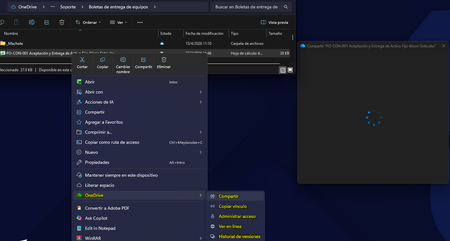
Description: Hi all, I'm experiencing an issue with OneDrive where the "Share" option from Windows File Explorer gets stuck indefinitely loading (blank window with spinner). Details: The issue occurs only when using right-click → Share from File Explorer Sharing works correctly from OneDrive web interface Issue is affecting multiple users in the same environment OneDrive sync itself is working normally Troubleshooting already performed: Reinstalled OneDrive completely (clean install) Cleared local cache and removed residual folders Reinstalled Microsoft Edge WebView2 Runtime (Evergreen x64) Cleared Windows Credential Manager entries Reconnected Work/School account (WAM reset) Tested on different networks (including mobile hotspot) Windows fully updated Environment: Windows 11 (corporate environment) Microsoft 365 / OneDrive for Business Observation: The issue seems isolated to the File Explorer integration (possibly WebView2 or WAM-related), since web sharing works fine. Has anyone experienced this behavior recently or is there any known issue with the OneDrive Explorer integration? Thanks in advance.1.9KViews0likes6CommentsConstant messages saying I'm over the 5 GB limit
I have hotmail and outlook. There is a free 5 GB one drive limit. I started receiving messages that I am over the 5 gb free limit. I deleted several GB. The message goes away for a minute and then says I am again over thghe 5 gb limit. Why is this happening. i am deleting a lot of files. How do I get rid of the free 5 gb one drive. It isn't worth it and I want to be able to keep sending and receiving e mail. This is a big problem.15KViews0likes5CommentsOnedrive personal vault problems
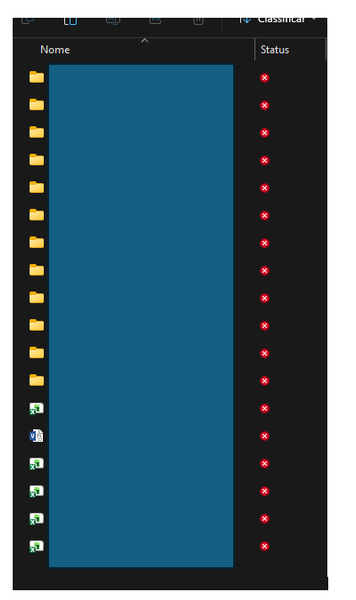
I'm having problems with opening my personal vault. The cloud icon at the bottom right of my screen has a red X and all I get is an error saying my personal vault isn't updated. I can't access any of the settings for OneDrive or Personal Vault. I downloaded an update, but when I tried to install it I got an error message saying I was using a newer version and must delete it before continuing. What do I need to do to get my OneDrive and/or Personal Vault working again?104Views0likes1Comment
OneDrive desktop client does not start after complete uninstall, cleanup and reinstall
Hello, I have a problem with the OneDrive desktop client on Windows 11. Issue The OneDrive desktop client does not start at all. OneDrive.exe exists in: C:\Program Files\Microsoft OneDrive\OneDrive.exe Double-clicking OneDrive.exe does nothing. No sign-in window appears. No OneDrive cloud icon appears in the system tray. No error message is shown. Running: "C:\Program Files\Microsoft OneDrive\OneDrive.exe" /verbose returns immediately with exit code 0. Running: "C:\Program Files\Microsoft OneDrive\OneDrive.exe" /? also produces no output. What I already tested DISM completed successfully. SFC completed successfully. OneDrive was uninstalled. Remaining OneDrive program folders were deleted. Local OneDrive configuration folders were removed/renamed. OneDrive registry entries were cleaned. Old account configuration was removed. A previously connected work/school account was removed from Windows. OneDrive was installed again from the latest installer. The issue remains exactly the same. Additional findings The file OneDrive.exe is present after installation. The modern OneDrive Photos (Beta) app starts normally. The classic OneDrive synchronization client does not start. Searching for "OneDrive" in the Start menu only shows the OneDrive app, not the classic desktop client. In some cases only a "OneDrive Sync Service" process appears in Task Manager. No useful OneDrive application errors are logged in Event Viewer. Important test I created a completely new local Windows test user account. The problem occurs there as well: OneDrive.exe does not start. No sign-in window appears. No cloud icon appears. Therefore the issue does not appear to be limited to my original Windows user profile. Data status My local data is still intact on a separate drive: E:\OneDrive The problem only affects launching the OneDrive desktop client. Could you help investigate why the OneDrive desktop application exits immediately without showing any UI or sign-in experience? Thank you.100Views0likes1Comment
blank bar at bottom of onedrive window
there's a blank bar at the bottom of the screen that squishes the content above it so the actual content only takes up about half the screen. is there any way to get rid of this? i've tried clicking on it, restarting the browser, refreshing the page. clicking on settings does nothing (not even opening the settings menu).99Views0likes1Comment
OneDrive just opens JPG files others get error 0x80070185 cloud operation was unsuccessful
Hello everyone, we have a problem on a Windows Server 2022 RDS Server with OneDrive. I can login to OneDrive and see all my files. When I try to open the files (e.g. PDF/Word/TXT) I get an error 0x80070185 the cloud operation was unsuccessful When I try to open JPG files its working. I can create folders and move files to this folder. The sync to my local notebook is ok. I tried to reset OneDrive, no success I installed the latest version of OneDrive, we checked the firewall (sophos) no blocked connections, we disabled the local AV software (sophos) to make sure it does not block anything, no success. I reset OneDrive, deleted the App Data folder for OneDrive, deleted the OneDrive folder within my User Account. It is still the same situation, login works I can see all my files and folders I can open JPG files but now word or PDF documents. I can create new folders and TXT files, fill them with content and its synced to OneDrive. Suggested solutions found on the internet are all the same, using reset onedrive and re/install latest version. We had version 26.119.0622.0003 and updated to 26.145.0728.0011 Has anybody another solution for that? Best regards117Views0likes2CommentsOneDrive desktop client continues to experience authentication problems
We're currently investigating a widespread OneDrive desktop client authentication issue affecting many users. Initially, users experienced continuous login prompt loops. In cases where authentication succeeded, OneDrive would repeatedly connect and disconnect, asking users to re-enter their credentials multiple times. We've already attempted: Resetting OneDrive Uninstalling and reinstalling the client Removing and recreating Windows Credential Manager entries Signing users out and back into Microsoft 365 None of these steps resolved the issue. A key finding is that OneDrive Online (browser access) works normally while connected to the corporate network. Users can access their files through the web without issue. However, the OneDrive desktop client continues to experience authentication problems. Today we identified an interesting workaround: when users connect through an external network (such as a mobile hotspot), OneDrive immediately authenticates and syncs successfully. Once we go back on the corporate network and reset OneDrive, the issue returns. No firewall, VPN, or known network configuration changes have been made, and current reviews have not shown any obvious blocked traffic. Given that: OneDrive Online works internally The desktop client fails internally The desktop client works externally (hotspot) We're trying to determine what network, authentication, proxy, DNS, SSL inspection, Conditional Access, or Microsoft 365 endpoint-related issue could be impacting the OneDrive desktop client specifically. Has anyone encountered similar behavior or have recommendations on where to investigate next?225Views0likes1CommentPersonal vault isn't working. Won't open.
My OneDrive cloud icon has a red X and says my personal vault isn't up to date. I've tried upgrading, installing a newer version, removing and reinstalling, cursing banging my head on my desk... Someone must know what I need to do to get my personal vault to work again. It just won't open. HELP!93Views0likes1Commentonedrive sync issues
Hi We use OneDrive for Business and need a solution for sharing files and folders among a team while maintaining proper access permissions. Currently, each team member's Desktop and Documents folders are synced with their own personal OneDrive for Business account. In addition, we have a separate common OneDrive account that has been added to all team members' PCs, and all team members have Owner permissions on that account. When a user creates a folder or saves a file in the shared OneDrive location, it is actually being created under the common OneDrive account, not in the user's personal OneDrive. While this allows everyone to access the same files, we frequently experience synchronization conflicts and sync issues between users. What is the Microsoft-recommended approach for this type of collaboration? Is using a common OneDrive account with multiple owners a supported best practice, or should we instead use a SharePoint document library (or another Microsoft 365 solution) for shared team files, permissions, and reliable synchronization? Thanks269Views0likes3CommentsHow to get rid of old Onenote files in Onedrive
I've been using Onenote for many, many years and over that time I have collected several unused files that seem to be un-deletable on Onedrive. I have deleted some of them within Onedrive from time to time but the names seem to remain. Here is what I see. When I click "Files" in One drive I see folders and under that documents which contains my only current Onenote database. The one I use. But, then I click "home" and see six old unused data base files that cannot be deleted. When I click on some of them the screen says "Sorry, something went wrong - Item may have been deleted by another person" Another file will say "This item might not exist or has been deleted". I am the only one who uses this account. I'm not sure what HOME is or what its function is as it doesn't show any folders or files that are active. It only shows these abandoned Onenote databases that nothing can be done with. So, Is there a way to clean this up or is it just not worth the effort. Since I don't know what the function of Home is I'm not sure if it matters. Thanks for any enlightenment.160Views0likes1Comment
😅 OneDrive Upload/Download Speed Help
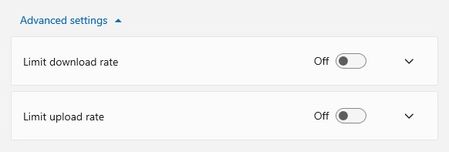
Does anyone know of how I can improve my OneDrive download speeds? I cannot get my computer to download from OneDrive faster than 3.5-4.7Mbps. I've ensured my OneDrive settings do NOT limit my downloads I went so far as to plug my computer directly into my modem; even with 350Mpbs download and 650Mbps upload - still limited to really sub-4.0Mbps download speed from OneDrive. I understand my laptop hardware isn't limiting anything: CPU - 11th gen Intel(R) Core(TM) i5-1135G7 @2.40GHz Memory - 2x 16gb DDR4 Thank you for any and all recommendations, exploratory questions, or knowledge sharing!!!2.4KViews0likes4Comments
OneDrive is soooooooooooooooooooooo slow!
Why is OneDrive for Business so unacceptably slow? I've had a case open with Microsoft Support since February and to date they have involved several different teams, run numerous diagnostics and tests remotely on my computer, but still haven't been able to improve let alone resolve the very poor download speeds we are getting across the company. They can see the issue with their own eyes, and the under-performing tests are appearing in their diagnostic logs, but for whatever reason they cannot fix their own systems! We have a fibre-optic leased line, 100Mbit over a 1Gbit bearer. Running a speed test, I am getting the full 100Mbit up and down, and yet when I am downloading a file (whether it's a few MB or a few hundred MB) from OneDrive, the download rate hovers between 500Kb/s and 800Kb/s. Uploading the OneDrive for Business is fine - the upload rate is between 7Mb/s and 9Mb/s. It's just the download rate that's the issue. Whenever any of our users save anything to OneDrive and the document is no longer cached, they have to wait for what feels like an eternity for the file to be downloaded before it can be opened. If they're opening the file via an application, then that application will hang and stop responding until the file has been downloaded from their OneDrive. Before we switched to Microsoft 365, we hosted everything locally. Anything we tried to open would do so almost instantly. But using OneDrive feels like we have travelled back in time to the days of 56K/ISDN. If this is how OneDrive has been designed, then it should not be labelled as a business service. There are other solutions out there from competitors that outperform OneDrive, and unfortunately if these issues are not resolved soon, I doubt we will be the only business who migrates away from OneDrive or even Microsoft altogether.32KViews6likes18CommentsWindows 10 Update (KB5001716) Broke My OneDrive on Windows 10 22H2
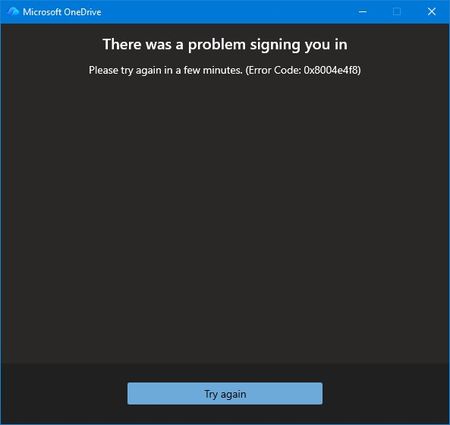
Prior to the August update all was well. I couldn't log into OneDrive from my desktop. No issues through my phone or online. Login screen fades away with no error just ghost One Drives filling my taskbar because multiple instances of OneDrive appear in Task Manager. At first, I thought maybe the update exposed some file corruption. A quick uninstall of OneDrive and re-install. Of course nothing is easy. I thought this would be the perfect opportunity to use AI to assist my troubleshooting. The AI found multiple issues with Windows Update Cleanup & WebView2 Runtime. I was all in the registry and services application. In the end, nothing worked and I threw the bomb at the desktop. Clean Windows install from a USB. Reinstalled Microsoft 365 and thought all would be well. Nothing is ever easy. The exact same issue. Microsoft validates my login but the hand-off to OneDrive fails. I got an actual error message for the first time from OneDrive. I reached out to tech support. AI seemed to think it's not a desktop issue because of the clean install. Because I'm on a Windows 10 machine my support person disclaimed limited support. I understood and was gracious. I had the opportunity to relay to my support person that I may have a backend issue and specifically error 0x8004e4f8 after a full clean install is the smoking gun. This error does not come from Windows. It comes from Microsoft’s cloud identity backend rejecting your OneDrive token request. I also performed these actions prior to reaching out: Full clean install All Windows updates Fresh OneDrive install Fresh Microsoft 365 install Fresh WebView2 Fresh Edge New password New recovery email Removal of old identity methods Device reboot Device registration reset I also relayed to my support person that AI thought Microsoft needed to perform these actions due to the error code: It requires a Microsoft engineer to: Reset your OneDrive service flags Rebuild your OneDrive tenant metadata Regenerate your OneDrive provisioning state Clear corrupted backend identity tokens Re‑provision your account on the OneDrive service My support person disagreed because my online OneDrive still works. He proved it using Quick Assist. We even tried using a new profile to see if OneDrive would work. No. Same issue. Window accepts me through authentication but when logging into OneDrive I receive the error message, try again later, or fades away. That was the end of my official Microsoft technical support. They suggested I post on here so here I am. Anyone else?187Views0likes1CommentHow do I stop onedrive from looking at my photos
I uploaded images to onedrive, but I want onedrive to treat them as files for storage and regard the content as private - not looking for faces, not anything else. Its not about synching, nor about upload from camera. Its about privacy.Solved233Views0likes1Comment


Events
Recent Blogs
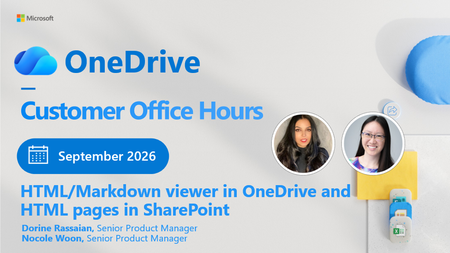
- 2 MIN READGet ready for the September 2026 OneDrive Customer Office Hours! This session creates space for open conversation around the latest updates and how they support the way you use your files every day. ...Sep 02, 2026321Views0likes1Comment
 Get ready for the August 2026 OneDrive Customer Office Hours! This session creates space for open conversation around the latest updates and how they support the way you use your files every day. In ...Aug 10, 2026468Views0likes0Comments