onedrive app
13 Topics
Add Shortcut to Files fails
My wife and I have a family Office 365 subscription. I have shared a folder with her with permissions to edit. She gets the email confirming this and can open the link and see the files in the folder. When she clicks "Add shortcut to My files" she gets a message "1 shortcut wasn't added". This happens using Onedrive web (through Edge) and on the Onedrive app on her iPhone. On the iPhone she hit "Add Shortcut to Files" and it says "By addding "Folder Name" to your OneDrive, you can sync it on your computers with other OneDrive files". When she clicks OK it says "Adding" and then comes up with a message "Something went wrong". Any ideas?4.7KViews11likes14CommentsOneDrive Stops Running
I have a Windows 11 on a laptop and have been using Onedrive for a long time. This problem happens when the PC is started. Suddenly the program stops after showing up in the taskbar. It goes through signing in and then quits running. For a while a window kept popping up suggesting an update to PowerDrive. That's when Onedrive stops. I uninstalled the PowerDrive program, but Onedrive stills stops. When following the suggestions on the Microsoft page for resetting Onedrive the message that it cannot find Onedrive shows up. Yet Onedrive presumably has been installed in the correct location. I have uninstalled and re-installed Onedrive. Also, re-installed Windows, and the Microsoft 365 family. Each time Onedrive shows up and then stops running. I can start Onedrive, the folder opens, the icons shows up. But a few seconds later the icon is gone. Ideas?80Views0likes1Comment
Search function on Onedrive for iOS not working
I have noticed that the search function on Onedrive for IPhone has stopped working and wondered if anyone else has had the same problem. I contacted MS support directly from within the app and received a reply which acknowledges that it is a real problem that they are working on but who knows when it will be resolved.1.5KViews6likes13CommentsOneDrive SYNC client not showing 'Shared folder'
The issue of having the 'shared folder turned into an internet shortcut' was solved for me a week ago. as both of the accounts are migrated on new OneDrive (V2) but I'm facing another issue even after migrated to the v2. The problem is, In Windows OneDrive SYNC client, from its settings/account/choose folder, the 'shared folder' is not showing over there. Therefore, I can't choose which folder/file to sync (selective sync that's called), and all the other unnecessary folders into that shared folder, which I don't need or require, are being synced and downloaded on daily basis, eating my bandwidth as well as storage space. I mailed this issue to MSFT but they didn't respond with anything conclusive, except asking to uninstall/reinstall/reset OneDrive, which I already did everything, so posting it here. has anyone else faced or experiecning this same issue? Any workaround? My post in MSFT forum with screenshots here: Check this out for better understanding of this issue. https://answers.microsoft.com/en-us/msoffice/forum/all/onedrive-sync-client-not-showing-shared-folder/cae9231f-4c02-4861-8a3b-aafe7b3e10c5698Views1like2CommentsOneDrive Application keeps processing large number of files even if it is not syncing
We have a cloud file storage that we plan to migrate to SharePoint sites. One of the sites that I copied to test performance has approx. 550 GB and 320K files (total storage has 5.2 TB and 1.1 million files). I opened SharePoint site and clicked button to add to OneDrive but didn't click sync button. I want to see folder structure in Windows Explorer but don't want to download files. The problem is that OneDrive Windows app keeps processing forever consuming a lot of CPU and memory. Most of us work on laptops and OneDrive app seems to restarting processing every time laptop is started, so it can't finish during the day. My users want accept browsing files using a web browser, so client app is an only option for me. Am I hitting a limit of OneDrive app?2.3KViews0likes1CommentMy first post got immediately deleted
My first post here was a tech question/bug description related to OneDrive API. The post immediately disappeared and I'm not sure if I should just try posting it again. This is the URL of my deleted post: https://techcommunity.microsoft.com/discussions/onedrivedeveloper/uploading-file-to-onedrive-personal-fails-when-filename-is-prefixed-with-the-wor/4372557Solved305Views1like2Comments
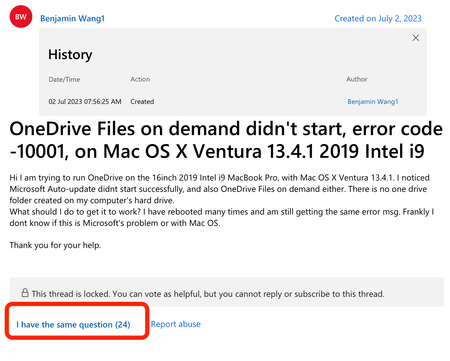
OneDrive Error -10001 in MacBook Pro M2 Pro with macOS14.5
After install the newest version OneDrive app from Microsoft web. OneDrive app didn't start correctly, pop up an error code -10001, I cannot even click any button in the icon tool (Top Right corner), so it's not possible to Quit OneDrive or get into the setting page in the App. I try the following ways, but this issue keep happening when the app was starting up. 1. Move the OneDrive application to the trash and download the program again from official OneDrive web (version 24.086.0428.0003) 2. Reboot the MacBook 3. Update the macOS to latest macOS14.5 (2024-06-11) 4. Delete all the file that I can find in Finder App MacBook Pro 14" 2023 M2 Pro, from Taiwan Apple Store --- I try to found solution in Microsoft Community, however the user that have the same error, cannot fix there problems too! More than 20 users click "I have the same question" under the error-10001 post. No one has respond that their problem were solved. I believe this error happens currently for more than one year. 1. FreyaVandenBroeck with MacBook Air MacOS 14.5 (23F79) on 01 Jun 2024 https://techcommunity.microsoft.com/t5/onedrive/onedrive-on-mac/m-p/4157541 https://answers.microsoft.com/en-us/profile/1019f83a-42de-42b7-80af-a49af6aa79a8with MacBook Pro 2019 Intel i9 MacOS 13.4. on 02 Jul 2023 https://answers.microsoft.com/en-us/msoffice/forum/all/onedrive-files-on-demand-didnt-start-error-code/9dbb2cab-e46b-4359-af4c-d12daf987ef76.7KViews0likes5Comments
OneDrive business account can't be removed from OneDrive for Android
Hi, I'm using a private Outlook account on my Android phone. In the past, I added my work account in the OneDrive app for Android. I need to remove this account, but... 1) The OneDrive app only has an option 'Sign out', not an option to remove the account. 2) Excel and Word for Android also show the work account under 'settings', with a red cross. The work account can be removed there, but whenever I choose 'reset Office', the work account returns automatically. 3) The Android Settings have an Accounts option, removing the OneDrive-work-account there also doesn't help, OneDrive still shows the account. I've tried endlessly removing and reinstalling apps, nothing works. Somehow it seems there's a link between the accounts which is restored on each and every occasion. I've seen similar questions, like the one below, but as far as the questions have a solution, it doesn't work in my case. https://techcommunity.microsoft.com/t5/onedrive-for-business/removing-an-account-from-onedrive-for-android/m-p/792926 Any clues? Cheers.5.6KViews1like2CommentsI have trouble with my onedrive on my phone S22 ultra for plan 100gb i paid
My one drive account is email address removed for privacy reasons can not use. Reasons I bought the 100gb plan - free use for 6 months on my Samsung S22 ultra phone. I pay via google play. After paying and being charged, I can't use the registered pillow. After paying and being charged, I can't use the registered pillow. I contacted google play to solve it, but they instructed me to contact the one drive app developer I activated the account email address removed for privacy reasons in app One drive on my phone. My phone screen: Check the list of products available for email address removed for privacy reasons -> then switch to the screen that shows the activation of the subscription for email address removed for privacy reasons -> followed by the screen that shows the inability to activate the subscription and requires a return OneDrive I need some help from Onedrive team. Thanks a lot.1.4KViews0likes3Comments