onedrive app
18 Topics
Windows 10 Update (KB5001716) Broke My OneDrive on Windows 10 22H2
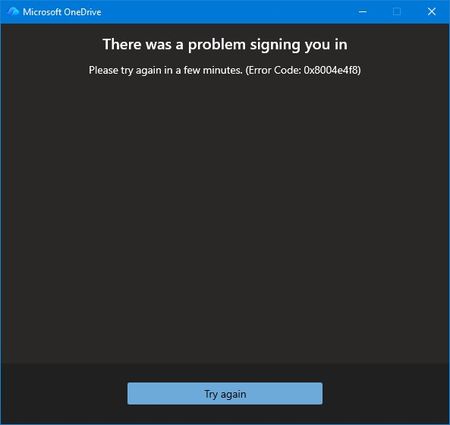
Prior to the August update all was well. I couldn't log into OneDrive from my desktop. No issues through my phone or online. Login screen fades away with no error just ghost One Drives filling my taskbar because multiple instances of OneDrive appear in Task Manager. At first, I thought maybe the update exposed some file corruption. A quick uninstall of OneDrive and re-install. Of course nothing is easy. I thought this would be the perfect opportunity to use AI to assist my troubleshooting. The AI found multiple issues with Windows Update Cleanup & WebView2 Runtime. I was all in the registry and services application. In the end, nothing worked and I threw the bomb at the desktop. Clean Windows install from a USB. Reinstalled Microsoft 365 and thought all would be well. Nothing is ever easy. The exact same issue. Microsoft validates my login but the hand-off to OneDrive fails. I got an actual error message for the first time from OneDrive. I reached out to tech support. AI seemed to think it's not a desktop issue because of the clean install. Because I'm on a Windows 10 machine my support person disclaimed limited support. I understood and was gracious. I had the opportunity to relay to my support person that I may have a backend issue and specifically error 0x8004e4f8 after a full clean install is the smoking gun. This error does not come from Windows. It comes from Microsoft’s cloud identity backend rejecting your OneDrive token request. I also performed these actions prior to reaching out: Full clean install All Windows updates Fresh OneDrive install Fresh Microsoft 365 install Fresh WebView2 Fresh Edge New password New recovery email Removal of old identity methods Device reboot Device registration reset I also relayed to my support person that AI thought Microsoft needed to perform these actions due to the error code: It requires a Microsoft engineer to: Reset your OneDrive service flags Rebuild your OneDrive tenant metadata Regenerate your OneDrive provisioning state Clear corrupted backend identity tokens Re‑provision your account on the OneDrive service My support person disagreed because my online OneDrive still works. He proved it using Quick Assist. We even tried using a new profile to see if OneDrive would work. No. Same issue. Window accepts me through authentication but when logging into OneDrive I receive the error message, try again later, or fades away. That was the end of my official Microsoft technical support. They suggested I post on here so here I am. Anyone else?398Views0likes2Comments
Add Shortcut to Files fails
My wife and I have a family Office 365 subscription. I have shared a folder with her with permissions to edit. She gets the email confirming this and can open the link and see the files in the folder. When she clicks "Add shortcut to My files" she gets a message "1 shortcut wasn't added". This happens using Onedrive web (through Edge) and on the Onedrive app on her iPhone. On the iPhone she hit "Add Shortcut to Files" and it says "By addding "Folder Name" to your OneDrive, you can sync it on your computers with other OneDrive files". When she clicks OK it says "Adding" and then comes up with a message "Something went wrong". Any ideas?5.3KViews11likes14CommentsOneDrive Stops Running
I have a Windows 11 on a laptop and have been using Onedrive for a long time. This problem happens when the PC is started. Suddenly the program stops after showing up in the taskbar. It goes through signing in and then quits running. For a while a window kept popping up suggesting an update to PowerDrive. That's when Onedrive stops. I uninstalled the PowerDrive program, but Onedrive stills stops. When following the suggestions on the Microsoft page for resetting Onedrive the message that it cannot find Onedrive shows up. Yet Onedrive presumably has been installed in the correct location. I have uninstalled and re-installed Onedrive. Also, re-installed Windows, and the Microsoft 365 family. Each time Onedrive shows up and then stops running. I can start Onedrive, the folder opens, the icons shows up. But a few seconds later the icon is gone. Ideas?212Views0likes1Comment
Search function on Onedrive for iOS not working
I have noticed that the search function on Onedrive for IPhone has stopped working and wondered if anyone else has had the same problem. I contacted MS support directly from within the app and received a reply which acknowledges that it is a real problem that they are working on but who knows when it will be resolved.1.9KViews6likes13Comments
"User content migrated" Error when Creating OneDrive Webhook Subscription
Dear Microsoft Community, Our application is encountering an undocumented error when attempting to set up a Webhook Subscription to a OneDrive app-root folder (/drive/special/approot). This issue began approximately one day after deployment, following an initial period where the subscription process worked correctly, and has now persisted for several weeks. Here's the full error message: { "error": { "code": "ExtensionError", "message": "Operation: Create; Exception: [Status Code: ServiceUnavailable; Reason: User content migrated. Cannot access disabled item.]", "innerError": { "date": "2025-06-10T10:58:15", "request-id": "edff6dc0-45b7-4e7c-8797-3134ebc6bae4", "client-request-id": "edff6dc0-45b7-4e7c-8797-3134ebc6bae4" } } } Could this error be related to: - The absence of an MPN ID? - The type of Microsoft account used for app registration (personal vs. work account)? Any insights or suggestions would be greatly appreciated!169Views0likes0CommentsOneDrive SYNC client not showing 'Shared folder'
The issue of having the 'shared folder turned into an internet shortcut' was solved for me a week ago. as both of the accounts are migrated on new OneDrive (V2) but I'm facing another issue even after migrated to the v2. The problem is, In Windows OneDrive SYNC client, from its settings/account/choose folder, the 'shared folder' is not showing over there. Therefore, I can't choose which folder/file to sync (selective sync that's called), and all the other unnecessary folders into that shared folder, which I don't need or require, are being synced and downloaded on daily basis, eating my bandwidth as well as storage space. I mailed this issue to MSFT but they didn't respond with anything conclusive, except asking to uninstall/reinstall/reset OneDrive, which I already did everything, so posting it here. has anyone else faced or experiecning this same issue? Any workaround? My post in MSFT forum with screenshots here: Check this out for better understanding of this issue. https://answers.microsoft.com/en-us/msoffice/forum/all/onedrive-sync-client-not-showing-shared-folder/cae9231f-4c02-4861-8a3b-aafe7b3e10c5856Views1like2CommentsOneDrive Application keeps processing large number of files even if it is not syncing
We have a cloud file storage that we plan to migrate to SharePoint sites. One of the sites that I copied to test performance has approx. 550 GB and 320K files (total storage has 5.2 TB and 1.1 million files). I opened SharePoint site and clicked button to add to OneDrive but didn't click sync button. I want to see folder structure in Windows Explorer but don't want to download files. The problem is that OneDrive Windows app keeps processing forever consuming a lot of CPU and memory. Most of us work on laptops and OneDrive app seems to restarting processing every time laptop is started, so it can't finish during the day. My users want accept browsing files using a web browser, so client app is an only option for me. Am I hitting a limit of OneDrive app?2.6KViews0likes1CommentMy first post got immediately deleted
My first post here was a tech question/bug description related to OneDrive API. The post immediately disappeared and I'm not sure if I should just try posting it again. This is the URL of my deleted post: https://techcommunity.microsoft.com/discussions/onedrivedeveloper/uploading-file-to-onedrive-personal-fails-when-filename-is-prefixed-with-the-wor/4372557Solved514Views1like2CommentsEdge Branding and OneDrive Client Sync App Support
I'm trying to configure Edge branding using the Edge Management Service. From the guide here https://learn.microsoft.com/en-us/deployedge/microsoft-edge-organization-branding it states: Are there any scenarios where organization branding can't be used? Yes, organization branding isn't supported for the following scenarios. Organization branding isn't applied if: OneDrive desktop sync is enabled. The OneDrive policy to exclude specific kinds of files from being uploaded is disabled. We have OneDrive client app installed on all our desktops. It's not clear to me why this would make this feature not supported. Any ideas/information on this?264Views0likes1Comment