Recent Discussions

Share Macro enabled workbook(s)
I have a folder with a macro enabled workbook which I want to share. I followed the share routine with success in getting the folder shared. However, when I try to open the workbook on the shared computer, I get messages saying it is not a "trusted site" and can't enable content. I have tried the widely published suggestions to fix this with no success. Why does OneDrive not work with macro enabled workbooks?? Is there a solution I have not seen??19Views0likes0Comments
One Drive Data recovery
I have deleted my One Drive completely almost 7 weeks ago. This was an intentional clean-up, but secured by a backup on a real SSD disk. And now that SSD disk had gone, and that was unintentional. Is there any way i can recover my data ? The data flies were only available online and never synced with my MacBook.50Views0likes1Comment
Windows automatically moves my custom Snipping Tool screenshots folder into the OneDrive folder.
This is a privacy concern. I never chose to back up or sync my screenshots with OneDrive, but Windows/OneDrive automatically changes the location of my Screenshots folder. I manually set the folder path to: `C:\Users\%USERNAME%\Pictures\Screenshots` However, after some time, it is automatically changed to: `C:\Users\%USERNAME%\OneDrive\Pictures\Screenshots` I do not want my screenshots stored in or synced with OneDrive, and the folder location should not be changed without my permission.31Views0likes1CommentMac: OneDrive Couldn't Start: Please restart your computer and try again
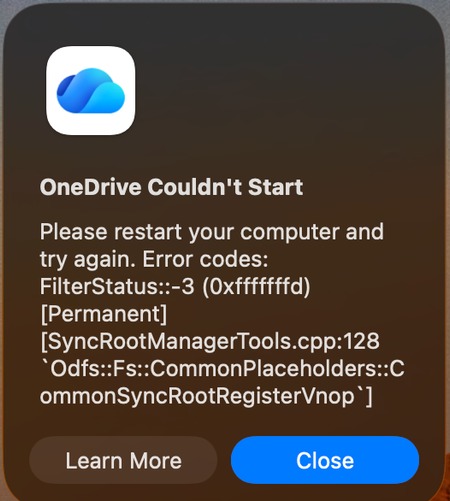
When OneDrive updated on 9/11, with build 26158.0816, I started to get this error: OneDrive Couldn't Start: Please restart your computer and try again. Error codes: FilterStatus::-3 (0xfffffffd) [Permanent] [SyncRootManagerTools.cpp:128 `Odfs::Fs::CommonPlaceholders::CommonSyncRootRegisterVnop`] I have powered off my Mac and rebooted. Restarting OneDrive does nothing. It keeps giving me this error and as a result, I also cannot live edit docs using the thick clients (Word, Excel, etc). Files I have modified with them are stuck on my Mac. I am looking for tips. Please do not ask me to unlink/de-register all of my Onedrive sync'd shares.951Views4likes7Comments
OneDrive just opens JPG files others get error 0x80070185 cloud operation was unsuccessful
Hello everyone, we have a problem on a Windows Server 2022 RDS Server with OneDrive. I can login to OneDrive and see all my files. When I try to open the files (e.g. PDF/Word/TXT) I get an error 0x80070185 the cloud operation was unsuccessful When I try to open JPG files its working. I can create folders and move files to this folder. The sync to my local notebook is ok. I tried to reset OneDrive, no success I installed the latest version of OneDrive, we checked the firewall (sophos) no blocked connections, we disabled the local AV software (sophos) to make sure it does not block anything, no success. I reset OneDrive, deleted the App Data folder for OneDrive, deleted the OneDrive folder within my User Account. It is still the same situation, login works I can see all my files and folders I can open JPG files but now word or PDF documents. I can create new folders and TXT files, fill them with content and its synced to OneDrive. Suggested solutions found on the internet are all the same, using reset onedrive and re/install latest version. We had version 26.119.0622.0003 and updated to 26.145.0728.0011 Has anybody another solution for that? Best regards117Views0likes2Comments
blank bar at bottom of onedrive window
there's a blank bar at the bottom of the screen that squishes the content above it so the actual content only takes up about half the screen. is there any way to get rid of this? i've tried clicking on it, restarting the browser, refreshing the page. clicking on settings does nothing (not even opening the settings menu).99Views0likes1CommentOnedrive personal vault problems
I'm having problems with opening my personal vault. The cloud icon at the bottom right of my screen has a red X and all I get is an error saying my personal vault isn't updated. I can't access any of the settings for OneDrive or Personal Vault. I downloaded an update, but when I tried to install it I got an error message saying I was using a newer version and must delete it before continuing. What do I need to do to get my OneDrive and/or Personal Vault working again?104Views0likes1CommentOneDrive desktop client continues to experience authentication problems
We're currently investigating a widespread OneDrive desktop client authentication issue affecting many users. Initially, users experienced continuous login prompt loops. In cases where authentication succeeded, OneDrive would repeatedly connect and disconnect, asking users to re-enter their credentials multiple times. We've already attempted: Resetting OneDrive Uninstalling and reinstalling the client Removing and recreating Windows Credential Manager entries Signing users out and back into Microsoft 365 None of these steps resolved the issue. A key finding is that OneDrive Online (browser access) works normally while connected to the corporate network. Users can access their files through the web without issue. However, the OneDrive desktop client continues to experience authentication problems. Today we identified an interesting workaround: when users connect through an external network (such as a mobile hotspot), OneDrive immediately authenticates and syncs successfully. Once we go back on the corporate network and reset OneDrive, the issue returns. No firewall, VPN, or known network configuration changes have been made, and current reviews have not shown any obvious blocked traffic. Given that: OneDrive Online works internally The desktop client fails internally The desktop client works externally (hotspot) We're trying to determine what network, authentication, proxy, DNS, SSL inspection, Conditional Access, or Microsoft 365 endpoint-related issue could be impacting the OneDrive desktop client specifically. Has anyone encountered similar behavior or have recommendations on where to investigate next?226Views0likes1CommentPersonal vault isn't working. Won't open.
My OneDrive cloud icon has a red X and says my personal vault isn't up to date. I've tried upgrading, installing a newer version, removing and reinstalling, cursing banging my head on my desk... Someone must know what I need to do to get my personal vault to work again. It just won't open. HELP!94Views0likes1Comment
OneDrive desktop client does not start after complete uninstall, cleanup and reinstall
Hello, I have a problem with the OneDrive desktop client on Windows 11. Issue The OneDrive desktop client does not start at all. OneDrive.exe exists in: C:\Program Files\Microsoft OneDrive\OneDrive.exe Double-clicking OneDrive.exe does nothing. No sign-in window appears. No OneDrive cloud icon appears in the system tray. No error message is shown. Running: "C:\Program Files\Microsoft OneDrive\OneDrive.exe" /verbose returns immediately with exit code 0. Running: "C:\Program Files\Microsoft OneDrive\OneDrive.exe" /? also produces no output. What I already tested DISM completed successfully. SFC completed successfully. OneDrive was uninstalled. Remaining OneDrive program folders were deleted. Local OneDrive configuration folders were removed/renamed. OneDrive registry entries were cleaned. Old account configuration was removed. A previously connected work/school account was removed from Windows. OneDrive was installed again from the latest installer. The issue remains exactly the same. Additional findings The file OneDrive.exe is present after installation. The modern OneDrive Photos (Beta) app starts normally. The classic OneDrive synchronization client does not start. Searching for "OneDrive" in the Start menu only shows the OneDrive app, not the classic desktop client. In some cases only a "OneDrive Sync Service" process appears in Task Manager. No useful OneDrive application errors are logged in Event Viewer. Important test I created a completely new local Windows test user account. The problem occurs there as well: OneDrive.exe does not start. No sign-in window appears. No cloud icon appears. Therefore the issue does not appear to be limited to my original Windows user profile. Data status My local data is still intact on a separate drive: E:\OneDrive The problem only affects launching the OneDrive desktop client. Could you help investigate why the OneDrive desktop application exits immediately without showing any UI or sign-in experience? Thank you.100Views0likes1CommentOnedrive not showing files!
Hi! I'm having big problem with OneDrive. Today my C drive was low on space and i read that you could change the location of OneDrive. I did change the location from C drive to I drive and decided to move OneDrive back to C drive location again to start reformat my pc. But my files are missing after synced with the OneDrive and my total usage was 34GB now it shows 43GB and at the OneDrive settings under account it shows only 430KB used on this pc. I'm having headache and I hope my documents didn't get lost. I did chat with one Microsoft agent and did reset OneDrive and said could thing but after I restarted my PC nothing happened. Pictures are missing and had a folder in the picture folder having documents plus other pictures in the screen folders are all missing. Thanks for the help.82Views0likes4CommentsWindows 10 Update (KB5001716) Broke My OneDrive on Windows 10 22H2
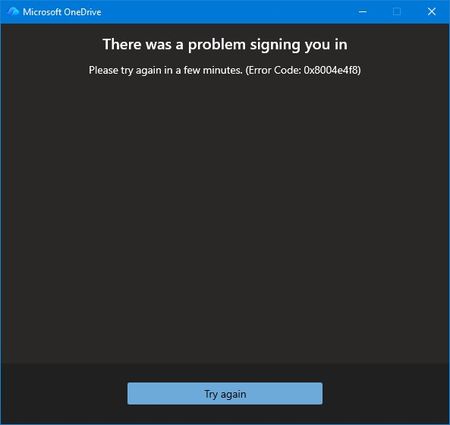
Prior to the August update all was well. I couldn't log into OneDrive from my desktop. No issues through my phone or online. Login screen fades away with no error just ghost One Drives filling my taskbar because multiple instances of OneDrive appear in Task Manager. At first, I thought maybe the update exposed some file corruption. A quick uninstall of OneDrive and re-install. Of course nothing is easy. I thought this would be the perfect opportunity to use AI to assist my troubleshooting. The AI found multiple issues with Windows Update Cleanup & WebView2 Runtime. I was all in the registry and services application. In the end, nothing worked and I threw the bomb at the desktop. Clean Windows install from a USB. Reinstalled Microsoft 365 and thought all would be well. Nothing is ever easy. The exact same issue. Microsoft validates my login but the hand-off to OneDrive fails. I got an actual error message for the first time from OneDrive. I reached out to tech support. AI seemed to think it's not a desktop issue because of the clean install. Because I'm on a Windows 10 machine my support person disclaimed limited support. I understood and was gracious. I had the opportunity to relay to my support person that I may have a backend issue and specifically error 0x8004e4f8 after a full clean install is the smoking gun. This error does not come from Windows. It comes from Microsoft’s cloud identity backend rejecting your OneDrive token request. I also performed these actions prior to reaching out: Full clean install All Windows updates Fresh OneDrive install Fresh Microsoft 365 install Fresh WebView2 Fresh Edge New password New recovery email Removal of old identity methods Device reboot Device registration reset I also relayed to my support person that AI thought Microsoft needed to perform these actions due to the error code: It requires a Microsoft engineer to: Reset your OneDrive service flags Rebuild your OneDrive tenant metadata Regenerate your OneDrive provisioning state Clear corrupted backend identity tokens Re‑provision your account on the OneDrive service My support person disagreed because my online OneDrive still works. He proved it using Quick Assist. We even tried using a new profile to see if OneDrive would work. No. Same issue. Window accepts me through authentication but when logging into OneDrive I receive the error message, try again later, or fades away. That was the end of my official Microsoft technical support. They suggested I post on here so here I am. Anyone else?188Views0likes1CommentHow to get rid of old Onenote files in Onedrive
I've been using Onenote for many, many years and over that time I have collected several unused files that seem to be un-deletable on Onedrive. I have deleted some of them within Onedrive from time to time but the names seem to remain. Here is what I see. When I click "Files" in One drive I see folders and under that documents which contains my only current Onenote database. The one I use. But, then I click "home" and see six old unused data base files that cannot be deleted. When I click on some of them the screen says "Sorry, something went wrong - Item may have been deleted by another person" Another file will say "This item might not exist or has been deleted". I am the only one who uses this account. I'm not sure what HOME is or what its function is as it doesn't show any folders or files that are active. It only shows these abandoned Onenote databases that nothing can be done with. So, Is there a way to clean this up or is it just not worth the effort. Since I don't know what the function of Home is I'm not sure if it matters. Thanks for any enlightenment.160Views0likes1Comment
The difference between backup/mirror and move
The terminology used by Microsoft to describe what OneDrive does is seriously flawed. To most people, the concept of backup means duplicating files to another location or archive file. That is a backup provides a mirror copy of files being backed up. OneDrive doesn't backup or mirror files, it moves them to the cloud. They are no longer available offline. You can of course disable syncing which is also wrong terminology because files are not synced, they're moved, which is a copy operation followed by a delete. No problem. You can turn off folder/file syncing and copy the relevant folders/files to your hard drive so they're accessible offline. I then uninstalled OneDrive to make certain. The trouble is, a few days ago my Outlook 365 broke because of a webview2 error which made editing drafts unusable. No problem, I did a repair which didn't fix it, and finally uninstalled office and reinstalled. When I reinstalled office, it also reinstalled OneDrive with the default settings, so OneDrive promptly reenabled folder redirection and the files/folders on the local drive disappeared. 12 months' worth of email, a bunch of documents, gone. No file date/time check to determine the direction of synchronization so that newer files replaced older files, no intelligence whatsoever. I won't quote what I said when I found out because there might be ladies present. Luckily my email service uses MAPI so some time in the future I'll have my emails back, I hope. But updated and new files are gone. Did I have a current backup? I did until someone borrowed my backup drive for something they thought was more important. It wouldn't have mattered if OneDrive had left the newer file copies alone, but the files on OneDrive had all the old date/time stamps from when I turned OneDrive off and that was it. Then there are the little things like if folder redirection was done properly so even the command prompt was appropriately redirected. Not so with OneDrive. Amateur. Backup should not mean my files are moved so there is only a single copy left, ditto with synchronization. So not only is the wrong terminology used, but the implementation of OneDrive also has major room for improvement which may never happen. I also have a MacBook Pro and while I'm much more conversant with Windows, Mark Russinivich's Sysinterbals tools etc, and have done extensive Windows application debugging. I would hope my experience is simply due to ignorance about OneDrive, but I that must be true for a lot of people. It's far from foolproof.316Views0likes1Comment"People section" turning on by itself and digging into my old photos without permission
I have used OneDrive on Android for years and just now I had a notification appear with an old picture of someone in my family asking me to type in her name and if other pictures of her are also her. I was shocked and irritated at this apparent privacy violation. I found out a "feature" called "People section" where "OneDrive uses AI to recognize faces in your photos" just turned itself on and decided to send me a notification. How utterly irritating. Microsoft should understand how unnerving it is to have your phone seem to just start digging into your photos without your permission. Why couldn't it just have a notification asking me if I want to turn on the feature and explain what it is? Why show my personal family pictures?194Views0likes0CommentsOneDrive embedded PowerPoint slides showing blank page or error
I embed PowerPoint files from OneDrive into eLearning courses using the standard embed links. As of today, all of them have stopped working. All my embedded PowerPoint slides are currently down across several live eLearning courses. What I've tried: Tried in a private/incognito browser window - still broken Created a brand new embed link from scratch - still broken Tried a completely different PowerPoint file - still broken So it doesn't seem to be a problem with one specific file or link - it's affecting all my embeds at once. What I see: Sometimes the page shows: "Something went wrong. This is a temporary issue, so try again in a few minutes." with reference codes: Ref A: 137479770EE248B2BD8767C1500F6314 Ref B: SG2EDGE2019 Ref C: 2026-08-25T04:41:15Z Other times the page just loads completely blank, with no error message at all. I also checked the browser's technical console, and it shows one of the files OneDrive needs to display the slides is failing to load (a 404 error on Microsoft's side), which is likely why the page won't display anything. Has anyone else run into this, or is there a known issue being tracked? Happy to share more detail if it's useful.305Views1like5CommentsOneDrive Android stuck on "We need to update your account"
Hi, Since a few days ago, I can no longer use OneDrive on my Xiaomi phone. When I open the app, I get the following message: "We can't display this item. We need to update your account. This operation should only take a few moments." When I select OK, nothing happens. No sign-in window appears and I can't access any of my files. I've already tried: uninstalling and reinstalling OneDrive clearing the app cache and data restarting the phone checking my network connection The problem remains. What's strange is that OneDrive seems to remember my account because it opens directly on the "My files" screen instead of asking me to sign in again. Has anyone else seen this recently on Android? Thanks.227Views0likes1Comment





Events
Recent Blogs
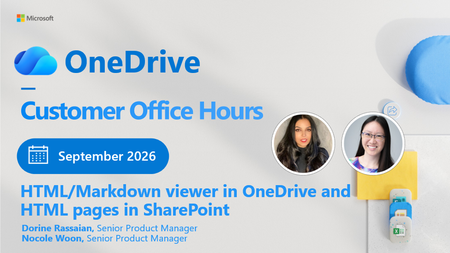
- 2 MIN READGet ready for the September 2026 OneDrive Customer Office Hours! This session creates space for open conversation around the latest updates and how they support the way you use your files every day. ...Sep 02, 2026321Views0likes1Comment
 Get ready for the August 2026 OneDrive Customer Office Hours! This session creates space for open conversation around the latest updates and how they support the way you use your files every day. In ...Aug 10, 2026469Views0likes0Comments