Recent Discussions

No labs for MB-500 in skillable and xtreme labs (for all MB series)
Hi, From past few months, we are unable to find the labs for MB-500. It's causing us trouble to do the trainings. Skillable and Xtreme labs providers are saying there is a problem from Microsoft end only. Kindly advise us when can we get the labs available.6Views0likes0Comments
Program a cell reference from another sheet
I need to be able to take the formula "=sheet2!c12" and be able to change the "C" in the formula many times in the worksheet so I don't have to change it manually across the rows. I want a cell that will be able to change the "=sheet2!c12" C reference throughout anywhere I've programmed this. I was going to use "find and replace" but that's not only nooby, it's going to wind up being buggy. Is there where an INDIRECT formula works? I think the answer should be simple. Thanks!15Views0likes1Comment
Name Manager using for create name which is contain atleast two name.
Hello. I creating somthing in excel with tables. These tables has thier own name, and can be dynamic or not. Any way. I using list in cell to select each data from a tables column. For that I created names with the content of a column. Unfortunatly i had to make a kind of name which is contain atleast 2 columns. These can grow dynamicly. So I think a plus helper tabel is not the right sollution for that. I think about 3 kind of solution. 1. =UNIQUE( VSTACK( INDEX(Tabla1[#Data];0;MATCH("Type_name";Tabla1[#Headers];0)); INDEX(Tabla2[#Data];0;MATCH("Column_name";Tabla2[#Headers];0)) ) output #name? 2. =UNIQUE(VSTACK(Lista_A; Lista_B)) lista_A as a name output #name? 3. created a helper table with the existing names. Created another name and use the table in it. output was the elements contained by the helper tabel, and the lista_A and lista_B tables each dedicated column. So How can i create list for a cell or cells from two column which are dynamicly growing, without a user needs to touch the core modell? Best Balázs11Views0likes0CommentsMicrosoft Baseline Security Mode Rolls Out
Microsoft has released a set of security benchmark recommendations for Microsoft 365 tenants that it calls baseline security mode. The recommendations cover authentication, file access, and Teams and the idea is that these are settings that Microsoft believes have proven their value over the years. The only criticism that you might have is about the potential clash for conditional access policies, but that’s not too serious. https://office365itpros.com/2025/12/15/baseline-security-mode/29Views0likes0Comments
Finding time duration between a start date & time with end date & time
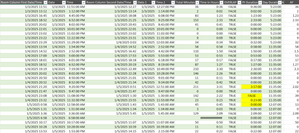
Hi all! I'm looking for any formula or power query to calculate a total time duration within a day, given the start date, start time, end date, end time. Most of the dates will equal the same but there are some with the end date being the next day. I'd like to be able to exclude any overlaps as well. Currently, I have a large embedded IF formula: =IF(AND($G4=$O4,$H4<$H5,$P4>=$H5,$P4<$P5,$H4<$H3),$P4-$H4,IF(AND($G4=$O4,$G4>$G3,$H4<$H3,$P4<$P3,$H4<$P3,$P4<$P5),$P4-$H4,IF(AND($G4=$O4,$H4>$H3,$H4>=$P3,$P4>$P3),$P4-$H4,IF(AND($G4=$O4,$H4=$P4),0,IF(AND($G4=$O4,$H4<$P3,$P4<=$P3),0,IF(AND($G4<$O4,$H4<$P3,$P4>$H4),($P4+1)-$P3,IF(AND($G4=$O4,$O4<$G5,$O4<$O5,$H4<$P3,$P4>$P3),$P4-$P3,IF(AND($G4=$O4,$G4>$G3,$H4>$H3,$P4>$P3,$H4>$P3),$P4-$H4,IF(AND($G4=$O4,$G4<$O5,$P4>$P3,$P4>$H5,$H4>$H3,$H4<$H5),0,IF(AND($G4=$O4,$O4=$G5,$H4<$P3,$P4>$H5,$P4>$P3,$P4>$P5,$P2>$P3),$P4-$P2,IF(AND($G4=$O4,$H4<$P3,$P4>$P3,$P4>$P5),$P4-$P3,IF(AND($G4=$O4,$H4<$P3,$P4>$P3,$H4<$H5,$P4<$P5),$P4-$P3,IF(AND($G4=$O4,$H4<$H5,$H4<$P3,$P4>$P3,$P4>$P5),$P4-$P3,IF(AND($G4=$O4,$O4=$G5,$H4<$P3,$P4>$H5,$P4>$P3),$P4-$P2,IF(AND(ISBLANK($O4),ISBLANK($P4)),0,IF(AND($G4<$O4,$H4<$P3,$P4<$H4),($P4+1)-$P3)))))))))))))))) This seems to work for the most part but there are a few that I just can't get. I also pulled up my query and started to enter in the time durations manually and it couldnt come up with anything automatic for me. There must be an easier way for me to do this other than trying to create an IF formula for each answer that turns up incorrect. I have a screen shot below.51Views0likes1CommentConditional data validation drop downs
I have a table with everyone's availability. Column A is names, Column B is Monday morning, Column C is Monday afternoon and so on. In another cell, I want a drop down list of names if they're available at that time. If( [Monday Morning] = "Available") put it in the drop down list and then do that for the whole week. When I try to do formulas in the data validation page it doesn't work.31Views0likes1CommentUnderstanding Teams Policies: Messaging, Meetings & Calling | Complete Guide
Teams policies give IT admins control over what users can do within the platform. If it is restricting who employees can chat with, controlling meeting features like recording, or defining how calls are routed, policies ensure the organization remains compliant, secure, and productive. In this blog, we will go through everything you need to know about Microsoft Teams messaging, meetings, and calling policies and how they form the user experience. https://dellenny.com/understanding-teams-policies-messaging-meetings-calling-complete-guide/27Views0likes0CommentsMicrosoft Teams Admin Center: A Beginner’s Guide
If you are new to the admin side of Microsoft Teams, in this blog will walk you through the essentials of the Admin Center and help you understand how to manage users, configure security, and control policies like a pro. https://dellenny.com/microsoft-teams-admin-center-a-beginners-guide/24Views0likes0Comments- 34Views0likes1Comment
- 14Views0likes0Comments

TOCOL/TOROW Treat Thunks as Errors
I just reported a bug to Excel in which the TOROW and TOCOL functions, if asked to delete errors, will also delete valid thunks. ISERROR returns FALSE when presented with a thunk, so, arguably, TOCOL shouldn't treat it as an error either. I'm running Office 365 on Windows 11 on a Samsung Yoga laptop. Steps to reproduce: Paste this into a single cell in a spreadsheet: =LET(th, VSTACK(LAMBDA(4)), (@TOCOL(th,2))()) Expected behavior: should return 4. (Delete the ",2" and it does exactly that.) Actual behavior: #CALC error Impact: Breaks workflows for SCAN, MAP, BYCOL, and BYROW Workaround: Use FILTER and ISERROR Details: An Excel "thunk" is a degenerate LAMBDA with no parameters. So if we used LET to make f equal to LAMBDA(4), then f() would always return 4. If a thunk is the final result of a function, it generates a #CALC error, but it's fine for intermediate results. This seems useless, but it's the only way to get functions like SCAN, MAP, and BYROW/COL to return anything but a scalar. For example, I have a piece of code where I need to repeatedly square a large matrix and save the values for further processing. If I get a zero value, I can save a lot of processing by "aborting" the operation. Since you can't abort a SCAN, I just return #NA. Then I'd like to use TOCOL(result, 2) to strip off the unnecessary values. But TOCOL discards everything. I can work around this by using a combination of ISERROR and FILTER, but I shouldn't have to.87Views2likes2Comments 214Views1like6Comments
Small Business
Hello Surya Narayana, first thank you for responding to my question. I still have a problem with the formulas. The original formula still returns the wrong entry such as (JAN-00), the second formula returns an entry (#VALUE!) I've tried to change the date format in every way but, the result is the same. Thank you60Views0likes1Comment
Organisation bookings and pass through data in MS Bookings
Hi All, I thought this was possible, but it doesn't seem to be working so hoping for some pointers.. When using Microsoft Bookings for a shared service, for the use of those internal to my organisation, is it possible for the person making the booking to have their details automatically populate the form (i.e. name, email address)? I'd have thought this was basic, but it looks like it's purely designed for external bookings, regardless to the audience. Many thanks, Dayna72Views0likes1CommentIssues With PowerQuery Using 2 Tables with different Data Sets
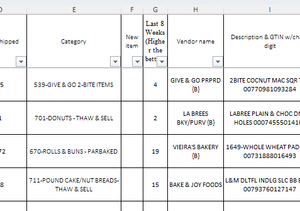
Im having issues using power query when I try to use 2 tables to make a pivot table. I am using a sheet that pulls information from a system I use for maintenance. The first screenshot is a subset that breaks down sub items for a main "work order". The next 2 screenshots are from a separate table that show the main "work order" and has an "Equipment Pool" that shows who owns the vehicle in question. When trying to create a pivot table, a lot of information shows as blank. (see bottom screenshot) I am wondering what I am doing wrong for it not to be able to pull the "Equipment Pool" when it aligns to the "Asset ID". Any help is appreciated. (For security reasons I have not put all information from the tables, only the relevant ones)114Views0likes4CommentsMicrosoft to Enable Anthrophic Models by Default
After the fuss around the initial introduction of the Anthrophic models into Microsoft 365 in September, we learn that Microsoft will enable access for all in January 2026. It would have been so much better had Microsoft said that they were working on the data protection arrangements with Anthrophic, but that didn’t happen. Is all well now? We’ll see in January… https://office365itpros.com/2025/12/12/anthrophic-models-m365/22Views0likes0Comments
Issue with siplay a picture “The picture can’t be displayed”
I worked for many days on a document that contains a very large number of images. When I reopened it, every single image was replaced by an error/placeholder message (e.g., “The picture can’t be displayed” / “The image cannot be displayed”). After troubleshooting with Microsoft Support, we discovered the document had been saved/handled as OpenDocument Text (.odt) (OpenDocumentText) instead of a standard Word Document (.docx). Support attempted format changes/conversions, but the issue remains. I urgently need a way to recover the images/content from the existing file and guidance to prevent this from happening again. Any idea about how to solve it? Thank you in advance38Views0likes1CommentAdvanced Excel Formula discussion - Problem with dynamic range
Let's assume I want to rent a house. For each house, if the landlord has an agent, I'll contact the agent; If not, I contact the landlord directly. As below: Landlord Agent House Landlord James Mary W James Linda Michael X David Y Linda Z James Column F: =IFERROR(XLOOKUP(E2:E5,A:A,B:B,E2:E5),E2:E5) This is correct Column G: =XLOOKUP(E2:E5,A:A,B:B,E2:E5) #VALUE! for X-David Column H: =XLOOKUP(E2:E5,A:A,B:B,CHOOSECOLS(E2:E5,1)) Wrong value for X-David, because it returned the first value in range of XLOOKUP([if_not_found]) field My question is: the only difference between G and H is CHOOSECOLS(). If I put =CHOOSECOLS(E2:E5,1) or =E2:E5 in a separate cell, it gives me same result. However, in XLOOKUP, they are recognized differently. What is the logic behind this? Thank you for spending time on reading this.255Views0likes7CommentsFormula to retrieve data from several sheets and return values from given criteria.
I am trying to get data from each of our areas of the school staff timetables EY MY LY and summaries what days each staff member works where to another sheet, as staff move around. I would appreciate some help please. This is how far I got: =IFERROR(VLOOKUP(A10,EY!$C$3:$G$33, 2, FALSE), IFERROR(VLOOKUP(A10,MY!$C$3:$G$33, 2, FALSE), "Not Found")) This just returns; I tried to add in the same formula for LY but it is saying too many arguments, this is why Michelle is Not Found. Will I also be able to return the area they are in on each of the days ? Any assistance would be very much appreciated.181Views0likes4CommentsChanging width of columns
When I just change the width of one column (by placing cursor between columns, excel changes the look and cant continue unless I change the Zoom in bottom left. I do not have this issue when changing the height of rows. any help would be appreciated Here is the look of spreadsheet in normal before changing the column and then the after54Views0likes1Comment




Events
Recent Blogs
- This update to Microsoft OneNote on Windows gives you more flexibility over proofing languages in your notebook pages.Dec 16, 202586Views0likes0Comments
- Confidently migrate user data across tenants. Automate cutover, keep teams connected, and stay secure.Dec 16, 2025169Views1like0Comments