Recent Discussions

Saving a Model Generated File in SharePoint - New Copilot Studio
Hi everyone, I have spent the last two days trying to solve a problem that to me should be a straightforward functionality. I have an agent I made which generates Word file reports. The agent is Cluade Opus 4.8 and it generates the file wonderfully as per my brand guidelines. The document in not a simple content file. Rather these documents can get complex based on the user requirement. Currently the document generates fine and the user gets a popup to download the file. I however need the file to be saved in our share SharePoint library. I created a workflow tool that accepts a file input and then saves it to SharePoint, however when I tried to configure this tool in the agent, the file input parameter was not showing. I then tried to set up a workflow which accepts a url, but the agent cannot seem to access any url or pass it to my workflow. Using a create file tool within the agent and having the agent fill in the file name and content parameters was slow, and the agent was actually attempting to rewrite the file byte-by-byte which lead to the file being re-created and is not scalable for large files. Based on the agent, this is how the file is currently saved: "The file is saved inside my sandboxed container at: /app/created/Sample_Report.docx /app/created/ is a special output directory: any file I place there is automatically packaged by the platform and returned to you as the chat attachment (the Sample_Report.docx chip you see). This is a private, ephemeral location inside my container — it is not a shared network path, and it is not the SharePoint library. Neither you nor the SharePoint tool can reach /app/created/ directly; the platform's attachment mechanism is the only bridge out of it, and as we established, that bridge delivers a direct download rather than a hosted HTTPS URL. So to be precise: the file exists only (a) here in my container at /app/created/Sample_Report.docx, and (b) as the downloadable attachment the platform generated from it. It has not been saved to SharePoint." I need this functionality working as I will have several automations flows around report generation so no human will be available to download the file from within Copilot. Note: I cannot use the old copilot studio as the file generation capabilities are not on par with the new copilot studio experience. The same agent model does not output files, and the create word file node does not output files at the depth and formatting complexity I require. Can anyone please help with a reliable way to get the file save in SharePoint from the New Copilot Studio experience? I'm at my wits end here.Solved305Views0likes1CommentCopilot Studio agent not visible in M365 mobile app without desktop access
Hi, I'm having an issue with a Copilot Studio agent not being discoverable in the Microsoft 365 mobile app for users without desktop access. **Setup:** - Agent created in Copilot Studio, published and shared with specific users - All users have the same Microsoft 365 Copilot license - Target channel is the Microsoft 365 app (not Teams) - The agent has been published to both the Teams and Microsoft 365 channels in Copilot Studio **The problem:** Users who have access to a desktop/browser can open the agent via a direct link, add it, and after that it appears correctly in the M365 mobile app. However, users who only have access to the M365 mobile app cannot find the agent there — even though it has been shared with them. **What I've tried:** - Verified the agent is published and shared directly with the affected users in Copilot Studio - Confirmed all users have the same license - Published the agent to both Teams and Microsoft 365 channels - Sending a direct link to the agent — works on desktop/browser but not actionable in the mobile app in a way that adds the agent - Logging out and back in to the M365 mobile app **What I'm looking for:** Is there a way for users to discover and add a shared Copilot Studio agent directly from the M365 mobile app, without needing desktop or browser access first? Any help or workarounds are appreciated!Solved381Views0likes4CommentsSharePoint lists with Copilot Studio error
I’m seeing a persistent issue when integrating SharePoint lists with Copilot Studio agents. Any SharePoint list I add to an agent results in an error being shown in the Copilot Studio UI, but no error message, diagnostic detail, or failure reason is surfaced. I’ve removed and re-added the list connections multiple times and reproduced the issue across multiple agents, with the same outcome each time. Has anyone encountered this behaviour, or are there known issues or prerequisites (e.g. permissions, connector state, tenant configuration, or recent service changes) that could cause silent failures when integrating SharePoint lists?Solved1.1KViews0likes2Comments
Small business
I'm using Exel 365. I've started a small business and doing the bookkeeping. I've started a spread sheet with several columns for the products. The first column has the daily date. on a second sheet I would like to get the totals for each month, I've used this formula: =SUMIFS('Business'!$B$2:$B$1000, 'Business'!$A$2:$A:$1000, ">="&A2, 'Business'!$A$2:$A$1000, "<="&EOMONTH(A2,0)) This only gives me a 0 return on my second column (JAN) and not the totals of the first sheet second column. Any help would be very much appreciated.Solved214Views0likes3Comments
Change Default for Copilot Automatic Room Rebooking Setting in Outlook?
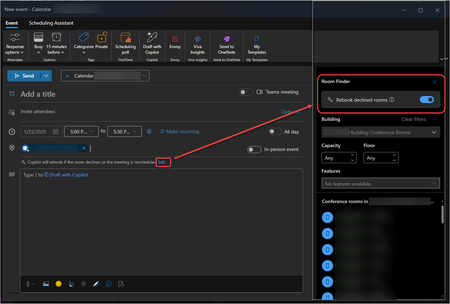
My users with Microsoft 365 Copilot licenses have noticed a newer feature that automatically rebooks meetings with an alternate room if the selected room is unavailable. It appears that this setting is on by default and can be turned off on a per case basis when a new meeting event is being scheduled. Is there a way to turn it off by default and allow people to enable it when a new calendar item is being created instead? Here is what it looks like for me in Outlook. I can click on Edit from the new meeting window and turn it off for a single event. I haven't found a way to change that default behavior. Has anyone found a way to adjust this? Thank you! BrianSolved13KViews5likes11CommentsCopilot: extra license for Teams?
Dear community, We have a request from one of our resellers (we are an Ind. Provider) when it comes to M365 Copilot and its usage in Teams. More specifically, they want to use Copilot as an AI assistant during meetings sessions to help them with meeting minutes, meeting summarization and so on. The question: is this achievable with just having the prerequisite licenses (e.g., M365 Premium etc) and M365 Copilot or do they need to have Teams Premium? Thank you in advance for your helpful insights to close this deal. Warm regards, NickSolved319Views1like2Comments
Change 365 personal to Current Channel
I just upgraded my MS 365 Basic to Personal and added a Copilot Pro license. When trying to access Copilot from PPT (running off my PC after I upgraded all the apps), it doesn't show. Support indicates that I need to use Current Channel or Monthly Enterprise Channel. My apps are set to Semi-Annual Enterprise Channel. To change it, I need to access the Microsoft 365 Admin Center. As my license is a personal license, I cannot access the Admin Center. How can I fix this issue so that I can access Copilot from my apps without having to run off the web?Solved315Views0likes5Comments
How to enable copilot on teams?
Hi All, I have recently purchased coplot 365 and I have existing E3 Subscription. After updating the licence, I got copilot on all 365 apps except teams. In the 365 Admin center the Copilot for Teams is already enabled. I am using the latest version of teams 24295.605.3225.8804. Please help me how to enable copilot on teams.Solved280Views0likes2CommentsHow do I use my action in M365 Copilot?
I created a flow action in Copilot for Microsoft 365. Where should this action be available? I don't see any evidence of it in Teams/Copilot. The documentation (https://learn.microsoft.com/en-us/microsoft-copilot-studio/copilot-plugins-overview) does not specify what the experience should be like, so I don't know where to even look for it, now that I've tested the action and it's showing up as "Ready" in Copilot Studio.Solved666Views0likes6CommentsExtract a particular slide from a power point
How can I extract a particular slide from a power point that is in a sharepint, to respond to a specific requirement to an Copilot agent, how important an extract of the presentation is and not the whole presentation, so you have to extract the sheets and generate a new power point with the extract to be presented whith the same nama + extract, Has anyone done something similar?Solved566Views0likes3CommentsWhere are the prompts in the new prompt gallery saved?
Recently Microsoft announced the New Prompt Gallery: New Copilot Prompt Gallery helps you discover, save, and share your favorite prompts | Microsoft Community Hub. From a business perspective: Where are the personal prompts saved and how are they protected by the enterprise data protection?Solved2.2KViews3likes7Comments
Copilot in excel - sort/format/highlight error
I am a Copilot Pro subcsriber. I am doing the following exercise from Microsoft learn.(https://learn.microsoft.com/en-us/training/modules/edit-transform-content-with-microsoft-copilot-microsoft-365/4-format-sort-filter-highlight-data-copilot-excel) format,sort,filter and highlight data. I am using the exact file from Microsoft site (downloaded) I am using the exact prompt from microsoft suggestion. however I am getting the following messages from copilot message: Sure! Looking at A1:E8, here's 1 conditional formatting rule to review and apply: Cell value less than 500: Apply the following to cells in the column ''Budget'' Fill color: yellow Font color: black AaBbCc apply button is disablead 2. message: I'm not able to do that. What else can I do for you? what should I need to do?Solved584Views0likes2CommentsI want to turn off or hide the draft with copilot dingbat that follows my cursor around in MS Word.
I have seen a few articles on this website, and I know it's not possible but I'm going to ask anyway. For reference this is what I'm referring to: It's more I find the little thing following me around on my screen to be annoying and distracting, I've managed to hide or disable anything related to copilot on my system except this little dingbat. When a new document is open you get a little message that says "Select the icon or press Alt + i to draft with copilot" It would be nice if I could hide that as well, yes copilot is a *feature*, and I don't care about it. I also want to hide the paste with copilot and just used the local paste options that were built into previous versions of word. I suspect that there is a copilot dingbat that is stored somewhere on my system, possibly in a font, and as I have already made a few detrimental modifications to my operating system registry, I'm not wary of messing up my computer any more than it could be. The only saving grace I have at the moment is there is an issue with my account, so any accidental triggering of the feature causes it to crap out. (So long as I don't accidentally press the 'fix account" button) I know that if it was easy to turn off there would be a button for it, I know Microsoft probably wants us to use this feature because it means more data for them to collect, an I'm disappointed in the loss of user agency that's resulted from this rollout, and there's a spike in animosity towards AI in general.Solved43KViews22likes39Comments
When using CoPilot in Edge What are the Benefits of using Web rather than Work?
I use CoPilot in Edge all the time just based on the proximity of where I'm working. Before we had web search enabled in M365 CoPilot it was obvious to me why I would choose work vs web in the chat windows. Now it isn't as clear. What are the benefits of using the Web option now rather than always using Work? I seem to get nearly identical results when I expect to use 3rd party sources. It is possible for those who have access to M365 that there is no real value in using the Web option anymore when in their work account. I expect to have people I support asking this question.Solved1.8KViews1like5CommentsAdd a Screenshot to Copilot Web not possible
Adding a Screenshot to Copilot Web Chat is not possible anymore. Someone knows about is? It is not possible as attachment and not possible in the chat. The fiel typ is not supported. Workaround for me it to paste the screenshot in a word file and save it as PDF and upload that. But thats not so smart....And as far as i know also paste screenshots in Viva Engage is not possible anymore. Maybe it has a contextSolved4.7KViews2likes6Comments
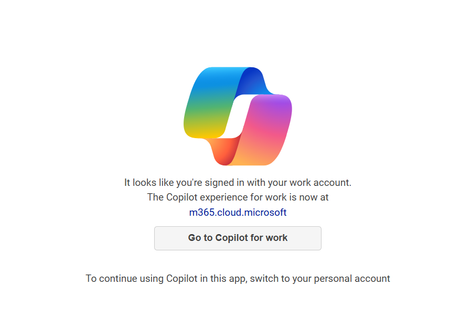
New copilot app can't switch from work to personal account
I installed the app from the Windows 11 store yesterday, and it was working fine just like it did on my mobile app. I made sure I signed in with my personal Microsoft account on both. Today, when I attempted to use it again on my Windows 11 PC, it seems like it signed in with my work account and no matter how many times I sign out and back in with my personal account it keeps displaying "It looks like you're signed in with your work account". I've terminated the app, uninstalled it, not sure what else to do? It is signed in with my personal account now but still not working.Solved33KViews17likes47Comments
Update licence seems to not activate Copilot.. gettign redirected to FAQ url
Good day I have updated the licence on my Copilot 365 several times to make sure i restarted the apps and even the machine... I can see Semi-Annual Enterprise Channel and the Copilot icon. But still everytime i click the copilot365 icon from within a 365 app I get redirected to when clicking copilot within an office ai always get redirected to https://go.microsoft.com/fwlink/?linkid=2242508 . i am not a admin on my machine so i suspect it might be it? ThanksSolved1.8KViews0likes7CommentsCompose feature is missing in Copilot for Edge Browser
Hello Everyone, Seems due to some recent copilot or edge browser update Compose feature is missing in Copilot for Edge Browser under Web Mode. Tried enabling feature "Enable Compose (AI-writing) on the web" in edge browser (edge://flags/#edge-compose). Then restarted edge even restarted the system but still no luck. Even tried clearing the site data in edge browser (edge://settings/siteData) but still no luck. Randomly but rarely Compose option will show but then after restarting Edge browser it will go away and never to come back. Is there a way to fix this issue permanently?Solved9.6KViews1like3Comments





Events
Register Here - https://aka.ms/MTC/CopilotRoadmapEventOct
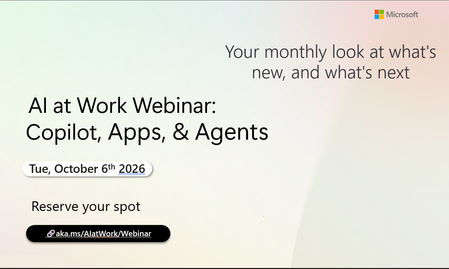
AI at Work Webinar: Copilot, Apps, & Agents — Want to stay on top of everything happening across Copilot and AI-powered business applicatio...
Tuesday, Oct 06, 2026, 09:00 AM PDTOnline
0likes
20Attendees
0Comments
Recent Blogs
- Domain Exclusion is available again, giving admins more control over Copilot web grounding.Sep 09, 202628Views0likes0Comments
- You have invested in Copilot. Adoption is climbing, prompt volume is up, and your dashboards are full of engagement charts. Yet the question leadership keeps asking is: How do we quantify the value o...Sep 09, 202650Views0likes0Comments