Recent Discussions

Microsoft's Copilot: A Frustrating Flop in AI-Powered Productivity
Microsoft's Copilot was supposed to be the game-changer in productivity, but it's quickly proving to be a massive disappointment. The idea was simple: integrate AI directly into Word, Excel, PowerPoint, and other Office tools to make our lives easier. But when it comes to actually performing specific functions, Copilot falls flat. Here’s the problem: when you ask Copilot to alter a document, modify an Excel file, or adjust a PowerPoint presentation, it’s practically useless. Instead of performing the tasks as requested, it often leaves you hanging with vague suggestions or instructions. Users don't want to be told how to perform a task—they want it done. This is what an AI assistant should do: execute commands efficiently, not just offer advice. What makes this even more frustrating is that other AI tools, like ChatGPT, can handle these tasks effortlessly. When you ask ChatGPT to perform a specific function, it does so without hesitation. It’s able to understand the request and deliver exactly what’s needed. But Copilot? It struggles with the basics, and that’s unacceptable, especially from a company like Microsoft. It’s frankly embarrassing that Microsoft can’t get this right. The whole point of integrating AI into these tools was to streamline workflows and boost productivity. But if Copilot can’t even manage simple tasks like formatting a document or adjusting a spreadsheet, then what’s the point? Users don’t need another tool that tells them how to do something—they need one that does it for them. Microsoft, you’ve missed the mark with Copilot. It's not just a minor inconvenience; it's a serious flaw that undermines the value of your Office suite. When other AI tools can easily accomplish what Copilot can't, it's time to reevaluate. Users expect more, and frankly, they deserve more for their investment. What’s been your experience with Copilot? Is anyone else finding it as frustrating as I am? Let’s talk about it.34KViews67likes95Comments
New copilot app can't switch from work to personal account
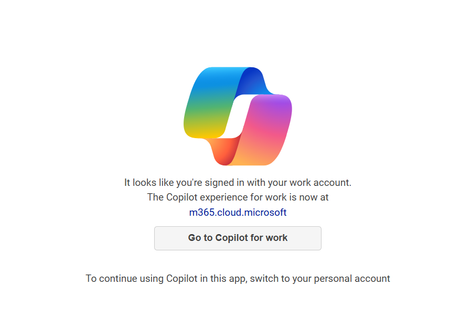
I installed the app from the Windows 11 store yesterday, and it was working fine just like it did on my mobile app. I made sure I signed in with my personal Microsoft account on both. Today, when I attempted to use it again on my Windows 11 PC, it seems like it signed in with my work account and no matter how many times I sign out and back in with my personal account it keeps displaying "It looks like you're signed in with your work account". I've terminated the app, uninstalled it, not sure what else to do? It is signed in with my personal account now but still not working.Solved33KViews17likes47CommentsThe "Reference a file" feature not working as documented
In Word, and based on the help documentation, I'm supposed to see the "Your computer" and "Online" tabs but I don't see them when I choose "Reference a file". I also see this in Outlook. I see only three Excel files and nothing else. These seem to be the last three Excel worksheets I accessed since the installation of Copilot. I tried to save an online Word document in OneDrive but wasn't able to see this file when I clicked on "Reference a file". What might be the issue?Solved43KViews3likes43CommentsI want to turn off or hide the draft with copilot dingbat that follows my cursor around in MS Word.
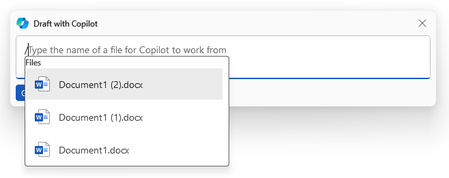
I have seen a few articles on this website, and I know it's not possible but I'm going to ask anyway. For reference this is what I'm referring to: It's more I find the little thing following me around on my screen to be annoying and distracting, I've managed to hide or disable anything related to copilot on my system except this little dingbat. When a new document is open you get a little message that says "Select the icon or press Alt + i to draft with copilot" It would be nice if I could hide that as well, yes copilot is a *feature*, and I don't care about it. I also want to hide the paste with copilot and just used the local paste options that were built into previous versions of word. I suspect that there is a copilot dingbat that is stored somewhere on my system, possibly in a font, and as I have already made a few detrimental modifications to my operating system registry, I'm not wary of messing up my computer any more than it could be. The only saving grace I have at the moment is there is an issue with my account, so any accidental triggering of the feature causes it to crap out. (So long as I don't accidentally press the 'fix account" button) I know that if it was easy to turn off there would be a button for it, I know Microsoft probably wants us to use this feature because it means more data for them to collect, an I'm disappointed in the loss of user agency that's resulted from this rollout, and there's a spike in animosity towards AI in general.Solved43KViews22likes39Comments
Copilot missing in Outlook
Hi, I have a Copilot license for Microsoft 365. I can use it in all the apps (Powerpoint, Excel, OneNote etc) except in Outlook. It was accessible in Outlook last week, but now it is missing. It is missing in Outlook Online and in the New Outlook for desktop. How can this be?Solved26KViews0likes28CommentsCopilot missing in Word, Excel and PowerPoint desktop apps
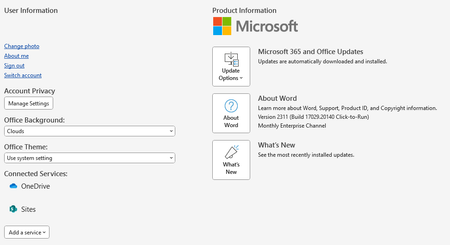
Hi everyone My company has recently purchased some Copilot for Microsoft 365 licenses, one of which was applied to my account on Monday. If I use Teams desktop app and the new Outlook desktop app Copilot is there and works fine. I can also use Copilot in the online versions of Word, Excel and PowerPoint. However, Copilot still isn't showing up in my desktop apps for Word, Excel and PowerPoint. I've checked and we're currently on the Monthly Enterprise Channel and the version of M365 Apps for Enterprise on my machine is Version 2311 Build 16.0.17029.20140, which seems to be the latest version. This is the same for all our users that have Copilot licenses and they are all experiencing the same issue. I've signed out and back into the Office apps and also checked for any Office or Windows updates but there's nothing that seems to get Copilot to appear in these apps. The one weird thing I've noticed is that in lots of guides one solution is to go to File > Account in Word/Excel etc and click an Update License button. However, if I do this I don't see this button: I'm wondering whether this suggests I'm not using the correct version of the Office apps? Any help would be graefully received.136KViews2likes25Comments
Using Files with Copilot
I am relatively new to the Microsoft 365 license for Copilot but I have quite a bit of training on ChatGPT 4, which, I believe, is the engine behind Copilot. When I tried to upload a file by clicking on the paperclip icon, I got a very limited list of files to choose from, rather than the ability to browse for any file that I had. After playing around for a while and opening, closing and moving some files, the file I wanted finally appeared on the list. This is very limiting. As I said, I am new at this version of Copilot and it may just be a setting that I missed and need to adjust. Is anyone else experiencing the same?40KViews0likes24Comments
Activate Copilot for Microsoft 365 Business Standard (Mac)
I purchased "Microsoft Copilot for Microsoft 365" license. However, I am unable to activate it on Outlook and OneNote. Word - Available on both Desktop & Website Excel - Available on both Desktop & Website Outlook - Available on Website, NOT on Desktop OneNote - NOT available on both Desktop & Website I tried the following method: Under "Language and time", turned on "Sync across Microsoft 365" under Use my Microsoft 365 setting Uninstall and reinstall the Office 365 Desktop app Turned on Optional Connected Experiences under Privacy in Outlook and OneNote Desktop app Update licenses on Desktop app Any idea why Copilot not appear on some of the apps? Thanks Andy66KViews1like24Comments
Creating PowerPoint presentation from Word file via Copilot
Copilot cannot create PowerPoint presentation from a Word document even when using the suggested prompt as follows: "Create a new presentation based on (linked to my Word document file). Copilot returned with this error message: "I can't do that with this account. If you paste in text from another document, I can help you rewrite or design it." I subscribed and paid Copilot for $20/month and thought it could help increase my productivity.18KViews0likes23CommentsCopilot for Microsoft 365 is not working on Terminalserver RDS
Hi, i´m trying to install/configure Copilot for MS365 on an Terminalserver. All Requierements from MS Docs are ok, on Clients it´s works fine. I already checked Policies, Configuration also do a re-install the Apps for Business with deployment tool. Wehn i create a brand new User Account with assigned License it´s works fine, but Copilot is not visible for „old“ Users on the Terminalserver in Business Apps like Word, Outlook... Anyone have ideas about that Topic? Terminalserver: On-Prem Windows Server 2019 Std (On-Prem Domain, no Azure Sync for now) Azure User License: MS365 Business Premium, Copilot for MS365 Best Regards Nils Btw.: Copilot is visible in MS Teams for all Users9.2KViews1like23CommentsHow to use Copilot Agents in SharePoint [All You Need To Know]
The creation of Copilot Agent is now enabled in SharePoint 🚀. Users holding M365 Copilot licenses will notice a new Copilot feature in the Suite Navigation bar, tailored to the site they are currently viewing. Additionally, they will find options to create Copilot agents from the 'New' menu on the homepage and within their document libraries. These features are accessible only to users with existing creation and editing rights on the site or document library. Moreover, they have the option to share a Copilot agent link with other users, who, if they possess a Microsoft 365 Copilot license, will be able to interact with it. #SharePoint #MicrosoftSharePoint #Microsoft365 #MPVbuzz #Copilot #AI9.7KViews9likes20CommentsCopilot no longer supports image uploads
Copilot is no longer allowing image uploading/uploading. Neither in web mode nor in work mode. Does anyone know if they took away the resource for good or if it is some instability? The official documentation mentions that at least in web mode it should be supported. Document Reference: File formats supported by Copilot - Microsoft Support
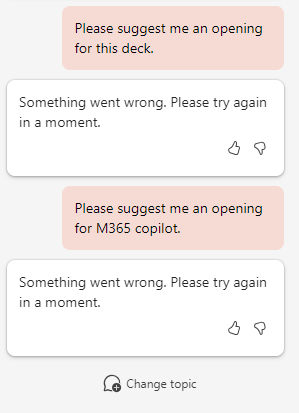
Copilot Not working in PowerPoint
[Update] Same issue happened in Word. -------- I'm asking Copilot to suggest me an opening for a deck but fails. My deck is written by traditional Chinese so I understand it might not able to read it. But when I ask it a general response, it still fails. (But the same prompt can work in Chat) Is the computing resource not sufficient for PowerPoint? Our team is eager to test Copilot for Powerpoint, but it ofen (always) fails to generate response. Thanks!14KViews3likes19CommentsCopilot Studio agents problems connecting to Sharepoint knowledge source
Hello, Since last week users in my tenant are experimenting issues regarding the connection between copilot studio agents and Sharepoint. The agents are not able to extract information from Sharepoint sites, printing there is not information in the Sharepoint site regarding the user's question when that information is in Sharepoint. These agents used to work well till last week. Does have been any update in Microsoft 365 services that can be affecting these agents ability to retrieve information from Sharepoint?1.6KViews1like18Comments
Microsoft copilot stops while giving a response.
Why is this happening? Is there a solution for this? It just stops while giving response. And it has happened several times. And you can't even give prompt to continue from there. You should restart it. Does anyone have a solution for this? and I have restarted and reinstalled it 1000 times.11KViews1like18Comments
300 seat minimum and Inclusiveness?
I am curious and believe there needs to be discussion around how the decision to have a 300 seat minimum figures into inclusiveness efforts? This decision seems to run counter to several of Microsoft's stated guiding principles for responsible AI, primarily Inclusiveness and Fairness. By imposing this minimum, they seemingly have intentionally cut out small businesses, non-profits, and other organizations that would tremendously benefit from the strategic application of M365 Copilot. Doesn't making this emerging technology available only to larger enterprise customers who can afford what amounts to an 108k yearly minimum further divide the business world and give those larger entities even more of an advantage over smaller ones?Solved9.8KViews8likes18CommentsCopilot : Minimum Licences ?
Hello, We've heard that the minimum number of co-pilot licenses is 300, but I can't find this information officially on the Microsoft site. I did see that you need the M365 E3 or E5 and not the M365 Business Premium (which is capped at 300 licenses maximum). Who has official information (with a link?) Regards Ludovik DOPIERALASolved22KViews2likes18Comments









Events
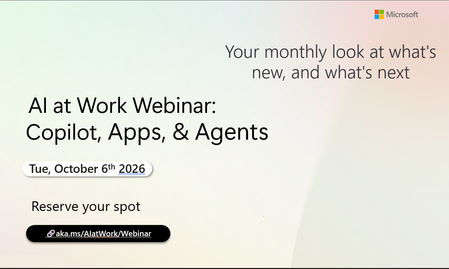
Register Here - https://aka.ms/MTC/CopilotRoadmapEventOct
AI at Work Webinar: Copilot, Apps, & Agents — Want to stay on top of everything happening across Copilot and AI-powered business applicatio...
Tuesday, Oct 06, 2026, 09:00 AM PDTOnline
0likes
20Attendees
0Comments
Recent Blogs
- Domain Exclusion is available again, giving admins more control over Copilot web grounding.Sep 09, 202628Views0likes0Comments
- You have invested in Copilot. Adoption is climbing, prompt volume is up, and your dashboards are full of engagement charts. Yet the question leadership keeps asking is: How do we quantify the value o...Sep 09, 202650Views0likes0Comments