Recent Discussions

Microsoft's Copilot: A Frustrating Flop in AI-Powered Productivity
Microsoft's Copilot was supposed to be the game-changer in productivity, but it's quickly proving to be a massive disappointment. The idea was simple: integrate AI directly into Word, Excel, PowerPoint, and other Office tools to make our lives easier. But when it comes to actually performing specific functions, Copilot falls flat. Here’s the problem: when you ask Copilot to alter a document, modify an Excel file, or adjust a PowerPoint presentation, it’s practically useless. Instead of performing the tasks as requested, it often leaves you hanging with vague suggestions or instructions. Users don't want to be told how to perform a task—they want it done. This is what an AI assistant should do: execute commands efficiently, not just offer advice. What makes this even more frustrating is that other AI tools, like ChatGPT, can handle these tasks effortlessly. When you ask ChatGPT to perform a specific function, it does so without hesitation. It’s able to understand the request and deliver exactly what’s needed. But Copilot? It struggles with the basics, and that’s unacceptable, especially from a company like Microsoft. It’s frankly embarrassing that Microsoft can’t get this right. The whole point of integrating AI into these tools was to streamline workflows and boost productivity. But if Copilot can’t even manage simple tasks like formatting a document or adjusting a spreadsheet, then what’s the point? Users don’t need another tool that tells them how to do something—they need one that does it for them. Microsoft, you’ve missed the mark with Copilot. It's not just a minor inconvenience; it's a serious flaw that undermines the value of your Office suite. When other AI tools can easily accomplish what Copilot can't, it's time to reevaluate. Users expect more, and frankly, they deserve more for their investment. What’s been your experience with Copilot? Is anyone else finding it as frustrating as I am? Let’s talk about it.34KViews67likes95CommentsWelcome to the Microsoft 365 Copilot community!
Greetings, IT admins, tech enthusiasts and Microsoft 365 enthusiasts alike! We are thrilled to announce the launch of the Microsoft 365 Copilot community-a hub where admins and users gather to explore the possibilities and harness the power of Microsoft 365 Copilot. Check out our first blog post in the community about how to get ready for Microsoft 365 Copilot. The Copilot community serves as a collaborative space where users can connect, share ideas, and collaborate on all things Microsoft 365 Copilot. Whether you're seeking tips and tricks to enhance productivity, looking to learn more about Microsoft AI, or are curious about Copilot, we’ve created this space for you. Expect digital events, like Ask Microsoft Anything (AMA), engagements with Microsoft experts and engineers, vibrant discussions with fellow Microsoft 365 users, advice from pros, and the latest news on updates and releases for Copilot. In addition to this community, check out this helpful article on Microsoft AI help and learning to get a broader understanding of how Microsoft is approaching AI and get oriented to what’s coming. Together, let's elevate our skills, empower our organizations, and embark on an exciting journey of digital transformation with Microsoft 365 Copilot! Explore. Engage. Empower. Welcome to the Microsoft 365 Copilot Community!39KViews50likes11CommentsI want to turn off or hide the draft with copilot dingbat that follows my cursor around in MS Word.
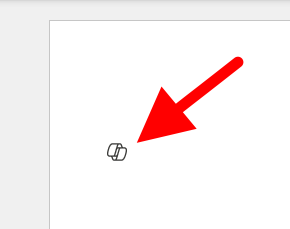
I have seen a few articles on this website, and I know it's not possible but I'm going to ask anyway. For reference this is what I'm referring to: It's more I find the little thing following me around on my screen to be annoying and distracting, I've managed to hide or disable anything related to copilot on my system except this little dingbat. When a new document is open you get a little message that says "Select the icon or press Alt + i to draft with copilot" It would be nice if I could hide that as well, yes copilot is a *feature*, and I don't care about it. I also want to hide the paste with copilot and just used the local paste options that were built into previous versions of word. I suspect that there is a copilot dingbat that is stored somewhere on my system, possibly in a font, and as I have already made a few detrimental modifications to my operating system registry, I'm not wary of messing up my computer any more than it could be. The only saving grace I have at the moment is there is an issue with my account, so any accidental triggering of the feature causes it to crap out. (So long as I don't accidentally press the 'fix account" button) I know that if it was easy to turn off there would be a button for it, I know Microsoft probably wants us to use this feature because it means more data for them to collect, an I'm disappointed in the loss of user agency that's resulted from this rollout, and there's a spike in animosity towards AI in general.Solved43KViews22likes39Comments
2026腾龙集团新盛公司最新游戏注册官网
腾龙集团负责人《184 88》6 621 09 》 现在主要是两种方式来进行开户,一种是网上开户《 T L 06 8 . C C 》,一种是到公司当面开户。工具原料银行卡q号, 手机号方法/步骤分步阅读1/5无论是选择哪种开户方式,都需要您准备好本人的身份证、 银行卡以及与之关联的手机号 。2/5若您选择前往公司进行当面开户,会有专业的工作人员全程指导您完成开户流 程,操作过程较为简便。3/5若选择网上开户,您需提前准备好证件照片,开户过程中还需进行视频确认 。 4/5同时,您需要填写评估问卷,并签署入市协议等相关文件。5/5开户完成后,公司会进行电话回访,这通电话非常重要,请您务必接听376Views18likes0Comments
Chat Management in CoPilot desktop (browser) and Mobile
I love CoPilot, it's been my go-to assistant for months now. However I think a few features would contribute to it's long-term usability. Pin conversations. Keep certain recurring conversations at the forefront in the list of chats. This would be useful for daily chats such as a food diary, workout tracker, etc. Delete or Archive conversations. The ability to either delete individual conversations or archive/hide them to keep the chat history list clean, concise and relevant. Rename and Label conversations. As a daily CoPilot user I want the ability to name my chats and/or add labels to them so that I can easily find particular chats and add a bit of structure to my chat history list. Bonus Request - The ability to customize the start screen or bypass it altogether. I'd rather jump straight into my chats and use CoPilot for its core features. The suggested content in the beginning screen is simply an extra click and (for me) serves no practical purpose.1.7KViews18likes4Comments
New copilot app can't switch from work to personal account
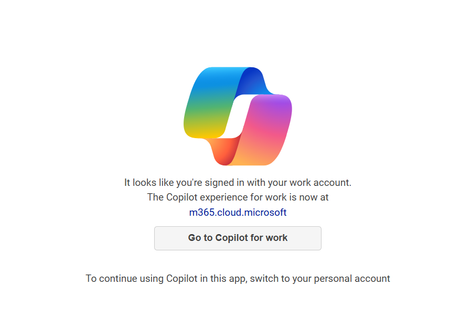
I installed the app from the Windows 11 store yesterday, and it was working fine just like it did on my mobile app. I made sure I signed in with my personal Microsoft account on both. Today, when I attempted to use it again on my Windows 11 PC, it seems like it signed in with my work account and no matter how many times I sign out and back in with my personal account it keeps displaying "It looks like you're signed in with your work account". I've terminated the app, uninstalled it, not sure what else to do? It is signed in with my personal account now but still not working.Solved33KViews17likes47Comments
How to remove Copilot from showing up on web-based apps?
Hello, I predominantly use Outlook through the website via Chrome. I also use OneDrive, Excel, and Word through Chrome quite often. I had a tech person walk me through removing Copilot from my computer's apps - the actual programs - but it's still showing up on my website uses. I do not support AI, AI is absolute trash, and I want Copilot completely eliminated from everything I use. I am tired of having to close the Copilot 'summary' that automatically pops up at the top of all my emails. Is there an easy way to completely eliminate this, or am I doomed? Thank you!7.9KViews16likes4Comments
Copilot Studio + SharePoint: Markdown (.md) Files in Doc Libraries Supported as Knowledge Sources?
Hi all, We’ve been doing some deeper testing with Copilot Studio agents grounded in SharePoint knowledge sources, and I’m hoping to clarify whether what we’re seeing is a known limitation or an undocumented gap. Scenario A Copilot Studio agent uses SharePoint document libraries as a knowledge source The library contains Markdown (.md) files that are intentionally used as canonical design references The same .md files: ✅ Work well when uploaded directly to the agent ❌ Are not retrievable or citable when stored in a SharePoint library and added as a SharePoint knowledge source To help with grounding, we created modern SharePoint index pages that: Explain what the markdown collections are (Patterns, ADRs, Guardrails) Link directly to the canonical folders and files Explicitly state that the .md files are the source of truth The agent can: Discover and summarize the index pages correctly Understand that .md artifacts exist and where they live But it cannot: Read the content of the individual .md files Apply a specific pattern or ADR from those files in a design conversation Cite them as sources, even when permissions and search indexing are confirmed What We’ve Checked Permissions (agent user has access) Folder depth (kept shallow) Search results (markdown files appear in SharePoint search) SharePoint indexing status Work IQ enabled Same content works when attached directly to the agent This behavior also seems consistent with what others have reported here: Markdown works when uploaded directly Markdown retrieval degrades when hosted in SharePoint libraries Questions for the Product Team / Community Are Markdown (.md) files in SharePoint document libraries officially supported as Copilot Studio knowledge sources today? If yes, are there specific constraints (file size, rendering, parsing, indexing) that differ from Word/PDF? If no (or “not yet”), is this a known limitation on the roadmap? Is the recommended pattern to: Convert important markdown files into .aspx pages, or Use thin “index / summary” pages and keep markdown canonical until retrieval improves? We’re happy to adapt our information architecture — just trying to align with the intended platform direction rather than work against it. Thanks in advance for any guidance or clarification. This capability is extremely powerful, and clearer expectations here would help a lot of teams make the right design tradeoffs.3KViews14likes6Comments
OneNote files not being indexed by Copilot for M365
Based on my tests Copilot for M365 does not seem to be indexing onenote files and yet based on this https://learn.microsoft.com/en-us/microsoftsearch/semantic-index-for-copilot#supported-content-types onenote files should already be within the scope of what is being indexed. Can you clarify what is the behavior to be expected now and if support for onenote files is to be yet released and what is the GA estimated date?1.9KViews13likes5CommentsCoPilot "An external link was removed to protect your privacy"
Scenario: I am signed in to corporate CoPilot for M365. I'm asking CoPilot app on desktop in "WORK" mode to generate an excel file with some fictitious data & make it available in an Excel file. CoPilot generates the table, then removes the link to the file 😑 I can use it in "WEB" mode to do the same, and it generates a BING URL that then results in a 404. <sigh> I can SIGN OUT and use generic CoPilot. That will generate a file, then prompt me for corporate credentials, and then it gives me the file. The question: How do I get file generation working while logged in to my corporate account? Do we have a security permission causing issues?12KViews12likes17CommentsWelcome to the Microsoft 365 Copilot community 😊!
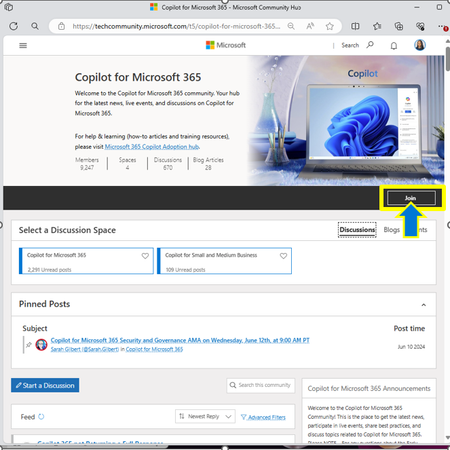
We’re thrilled to have you here and are excited about this forum where we can come together to exchange ideas, collaborate, and delve into all aspects of Microsoft 365 Copilot. We want you to be an active participant in this community! We’d like for you to ask questions, answer others’ questions, and participate in discussion. Expect digital events, like Ask Microsoft Anything (AMA), engagements with Microsoft experts and engineers, vibrant discussions with fellow Microsoft 365 users, advice from pros, and the latest news on updates and releases for Copilot. Below are some tips on how to best use this community: Join the Community: Make sure to click the “join” button on the top right of our community home page so that you can officially become a member of our community! Get the Latest Blog Posts: Stay informed by following and subscribing to our blog space. You’ll receive email updates whenever we post new articles. Keep Up with Our Events: Don’t miss out on our monthly Ask Me Anything (AMA) events. Subscribe and RSVP to let us know you’re attending and add the event to your calendar, so you won’t miss it. We are excited to see the great things you’ll achieve with Microsoft 365 Copilot and look forward to your active participation in this community. Welcome aboard!3.6KViews10likes3CommentsCopilot on Word App on iPad - how to turn off?
I’ve managed to turn the wretched thing off on Word on my desktop and laptop after updating to latest versions and the “disable co-pilot “ checkbox finally appearing in settings. but how on earth do I turn it off on my iPad as it doesn’t have a whole load of settings for the app? I have office 365 personal subscription. #co-pilot7.8KViews9likes11CommentsHow to use Copilot Agents in SharePoint [All You Need To Know]
The creation of Copilot Agent is now enabled in SharePoint 🚀. Users holding M365 Copilot licenses will notice a new Copilot feature in the Suite Navigation bar, tailored to the site they are currently viewing. Additionally, they will find options to create Copilot agents from the 'New' menu on the homepage and within their document libraries. These features are accessible only to users with existing creation and editing rights on the site or document library. Moreover, they have the option to share a Copilot agent link with other users, who, if they possess a Microsoft 365 Copilot license, will be able to interact with it. #SharePoint #MicrosoftSharePoint #Microsoft365 #MPVbuzz #Copilot #AI9.7KViews9likes20CommentsUpdated Copilot app doesn't work with Work account
There was an update to the Copilot app on Oct 3, 2024 (1.0.4.0), and now the app is acting weird on my Copilot+PC work laptop. I press the dedicated Copilot button and expect to have Copilot open from the right. Instead I get a centered screen (which by the way is this address: https://copilot.microsoft.com/?dpwa=1 ) telling me "It looks like you're signed in with your work account. The Copilot experience for work is now at copilot.cloud.microsoft." There is also a button "Go to Copilot for work" which goes to this address https://copilot.cloud.microsoft/?fromCode=pwa, but funny enough, it doesn't redirect within the window but instead opens the address in the Edge browser!? 🤷♂️ In comparison opening https://copilot.microsoft.com/ in the browser navigates directly to the new address for the Copilot experience for work, no issues. Why doesn't the app just redirect directly to the new address for work accounts so I can use the Copilot button as intended? Thanks!18KViews9likes11Comments
Co-Pilot for academic tenants?
What is the roadmap for adding copilot capability to the A3 and A5 licensed tenants? This isn't the first time you have left out functionality for academic license users and it is not clear why. These are the students and faculty that lead the next generation of workers.11KViews9likes13CommentsCDX tenant for Copilot
Will there be a CDX tenant for demo of CoPilot - or are there plans to create one soon? As we cannot preview any Copilot features unless we are in the early adopters trial, a CDX tenant with Copilot would be a great way for those of us that need to sell it and talk about it with clients to get a better understanding of it12KViews9likes17Comments








Events
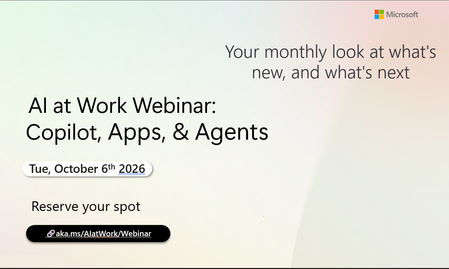
Register Here - https://aka.ms/MTC/CopilotRoadmapEventOct
AI at Work Webinar: Copilot, Apps, & Agents — Want to stay on top of everything happening across Copilot and AI-powered business applicatio...
Tuesday, Oct 06, 2026, 09:00 AM PDTOnline
0likes
20Attendees
0Comments
Recent Blogs
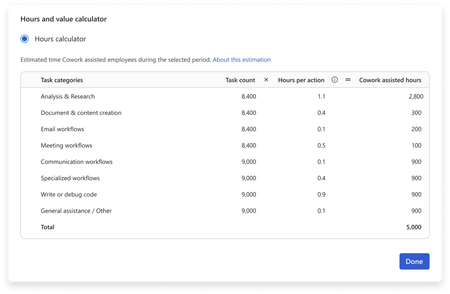
- You have invested in Copilot. Adoption is climbing, prompt volume is up, and your dashboards are full of engagement charts. Yet the question leadership keeps asking is: How do we quantify the value o...Sep 09, 202635Views0likes0Comments
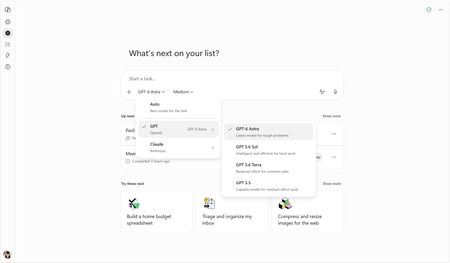
- OpenAI's GPT-6 Astra is rolling out in Copilot Cowork and Copilot Studio todaySep 04, 202620KViews2likes1Comment