security and compliance
33 TopicsMicrosoft Revamps Purview Retention Policies for Copilot
Purview data lifecycle management is changing how Copilot retention policies work. First, legacy policies which process compliance records for both Teams chat messages and Copilot interactions will stop processing Copilot data (so new retention policies are needed). Second, Microsoft is introducing support for retention policies to process Copilot memory files. We don’t quite know yet how compliance officers will make use of Copilot memory files, but I guess we’ll see in the future. https://office365itpros.com/2026/10/26/copilot-retention-policies-update/12Views0likes0Comments
Please Remove Daily Cap Usage for Free Copilot Text Chat
Dear Microsoft Copilot Team, I am writing to express my disappointment with the new daily usage caps on Microsoft Copilot, particularly for ordinary text-based conversations. In the past, I could use Copilot freely for everyday questions, learning, research, brainstorming, and general conversations without constantly worrying about reaching a daily limit. The newer restrictions have made the experience significantly more frustrating and less useful. I understand that running AI services requires computing resources and that Microsoft must manage operating costs. However, I believe ordinary text chat should remain uncapped, especially when it was previously possible to use Copilot much more freely. Text conversations are a fundamental part of the service, and users should not have to stop in the middle of a useful discussion because they have exhausted a daily allowance. The move toward a unified Copilot experience should make the product simpler, more consistent, and more useful—not make existing users feel that they have lost access to a service they have come to rely on. I am therefore asking Microsoft to: Remove daily usage caps entirely for ordinary text-based Copilot conversations, including for free users. Keep basic text chat freely accessible without arbitrary daily cutoffs or lengthy waiting periods. If stricter limits are necessary for resource-intensive features such as image generation or advanced research, apply those limits separately rather than restricting ordinary text conversations. Clearly communicate any usage policies and reconsider changes that negatively affect the experience of long-time users. Unlimited text chat would help preserve user trust, encourage continued engagement, and distinguish Copilot as an accessible AI assistant for everyone. Restricting basic conversations risks pushing loyal users toward competing services that offer a more suitable experience. I hope Microsoft will take this feedback seriously and reconsider the current daily cap policy. Please restore uncapped text chat so users can rely on Copilot whenever they need assistance, without worrying about running out of messages. People on Reddit and online have been criticizing these changes ever since Copilot was unified under one product between enterprise and personal, If you guys dont do anything now it might reduce user trust and might be bad business decisions so please fix Copilot Thank you for your time and consideration. I look forward to seeing Microsoft make Copilot more accessible and user-friendly again.319Views4likes2Comments
Building Trust-Aware Controls for AI: Differentiated handling of untrusted content
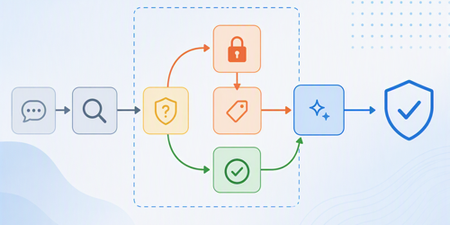
A new enforcement layer in Microsoft 365 Copilot that helps defend against indirect prompt injection attacks by isolating untrusted content, constraining how it is processed, and enforcing clear trust boundaries at inference time.1.5KViews1like0CommentsFix all annoying Copilot bugs
I’m experiencing an issue with Microsoft Edge on Android. Starting today (September 22, 2026), whenever I try to visit copilot.microsoft.com, Edge automatically redirects me to the Google Play Store to install the Copilot app. I prefer using Copilot in the browser and do not want to install the app. And even when i try to install the copilot app it does not let me do anything and thinks I need a license or subscription to access it like copilot is litterly supposed to be free and also even when i try to get rid of the app redirection it for some dumb reason it redirects me to from copilot.microsoft.com to copilot.com and they put in restrictions like after a lot of chats you must wait for a specific time period and a couple months ago you guys removed the ability to use copilot without registration like come on that is so dumb I want Microsoft Copilot to be fixed revert how copilot was before how is this consumer friendly349Views1like2CommentsDifference between Copilot Agent settings and Microsoft Agent 365 Agent settings
Hello, I am trying to better understand the distinction between the agent governance settings available in the Microsoft 365 admin center. Currently, I can find seemingly similar agent access settings in two different locations: Copilot → Settings → Agents Agents → Settings → User Access (Microsoft Agent 365) For example, both locations appear to provide controls such as : Who can access agents Whether access is granted to all users or specific groups Agent usage permissions From an administrator perspective, it is not clear whether these are two different configuration scopes, two different management experiences, or simply two entry points to the same underlying policy. So : What is the intended difference between the Copilot settings experience and the Agent 365 settings experience ? Which interface should be considered the primary administration location going forward ? Are the settings synchronized and backed by the same configuration objects ? Is one of these experiences planned to replace the other in the future ? What governance scenarios should be managed in Copilot settings versus Agent 365 settings ? Thank you for your help.159Views0likes1CommentIn Case You Missed It: Frontier Transformation and Wave 3 of Microsoft 365 Copilot Announcements
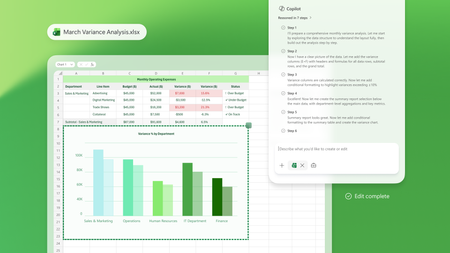
March brought a major set of Frontier Transformation and wave 3 of Microsoft 365 Copilot announcements across Microsoft 365 Copilot, Copilot Chat, and agents—all focused on helping people move faster from intent to action and helping organizations scale AI responsibly. If you missed any of the updates, here’s a quick recap of what’s new and why it matters. Copilot Transforms Knowledge Work These updates deepen how Copilot shows up inside the flow of work—grounded in your content, context, and tools. Word, Excel, and PowerPoint Agents From Copilot Chat, users can ask Word, Excel, or PowerPoint agents to create content, take next steps, or execute tasks, helping them move from intent to action without copying and pasting or switching contexts. 👉 Learn more Edit with Copilot in Word, Excel, and PowerPoint Copilot now creates, edits, and refines content directly inside Word, Excel, and PowerPoint, grounded in the context of a user’s work through Work IQ, so people can iterate and improve content without leaving the app they’re working in. 👉 Learn more Sequences shortened for demonstration purposes. Copilot Chat in Outlook Copilot Chat in Outlook enables users to draft and refine emails, manage calendars and RSVPs, and use the Outlook email widget to take action directly from chat, streamlining everyday communication and scheduling tasks. 👉 Learn more Outlook customer calendar instructions & proactive RSVPs Copilot finds available meeting times, sends invites, and keeps calendars up to date based on custom instructions, notifying users of changes directly in chat to reduce manual coordination. 👉 Learn more Copilot Cowork Built with Anthropic, Copilot Cowork brings a multimodel approach to Microsoft 365 Copilot—so your work isn’t tied to a single model. Cowork moves Copilot beyond prompts into long‑running, multi‑step work. With full awareness of your work context through Work IQ, it lets you delegate meaningful work and stay informed as it progresses. 👉 Learn more Claude Sonnet available in Copilot Chat Users can select Claude models directly in Copilot Chat, alongside next‑generation OpenAI models, bringing leading models from multiple providers into a single Copilot experience. 👉 Learn more Dataverse in Work IQ Work IQ connects signals from Microsoft 365—including documents, meetings, email, and chat—and will soon access operational data in Dataverse through Copilot in Dynamics 365 and Power Apps, bringing work context and business data closer together. 👉 Learn more Work IQ Memory (Chat History) Work IQ Memory enables more relevant, personalized Copilot responses shaped by a user’s work and Copilot chat history over time. 👉 Learn more Extensibility: Work IQ API / MCP Work IQ APIs provide access to production‑ready AI capabilities that work directly with enterprise work context, enabling extensibility through APIs and MCP. 👉 Learn more Launch Demo Copilot in Dynamics 365 & Power Apps Microsoft 365 Copilot is accessible directly within Dynamics 365 Sales, Customer Service, and Power Apps, extending Copilot experiences into business applications where operational work happens. 👉 Learn more Agents That Help Run the Business These announcements focus on building, deploying, and scaling agents across the enterprise. Apps SDK The Apps SDK provides tools to build ChatGPT apps based on the MCP Apps standard, with additional ChatGPT functionality to support agent and Copilot experiences. 👉 Learn more Model Context Protocol (MCP) Apps MCP Apps turn Copilot from a text interface into a governed, interactive execution layer by surfacing interactive app experiences directly in Copilot Chat. 👉 Learn more Apps in Agents: Outlook, Dynamics 365, and Power Apps Agents can bring Outlook, Dynamics 365, and Power Apps directly into chat, allowing users to review information and take action without leaving the conversation. 👉 Learn more Agent Recommendations in Microsoft 365 Copilot When users prompt Microsoft 365 Copilot, the system analyzes intent and recommends an installed, IT‑approved agent directly in the flow of work, making agents easier to discover and use at scale. 👉 Learn more Evaluate agents in Copilot Studio Copilot Studio provides structured, repeatable testing to help catch issues early, reduce the risk of bad answers, and maintain agent quality as agents evolve. 👉 Learn more Visibility, Governance, and Control at Scale As agent usage grows, these updates help organizations move from experimentation to enterprise readiness. Agent 365 Agent 365 serves as the control plane for agents, helping organizations move from experimentation to enterprise‑scale operations by enabling them to observe, govern, and secure agents. 👉 Learn more Microsoft 365 E7: The Frontier Suite Microsoft 365 E7 unifies Microsoft 365 E5, Microsoft 365 Copilot and Agent 365 into a single solution powered by Work IQ and integrated with the productivity apps and security stack customers already rely on. It includes Microsoft Entra Suite and advanced Defender, Intune and Purview security capabilities, delivering comprehensive protection across agents and employees. 👉 Learn more To explore what’s available now—and what’s coming next—visit the Microsoft 365 roadmap and related announcement blogs. 👉 Explore the roadmap8.7KViews3likes1CommentBeyond the hype: turning Microsoft 365 Copilot and agents into real business outcomes
Microsoft Ignite 2025 in San Francisco was an electrifying gathering that brought together over 30,000 tech professionals, business leaders, and innovators from around the globe. This year’s event set a bold tone for the future, spotlighting the transformative role of Copilot and agents in modern workplaces and unveiling a wave of advancements across the Microsoft 365 ecosystem. The energy on the ground reflected both the excitement and the urgency of this new era, making it clear: Microsoft 365 Copilot and agents are not just the future—they are redefining the way companies get work done today. As I spoke with partners and customers, I was inspired by how organizations are embracing these tools to unlock new ways of working and developing rich business solutions. I want to take a moment to reflect on some of my highlights from the event. Extend familiar management infrastructure to agents with Microsoft Agent 365 Over the last week, I heard time and time again how business leaders are embracing the Frontier Firm wave, steering their organizations toward partnering people with agents across every workflow. Thousands of agents are already automating business processes, and by 2028 IDC projects there will be 1.3 billion in circulation.* For enterprise customers, this will bring a massive new digital workforce to manage. As agents get added to every workflow and become more capable, some business leaders have expressed concerns about how to accelerate AI innovation securely. Microsoft Agent 365 turns this challenge into an opportunity. Operating as a control plane for AI agents, Agent 365 extends the existing infrastructure used to manage people to also manage agents, equipping them with the same apps, protections, and context. For IT leaders, Agent 365 gives organizations a single platform to deploy, govern, and organize agents, transforming them from isolated actors into an integrated part of business operations. Agent 365 helps protect and manage agents across the organization by unifying Defender, Entra, and Purview, and provides a single view of their entire agent fleet with the Microsoft 365 admin center. To ensure agents have the context they need to provide the most accurate results, Agent 365 connects Microsoft 365 apps and Semantic Index through WorkIQ. For organizations ready to take advantage of this unified foundation, Agent 365 will offer a robust ecosystem. For example, Microsoft agents like the new, fully autonomous Sales Development Agent; partner agents from Adobe, Cognition, Databricks, Genspark, Glean, Kasisto, Manus, NVIDIA, n8n, SAP, ServiceNow, Workday, and more; and open-source agents from Anthropic, Cursor, LangChain, OpenAI, Perplexity, and Vercel. For developers looking to build their own Agent 365-compatible agents, they can start with Copilot Studio or Microsoft Foundry. For deeper integrations, Microsoft Agent Framework or Agent 365 SDK enable unified discovery, governance, and collaboration across Microsoft 365. Simplify HR and IT support with the Employee Self-Service agent Another impactful way businesses are integrating agents into operational workflows is by replacing fragmented employee-support systems for HR or IT tasks. At Ignite, we announced the general availability of the Employee Self Service (ESS) agent, which brings AI-powered service delivery directly into Microsoft 365 Copilot to improve HR and IT employee support scenarios. Within Copilot, employees can ask questions, submit requests, and complete routine tasks in one trusted place without disrupting workflow. Natively built into Copilot Studio, the ESS agent provides a customizable foundation for intelligent employee service. It works with HR and IT systems such as Workday, ServiceNow, and SAP SuccessFactors and can easily be expanded through low-code extensions, connectors, and integrations with enterprise systems. Employees can tailor workflows, embed organizational knowledge, and adapt the experience to match their organization’s systems, resulting in a faster and more connected support experience. Frontier Firms in action: Turning AI innovation into business outcomes On Thursday, I hosted a panel session with leaders from several enterprise customers who are well on the path to becoming Frontier Firms: Sean Alexander, SVP, Connected Ecosystem, Lumen Tim Holt, VP, Health Answers Tech Lead & Architect, Pfizer Mona Riemenschneider, Head of Global Communications, GenAI, BASF John Whittaker, Director, AI Platform & Products, Ernst & Young Two themes emerged from our panel discussion. First, the most successful organizations are moving from experimentation to operationalization, developing agent-specific KPIs, governance structures, and more. These are not science experiments, but production tools already embedded directly into some of the world’s most complex enterprises. For example, Pfizer is leveraging Copilot Studio at scale with over 300 agents deployed across their organization, including a specialized agent that provides continuous manufacturing improvement with prioritized opportunities across the supply chain. Second, leaders on the panel emphasized that the future of work is human-led and agent powered. At Lumen, they’ve developed a declarative agent that synthesizes internal data, external filings, and real-time insights to generate tailored executive briefings, reducing cognitive load and surfacing the context needed to prepare for partner and customer meetings. At BASF Agricultural Solutions, they’re using a Copilot agent to transform global corporate communication efficiency. The Copilot agent streamlines the compilation of internal and external communication messages, efficiently and securely, resulting in significant time savings. "If 2025 was the year of the agent, then 2026 will be the year of the agents," said EY’s John Whittaker. “That’s where I think we’re going to see the consolidation of processes into far faster, more real-time, improved outcomes.” Learn how partners and customers are already unlocking new value with AI agents It’s exciting to see how our rich ecosystem of customers and partners are using Microsoft technology to create their own agents to solve real-world challenges, accelerate transformation, and scale human-agent collaboration. Ignite 2025 featured several Microsoft partners and customers who are building innovative agents, designed to work with Microsoft 365 Copilot to help save time, boost productivity, and accelerate business transformation. ADP - The ADP Assist agent for Microsoft 365 Copilot is purpose-built to support HR and will simplify payroll tasks by bringing key workflows into Copilot Chat and Microsoft Teams. Employees will be able to check time-off balances, review pay statements, and confirm direct deposit settings, all without leaving their flow of work. Blue Yonder - Blue Yonder Inventory Ops for Microsoft 365 Copilot automates demand forecasting using advanced machine learning and generates optimized, constraint-based supply plans covering production, distribution, and procurement to meet business objectives and enhance planner productivity. Freshservice - Freddy AI Agent now integrates seamlessly with Microsoft Copilot, bringing instant IT and support assistance into Word, Outlook, Teams, and more. This deep integration boosts adoption, eliminates context switching, and empowers employees to resolve issues effortlessly inside their everyday Microsoft 365 tools. monday.com - monday.com has integrated its MCP server with Microsoft Copilot both as a ready-to-use agent in the Agent Store and as a "Tool" for users to build custom agents on Copilot Studio. Users can now directly access their monday.com data, surface boards and items, or even update statuses directly within their Teams app or Microsoft 365. Sophos - Sophos Intelix will integrate real-time threat intelligence into Microsoft 365 Copilot, empowering IT teams and business users to check links and files, and make faster, more informed security decisions while democratizing enterprise-grade cybersecurity insights within everyday Microsoft 365 workflows. Wipro – Wipro has implemented Copilot-powered agents across sales, procurement, finance, and talent functions, enhancing knowledge access and decision-making to drive faster, more accurate, and consistent business operations. These aren’t the only incredible agents helping businesses. Thousands more are available in Microsoft Marketplace, where partners like the ones below are already reaching customers at scale. Shape the future of work with AI agents What inspires me most coming out of Ignite 2025 is seeing how customers and partners are already building the foundation of their Frontier Firms—people and agents working together to transform productivity and decision-making. This shift is no longer theoretical, it’s happening now across industries, powered by Copilot. To learn more about agents in Copilot and gain access to Microsoft resources, follow the links below. Check out recorded sessions from Ignite and watch demonstrations of agentic solutions from leading software companies Read about the exciting AI innovations for software developers who are building agents Start building agents with Microsoft Copilot Studio and Microsoft Visual Studio Get resources for building and customizing agents from the Microsoft 365 Dev Center and the AI Agents Hub *IDC Info Snapshot, sponsored by Microsoft, 1.3 Billion AI Agents by 2028, #US53361825 and May 20252.6KViews4likes0CommentsMicrosoft leads the way earning CSA STAR for AI 42001
We are proud to announce a major milestone in responsible AI: recognition as one of the first organizations to achieve CSA STAR for AI Level 2 certification under the Cloud Security Alliance (CSA) new STAR for AI 42001 program.1KViews3likes1Comment