security and compliance
58 TopicsMicrosoft Revamps Purview Retention Policies for Copilot
Purview data lifecycle management is changing how Copilot retention policies work. First, legacy policies which process compliance records for both Teams chat messages and Copilot interactions will stop processing Copilot data (so new retention policies are needed). Second, Microsoft is introducing support for retention policies to process Copilot memory files. We don’t quite know yet how compliance officers will make use of Copilot memory files, but I guess we’ll see in the future. https://office365itpros.com/2026/10/26/copilot-retention-policies-update/28Views0likes0Comments
Microsoft Copilot 365 Personal Premium limits
In my Copilot Notebook, I deliberately loaded 20 PDF files in order to test Copilot’s grounding behavior across the full set of available references. At the time this testing setup was created, 20 references represented the effective grounding limit described for Copilot Notebooks, meaning that these references were expected to form the source base used by Copilot when generating grounded responses. The references consisted of fully functional, original academic textbooks containing relevant and up-to-date scientific information, mostly published within the last ten years. Importantly, the sources do not differ from one another in terms of accessibility, file type, availability, or how they were added to the notebook. They are all PDF files, they are all available in the same environment, and there is no obvious difference in access conditions that would explain why some are consistently used while others are repeatedly treated as inaccessible, unavailable, summarized, or skipped. The purpose of the test was therefore not simply to see whether Copilot could access 20 files, but whether it could actually ground its answers in the complete reference set when explicitly instructed to analyze all available sources. Despite this, in approximately 99.9% of my tests, Copilot appears to ground its responses in only 3 to 5 of the 20 available references, often repeatedly using the same documents. When I ask what happened to the remaining sources, Copilot gives different explanations. Sometimes it says that it does not have access to certain files. Sometimes it says that it only received a summary of the file. Sometimes it says that a step involved in retrieving or processing the information failed. The way Copilot explains this often makes it sound as if access to the uploaded files depends on some external or intermediate system, rather than being something Copilot itself can directly control. This is difficult to understand from a user perspective because the files are already uploaded into the Copilot environment and were specifically provided as source material for analysis. The practical result is that a task explicitly requesting analysis of 20 sources often produces an answer based on only 3 to 5 of them. For academic or research use, this is a serious limitation. If 15 to 17 out of 20 carefully selected sources are not actually examined, then the final synthesis cannot realistically represent the full source base. This also creates uncertainty about what Copilot means when it claims to have used the provided materials. My question to Microsoft is: Is there a technical limit on how much information Copilot can actually retrieve, open, and analyze from uploaded files during a single task or session? If such a limit exists, what is that limit? And why, when 20 valid PDF sources are uploaded and Copilot is explicitly instructed to analyze all of them, does it so often appear to open only 3 to 5 files, while describing the others as inaccessible, summarized, or unavailable because some retrieval step failed?219Views1like1Comment
How does ERP MCP determine F&O environment?
How does the Dynamics 365 ERP MCP Server determine the target Finance & Operations environment when multiple environments (SIT, UAT, and Production) have MCP enabled? In Copilot Studio, the MCP connection only shows the authenticated user and does not expose any environment selection or environment identifier. Is the target F&O environment determined by the underlying Power Platform connection, the MCP client registration, a connection reference, or another routing mechanism? How can administrators verify which F&O environment an MCP-enabled agent is actually connected to?164Views0likes2Comments
Please Remove Daily Cap Usage for Free Copilot Text Chat
Dear Microsoft Copilot Team, I am writing to express my disappointment with the new daily usage caps on Microsoft Copilot, particularly for ordinary text-based conversations. In the past, I could use Copilot freely for everyday questions, learning, research, brainstorming, and general conversations without constantly worrying about reaching a daily limit. The newer restrictions have made the experience significantly more frustrating and less useful. I understand that running AI services requires computing resources and that Microsoft must manage operating costs. However, I believe ordinary text chat should remain uncapped, especially when it was previously possible to use Copilot much more freely. Text conversations are a fundamental part of the service, and users should not have to stop in the middle of a useful discussion because they have exhausted a daily allowance. The move toward a unified Copilot experience should make the product simpler, more consistent, and more useful—not make existing users feel that they have lost access to a service they have come to rely on. I am therefore asking Microsoft to: Remove daily usage caps entirely for ordinary text-based Copilot conversations, including for free users. Keep basic text chat freely accessible without arbitrary daily cutoffs or lengthy waiting periods. If stricter limits are necessary for resource-intensive features such as image generation or advanced research, apply those limits separately rather than restricting ordinary text conversations. Clearly communicate any usage policies and reconsider changes that negatively affect the experience of long-time users. Unlimited text chat would help preserve user trust, encourage continued engagement, and distinguish Copilot as an accessible AI assistant for everyone. Restricting basic conversations risks pushing loyal users toward competing services that offer a more suitable experience. I hope Microsoft will take this feedback seriously and reconsider the current daily cap policy. Please restore uncapped text chat so users can rely on Copilot whenever they need assistance, without worrying about running out of messages. People on Reddit and online have been criticizing these changes ever since Copilot was unified under one product between enterprise and personal, If you guys dont do anything now it might reduce user trust and might be bad business decisions so please fix Copilot Thank you for your time and consideration. I look forward to seeing Microsoft make Copilot more accessible and user-friendly again.328Views4likes2Comments
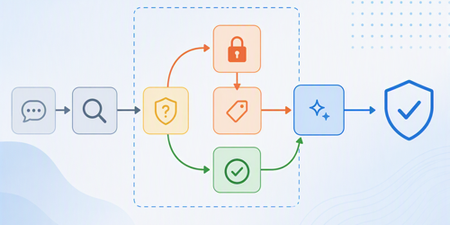
Building Trust-Aware Controls for AI: Differentiated handling of untrusted content
A new enforcement layer in Microsoft 365 Copilot that helps defend against indirect prompt injection attacks by isolating untrusted content, constraining how it is processed, and enforcing clear trust boundaries at inference time.1.6KViews1like0CommentsFix all annoying Copilot bugs
I’m experiencing an issue with Microsoft Edge on Android. Starting today (September 22, 2026), whenever I try to visit copilot.microsoft.com, Edge automatically redirects me to the Google Play Store to install the Copilot app. I prefer using Copilot in the browser and do not want to install the app. And even when i try to install the copilot app it does not let me do anything and thinks I need a license or subscription to access it like copilot is litterly supposed to be free and also even when i try to get rid of the app redirection it for some dumb reason it redirects me to from copilot.microsoft.com to copilot.com and they put in restrictions like after a lot of chats you must wait for a specific time period and a couple months ago you guys removed the ability to use copilot without registration like come on that is so dumb I want Microsoft Copilot to be fixed revert how copilot was before how is this consumer friendly353Views1like2CommentsDifference between Copilot Agent settings and Microsoft Agent 365 Agent settings
Hello, I am trying to better understand the distinction between the agent governance settings available in the Microsoft 365 admin center. Currently, I can find seemingly similar agent access settings in two different locations: Copilot → Settings → Agents Agents → Settings → User Access (Microsoft Agent 365) For example, both locations appear to provide controls such as : Who can access agents Whether access is granted to all users or specific groups Agent usage permissions From an administrator perspective, it is not clear whether these are two different configuration scopes, two different management experiences, or simply two entry points to the same underlying policy. So : What is the intended difference between the Copilot settings experience and the Agent 365 settings experience ? Which interface should be considered the primary administration location going forward ? Are the settings synchronized and backed by the same configuration objects ? Is one of these experiences planned to replace the other in the future ? What governance scenarios should be managed in Copilot settings versus Agent 365 settings ? Thank you for your help.162Views0likes1CommentMicrosoft Copilot 365
To Microsoft: Serious Concerns Regarding the Actual Capabilities of Microsoft Copilot Microsoft, After 12 consecutive days of intensive testing of Microsoft Copilot, for approximately eight hours per day — around 96 hours of practical use in total — I have serious concerns about the accuracy of the way Copilot's functions and capabilities are described and presented by Microsoft. What I have observed in actual use is repeatedly and substantially different from what the product is presented as being capable of doing. This conclusion is not based on a single unsuccessful prompt, an isolated error, or a short test. It is based on repeated testing over many days, involving continuous academic, analytical, document-based, and multi-step tasks. One of the most serious problems is Copilot's inability to reliably maintain and use conversational context even within the same active session. For example, Copilot can generate a substantial piece of text and, in the immediately following interaction, claim that it cannot see or access that same text. It may ask the user to provide again information or content that Copilot itself generated only one response earlier. This makes it impossible to rely on the system for genuine sequential work. During testing, the same general problem has appeared in different forms: Copilot fails to return reliably to earlier tasks, loses access to information already established within the conversation, fails to connect consecutive instructions, and sometimes behaves as though previous parts of the same active session do not exist. This is particularly serious when Copilot is used for academic or research work. A workflow may require the system first to generate or analyse material, then classify it, compare it with another part of the work, identify its sources, reorganise it, and finally continue developing it. If Copilot cannot reliably access the result of the immediately preceding step, such a workflow becomes fundamentally unreliable. After approximately 96 hours of direct testing, it is increasingly difficult to regard these problems simply as occasional technical limitations. The discrepancy between Microsoft's descriptions of Copilot and the behaviour actually observed during sustained use is substantial enough to raise a much more serious question: whether the functions and capabilities attributed to Copilot in Microsoft's product descriptions accurately represent what the system can actually and reliably do in normal use. From the user's perspective, the current experience creates the impression that Microsoft's claims about Copilot's capabilities are misleading. A capability should not be considered a genuine product capability merely because the system can occasionally perform it under favourable conditions. If a feature is presented to users as part of the product's functionality, users should reasonably be able to expect that functionality to operate consistently enough to be relied upon. After 12 days of testing, that has not been my experience. The difference between the advertised or described capabilities and the actual behaviour of Copilot is not minor. In several fundamental areas — particularly conversational continuity, access to previous work within the same session, multi-step task execution, and reliable reuse of previously generated content — the practical experience does not correspond to the expectations created by Microsoft's descriptions of the product. After nearly 100 hours of testing, I am therefore questioning not simply the quality of Copilot, but the accuracy and transparency of Microsoft's representation of what Copilot is actually capable of doing. If Microsoft describes Copilot as possessing capabilities that repeatedly cannot be reproduced in sustained real-world use, then the issue is no longer merely whether Copilot occasionally makes mistakes. The issue is whether users are being given an accurate representation of the product they are being asked to use and pay for.192Views0likes0CommentsBitlocker key requested on the boot, but I don’t have any key
My laptop (Windows 10, version 22H2, build 19045), that I have been using more than 6 years already, suddenly started asking for the BitLocker recovery key at startup, which is blocking access to the system entirely. What I've already checked/tried: - Checked account.microsoft.com/devices/recoverykey while signed in with my Microsoft account, no key appears for this device. - Contacted Microsoft Support directly, they said they can no longer assist with Windows 10 issues and suggested posting here instead. Is there any way to recover access to this drive?780Views0likes3CommentsWhat it looks like: Trusted, compliant AI systems at scale
As AI systems move into production, the risk landscape expands beyond traditional app security. Examine emerging threats like prompt injection, data leakage, and autonomous tool misuse—and hear ways to mitigate threats using a defense-in-depth strategy. Find out how to apply layered controls across identity, data protection, orchestration, and runtime environments to keep AI systems secure and controllable. AI security and observability are essential for building trusted, compliant AI systems at scale. That's why we'll also cover how traceability, safety monitoring, and auditability help you maintain trust, prove compliance, and operate with confidence in real-world conditions. How do I participate? Select Add to Calendar to save the date, then click the Attend button to save your spot, receive event reminders, and participate in the Q&A. Not able to attend live? This session will be recorded and available on demand shortly after airing. Just announced! Live Q&A will also be available July 29 from 9:00-10:00 AM SGT (UTC+8) to support attendees in Asia and western Australia. Don't see Attend or Add to Calendar? Sign in to the Tech Community to join the conversation. Organizational policies preventing you from signing in to the Tech Community? Use a personal account or tune in on LinkedIn. This session is part of Path to production for agents: a Microsoft Azure AI Tech Accelerator. View the full agenda for more actionable strategies to help you deliver secure, compliant, and high-performing AI solutions across your organization.1KViews0likes4Comments