Recent Discussions
Is "uncertainty" the feedback signal Copilot Studio agents are actually missing?
At today's M365 Platform Weekly session, we were asked for our input on what feedback we wish we could pull beyond thumbs up/down and verbatims. Is it trends over time, sentiment themes, the response-to-triage loop, etc. Here's an angle: What if the primitive itself is wrong? Thumbs up/down measures satisfaction after the fact. What if we measured confidence instead? How often an agent actually knows it's on shaky ground, and whether the user's reaction matches that? If an agent flags its own uncertainty at the point of response instead of a static thumbs up/down, a feedback prompt gets generated from whatever's trending in that uncertainty instead of the same generic question every time, and "trends over time" becomes "did this agent get more confident or less confident since the last update" rather than a flat satisfaction line. It might also solve the silence problem that most users rarely click anything. A reaction that's actually specific ("you caught something the agent flagged as shaky") seems easier to engage with than a binary good or bad. To be clear, confidence signals already exist in adjacent forms. Copilot Studio and most conversational AI platforms already use a confidence score internally to decide whether to answer directly, ask a clarifying question, or escalate to a human. GitHub Copilot has used a confidence score since its earliest versions too, ranking code suggestions and defaulting to the highest-scoring one. None of that is new. So rather than "add a percentage next to the answer", what if there is a specific flag pointing at the exact claim or step the agent is unsure about, feeding into the feedback loop? Curious if anyone else building in Copilot Studio has run into this: Do you ever wish your agent had hedged when it didn't? What would you actually do with an uncertainty score if you had one? And would just love others thoughts on this :)20Views0likes0CommentsRetention policy for only Microsoft Copilot Chat and Copilot Studio agent transcript?
Is it possible to create a retention policy for "Microsoft Copilot Experiences" location but targeting only Microsoft 365 Copilot and Copilot studio but not Security Copilot or Copilot in Fabric?11Views0likes0Comments
URGENT: Tenant Lockout, Without Global Admin Access for 2 Weeks – Existing Case Not Escalated
Can a Microsoft moderator please initiate or verify escalation to the Data Protection/Tenant Recovery team and contact me privately for our service request number? Our healthcare practice has been unable to regain Global Administrator access to our Microsoft 365 tenant for approximately two weeks. We have already opened a support case, completed the verification steps requested by Microsoft, contacted support multiple times, requested escalation to the Tenant Recovery/Data Protection team, and requested to speak with management. Despite all of this, we still do not have administrative control of our tenant and have not been given a clear path to resolution. This is now a serious business continuity and security concern for our organization. We are not requesting a standard password reset or routine Dynamics 365 support. We need assistance with restoring administrative control of our Microsoft 365/Entra tenant. Can a Microsoft moderator please help verify that our case has been escalated to the appropriate Data Protection/Tenant Recovery team and contact me privately so I can provide our existing service request number and any ownership-verification information needed? We are happy to provide all case details privately. I do not want to post sensitive tenant, account, or company security information publicly. At this point, we urgently need someone within Microsoft to take ownership of the escalation and help us regain Global Administrator access.7Views0likes0Commentshow to create a globally Shared ServiceNow Connector Connection in Copilot Studio
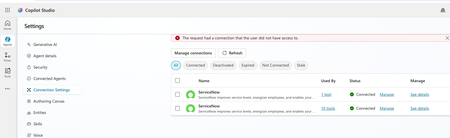
Hello, I have configured Microsoft entra ID oauth using certificate and shared this connection with everyone in my company since this is the only shared connection on the platform. https://learn.microsoft.com/en-us/connectors/service-now/#microsoft-entra-id-oauth-using-certificate. But, whey user's ( end users, agent maker, environment maker basically any user in copilot environment) are trying to use any servicenow tools ( e.g create record) which is using this shared connection in copilot studio/ teams, they are getting below error. https://learn.microsoft.com/en-us/connectors/service-now/ How to create a shared connection which can be shared across all enterprise users in my org for copilot AI agents which are using servicenow connector? Regards, Sachin16Views0likes0CommentsError Connecting Whatsapp Number (Copilot Studio to Azure ACS)
Please help. I created an AI Agent in Copilot Studio for connecting to WhatsApp. I created an Azure Communication Services (ACS) and connected my personal Facebook page to it. I created a WhatsApp Business number, I got the code, and it connected. However, when I return to Copilot studio to connect using my Azure Subscription and Resource, it says- Error connecting to WhatsApp phone number. Please try again. How do I resolve this?5Views0likes0Comments
Can Copilot handle repeatable account reviews, or do SMBs need agents?
Hi everyone, I’m trying to better understand how small and medium-sized businesses are using Microsoft 365 Copilot for recurring business-review workflows. A pattern I see often is account or customer review prep. For example, a team may manage dozens of customers, merchants, partners, vendors, or locations. Every month or quarter, someone needs to pull performance data, summarize what changed, create slides or a short report, recommend next actions, organize the files, and send follow-up notes. For those of you using Copilot in a small or mid-sized business: - Is Copilot enough for this kind of recurring workflow using Excel, PowerPoint, Word, Outlook, Teams, OneDrive, and SharePoint? - Where does the process still become manual or hard to repeat? - Do you need to handle many accounts/customers/locations in one run, or is one at a time enough? - How important is history tracking across months or quarters? - Would automatic OneDrive or SharePoint organization be useful so each account has a durable review history? - What would make AI-generated summaries, slides, and action plans trustworthy enough for executive or customer-facing use? I’m especially interested in the business-user perspective: account managers, customer success teams, sales/partner managers, operations teams, and small business leaders who prepare recurring reviews or performance updates. For context, we recently built a Microsoft 365 Marketplace agent focused on merchant QBR preparation, but my broader question is about the workflow pattern: what do SMB users actually want Copilot or workflow-specific agents to do when recurring review work spans data, slides, files, and follow-up? Curious how others are approaching this.32Views0likes0Comments
How to Integrate Copilot Studio Agent with a Website Using API?
Hello Team, I have created a Copilot Agent using Copilot Studio and published it on our public website using an iframe. Currently, the agent does not have any authentication configured because we want it to be publicly accessible. However, our website development team has raised a security concern with this approach, as embedding the Copilot Agent directly using an iframe may not be the most secure or recommended approach. We are looking for an alternative integration approach. For example: Is it possible to expose the Copilot Studio Agent through an API or another secure endpoint? Can our website development team call the agent through an API, receive the response, and build their own custom UI instead of embedding the agent using an iframe? Is there any recommended architecture or Microsoft-supported approach for securely integrating a Copilot Studio Agent with a public-facing website? If anyone has implemented a similar solution or has any recommendations, I would appreciate your suggestions.87Views0likes1Comment
Copilot+ laptop cannot access my local files or folders. No permission dialog to approve access.
First up - I'm not a tech expert! I have a new CoPilot+ laptop. Asked CoPilot to do a task in my folders and files that I downloaded from iCloud, but it cannot access my files or folders. Asks me to allow access through Microsoft prompt that never appears. Contacted Microsoft Support yesterday and after 2 hours and no progress, they told me to contact laptop manufacturer support. Which I did, and this resulted in a reset to factory setting of the laptop today. Problem still persists, its not hardware related. I contacted Microsoft Support again and have been directed her on the basis that this appears to be an ongoing Copilot+ issue that has already been through extensive troubleshooting, the Tech Community is currently the best channel to track updates and raise visibility with the teams investigating the problem." Any suggestions on what I need to try next? Bearing in mind, I am not an expert! Thank you in advance Gail98Views0likes1Comment
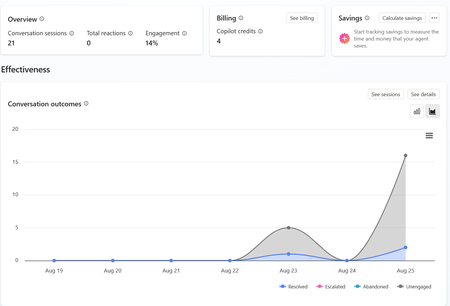
Copilot Studio Agent Shows Usage Limit Error Despite Low Credit Usage
a { text-decoration: none; color: #464feb; } tr th, tr td { border: 1px solid #e6e6e6; } tr th { background-color: #f5f5f5; } Hi everyone, We are experiencing an issue with a Copilot Studio agent and would appreciate any guidance from the community. Scenario: The agent works correctly in the Copilot Studio test environment and responds as expected. However, after integrating the same agent into our web application, users receive the following error: "This agent is currently unavailable. It has reached its usage limit. Please try again later." Additional Information: In Copilot Studio Usage Monitoring, we can only see approximately 4 credits consumed. Based on the reported consumption, we would not expect a usage limit to have been reached. The issue occurs only when accessing the agent through the web application. The Copilot Studio test interface continues to work normally. Questions: Has anyone experienced a similar issue? Could this be related to licensing, capacity allocation, authentication, or channel configuration? Is there any difference in credit consumption or capacity enforcement between the Copilot Studio test environment and embedded web channels? Are there additional monitoring locations where we can verify the actual credit usage and capacity status? Any insights or recommendations would be greatly appreciated.122Views0likes1CommentCopilot Studio agent suddenly stopped working in Teams
Hello, I've run into a strange issue with a Copilot Studio agent and I'm trying to understand where to investigate next. The agent is published to the "Teams and Microsoft 365 Copilot" channel and was working normally in Microsoft Teams until recently. The agent still works correctly in Copilot Studio. The agent still works correctly in Microsoft 365 Copilot / Copilot Chat. The issue only occurs in Microsoft Teams. What happens in Teams: Messages can be sent to the agent. No error message is displayed. No response is returned. Most importantly, no session is created in Copilot Studio (Analytics / Observability). Because no session is created, it looks like the message never reaches the agent runtime. What I've already checked: Republished the agent. Reinstalled the Teams app. Verified the Teams and Microsoft 365 Copilot channel configuration. Checked permissions and sharing settings. Checked Teams Admin Center configuration. Tested in both Teams Desktop and Teams Web. Reviewed Microsoft 365 service health. This same tenant has another Copilot Studio agent that works normally in Teams. The affected agent previously worked in Teams for several weeks before the issue appeared. The agent architecture is very simple (single MCP server, no custom connectors, no Power Automate involved in this scenario). At this point, I'm mainly trying to understand why Teams no longer seems to create a conversation/session for this specific agent while the same agent continues to work in Copilot Studio and Microsoft 365 Copilot. Has anyone seen similar behavior or found a way to diagnose why Teams is no longer forwarding requests to a specific agent ? Thank you for help240Views1like1CommentNew Copilot Studio experience - MS365 Copilot and Teams - Channel About Info
We have imported a managed Solution into our Production Environment and all Objects successfully migrated, with the exception of the Channel 'About Info'. We find we can now update these About Info details, but they do not carry through into the App Manifest Download or the Submit to Org Catalogue. Unlike the Classic experience, there is also nowhere to update the Icon in the Channel Details, so only the default icon comes through in the Manifest and Org Catalogue workflow. HELP!176Views0likes1Comment
Copilot Studio Agent Unable to Retrieve Usable DOCX/XLSX Content from OneDrive (and SharePoint)
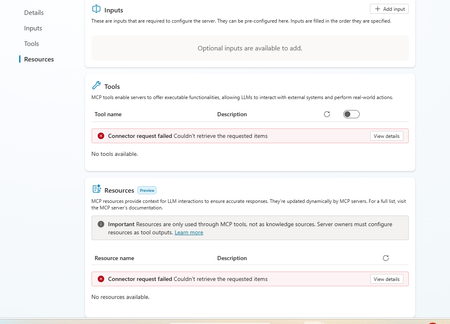
Hi everyone, I'm building a Copilot Studio agent that needs to read and process Word (.docx) and Excel (.xlsx) files stored in OneDrive. The agent can successfully locate files and retrieve metadata, but it appears unable to retrieve Office files as usable binary content. I tested the behaviour using the OneDrive Get file content action: A text file (test.txt) was returned correctly and matched the original file contents exactly. A Word file (Test.docx) was returned beginning with the ZIP signature PK and contained recognisable DOCX entries such as [Content_Types].xml and _rels/.rels. However, the returned payload also contained large numbers of Unicode replacement characters (�). The returned content appears to be a text string rather than binary data or base64 content. Because Office files are ZIP-based binary formats, the returned payload cannot be reconstructed into a valid .docx or .xlsx file, preventing downstream libraries such as python-docx and openpyxl from opening the file. Is there any way to resolve this issue?255Views0likes4CommentsKnowledge retrieval on the GitHub Copilot harness suddenly slow (~1:25 min/turn)
Since about a week we're seeing severe knowledge-retrieval latency on a Copilot Studio agent (GitHub Copilot harness, SharePoint sources) — ~1:25 min per answer. No config changes on our side. Same source on the standard harness: ~20 s. We captured a HAR of a slow turn and found this in the SSE stream: knowledge_search_sharepoint completes in ~11 s (durationMs: 10774) — search is not the problem. But instead of snippets, the tool result says: "The full documents have been downloaded to /app/uploads/" — 9 complete files, including large PDFs. 8 of 10 results contain no snippet at all. It then instructs the model: "Read each relevant file IN FULL before responding — every part, from the start to the end of the file." The remaining ~70 s is the model reading those files before answering. More sources = more full documents = longer turns. Oddly, the tool's own description promises the opposite: "Results are search snippets … call KnowledgeRetrieve with the ReferenceId to get the full document." Anyone else seeing this since ~mid-August? Known issue or intended GA behavior?221Views0likes2Comments
Minimum Environment Permissions (Security Roles) for Copilot Studio Agent in Teams?
Hi Copilot Studio Community! I’m facing a strange permissions (Security Roles) challenge when sharing an Agent with users on Teams, and I’m looking for the best practice to determine the minimum required privileges. The Scenario: I built an Agent grounded in a SharePoint Knowledge Base. The end-users currently have: - Read access to the SharePoint Document Libraries. - View-only access to the Agent when shared from Copilot Studio. - No permissions at the Environment level in Dataverse. The Issue: When I share the Agent link on Teams, users add it successfully. However, when they ask a question, the Agent immediately triggers the Fallback Topic (acting as if it has no information to pull from or can't access SharePoint). The Strange Behavior (Workaround): I discovered that if I temporarily grant the user the following high privileges: 1. Environment Maker role. 2. Bot roles (Bot Contributor, Bot Transcript Viewer, Bot Viewer). 3. Editor permission on the Agent. Then, if the user tests a question inside the Copilot Studio canvas, it answers correctly. After that, if they test it in Teams, it works perfectly there too! The weirdest part: if I immediately revoke all these high privileges (returning the user to a simple Viewer with no Environment Access), the Agent continues to work normally for them in Teams and fetches answers from SharePoint without any issues! My Question to the Experts: 1. Since I don't want (and for security reasons, shouldn't) grant end-users roles like Maker or Editor, what are the exact minimum basic permissions (Security Roles) at the Environment/Dataverse level (e.g., Basic User) that a user must have just to chat with the Agent in Teams successfully from the first try? 2. Is there a technical explanation for why the Agent keeps working in Teams after revoking the permissions? Is it just Token Caching, or is there something else at play? I would highly appreciate your insights!157Views0likes1CommentHow to preserve document format and structure with Copilot Agent
Hi everyone, I was building a copilot agent that should be able to accept a document and then make changes to it before returning the new version of that document, which has the same format and structure as the original. What is the best way to accomplish this in copilot studio? So far, I have tried using a power automate flow and external tools but it seems that there is no free included tool that can achieve this task. All the document writing tools seem to be paid services requiring API keys. Is there an alternate free way of achieving this task? Thank you155Views0likes1CommentIntermittent Post-Deployment Issues with Copilot Agent Using SharePoint Knowledge Sources
Summary We are testing a Copilot Studio agent following admin approval and installation for a set of users before we launch it to everyone in the organization - the objective being to test out the end user experience and check that everything is working fine. We have encountered several inconsistent behaviours using the agent across both the Copilot app and Microsoft Teams. The issues seem to be resolved after signing out, restarting the application, or signing in again. 📍Looks like a lot of instabilities and poor end user experience with this method & this is blocking us from launching the agent to the organization. Agent Setup Agent built in Copilot Studio & deployed via pipeline (Development > QA > Production) Knowledge source 1: SharePoint connection using Dataverse indexing/synchronisation Knowledge source 2: Live SharePoint connection Tested in the following apps after admin approval/publishing/pinning: Microsoft Copilot app Microsoft Teams Issues observed Agent not visible in Copilot app After agent is approved, installed, shared and pinned (to specific users) from Admin side, the agent is not visible in Copilot app. We gave it over 8 hours after the admin process. Agent appeared after signing out of Copilot app and signing back in again. SharePoint connection consent prompt not displayed Users are expected to receive a prompt with consent to connect to SharePoint (with "Allow" button). What appears is only a message but no card with the "Allow" button. This started working after signing out of Copilot app and signing back in again - so the sign out + sign in had to be done twice Responses not retrieved from Knowledge source 1 In spite of proceeding with the "Allow" prompts, for some users, the responses are coming only from Knowledge source 2 (live connection) & not Knowledge source 1 (connection with dataverse indexing). This is seen both when interacting with the agent in Copilot app and Teams. For some users, this was fixed after signing out and back into the apps Questions Has anyone experienced such instabilities with admin deployment/publishing of agents? If yes, what have you done to sort them out and have you been able to successfully launch agents organization wide with this approach? Does anyone know about known issues/glitches with admin deployment/publishing of agents? We did not see these issues when sharing the agent using Copilot Studio.238Views1like3CommentsDataverse mcp is broken in copilot studio
This is really annoying. I am having this experience where dataverse mcp is broken. I recreated the connection and after that the query is returning empty results. Everything was working fine until last week. Is anyone experiencing same problem260Views2likes2CommentsUpdate: Root Cause Identified
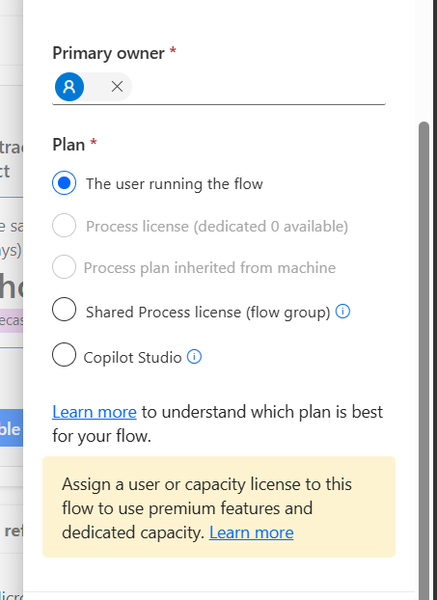
Hi everyone, I would like to share the root cause and solution in case someone else encounters the same issue. The Problem I created several agent flows directly in Power Automate using: https://make.powerautomate.com The flows were configured correctly: The flow starts with When an agent calls the flow The flow ends with Respond to the agent The flow and agent are in the same environment The flow is included in a solution The flow is published and fully functional The flows could be added to an agent and executed successfully. However, unlike flows created directly from Copilot Studio, they did not appear in the Global Tools directory. What I Investigated I verified: Trigger configuration Respond to the agent action Environment consistency Solution membership Publish all customizations Asynchronous response settings Synchronization delays between Power Automate and Copilot Studio None of these were the root cause. Root Cause The issue was related to the workflow Plan. I discovered that: Flows created directly in Power Automate were assigned: Plan = The user running the flow Flows created directly in Copilot Studio were assigned: Plan = Copilot Studio Although the Power Automate flow was fully functional and could be used by the agent, it was not visible in the Global Tools directory. Solution After changing the workflow Plan to: Plan = Copilot Studio the flow immediately appeared in the Global Tools directory. Configuration Location The setting can be found in the workflow properties under: Primary owner → Plan Important Note Based on my testing, changing the Plan to Copilot Studio appears to be a one-way operation and may not be reversible. It may be a good idea to export or save the flow before making the change. Acknowledgements Special thanks to sohnash for reproducing the scenario and providing troubleshooting suggestions, and to Patty_Velasquez for sharing similar observations that helped confirm the behavior. Hopefully this helps others who encounter the same issue. Best regards, Adhonaï KOUKA106Views1like0CommentsFree Copilot Credits for MCTs/ MVPs ?
Hello All The new Copilot Studio experience, powered by the GitHub Copilot harness, requires Copilot Credits for building, testing, and evaluating agents. In contrast, classic Copilot Studio requires Copilot Credits only after publishing. Is there a way for MCTs or MVPs to get Free access to Copilot Credits so they can test agents in the new Copilot Studio experience?166Views0likes1Comment







Events
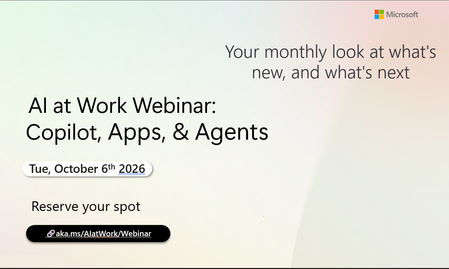
Register Here - https://aka.ms/MTC/CopilotRoadmapEventOct
AI at Work Webinar: Copilot, Apps, & Agents — Want to stay on top of everything happening across Copilot and AI-powered business applicatio...
Tuesday, Oct 06, 2026, 09:00 AM PDTOnline
0likes
20Attendees
0Comments
Recent Blogs
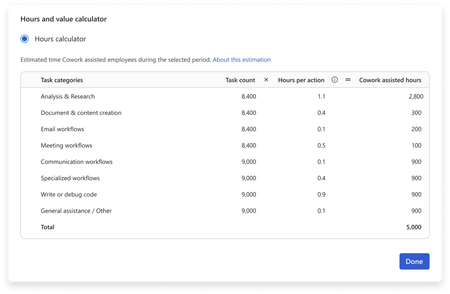
- You have invested in Copilot. Adoption is climbing, prompt volume is up, and your dashboards are full of engagement charts. Yet the question leadership keeps asking is: How do we quantify the value o...Sep 09, 202630Views0likes0Comments
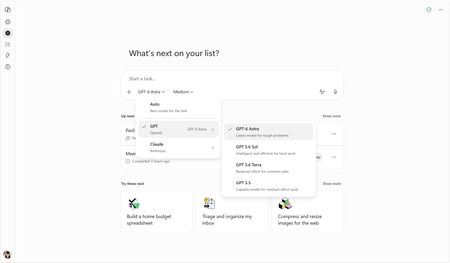
- OpenAI's GPT-6 Astra is rolling out in Copilot Cowork and Copilot Studio todaySep 04, 202620KViews2likes1Comment