Recent Discussions
Is "uncertainty" the feedback signal Copilot Studio agents are actually missing?
At today's M365 Platform Weekly session, we were asked for our input on what feedback we wish we could pull beyond thumbs up/down and verbatims. Is it trends over time, sentiment themes, the response-to-triage loop, etc. Here's an angle: What if the primitive itself is wrong? Thumbs up/down measures satisfaction after the fact. What if we measured confidence instead? How often an agent actually knows it's on shaky ground, and whether the user's reaction matches that? If an agent flags its own uncertainty at the point of response instead of a static thumbs up/down, a feedback prompt gets generated from whatever's trending in that uncertainty instead of the same generic question every time, and "trends over time" becomes "did this agent get more confident or less confident since the last update" rather than a flat satisfaction line. It might also solve the silence problem that most users rarely click anything. A reaction that's actually specific ("you caught something the agent flagged as shaky") seems easier to engage with than a binary good or bad. To be clear, confidence signals already exist in adjacent forms. Copilot Studio and most conversational AI platforms already use a confidence score internally to decide whether to answer directly, ask a clarifying question, or escalate to a human. GitHub Copilot has used a confidence score since its earliest versions too, ranking code suggestions and defaulting to the highest-scoring one. None of that is new. So rather than "add a percentage next to the answer", what if there is a specific flag pointing at the exact claim or step the agent is unsure about, feeding into the feedback loop? Curious if anyone else building in Copilot Studio has run into this: Do you ever wish your agent had hedged when it didn't? What would you actually do with an uncertainty score if you had one? And would just love others thoughts on this :)20Views0likes0CommentsRetention policy for only Microsoft Copilot Chat and Copilot Studio agent transcript?
Is it possible to create a retention policy for "Microsoft Copilot Experiences" location but targeting only Microsoft 365 Copilot and Copilot studio but not Security Copilot or Copilot in Fabric?11Views0likes0Comments
URGENT: Tenant Lockout, Without Global Admin Access for 2 Weeks – Existing Case Not Escalated
Can a Microsoft moderator please initiate or verify escalation to the Data Protection/Tenant Recovery team and contact me privately for our service request number? Our healthcare practice has been unable to regain Global Administrator access to our Microsoft 365 tenant for approximately two weeks. We have already opened a support case, completed the verification steps requested by Microsoft, contacted support multiple times, requested escalation to the Tenant Recovery/Data Protection team, and requested to speak with management. Despite all of this, we still do not have administrative control of our tenant and have not been given a clear path to resolution. This is now a serious business continuity and security concern for our organization. We are not requesting a standard password reset or routine Dynamics 365 support. We need assistance with restoring administrative control of our Microsoft 365/Entra tenant. Can a Microsoft moderator please help verify that our case has been escalated to the appropriate Data Protection/Tenant Recovery team and contact me privately so I can provide our existing service request number and any ownership-verification information needed? We are happy to provide all case details privately. I do not want to post sensitive tenant, account, or company security information publicly. At this point, we urgently need someone within Microsoft to take ownership of the escalation and help us regain Global Administrator access.7Views0likes0Commentshow to create a globally Shared ServiceNow Connector Connection in Copilot Studio
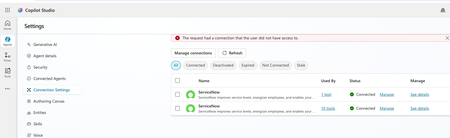
Hello, I have configured Microsoft entra ID oauth using certificate and shared this connection with everyone in my company since this is the only shared connection on the platform. https://learn.microsoft.com/en-us/connectors/service-now/#microsoft-entra-id-oauth-using-certificate. But, whey user's ( end users, agent maker, environment maker basically any user in copilot environment) are trying to use any servicenow tools ( e.g create record) which is using this shared connection in copilot studio/ teams, they are getting below error. https://learn.microsoft.com/en-us/connectors/service-now/ How to create a shared connection which can be shared across all enterprise users in my org for copilot AI agents which are using servicenow connector? Regards, Sachin16Views0likes0CommentsError Connecting Whatsapp Number (Copilot Studio to Azure ACS)
Please help. I created an AI Agent in Copilot Studio for connecting to WhatsApp. I created an Azure Communication Services (ACS) and connected my personal Facebook page to it. I created a WhatsApp Business number, I got the code, and it connected. However, when I return to Copilot studio to connect using my Azure Subscription and Resource, it says- Error connecting to WhatsApp phone number. Please try again. How do I resolve this?5Views0likes0Comments
Can Copilot handle repeatable account reviews, or do SMBs need agents?
Hi everyone, I’m trying to better understand how small and medium-sized businesses are using Microsoft 365 Copilot for recurring business-review workflows. A pattern I see often is account or customer review prep. For example, a team may manage dozens of customers, merchants, partners, vendors, or locations. Every month or quarter, someone needs to pull performance data, summarize what changed, create slides or a short report, recommend next actions, organize the files, and send follow-up notes. For those of you using Copilot in a small or mid-sized business: - Is Copilot enough for this kind of recurring workflow using Excel, PowerPoint, Word, Outlook, Teams, OneDrive, and SharePoint? - Where does the process still become manual or hard to repeat? - Do you need to handle many accounts/customers/locations in one run, or is one at a time enough? - How important is history tracking across months or quarters? - Would automatic OneDrive or SharePoint organization be useful so each account has a durable review history? - What would make AI-generated summaries, slides, and action plans trustworthy enough for executive or customer-facing use? I’m especially interested in the business-user perspective: account managers, customer success teams, sales/partner managers, operations teams, and small business leaders who prepare recurring reviews or performance updates. For context, we recently built a Microsoft 365 Marketplace agent focused on merchant QBR preparation, but my broader question is about the workflow pattern: what do SMB users actually want Copilot or workflow-specific agents to do when recurring review work spans data, slides, files, and follow-up? Curious how others are approaching this.32Views0likes0CommentsUpdate: Root Cause Identified
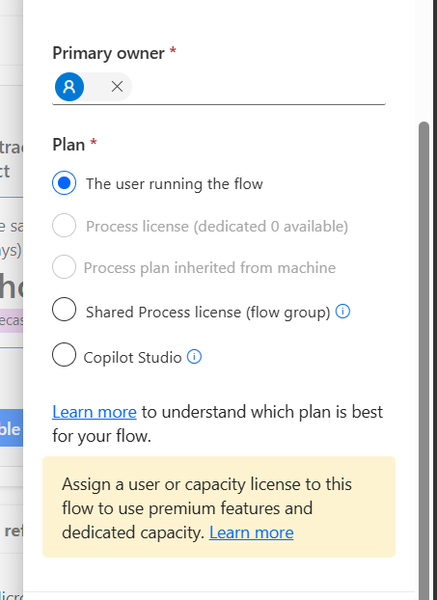
Hi everyone, I would like to share the root cause and solution in case someone else encounters the same issue. The Problem I created several agent flows directly in Power Automate using: https://make.powerautomate.com The flows were configured correctly: The flow starts with When an agent calls the flow The flow ends with Respond to the agent The flow and agent are in the same environment The flow is included in a solution The flow is published and fully functional The flows could be added to an agent and executed successfully. However, unlike flows created directly from Copilot Studio, they did not appear in the Global Tools directory. What I Investigated I verified: Trigger configuration Respond to the agent action Environment consistency Solution membership Publish all customizations Asynchronous response settings Synchronization delays between Power Automate and Copilot Studio None of these were the root cause. Root Cause The issue was related to the workflow Plan. I discovered that: Flows created directly in Power Automate were assigned: Plan = The user running the flow Flows created directly in Copilot Studio were assigned: Plan = Copilot Studio Although the Power Automate flow was fully functional and could be used by the agent, it was not visible in the Global Tools directory. Solution After changing the workflow Plan to: Plan = Copilot Studio the flow immediately appeared in the Global Tools directory. Configuration Location The setting can be found in the workflow properties under: Primary owner → Plan Important Note Based on my testing, changing the Plan to Copilot Studio appears to be a one-way operation and may not be reversible. It may be a good idea to export or save the flow before making the change. Acknowledgements Special thanks to sohnash for reproducing the scenario and providing troubleshooting suggestions, and to Patty_Velasquez for sharing similar observations that helped confirm the behavior. Hopefully this helps others who encounter the same issue. Best regards, Adhonaï KOUKA106Views1like0CommentsPattern for governing Copilot Studio agents before they reach production
I keep seeing the same gap across Copilot Studio deployments: agents get built and shared before anyone has answered three basic governance questions. Before I call an agent production-ready, I check: -> Who's the sponsor? Not just who built it, who's accountable for it existing. -> What's it grounded on, and who can actually read that data? A knowledge source that's technically "in scope" isn't the same as verified content people should be answering from. -> Is there an audit trail for what the agent said and to whom, if someone asks later? None of this shows up in a demo. It only shows up a few months in, when the agent's still running and nobody remembers why. I wrote a longer breakdown of this governance model, including how Microsoft Agent 365 fits into it, here: https://jpmarquez.com/blog/microsoft-agent-365-licensing-what-you-actually-buy/ Curious what pattern others are using here, especially for the sponsor/ownership question, since that's the one I see skipped most.75Views0likes0Comments
New experience workflow can't use dynamic value in Business central connector bool
Hi all As the title states I have run into an issue when trying to use the Business central connector in a new experience workflow to create a record in my sales invoice lines. I am trying to create a prototype for an agent that can create invoices in my Business central environment based on certain criteria given by my customers. To let the agent do things in Business central I am trying to create workflows for it to use as tools, but when trying to add sales lines to the invoice, I can't seem to use dynamic values in two boolean fields, it only shows a dropdown with true/false. I know I could use a condition and use the create record four times depending on the combination of the two fields, but that seems messy, especially when this was possible back in power automate flows. Has anyone experienced this and do we know if this is considered a bug or won't it get fixed?56Views0likes0Comments
Copilot Studio Agent for Excel Macro Modernization — Anyone Tried This?
Anyone built a Copilot Studio agent to analyze macro-enabled Excel workbooks (.xlsm) and recommend a modernization path — e.g., migrating logic to Power Automate or rebuilding as Power BI dashboards? Curious about real-world attempts: what worked, what didn’t, and where the ROI actually showed up. Would love to compare notes before diving in myself. #CopilotStudio #Excel #PowerAutomate #PowerBI #PowerPlatform35Views0likes0CommentsLooking for ideas: Reducing "Allow" prompts when using SharePoint Knowledge
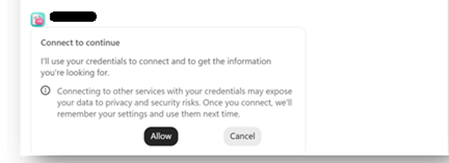
Hello community members! I'm hoping to get some advice from people who may have come across a similar challenge with their Copilot Studio "SharePoint knowledge retrieval" agents 🤞 Current setup Agent set up in Copilot Studio and published to channels - M365 Copilot and Teams Agent is connected to 4 SharePoint folders (I'm using Method#1 - see below screenshot for reference). This is essential because the documents inside the folders contain both text and image-based content. This is the only method that brings results Users have permissions to access the content in these folders Problem We are currently preparing to roll out this agent but we've hit a user experience issue that is becoming a blocker for moving forward. When a user interacts with the agent for the first time, they are asked to click "Allow" ... 4 times .. one for each of the folder that the agent is connected to This experience feels heavy for users (based on our pilot feedback) and people give up after the first or second time because they think it is not working. In spite of comms and a video about having to repeat this action until done. We want the first time experience to be as smooth as possible to drive adoption. Also, we are going to expand the solution to include more folders soon - so there is also a concern that number of consent prompts could grow further. What I've tried Used Method#2 to connect to SharePoint folders. While this didn't pop up the "Allow" prompts, as indicated earlier, this approach doesn't work because it doesn't return any results from documents as they contain both text and image content. Tried Method#1 to connect to the library (and use instructions to indicate necessary folders) - this didn't work because the method doesn't allow to connect to libraries. Note - I cannot restructure the library and put all the documents into one folder because that's the way the documents have been maintained for a long time & direct links to the folders are being used across the organization via. emails, decks etc. Looking for advice Has anyone found a way to reduce or eliminate these consent prompts? Are there any other recommendations on using SharePoint as a knowledge source that respects user permissions without these consent prompts? Does anyone know why Method#1 and Method#2 have different user experiences where the first one prompts for consent and the second doesn't?113Views1like0Comments
Deterministic way to mark generative answer output as AI-generated - AI Act
Hi all, We have a text-based RAG agent in Copilot Studio using the Azure AI Search connector as the knowledge source. It's customer-facing. We need every generated turn to carry a machine-readable marker identifying it as AI-generated, not just a visible disclaimer line. Instructing the model to append something isn't acceptable for us, because it's non-deterministic and can be prompt-injected away. Has anyone found a cleaner pattern? Like how to do it?30Views0likes0CommentsMicrosoft AI Agent Creator Associate Certificate
Hello everyone, I have a question about the Microsoft AI Agent Creator Associate certification. I’m passionate about artificial intelligence and Microsoft Copilot Studio. I’m currently taking the training course and working toward earning the Microsoft AI Agent Creator Associate certification. My question is: Will earning this certification improve my chances of getting a job at Microsoft? If anyone in this community has earned this certification or has experience with it, I’d really appreciate your feedback. Has it helped you get hired by Microsoft or one of its partners? Thank you in advance for your advice and insights!94Views0likes0CommentsEditor cannot see agent instruction in Copilot Studio 5137678
Classic Bot Sharing Broken in Copilot Studio – when owner share a agent to editors but it editor can’t edit or see instructions ) – Issue ID 5137678 Many environment are affected and Microsoft is not permanent fixing it even after we as customer are encountering with bot/agent sharing in Microsoft Copilot Studio. Issue Description: what was given Sharing bots fails in environments where a Team record exists with the following properties: MembershipType = Members TeamType = Office Group (Microsoft 365 Group) This appears to be a known issue tracked as Issue ID 5137678 (created June 3, 2025). Symptoms: Unable to share bots with Teams or specific users/groups. (1) what should we set for security group when new environment is setup (2) existing environment how can this be best resolve in bulk?42Views0likes0Comments
Copilot Studio agent works in M365 Copilot but silent in Teams personal chat (0 Studio sessions)
We are troubleshooting a Copilot Studio agent that works in Microsoft 365 Copilot and Studio test, but does not receive inbound activities from Microsoft Teams personal chat. Environment - Agent: Caflou Asistent v1.0.8 - Channels: Microsoft 365 Copilot + Microsoft Teams (published / synchronized) - Agent Registry: Available - Entra/bot appId: 7e4a53cc-f51c-4772-ad93-e3f1e8060f35 - Maker-provided tool connection works in Studio (example getTasks HTTP 200) What works 1) Microsoft 365 Copilot agent chat / shareLink → agent replies; Studio sessions with channel "Microsoft 365 Copilot" 2) Copilot Studio test pane → agent responds What fails 1) Teams personal chat (desktop AND web): user message visible in "Caflou Asistent" chat, no agent reply 2) Studio Monitor: Teams channel sessions = 0 for probes (only M365 Copilot sessions in last 7 days) 3) Teams Admin Center → Manage apps: 0 results for name "Caflou" and full appId (other apps searchable); UAM banner present while Registry shows Available Classification - Teams inbound activity not reaching Copilot Studio runtime - Not OAuth / not MCP host / not publish alone (M365 path proves runtime alive) - Secondary: Registry Available ≠ TAC Manage apps listing Questions 1) Why would Teams 1:1 never create a Studio conversation while M365 Copilot does? 2) Is missing TAC Manage apps row expected under Unified App Management when Registry shows Available? 3) Best next diagnostic when Monitor shows 0 Teams sessions after confirmed client send? Constraints: no Copilot Studio paid support plan; looking for field experience / known product issues. No secrets posted.116Views0likes0CommentsCS agent OK in M365 Copilot; Teams chat silent / no Studio session
We are troubleshooting a Copilot Studio agent that works correctly in Microsoft 365 Copilot and in the Copilot Studio test surface, but does not receive inbound activities from Microsoft Teams personal chat. Environment and evidence: - Agent: Copilot Studio agent (custom business assistant) - Copilot Studio agent ID: 88901b10-… (truncated) - Teams/Entra app ID: 7e4a53cc-… (truncated) - Manifest version: 1.0.8 - Channel configuration: Microsoft 365 Copilot + Microsoft Teams - Publish: Succeeded / Channel state: Synchronized - Agent Registry: Available - Authentication: Integrated / Tool credentials: Maker-provided - MCP/custom connector runtime: working (Studio tool test HTTP 200) - Microsoft 365 Copilot routing: working Failure specific to Teams: - Messages in Teams web and desktop appear delivered in the agent personal chat - Agent never replies - Studio monitor has M365 Copilot sessions, but no Teams session for those timestamps - Teams Admin Center Manage apps returns 0 results by name or exact app ID despite Agent Registry Available - Intentionally not republishing / reconnecting OAuth / rewiring connectors because M365 Copilot path proves the same agent+connection works Classification: FAIL — Teams inbound activity is not reaching the Copilot Studio agent. Questions: 1. Anyone seen agents that work in M365 Copilot but receive no personal-chat activities from Teams? 2. Can Agent Registry show Available while TAC Manage apps has no matching row? 3. Known Unified App Management sync issues for Copilot Studio agents? 4. Separate Teams app catalog deployment/approval required when Teams channel shows Synchronized? 5. Which logs prove whether Teams attempted to route the inbound activity? 6. Known manifest / personal scope / app-centric management / conversation-binding issues with this split? Looking for confirmed production experience or documented workaround. Redacted screenshots available; no tokens/secrets.74Views0likes0CommentsDiscover a community gallery of reusable skills for AI agents
Save this link, it is a gem for your Copilot agents. This community-driven skills gallery brings together dozens of ready-to-use examples that you can download and import into: Agents built with Copilot Studio Copilot Cowork Microsoft Scout As a reminder, a skill is a reusable set of instructions that gives an agent a specific capability. You will find use cases covering document analysis, content creation, document conversion, automation, and data processing. For those of you working on agent development in Copilot Studio, this is an excellent source of inspiration. Beyond downloading existing skills, it is also a great way to discover how other creators structure their skills, organize their instructions, and design reusable capabilities across multiple agents. Skills Gallery: https://microsoft.github.io/cat-agent-skills/348Views0likes0Comments











Events
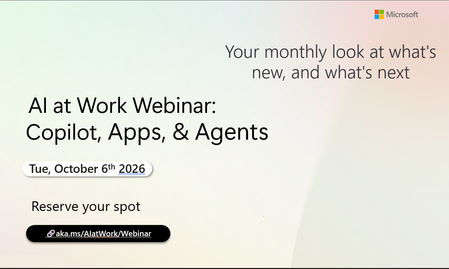
Register Here - https://aka.ms/MTC/CopilotRoadmapEventOct
AI at Work Webinar: Copilot, Apps, & Agents — Want to stay on top of everything happening across Copilot and AI-powered business applicatio...
Tuesday, Oct 06, 2026, 09:00 AM PDTOnline
0likes
20Attendees
0Comments
Recent Blogs
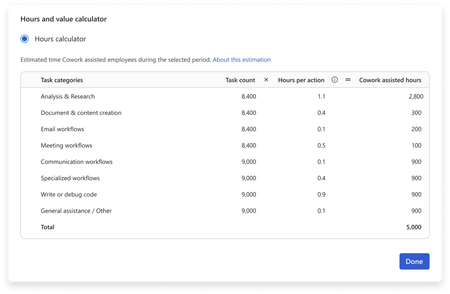
- You have invested in Copilot. Adoption is climbing, prompt volume is up, and your dashboards are full of engagement charts. Yet the question leadership keeps asking is: How do we quantify the value o...Sep 09, 202632Views0likes0Comments
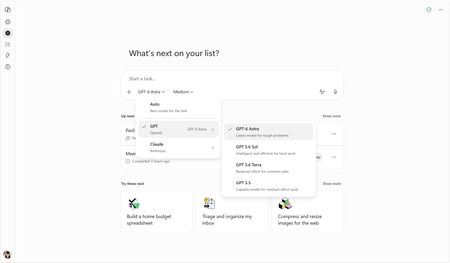
- OpenAI's GPT-6 Astra is rolling out in Copilot Cowork and Copilot Studio todaySep 04, 202620KViews2likes1Comment