Recent Discussions
Is "uncertainty" the feedback signal Copilot Studio agents are actually missing?
At today's M365 Platform Weekly session, we were asked for our input on what feedback we wish we could pull beyond thumbs up/down and verbatims. Is it trends over time, sentiment themes, the response-to-triage loop, etc. Here's an angle: What if the primitive itself is wrong? Thumbs up/down measures satisfaction after the fact. What if we measured confidence instead? How often an agent actually knows it's on shaky ground, and whether the user's reaction matches that? If an agent flags its own uncertainty at the point of response instead of a static thumbs up/down, a feedback prompt gets generated from whatever's trending in that uncertainty instead of the same generic question every time, and "trends over time" becomes "did this agent get more confident or less confident since the last update" rather than a flat satisfaction line. It might also solve the silence problem that most users rarely click anything. A reaction that's actually specific ("you caught something the agent flagged as shaky") seems easier to engage with than a binary good or bad. To be clear, confidence signals already exist in adjacent forms. Copilot Studio and most conversational AI platforms already use a confidence score internally to decide whether to answer directly, ask a clarifying question, or escalate to a human. GitHub Copilot has used a confidence score since its earliest versions too, ranking code suggestions and defaulting to the highest-scoring one. None of that is new. So rather than "add a percentage next to the answer", what if there is a specific flag pointing at the exact claim or step the agent is unsure about, feeding into the feedback loop? Curious if anyone else building in Copilot Studio has run into this: Do you ever wish your agent had hedged when it didn't? What would you actually do with an uncertainty score if you had one? And would just love others thoughts on this :)20Views0likes0CommentsRetention policy for only Microsoft Copilot Chat and Copilot Studio agent transcript?
Is it possible to create a retention policy for "Microsoft Copilot Experiences" location but targeting only Microsoft 365 Copilot and Copilot studio but not Security Copilot or Copilot in Fabric?11Views0likes0Comments
URGENT: Tenant Lockout, Without Global Admin Access for 2 Weeks – Existing Case Not Escalated
Can a Microsoft moderator please initiate or verify escalation to the Data Protection/Tenant Recovery team and contact me privately for our service request number? Our healthcare practice has been unable to regain Global Administrator access to our Microsoft 365 tenant for approximately two weeks. We have already opened a support case, completed the verification steps requested by Microsoft, contacted support multiple times, requested escalation to the Tenant Recovery/Data Protection team, and requested to speak with management. Despite all of this, we still do not have administrative control of our tenant and have not been given a clear path to resolution. This is now a serious business continuity and security concern for our organization. We are not requesting a standard password reset or routine Dynamics 365 support. We need assistance with restoring administrative control of our Microsoft 365/Entra tenant. Can a Microsoft moderator please help verify that our case has been escalated to the appropriate Data Protection/Tenant Recovery team and contact me privately so I can provide our existing service request number and any ownership-verification information needed? We are happy to provide all case details privately. I do not want to post sensitive tenant, account, or company security information publicly. At this point, we urgently need someone within Microsoft to take ownership of the escalation and help us regain Global Administrator access.7Views0likes0CommentsCopilot Studio agents problems connecting to Sharepoint knowledge source
Hello, Since last week users in my tenant are experimenting issues regarding the connection between copilot studio agents and Sharepoint. The agents are not able to extract information from Sharepoint sites, printing there is not information in the Sharepoint site regarding the user's question when that information is in Sharepoint. These agents used to work well till last week. Does have been any update in Microsoft 365 services that can be affecting these agents ability to retrieve information from Sharepoint?1.6KViews1like18Comments
How to view details about assigned and purchased Copilot licenses such as date last used/logged in?
Hello Everyone. The company I work for has issued licenses to employees for Copilot for Microsoft 365. Using the MS365 admin centre, is there a way to see when those licenses were last used? If not, can it be done any other way, like by using Powershell? We want this so that, say, if a license has not been used for a while, it can be unassigned from that employee and then assigned to someone else. Regards.Solved25KViews0likes3Commentshow to create a globally Shared ServiceNow Connector Connection in Copilot Studio
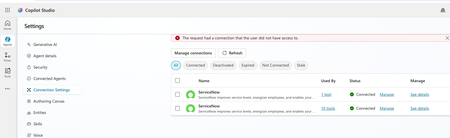
Hello, I have configured Microsoft entra ID oauth using certificate and shared this connection with everyone in my company since this is the only shared connection on the platform. https://learn.microsoft.com/en-us/connectors/service-now/#microsoft-entra-id-oauth-using-certificate. But, whey user's ( end users, agent maker, environment maker basically any user in copilot environment) are trying to use any servicenow tools ( e.g create record) which is using this shared connection in copilot studio/ teams, they are getting below error. https://learn.microsoft.com/en-us/connectors/service-now/ How to create a shared connection which can be shared across all enterprise users in my org for copilot AI agents which are using servicenow connector? Regards, Sachin16Views0likes0CommentsError Connecting Whatsapp Number (Copilot Studio to Azure ACS)
Please help. I created an AI Agent in Copilot Studio for connecting to WhatsApp. I created an Azure Communication Services (ACS) and connected my personal Facebook page to it. I created a WhatsApp Business number, I got the code, and it connected. However, when I return to Copilot studio to connect using my Azure Subscription and Resource, it says- Error connecting to WhatsApp phone number. Please try again. How do I resolve this?5Views0likes0CommentsCopilot+ laptop cannot access my local files or folders. No permission dialog to approve access.
First up - I'm not a tech expert! I have a new CoPilot+ laptop. Asked CoPilot to do a task in my folders and files that I downloaded from iCloud, but it cannot access my files or folders. Asks me to allow access through Microsoft prompt that never appears. Contacted Microsoft Support yesterday and after 2 hours and no progress, they told me to contact laptop manufacturer support. Which I did, and this resulted in a reset to factory setting of the laptop today. Problem still persists, its not hardware related. I contacted Microsoft Support again and have been directed her on the basis that this appears to be an ongoing Copilot+ issue that has already been through extensive troubleshooting, the Tech Community is currently the best channel to track updates and raise visibility with the teams investigating the problem." Any suggestions on what I need to try next? Bearing in mind, I am not an expert! Thank you in advance Gail98Views0likes1Comment
Copilot Studio + SharePoint: Markdown (.md) Files in Doc Libraries Supported as Knowledge Sources?
Hi all, We’ve been doing some deeper testing with Copilot Studio agents grounded in SharePoint knowledge sources, and I’m hoping to clarify whether what we’re seeing is a known limitation or an undocumented gap. Scenario A Copilot Studio agent uses SharePoint document libraries as a knowledge source The library contains Markdown (.md) files that are intentionally used as canonical design references The same .md files: ✅ Work well when uploaded directly to the agent ❌ Are not retrievable or citable when stored in a SharePoint library and added as a SharePoint knowledge source To help with grounding, we created modern SharePoint index pages that: Explain what the markdown collections are (Patterns, ADRs, Guardrails) Link directly to the canonical folders and files Explicitly state that the .md files are the source of truth The agent can: Discover and summarize the index pages correctly Understand that .md artifacts exist and where they live But it cannot: Read the content of the individual .md files Apply a specific pattern or ADR from those files in a design conversation Cite them as sources, even when permissions and search indexing are confirmed What We’ve Checked Permissions (agent user has access) Folder depth (kept shallow) Search results (markdown files appear in SharePoint search) SharePoint indexing status Work IQ enabled Same content works when attached directly to the agent This behavior also seems consistent with what others have reported here: Markdown works when uploaded directly Markdown retrieval degrades when hosted in SharePoint libraries Questions for the Product Team / Community Are Markdown (.md) files in SharePoint document libraries officially supported as Copilot Studio knowledge sources today? If yes, are there specific constraints (file size, rendering, parsing, indexing) that differ from Word/PDF? If no (or “not yet”), is this a known limitation on the roadmap? Is the recommended pattern to: Convert important markdown files into .aspx pages, or Use thin “index / summary” pages and keep markdown canonical until retrieval improves? We’re happy to adapt our information architecture — just trying to align with the intended platform direction rather than work against it. Thanks in advance for any guidance or clarification. This capability is extremely powerful, and clearer expectations here would help a lot of teams make the right design tradeoffs.3KViews14likes6CommentsWhat is the best file format for an AI agent knowledge base?
This is a best practice sharing the best format for an agent and show you why you should convert your PPT, PDF, WORD into a TXT markdown. I had an issue with my agent, time taken to answer was too long, and usually we spend a lot of time asking: What is the best prompt? Why is my agent slow? Why does retrieval sometimes work and sometimes fail? How can I improve answer quality? But I realised I was asking another question much less often: What is actually the best file format for the knowledge base? PDF? Raw text? Markdown? Pre-chunked text? Semantic sections? Context-enriched text? And more importantly: How much does the format alone affect agent performance? I tried to find a quantified benchmark answering this specific question, with the same agent, same source knowledge and same questions, but different knowledge representations. I couldn't find one that really answered what I wanted to measure. So I decided to run the experiment myself on a real case. My first exploratory tests were already surprising: depending on the representation, the agent could be significantly faster and more accurate, despite working from the exact same source information. So I decided to push the test further. My objective I want to identify, without assumptions and based on actual evaluation data, how a long document should be prepared for an LLM knowledge base so that the agent can retrieve, understand, ground and answer from it as reliably as possible. I focused on five dimensions: Answer quality Retrieval reliability Source grounding / citations Execution time Robustness across single-turn and multi-turn questions The broader question I'm trying to answer is: How should we structure knowledge so that an LLM can retrieve and use it as reliably as possible? The test case I deliberately chose a document that isn't particularly friendly for RAG: a 46-page European regulation, https://eur-lex.europa.eu/eli/reg/2011/1169/oj?locale=fr, on the provision of food information to consumers. The information is distributed across articles, definitions, exceptions, annexes, tables, numerical thresholds and cross-references. That makes it useful for testing retrieval: answering correctly often requires finding a very specific piece of information while preserving enough context to understand how it applies. I used the native PDF as the baseline and created 6 additional knowledge-base representations of the same document: Raw TXT Markdown Chunk-ready TXT RAG-oriented units Semantic TXT Contextual TXT One rule: same knowledge, same agent, same instructions, same questions. Only the knowledge representation changes. The benchmark I used two evaluation sets: 42 single-turn questions testing broad coverage of the document: direct facts, thresholds, exceptions, annexes, lists and cross-references. 5 multi-turn conversations containing 13 questions, to see what happens when a user asks a question and then follows up with things like: "And in this case?" "What are the exceptions?" "And for dietary fibre?" This gave me: 47 evaluated test cases / 55 actual questions per format Across all 7 formats: 329 evaluated conversations 385 user questions executed First results Metric Native PDF Best structured representation Overall pass rate 66.0% 85.1% - Contextual TXT Best single-turn score 69.0% 88.1% - Chunk-ready TXT Multi-turn benchmark 40% 80% - Contextual TXT Multi-turn execution time 14m24 5m54 Total benchmark time 44m31 24m49 The quality gap was already substantial: 66.0% → 85.1% That's +19.1 percentage points while keeping the underlying knowledge unchanged. I also saw a major difference in execution time. On the multi-turn test: 14m24 → 5m54 That's approximately 2.4× faster. Across the complete benchmark: 44m31 → 24m49 Around 44% less execution time. These timings represent the complete agent evaluation pipeline, so they shouldn't be interpreted as pure LLM inference latency. But the difference under identical test conditions is large enough that I want to understand it better. Findings There wasn't one format dominating every benchmark. Chunk-ready TXT scored highest on independent questions: 88.1%, while Contextual TXT performed better across multi-turn conversations and finished with the highest overall score. That may suggest that the way we optimise a document for isolated retrieval isn't exactly the same as the way we should prepare it for conversational retrieval. In the contextual version, I tried to make every section understandable when retrieved independently by keeping useful information around it: Source references Section context Retrieval cues Relevant cross-references For regulatory documents, this seems particularly important. A numerical value retrieved alone can be meaningless without knowing which rule it belongs to, under which conditions it applies, and whether another article contains an exception. Where I am now This remains an exploratory benchmark: One document One domain One agent setup One evaluation framework One run per configuration There are plenty of things I still want to test: repeated runs, retrieval-level evaluation, token consumption, larger knowledge bases, other document types, chunk sizes, overlap, contextual headers, and more. But these first results already convinced me that the preparation of the knowledge base deserves much more attention when evaluating an agent. We often spend hours refining instructions while the same information may behave very differently depending on how it reaches the retrieval layer. Next step I'll share the prompts, knowledge-base formats and evaluation methodology on GitHub so the experiment can be reproduced and challenged. I'll keep enriching the repository as I test new formats, improve the evaluation set and add new results. If people here have ideas, edge cases or formats worth testing, I'd genuinely like to include some of them in the next iteration. What would you test next?446Views2likes3Comments
Can Copilot handle repeatable account reviews, or do SMBs need agents?
Hi everyone, I’m trying to better understand how small and medium-sized businesses are using Microsoft 365 Copilot for recurring business-review workflows. A pattern I see often is account or customer review prep. For example, a team may manage dozens of customers, merchants, partners, vendors, or locations. Every month or quarter, someone needs to pull performance data, summarize what changed, create slides or a short report, recommend next actions, organize the files, and send follow-up notes. For those of you using Copilot in a small or mid-sized business: - Is Copilot enough for this kind of recurring workflow using Excel, PowerPoint, Word, Outlook, Teams, OneDrive, and SharePoint? - Where does the process still become manual or hard to repeat? - Do you need to handle many accounts/customers/locations in one run, or is one at a time enough? - How important is history tracking across months or quarters? - Would automatic OneDrive or SharePoint organization be useful so each account has a durable review history? - What would make AI-generated summaries, slides, and action plans trustworthy enough for executive or customer-facing use? I’m especially interested in the business-user perspective: account managers, customer success teams, sales/partner managers, operations teams, and small business leaders who prepare recurring reviews or performance updates. For context, we recently built a Microsoft 365 Marketplace agent focused on merchant QBR preparation, but my broader question is about the workflow pattern: what do SMB users actually want Copilot or workflow-specific agents to do when recurring review work spans data, slides, files, and follow-up? Curious how others are approaching this.32Views0likes0Comments
How to Integrate Copilot Studio Agent with a Website Using API?
Hello Team, I have created a Copilot Agent using Copilot Studio and published it on our public website using an iframe. Currently, the agent does not have any authentication configured because we want it to be publicly accessible. However, our website development team has raised a security concern with this approach, as embedding the Copilot Agent directly using an iframe may not be the most secure or recommended approach. We are looking for an alternative integration approach. For example: Is it possible to expose the Copilot Studio Agent through an API or another secure endpoint? Can our website development team call the agent through an API, receive the response, and build their own custom UI instead of embedding the agent using an iframe? Is there any recommended architecture or Microsoft-supported approach for securely integrating a Copilot Studio Agent with a public-facing website? If anyone has implemented a similar solution or has any recommendations, I would appreciate your suggestions.87Views0likes1CommentUnanswered Questions on GitHub Copilot Harness in Copilot Studio
We're piloting the GitHub Copilot harness in Copilot Studio (GA August 2026) and several operational and architectural details remain undocumented in the GA FAQ, Microsoft Learn, or licensing guides. Looking for official answers or PM contacts on: Architecture & Execution – When the harness breaks tasks into subtasks, does it use internal sub-agents or only skills/connected agents, what are the exact timeout/retry/max-execution-duration limits for long-running workflows, and are planning/context-retrieval/orchestration internals documented anywhere or is the orchestrator a black box? Model Selection – Can individual skills within one agent use different models or is selection strictly agent-level, how are models chosen internally when multiple skills execute, are any internal models developer-configurable, and what's the roadmap for models being added/retired/deprecated plus the lag between public release and Copilot Studio availability? Cost & Token Optimization – How exactly is the ~45% token reduction achieved, how much control do makers have over context/caching/retrieval/tool calls, what are per-model credit consumption characteristics, which models are most cost-effective for specific workloads, and what's the minimum credit cost for trivial interactions? Memory Management – What are retention periods for session/working/agent memory beyond the documented 28-day user-memory expiry, is true long-term memory supported, and what changed versus earlier implementations? Knowledge Retrieval – Can skills or system instructions influence retrieval strategy/document selection/prioritization/filtering, can planning stages perform conflict/duplicate/version detection before retrieval, and how does the harness decide which sources to search? Apps Feature – What is the "Apps (preview)" capability for, when does it GA, and how does it differ from workflows/skills/adaptive cards/agents? Billing & Credit Sizing – Is there a framework to classify users/agents by expected consumption and size credit allocation per group (citizen vs pro developers), and what's the minimum/typical consumption for simple/medium/heavy interactions? Governance & Admin – Can usage limits be set at user level (not just environment/agent), is there an API/IaC path for large-scale credit assignment, can non-admins view their own consumption/remaining allocation, and is there a self-service request-more-credits dashboard? ALM & Environments – What's the recommended path to move harness agents across Dev/Test/UAT/Prod (Solutions/ALM "setup differs" per parity chart—how?), does GitHub integration replace or complement solution-based deployment, are there recommended AgentOps practices for source control/releases/versioning, and what baseline credits and onboarding model are suggested for citizen developers under usage billing—any enterprise reference implementations?317Views2likes1Comment
How to preserve document format and structure with Copilot Agent
Hi everyone, I was building a copilot agent that should be able to accept a document and then make changes to it before returning the new version of that document, which has the same format and structure as the original. What is the best way to accomplish this in copilot studio? So far, I have tried using a power automate flow and external tools but it seems that there is no free included tool that can achieve this task. All the document writing tools seem to be paid services requiring API keys. Is there an alternate free way of achieving this task? Thank you155Views0likes1CommentCopilot Studio Agent Shows Usage Limit Error Despite Low Credit Usage
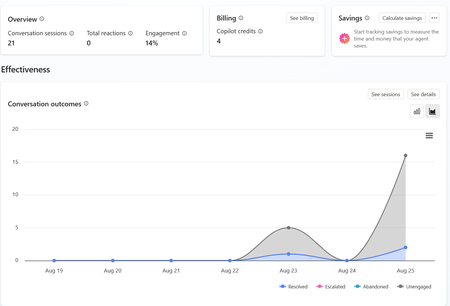
a { text-decoration: none; color: #464feb; } tr th, tr td { border: 1px solid #e6e6e6; } tr th { background-color: #f5f5f5; } Hi everyone, We are experiencing an issue with a Copilot Studio agent and would appreciate any guidance from the community. Scenario: The agent works correctly in the Copilot Studio test environment and responds as expected. However, after integrating the same agent into our web application, users receive the following error: "This agent is currently unavailable. It has reached its usage limit. Please try again later." Additional Information: In Copilot Studio Usage Monitoring, we can only see approximately 4 credits consumed. Based on the reported consumption, we would not expect a usage limit to have been reached. The issue occurs only when accessing the agent through the web application. The Copilot Studio test interface continues to work normally. Questions: Has anyone experienced a similar issue? Could this be related to licensing, capacity allocation, authentication, or channel configuration? Is there any difference in credit consumption or capacity enforcement between the Copilot Studio test environment and embedded web channels? Are there additional monitoring locations where we can verify the actual credit usage and capacity status? Any insights or recommendations would be greatly appreciated.122Views0likes1CommentKnowledge retrieval on the GitHub Copilot harness suddenly slow (~1:25 min/turn)
Since about a week we're seeing severe knowledge-retrieval latency on a Copilot Studio agent (GitHub Copilot harness, SharePoint sources) — ~1:25 min per answer. No config changes on our side. Same source on the standard harness: ~20 s. We captured a HAR of a slow turn and found this in the SSE stream: knowledge_search_sharepoint completes in ~11 s (durationMs: 10774) — search is not the problem. But instead of snippets, the tool result says: "The full documents have been downloaded to /app/uploads/" — 9 complete files, including large PDFs. 8 of 10 results contain no snippet at all. It then instructs the model: "Read each relevant file IN FULL before responding — every part, from the start to the end of the file." The remaining ~70 s is the model reading those files before answering. More sources = more full documents = longer turns. Oddly, the tool's own description promises the opposite: "Results are search snippets … call KnowledgeRetrieve with the ReferenceId to get the full document." Anyone else seeing this since ~mid-August? Known issue or intended GA behavior?221Views0likes2Comments
Copilot Studio Agent Unable to Retrieve Usable DOCX/XLSX Content from OneDrive (and SharePoint)
Hi everyone, I'm building a Copilot Studio agent that needs to read and process Word (.docx) and Excel (.xlsx) files stored in OneDrive. The agent can successfully locate files and retrieve metadata, but it appears unable to retrieve Office files as usable binary content. I tested the behaviour using the OneDrive Get file content action: A text file (test.txt) was returned correctly and matched the original file contents exactly. A Word file (Test.docx) was returned beginning with the ZIP signature PK and contained recognisable DOCX entries such as [Content_Types].xml and _rels/.rels. However, the returned payload also contained large numbers of Unicode replacement characters (�). The returned content appears to be a text string rather than binary data or base64 content. Because Office files are ZIP-based binary formats, the returned payload cannot be reconstructed into a valid .docx or .xlsx file, preventing downstream libraries such as python-docx and openpyxl from opening the file. Is there any way to resolve this issue?255Views0likes4Comments
Minimum Environment Permissions (Security Roles) for Copilot Studio Agent in Teams?
Hi Copilot Studio Community! I’m facing a strange permissions (Security Roles) challenge when sharing an Agent with users on Teams, and I’m looking for the best practice to determine the minimum required privileges. The Scenario: I built an Agent grounded in a SharePoint Knowledge Base. The end-users currently have: - Read access to the SharePoint Document Libraries. - View-only access to the Agent when shared from Copilot Studio. - No permissions at the Environment level in Dataverse. The Issue: When I share the Agent link on Teams, users add it successfully. However, when they ask a question, the Agent immediately triggers the Fallback Topic (acting as if it has no information to pull from or can't access SharePoint). The Strange Behavior (Workaround): I discovered that if I temporarily grant the user the following high privileges: 1. Environment Maker role. 2. Bot roles (Bot Contributor, Bot Transcript Viewer, Bot Viewer). 3. Editor permission on the Agent. Then, if the user tests a question inside the Copilot Studio canvas, it answers correctly. After that, if they test it in Teams, it works perfectly there too! The weirdest part: if I immediately revoke all these high privileges (returning the user to a simple Viewer with no Environment Access), the Agent continues to work normally for them in Teams and fetches answers from SharePoint without any issues! My Question to the Experts: 1. Since I don't want (and for security reasons, shouldn't) grant end-users roles like Maker or Editor, what are the exact minimum basic permissions (Security Roles) at the Environment/Dataverse level (e.g., Basic User) that a user must have just to chat with the Agent in Teams successfully from the first try? 2. Is there a technical explanation for why the Agent keeps working in Teams after revoking the permissions? Is it just Token Caching, or is there something else at play? I would highly appreciate your insights!157Views0likes1CommentCopilot Studio agent suddenly stopped working in Teams
Hello, I've run into a strange issue with a Copilot Studio agent and I'm trying to understand where to investigate next. The agent is published to the "Teams and Microsoft 365 Copilot" channel and was working normally in Microsoft Teams until recently. The agent still works correctly in Copilot Studio. The agent still works correctly in Microsoft 365 Copilot / Copilot Chat. The issue only occurs in Microsoft Teams. What happens in Teams: Messages can be sent to the agent. No error message is displayed. No response is returned. Most importantly, no session is created in Copilot Studio (Analytics / Observability). Because no session is created, it looks like the message never reaches the agent runtime. What I've already checked: Republished the agent. Reinstalled the Teams app. Verified the Teams and Microsoft 365 Copilot channel configuration. Checked permissions and sharing settings. Checked Teams Admin Center configuration. Tested in both Teams Desktop and Teams Web. Reviewed Microsoft 365 service health. This same tenant has another Copilot Studio agent that works normally in Teams. The affected agent previously worked in Teams for several weeks before the issue appeared. The agent architecture is very simple (single MCP server, no custom connectors, no Power Automate involved in this scenario). At this point, I'm mainly trying to understand why Teams no longer seems to create a conversation/session for this specific agent while the same agent continues to work in Copilot Studio and Microsoft 365 Copilot. Has anyone seen similar behavior or found a way to diagnose why Teams is no longer forwarding requests to a specific agent ? Thank you for help240Views1like1Comment





Events
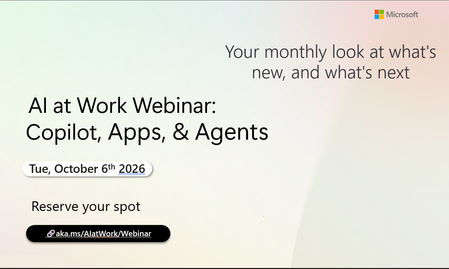
Register Here - https://aka.ms/MTC/CopilotRoadmapEventOct
AI at Work Webinar: Copilot, Apps, & Agents — Want to stay on top of everything happening across Copilot and AI-powered business applicatio...
Tuesday, Oct 06, 2026, 09:00 AM PDTOnline
0likes
20Attendees
0Comments
Recent Blogs
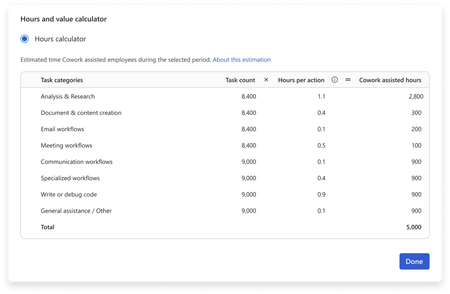
- You have invested in Copilot. Adoption is climbing, prompt volume is up, and your dashboards are full of engagement charts. Yet the question leadership keeps asking is: How do we quantify the value o...Sep 09, 202635Views0likes0Comments
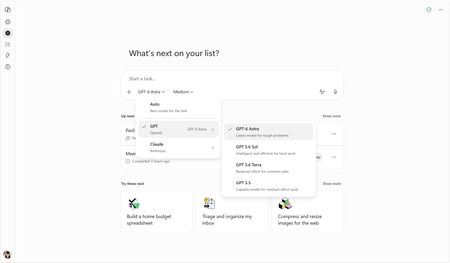
- OpenAI's GPT-6 Astra is rolling out in Copilot Cowork and Copilot Studio todaySep 04, 202620KViews2likes1Comment