Recent Discussions

Entra ID logins to Azure VMs.
Hello everyone. I've posted a much longer, more detailed question about this on the Azure support forums, but I'm trying to get more people to look at this. Basically, I'm trying to set up Entra accounts that can log into an Azure-based Windows VM, using the instructions Microsoft have put here: https://learn.microsoft.com/en-us/entra/identity/devices/howto-vm-sign-in-azure-ad-windows I've treated the Microsoft instructions as a checklist, in order to be as precise as possible. My own notes and records from 2024 seem to indicate I built a similar system then, following the same instructions. I was surprised that it didn't work as easily this time. Does anyone know of changes that were made to Entra ID since 2024 (or 9 months ago, when most of the newest YouTube tutorials were made) to make it much harder to use? In addition to Microsoft's instructions, I have also experimented with alternative configurations (a lot of them) detailed on YouTube, none of which worked. My VM (and Entra itself) both seem to indicate that my Entra accounts are valid, and that the VMs are correctly joined to Entra. I am still able to log into the VMs with local accounts, so the VMs are correctly connected to Azure. I've tried both with and without a Bastion, with the same results. Local accounts work, but Entra doesn't. I've so far been unable to log the Entra accounts in at all, as the passwords (all of them valid, and double-checked) have been rejected. I think if I could find one method of using the Entra accounts which worked, I would settle on it, but so far I haven't found a single configuration that works. Does anyone have a theory of what's blocking me? I do have more test data, but I don't want to flood this post. Thanks.43Views0likes4Comments
Explicitly sharing files externally
Requirement: Let user A (in tenant/org Y) share a file with user B (in tenant/org Z) and allow user B to access or copy this file to their storage programmatically. Can this be achieved? I have tried the following - "/copy" endpoint with either user's authentication results in 404 error - The resource could not be found. "/invite" endpoint with user A's authentication, then "/sharedWithMe?allowexternal=true" with user B's authentication - does not list the shared file.522Views1like2CommentsBuilding Resilient Cloud Architectures with Azure’s Agentic Agents
Cloud computing has evolved far beyond simply moving workloads from on-premises servers to virtual machines. Organizations today expect their cloud environments to be intelligent, resilient, secure, and capable of adapting to changing business demands with minimal human intervention. As artificial intelligence continues to reshape enterprise technology, Microsoft Azure is introducing a new generation of AI-powered capabilities through Agentic AI. https://dellenny.com/building-resilient-cloud-architectures-with-azures-agentic-agents-migration-observability-and-optimization/39Views1like0Comments
Is there no way to get better support for Azure - esp for SEV A tickets
We have had a sev A ticket open for over 5 days, and are incurring thousands in losses every day, and despite assurances from the Azure Support that it is being solved in hours and then having confirmations that it is solved, the issue is still not solved. I have asked numerous times to get our teams in touch with actual microsoft employees, not front end contractors, who is more like level 1 support, and just running messages between customer and back end team, and really are powerless to handle any suport issues themselves, and they are on complete mercy of "other teams" yet as a customer, apparantly we cant even get on a call with these other teams, and the poor front end contractors are getting the brunt of our pain. Absolutely are in the dark, as to what is actually happening in the back end, other than "trust me bro" we are working on it. No eta, no explanation.. hard to fathom how this can go on like this176Views3likes6Comments
Could not find stored procedure 'OPTIMIZE' in Synapse
Hi Fellow Azure people! I'm trying to use the OPTIMIZE procedure on a delta table in Synapse but I'm getting a "Could not find stored procedure 'OPTIMIZE'" error. Delta's docs do mention that this feature is only available in Delta Lake 1.2.0 and above, I've double checked and we are running Delta 1.2 Below is an example of what I'm doing: OPTIMIZE '/path/to/delta/table' -- Optimizes the path-based Delta Lake table Does anyone know what this could be happening? I did notice that there was no reference to OPTIMIZE in the Synapse docs but it did exist in the Databricks docs. Perhaps the procedure hasn't been implemented in Synapse yet?806Views0likes2Comments
how to add custom field in "CommonSecurityLog" Table
Hi Guys, I am adding new column in CommonSecurity Table. But i am having issue in kql quey. Please help me. This is Palo alto related logs. As "cat" field is in both Threat and System. So it is going to overlap. thats why i have to run query with "OR" operator so Threat "cat" field will not overlap with System "cat" field. Please help me. . CommonSecurityLog | where Activity in ("TRAFFIC", "THREAT") | extend SessionEndReason_CF = extract('reason=([^;]+)',1, AdditionalExtensions) | extend ThreatContentName_CF = extract('cat=([^;]+)',1, AdditionalExtensions) | extend thr_category_CF = extract('PanOSThreatCategory=([^;]+)',1, AdditionalExtensions) combined with "OR" condition | where Activity == "SYSTEM" | extend EventID_CF = extract('cat=([^;]+)',1, AdditionalExtensions)641Views0likes2CommentsCan't write to custom logs
I am new to Intune. I have created a log analytics workspace. Using PowerShell I want to write to this location. My web address is always wrong, regardless of what I use. PowerShell gives me this error: Invoke-WebRequest : The remote name could not be resolved: I am trying to use this code that I found online. # Log analytics part $CustomerId = "7aa60a6a-1234-4c67-5678-93d0f5f997c8" $SharedKey = '' $LogType = "TestReport" $TimeStampField = "" #*********************************************************************************************************** # Log analytics functions Function Build-Signature ($customerId, $sharedKey, $date, $contentLength, $method, $contentType, $resource) { $xHeaders = "x-ms-date:" + $date $stringToHash = $method + "`n" + $contentLength + "`n" + $contentType + "`n" + $xHeaders + "`n" + $resource $bytesToHash = [Text.Encoding]::UTF8.GetBytes($stringToHash) $keyBytes = [Convert]::FromBase64String($sharedKey) $sha256 = New-Object System.Security.Cryptography.HMACSHA256 $sha256.Key = $keyBytes $calculatedHash = $sha256.ComputeHash($bytesToHash) $encodedHash = [Convert]::ToBase64String($calculatedHash) $authorization = 'SharedKey {0}:{1}' -f $customerId,$encodedHash return $authorization } # Create the function to create and post the request Function Post-LogAnalyticsData($customerId, $sharedKey, $body, $logType) { $method = "POST" $contentType = "application/json" $resource = "/api/logs" $rfc1123date = [DateTime]::UtcNow.ToString("r") $contentLength = $body.Length $signature = Build-Signature ` -customerId $customerId ` -sharedKey $sharedKey ` -date $rfc1123date ` -contentLength $contentLength ` -method $method ` -contentType $contentType ` -resource $resource $uri = "https://" + $customerId + ".MyAzureCompany.onmicrosoft.com" + $resource + "?api-version=2022-11-13" # $uri = "https://" + $customerId + ".MyAzureCompany.azure.com" + $resource + "?api-version=2022-11-13" ############################################################################################################################## $headers = @{ "Authorization" = $signature; "Log-Type" = $logType; "x-ms-date" = $rfc1123date; "time-generated-field" = $TimeStampField; } $response = Invoke-WebRequest -Uri $uri -Method $method -ContentType $contentType -Headers $headers -Body $body -UseBasicParsing return $response.StatusCode } $Current_User_Profile = Get-ChildItem Registry::\HKEY_USERS | Where-Object { Test-Path "$($_.pspath)\Volatile Environment" } | ForEach-Object { (Get-ItemProperty "$($_.pspath)\Volatile Environment").USERPROFILE } $Username = $Current_User_Profile.split("\")[2] $WMI_computersystem = gwmi win32_computersystem $Manufacturer = $WMI_computersystem.manufacturer If($Manufacturer -eq "Lenovo") { $Get_Current_Model = $WMI_computersystem.SystemFamily.split(" ")[1] } Else { $Get_Current_Model = $WMI_computersystem.Model } $Get_Current_Model_MTM = ($WMI_computersystem.Model).Substring(0,4) $Get_Current_Model_FamilyName = $WMI_computersystem.SystemFamily.split(" ")[1] $BIOS_Version = (gwmi win32_bios).SMBIOSBIOSVersion # Get Hard disk size info $Win32_LogicalDisk = Get-ciminstance Win32_LogicalDisk | where {$_.DeviceID -eq "C:"} $Disk_Full_Size = $Win32_LogicalDisk.size $Disk_Free_Space = $Win32_LogicalDisk.Freespace # Hard disk size percent [int]$Free_DiskPercent = '{0:N0}' -f (($Disk_Free_Space / $Disk_Full_Size * 100),1) # Hard disk size Log Anaytics format $Disk_Size = ([System.Math]::Round(($Disk_Full_Size) / 1MB, 2)) $Free_DiskSpace = ([System.Math]::Round(($Disk_Free_Space) / 1MB, 2)) # Bitlocker status $Bitlocker_status = (Get-BitLockerVolume -MountPoint "c:").protectionstatus If($Bitlocker_status -eq "On") { $Bitlocker_status = "Enabled" } Else { $Bitlocker_status = "Disabled" } # Create the object $Properties = [Ordered] @{ "Computer" = $env:computername "UserName" = $Username "Vendor" = $Manufacturer "DeviceModel" = $Get_Current_Model "BIOSVer" = $BIOS_Version "DiskSize" = $Disk_Size "FreeDisk" = $Free_DiskSpace "FreeDiskPercentage" = $Free_DiskPercent "BitlockerStatus" = $Bitlocker_status } $DeviceInfo = New-Object -TypeName "PSObject" -Property $Properties $DeviceInfoJson = $DeviceInfo | ConvertTo-Json $params = @{ CustomerId = $customerId SharedKey = $sharedKey Body = ([System.Text.Encoding]::UTF8.GetBytes($DeviceInfoJson)) LogType = $LogType } $LogResponse = Post-LogAnalyticsData @params No matter what I try for $CustomerID and URL it fails. For CustomerID I have tried my subscription ID, my tenant ID and the Workspace ID and nothing works. Question: Do I need to pre-create a custom log in Azure? If so how? It askes for a custom script and I don't know what to use. Any help would be great.1.1KViews0likes1Comment
Looking for guidance on designing an Azure data analytics pipeline for reporting
I’m working on modernizing an old reporting workflow that currently runs on a few on-premises databases and scheduled scripts. The current process collects operational data from multiple systems, performs some basic transformation and aggregation, and then generates reports for different business teams. As the data volume is growing, the existing setup is becoming difficult to maintain and slow to refresh. I’m looking for an Azure-based architecture that can ingest data from different sources, store both raw and processed data, run scheduled transformations, and make the final datasets available for reporting tools like Power BI. Would appreciate any suggestions on the recommended architecture, especially around data storage, transformation, refresh performance, and cost control. Thanks32Views0likes2Comments
Azure for Students Subscription Renewal
Hello, I'm unable to renew my Azure for Students Subscription as I get the following error message: You are not eligible to renew Azure for Students Sign up for Azure for Students Starter. Unfortunately, I teach ASP.NET and Azure courses at my community college so this is a big problem for me. It appears that at some point my subscription was changed to a free trial and now I'm unable to renew Azure for Students. I have two expired Azure for Students subscriptions as well on my account. I've tried Azure support but they were unable to assist me. Any assistance would be greatly appreciated. Thanks, Joe260Views0likes4CommentsPortable Azure topology and documentation snapshots with OSIRIS JSON
Ciao everyone, I’m working on https://github.com/osirisjson/osiris, a vendor-neutral specification for describing infrastructure resources and their relationships as portable point-in-time snapshots. To proof that the specification could work in real-scenarios I already built an initial https://osirisjson.org/en/docs/producers/hyperscalers/microsoft-azure in Go. You run on-premise and it connects through the Azure CLI, reads Azure subscriptions and emits an OSIRIS JSON document that can be used for documentation, topology diagrams, audits, configuration drift analysis, CMDB/IPAM/DCIM workflows, or controlled AI/context workflows without giving those platforms/tools direct access to Azure. The producer currently covers several Azure areas, including networking, compute, storage, identity, databases, containers, integration, observability, backup, automation, management groups, and cross-resource dependency edges such as Private Endpoint to PaaS targets, App Service to Application Insights / Log Analytics, AKS to subnets and node pools, and backup vault relationships. It supports two output purposes: documentation: minimal high-level projection for diagrams, inventory dashboards, and architectural documentation audit: deeper projection with readable properties and extensions after sensitive-field redaction This is not intended to replace Azure tooling, Azure Resource Graph, IaC, Azure Policy, or any existing governance/control-plane workflow. OSIRIS JSON is simply a read-only external producer that generates a vendor-neutral snapshot of the observed Azure environment. I would really appreciate feedback from Azure architects, cloud engineers, and governance practitioners on the mapping model: Which Azure resources and relationships are the most important for documentation and topology generation? Are the current connection types useful for real-world architecture views? What should be prioritized in next releases? Would a documentation/audit split be useful in enterprise environments? You find the current Azure producer documentation here: https://osirisjson.org/en/docs/producers/hyperscalers/microsoft-azure I would really appreciate any feedback, suggestions, edge cases, or ideas from people who operate, document, audit, or govern Azure environments and I also welcome anyone who want to participate on development. Ciao from Italy, Tia51Views0likes2Comments
Azure Event Grid with ASB
Hi, we need to push Event Grid events for blob creation to an Azure Service Bis queue to deduplicate as the EG guarantee "At least one delivery" pattern, but the problem is that we need to deduplicate with blob name as "MessageId" on ASB side. The problem is that the blob name is not present in the event data. we have only "subject" with the full url that can exceed 128 characters, the limit of ASb Messageid. In some duplicate events I found that the filed "data/storageDiagnostics/batchId" is the same for duplicated events. I'm wonderring if this batchId will be always the same for duplicate events, I can use it as "MessagesId" in "Delivery properties"20Views0likes1CommentCI/CD pipeline for microservice.
Hi All, We are new to Azure DevOps and start managing our project and planning to have CI/CD pipeline from our microservice. We are planning to have the below flow for each service: 1. Whenever the main branch is updated, run the Azure Pipeline (Build/Test/Review) 2. If Build succeeded, decide whether to deploy the changes on UAT by running the UAT Release pipeline manually. 3. Test on UAT. If everything works fine then ready to deploy on Production. 4. Create a release tag for the particular commit for which we created the build and tested it on UAT. 5. Run the Production Release pipeline manually to deploy the release on Production env. Is our flow correct? Please give us suggestions. We also have some questions: 1. Do we create branches for Releases or use tags? And when to create it, before deploying to UAT or after deploying on UAT? (Note: we are not sure whether we will deploy the changes to production immediately after deployment and testing on UAT, there may be a possibility that we will add some more features to the on UAT and then deploy on Production). 2. Should we create and push Docker Image in the Azure pipeline or Release pipeline? And how many image tags should we create? (say one with the release tag and one with the latest tag). Thanks Saurabh1.2KViews0likes1Comment
azure devops work item duplicates when inserting csv
I am moving from one ADO Board to another. So I have downloaded the CSV from the old board via queries and tried uploading. For all items which arent 'New' I have to manually edit which I have accepted will be a manual effort. The main problem is for every workitem which is 'new' and doesn't have an error duplicates itself. This is the same case for all 'new' work items. Sometimes it can be duplicated 8 times. How do I stop the duplicates941Views0likes1CommentThe default azure-pipelines.yml is broken
Create a new project. Create an azure repo and clone it with ssh. Run go mod init and create a main.go file in the cloned repo. Commit and push the changes. Create a pipeline using your repo. An azure-pipelines.yml is created as shown below. Run the new pipeline. It gives the error below. My go.mod has go 1.19 and if I change the .yml to 1.19 it gives the same error with /usr/local/go1.19. How do I fix this, and where do I file a bug against the Pipeline default .yml file? 2022-11-01T03:06:15.6247802Z [command]/usr/bin/bash --noprofile --norc /home/vsts/work/_temp/d62a4714-ede5-408d-9b1f-efbae06e65a3.sh 2022-11-01T03:06:15.6248305Z go: cannot find GOROOT directory: /usr/local/go1.11 2022-11-01T03:06:15.6248734Z go: cannot find GOROOT directory: /usr/local/go1.11 2022-11-01T03:06:15.6249112Z go: cannot find GOROOT directory: /usr/local/go1.11 2022-11-01T03:06:15.6282871Z ##[error]Bash exited with code '2'. Here is the .yml: # Go # Build your Go project. # Add steps that test, save build artifacts, deploy, and more: # https://docs.microsoft.com/azure/devops/pipelines/languages/go trigger: - master pool: vmImage: ubuntu-latest variables: GOBIN: '$(GOPATH)/bin' # Go binaries path GOROOT: '/usr/local/go1.11' # Go installation path GOPATH: '$(system.defaultWorkingDirectory)/gopath' # Go workspace path modulePath: '$(GOPATH)/src/github.com/$(build.repository.name)' # Path to the module's code steps: - script: | mkdir -p '$(GOBIN)' mkdir -p '$(GOPATH)/pkg' mkdir -p '$(modulePath)' shopt -s extglob shopt -s dotglob mv !(gopath) '$(modulePath)' echo '##vso[task.prependpath]$(GOBIN)' echo '##vso[task.prependpath]$(GOROOT)/bin' displayName: 'Set up the Go workspace' - script: | go version go get -v -t -d ./... if [ -f Gopkg.toml ]; then curl https://raw.githubusercontent.com/golang/dep/master/install.sh | sh dep ensure fi go build -v . workingDirectory: '$(modulePath)' displayName: 'Get dependencies, then build'1.6KViews0likes1CommentPrint Spooler on AVD hosts doesn't start when booted up
This just came about today, any host that was turned on via Nerdio the print spooler was off. All these hosts were provisioned on Oct. 7 and haven't had this issue until today. Azure issue? AVD issue? We've changed nothing configuration wise that would cause this, no new patches either. These are 16vCPU boxes, with 64GB of RAM, again only happened today and we've been running this image since Oct 7th without issue and AVD since July in prod. Print Nightmare patches are installed.821Views0likes1Comment
Azure App Service Environments Internal and External access
I am looking to deploy a internal Intranet site and an external internet site and i would like to try and use Azure Web Apps to do this. The intranet should only be accessible from internal networks however the public facing website will obviously need to be accessible from anywhere. At the moment it is looking like i would need to deploy an App Service Environment and host the intranet site in there but it would be nice if i could then create a separate app and host that from within the same ASE. I suspect i could do it if i put a web application gateway on the network with a public IP but i want to try and avoid that as it is additional management and overhead. How have others done this? Do you just host Web Apps using multiple app service plans?2.7KViews0likes1CommentTrying to get list of commits using ADO API from specific tag ("Release ..."), not seeing the option
Trying to get list of all commits for a GIT repo in ADO from a specific tag (Release ...), not seeing the option in Management API https://learn.microsoft.com/en-us/rest/api/azure/devops/git/commits/get-commits?view=azure-devops-rest-7.0&tabs=HTTP1KViews0likes1Comment
Visual Studio Sign In Issues (Restricted IE)
Hi, Does anyone know how to get around the VS sign in issue when your organisation restrict the use of Internet Explorer for external sites? I get a blank screen as connection is blocked. Changing the default brower in VS doesnt seem to effect the sign page either. Thanks1.1KViews0likes1CommentWhich Azure service do you find yourself using the most, and why?
Whether it's Virtual Machines, Storage Accounts, App Services, Azure SQL, Key Vault, Azure Monitor, or something else, I'm curious to know which service has become essential in your day-to-day work. Share your experience, tips, or lessons learned.30Views0likes1Comment




Events

Move AI agents from experimentation to production with trusted architecture, governance, and operations. Many organizations have made progress with AI prototypes, but struggle to turn early success i...
Monday, Jul 27, 2026, 08:00 AM PDTOnline
0likes
107Attendees
0Comments
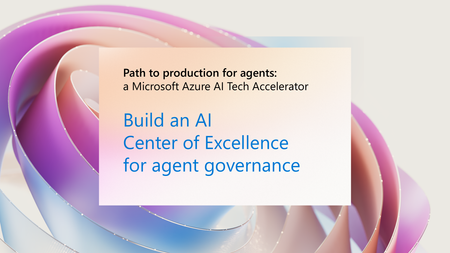
AI governance and Center of Excellence (CoE) strategies are key to scaling trusted AI. Too many AI initiatives stall in the proof of concept graveyard—not because of lack of innovation, but because t...
Monday, Jul 27, 2026, 08:00 AM PDTOnline
0likes
38Attendees
0Comments
Recent Blogs
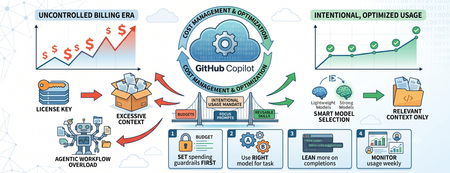
- GitHub Copilot has become a core part of the modern developer workflow. We use it to complete code, explain unfamiliar repositories, write tests, refactor legacy applications, review pull requests, g...Jul 07, 202682Views0likes0Comments
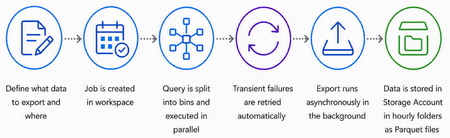
- Log Analytics Export Job is now available in public preview. It gives you a straightforward way to export historical log data from your workspace to Azure Blob Storage, without writing custom scripts...Jul 07, 202647Views0likes0Comments