best practices
287 TopicsData Transfer and Transactions metrics now generally available for Azure Container Registry
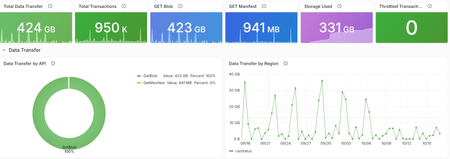
Azure Container Registry now provides two new platform metrics that make it easier to understand outbound data transfer, inspect API traffic, and investigate throttled or failed requests without first opening a support request. We're excited to share the general availability of the Data Transfer and Transactions metrics for Azure Container Registry (ACR). Both metrics are emitted automatically through Azure Monitor and include dimensions that help you move from “something changed” to the operation, response, and region that explain the change. Available to all ACR customers today: The Data Transfer and Transactions metrics are available automatically for every registry, with no additional configuration or cost for the metrics themselves. Deeper visibility into registry activity ACR's existing platform metrics provide useful high-level signals such as total and successful pull and push counts, along with storage usage. However, those aggregate signals don't tell you which API operation changed, which region served the traffic, or whether requests were successful, rejected, or throttled. Answering those questions often required you to configure diagnostic settings, query logs, correlate client-side telemetry, or contact support. The new metrics add built-in dimensions for common operational investigations, so you can identify the traffic pattern first and then decide whether to tune clients, adjust deployment behavior, change capacity, or investigate a failure. Before What the new metrics unlock Aggregate pull and push counts Transaction volume split by registry API operation. HTTP 429 responses visible primarily from client failures Throttled transactions filtered by response type and split by API or region. Limited attribution for outbound transfer Outbound bytes split by operation and serving registry region. Separate log and client-side investigations Built-in metric charts, alerts, and Grafana dashboards without custom instrumentation. This visibility is especially useful for shared registries and geo-replicated environments. If request volume increases, outbound transfer changes, or clients begin receiving HTTP 429 responses, you can investigate the activity directly in Azure Monitor or the integrated Grafana experience. What is new Data Transfer: understand outbound registry traffic The Data Transfer metric measures total outbound data transferred from your registry in bytes. Split the metric by ApiName to distinguish client blob and manifest downloads, geo-replication traffic, and data read when another registry imports content from this registry. Split by Region to see where that transfer originated. Transactions: understand registry API activity The Transactions metric counts registry API operations. Use its dimensions to identify which operations are generating traffic, where requests are served, and whether the response succeeded, redirected, failed, or was throttled. Dimension Available on What it tells you ApiName DataTransfer/Transactions The registry operation represented by the metric. Region DataTransfer/Transactions The region that served the request or from which data was transferred. ResponseType Transactions The request outcome, including success, redirect, authorization failure, not found, throttled, and other client or server errors. For the complete list of API names and response classifications, see the Azure Container Registry monitoring data reference . Questions you can answer Which APIs are busiest? Split Transactions metric by ApiName to compare manifest, layer, metadata, and authentication operations. How is traffic distributed across my registry geo-replications? Split Transactions and DataTransfer metrics by Region to monitor transaction volume and outbound data transfer across the registry's geo-replications. Are my requests being throttled? Filter Transactions by ResponseType = Throttled, then split by ApiName or Region to find the affected traffic. What operations are driving outbound data transfer from my registry? Split DataTransfer by ApiName to compare client downloads, replication, and import-source traffic. You can explore these new insights in two ways. Start with the integrated Grafana dashboard for a curated, customizable view of registry health and activity. For quick questions or focused investigations, use Azure Monitor Metrics to filter and split the underlying metrics by API, region, and response type. Start with the integrated Grafana dashboard Alongside these metrics, we're introducing a new visualization experience for ACR customers: Dashboards with Grafana. The experience is enabled by Azure Managed Grafana and brings a prebuilt, customizable Grafana dashboard into the registry's Azure portal experience. The dashboard provides out-of-the-box panels for key operational insights, including transaction activity and request outcomes by region, outbound data transfer, throttled requests, and storage consumption. To get started, open your registry in the Azure portal and select Monitoring > Dashboards with Grafana. The gallery includes the Azure Container Registry observability dashboard with views for data transfer, transaction trends, throttling, and storage consumption. You don't need to deploy or manage a separate Grafana instance. For teams that already use Grafana, the ACR Observability dashboard is also available in the public Grafana dashboard gallery, where it can be imported and customized for existing monitoring environments. Use the prebuilt dashboard as a starting point, then add panels and customize the views to surface and save the insights most important to your team. You can also use Grafana Explore for ad hoc analysis. The integrated observability dashboard brings key registry metrics together in one view. The dashboard is broken down into sections: Overview, Data Transfer, Transactions, and Storage. Explore the dashboard sections, including Transactions, to view overall request breakdown and audit throttle activity. For dashboard creation, customization, access, and deployment guidance, see Use Grafana dashboards in Azure Container Registry. Run ad hoc metric queries in Azure Monitor For a quick question or focused investigation, open your registry and select Monitoring > Metrics. Select Data Transfer or Transactions, then use filtering and splitting to analyze the relevant API, region, or response dimensions. Investigating throttling? Start with Transactions, filter ResponseType to Throttled, and split by ApiName. After you identify the traffic pattern, review the mitigation guidance in Azure Container Registry SKU features and limits . Use the Transactions dimensions to investigate operation volume, regional traffic, and outcomes. Use Data Transfer dimensions to identify the operations and regions generating outbound transfer. Learn more Monitor Azure Container Registry Azure Container Registry monitoring data reference Use Grafana dashboards in Azure Container Registry Azure Container Registry API request rate limits Engineering deep dives For a closer look behind the scenes, these engineering deep dives explain how our team designed and implemented the capabilities that make these new insights possible. Making ACR Data Transfer Visible: The Storage Activity Platform Behind GetBlob Metrics Making Registry Activity Visible at Scale Start exploring the metrics today Open your registry in the Azure portal and select Monitoring > Dashboards with Grafana to explore transaction trends, outbound data transfer, throttling, and storage in one integrated view. Use the built-in dashboard as a starting point, then add panels and customize the views to surface and save the insights most important to your team. This integrated experience gives registry teams a self-service path from signal to explanation, helping you understand usage patterns and investigate failed or throttled requests before turning to logs or opening a support request.140Views1like1CommentBeyond One-Size-Fits-All: Decision Routing for GitHub Copilot in CLI & VS Code
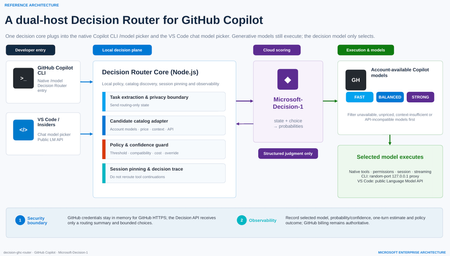
As developer tools move into the age of agentic AI, it is easy to fall into a familiar habit: when a task matters, choose the strongest—and usually most expensive—model available. Real software work is more varied than that. Explaining a function, editing a README, adding a boundary test, debugging a cross-module race condition and reviewing authentication logic demand very different levels of reasoning, context, tool use and reliability. A fixed model for every turn either wastes latency and budget or leaves difficult tasks underpowered. That is the motivation behind decision-ghc-router: GitHub Copilot continues to execute, while a Decision Router selects a sufficiently reliable and economically sensible model at the start of each new user turn. (The design also draws on gargpratyush/jev-router, especially its per-turn routing, native CLI preservation and model pinning across tool continuations.) The goal is not to build another agent outside Copilot or replace the native developer experience with a custom chat UI. GitHub Copilot CLI and the VS Code GitHub Copilot extension should keep their existing authentication, model catalog, tools, permissions, sessions and streaming behavior. The router adds one short, explicit decision step—and then gets out of the way. 1. Start with the distinction: a Decision Model is not a Model Router Before discussing implementation, two frequently conflated concepts need to be separated. A Decision Model makes bounded, structured judgments A Decision Model is not prompted with “write an article.” It receives: a current state, expressed as text or JSON; one or more bounded questions; explicit options or grading criteria. It returns typed results and probabilities that software can act on immediately, rather than free-form prose. For example: noul: Does this tool call touch production data? Return a probability between 0 and 1. choice: Should this task use the Fast, Balanced or Strong tier? Return the selected option and a probability for every option. score: How risky is this code change? Return an ordered score and its probability distribution. A Decision Model is therefore a fast, calibratable judgment primitive. Its uses extend beyond model selection to classification, ranking, prioritization, validation, agent control, safety screening and AI judging. A Model Router turns judgment into execution A Model Router is a system pattern, not a single model. A production-ready router must typically: discover models actually available to the signed-in account; reject candidates that are unavailable, unpriced, context-insufficient or API-incompatible; build a minimal routing state; invoke a scorer—which might be rules, a benchmark table, an LLM classifier or a Decision Model; apply confidence, cost, latency, safety and organizational policy; select a concrete model and start native execution; pin that model across tool continuations; emit decisions, estimates and failures for audit and tuning. In short: The Decision Model judges what is most suitable. The Model Router makes that judgment usable, compliant, executable, observable and recoverable. A Decision Router does not replace the larger routing system. It gives that system a specialized, fast and threshold-friendly scoring engine. Decision Model versus Model Router Dimension Decision Model Model Router Nature Specialized model capability Application or platform architecture pattern Input State, bounded questions, options or grading criteria User task, account catalog, prices, context limits and policy Output Typed answer and probabilities Concrete model, execution path, policy outcome and telemetry Content generation Does not produce free-form content Usually dispatches a generative model Account entitlement Not responsible Responsible API compatibility Not responsible Responsible Failure handling Provides uncertainty Must define fallback or stop behavior Broader use Classification, scoring, routing and validation Multi-model orchestration, cost governance and runtime control 2. Microsoft-Decision-1: why it fits developer-tool routing Microsoft introduced Microsoft-Decision-1 in October 2026 as a specialized model for fast decision scoring, available through Microsoft Foundry. Unlike a generative LLM, it does not produce an essay or a written chain of reasoning. It makes a focused judgment about text or JSON and returns typed numerical decisions. Microsoft describes the model as a post-trained Qwen3.5-9B designed for single-pass scoring over fixed options. It reports the highest accuracy in a 36-benchmark comparison spanning nearly 150,000 questions kept blind from training, P50 latency roughly 35 times faster than GPT-6 Sol, and an average 1.3% decision-flip rate across eight perturbation types. At launch, Microsoft listed input at US$0.042 per million tokens with no output-token charge; pricing is dynamic, so a deployment should use the current Microsoft Foundry listing. Those are Microsoft-published benchmark results, not a substitute for evaluation on a team’s own development workload. Microsoft-Decision-1 exposes three question types that map naturally to an AI control plane: noul for binary gates such as “May this command run automatically?” choice for bounded routing such as “Which model tier should handle this turn?” score for ordered grading such as “How severe is the change risk?” Why not use a small LLM classifier? That is a valid architecture. Many model routers ask a lightweight LLM to emit easy, medium or hard. GitHub Agentic Workflows’ experimental model routing also classifies a task before ranking allowed model-and-effort combinations through precompiled routing tables. A dedicated Decision Model, however, offers four useful properties for developer tools: Bounded output. A router needs a label and probabilities, not persuasive prose. Predictable latency. Agent workflows amplify the cost of every sequential control-plane call. Policy-ready confidence. If the top probability is below 0.65, a local policy can avoid downgrading, keep the current model or request manual selection. Composable governance. One structured request can score model tier, operational risk and the need for human review. A conceptual choice request for Copilot routing The following is simplified pseudodata—not repository source—and omits deployment and authentication details: { "state": { "task": "Fix intermittent failures in the authentication integration tests", "estimatedContextTokens": 18000, "toolUseExpected": true, "workspaceScope": "multi-file", "latencyPreference": "balanced" }, "questions": { "model_tier": { "type": "choice", "instructions": "Choose the least expensive tier likely to complete the task reliably in one pass.", "criteria": { "fast": "Simple explanation, formatting, lookup, or small deterministic edit", "balanced": "Normal coding, tests, debugging, or limited multi-file work", "strong": "Ambiguous architecture, security, difficult debugging, or broad multi-file reasoning" } } } } The response identifies a tier and assigns a probability to every tier. The router then maps the abstract choice to a concrete model that is truly available to the current GitHub account. That separation matters: a Decision Model should not assume that a user owns or can access a particular model. The account catalog is the source of truth. 3. The decision-ghc-router scenario and reference architecture The architecture has two hosts but one consistent decision model. 3.1 GitHub Copilot CLI: put the router in native /model In the public predecessor implementation, a user-level extension adds a router entry to GitHub Copilot CLI’s native /model menu. The user can select the router or choose a concrete model directly: Select Decision Router: route every new user turn. Select a concrete model: bypass routing and return to native fixed-model behavior. Continue a tool call: keep the model chosen for that turn; do not classify again. Explicitly request a model: the explicit request should win. The CLI path uses a random-port 127.0.0.1 proxy to expose the router as a temporary provider while preserving Copilot authentication, sessions, tools, permissions and streaming. GitHub credentials should remain in memory and be used only for HTTPS requests to GitHub. The local proxy uses separate random credentials; GitHub credentials must not be written to logs or sent to the Decision API. This is the design principle I care about most: The router changes which model is selected, not how Copilot works. 3.2 VS Code and VS Code Insiders: enter the Chat Model Picker The editor integration is a separate extension. It registers decision-router in VS Code Chat’s model picker and uses the public Language Model API to discover Copilot models available to the account signed into that editor. The privacy boundary is intentional: The Decision Model receives an unambiguously extracted task or a routing-only summary entered by the user. If the task cannot be reliably isolated from editor context, the extension should not automatically upload attachments, source files or the full conversation. The selected Copilot model still receives the full conversation, tool definitions and workspace context. VS Code invokes native tools, while tool-call IDs maintain model consistency. The short version is: minimize data for decision; maximize context for execution. 3.3 The seven-step loop for each new user turn Receive the task through native Copilot CLI or VS Code Chat. Discover candidates from account models, prices, context capabilities and API compatibility. Build routing state with the minimum sufficient task summary and bounded choices. Call Microsoft-Decision-1 and receive choice probabilities. Apply local policy for confidence, cost, compatibility and manual overrides. Execute natively with the selected model, existing tools, permissions, session and streaming. Pin and trace the model for tool continuations while recording the decision and estimate. 3.4 Why not reroute every tool continuation? Imagine a model runs tests, reads the failure output and then edits code. If the router chooses a new model after every tool result: prompt-cache benefits may disappear, increasing total cost; the new model may interpret earlier tool calls differently; the debugging chain becomes harder to reproduce and audit. I therefore retain one of jev-router’s strongest ideas: make one decision at the start of a new user turn, then pin that model for the resulting tool chain. Main conversations and sub-agents should be pinned independently. 4. Main technologies and frameworks Based on mechanisms verifiable in the public predecessor and the Microsoft-Decision-1 evolution described here, the project separates into the following layers. Node.js and ESM modules The core router uses Node.js and .mjs modules to handle: CLI startup and argument forwarding; model catalog and price adaptation; the local HTTP proxy; configuration and environment variables; Decision API calls; policy, errors and telemetry. The public predecessor requires Node.js 22.16 or later and uses Microsoft’s npm package source for relevant dependencies. GitHub Copilot CLI extension interfaces The CLI integration relies on experimental extension interfaces to register the router as a native model entry. It explicitly enables the provider-endpoint interface and obtains the model catalog, runtime inference endpoint and authentication from the active session. Three rules are essential: Do not modify the user’s global default model. Do not automatically grant shell or other tool permissions. If initialization fails, report a clear error instead of pretending routing succeeded. Local loopback proxy The loopback proxy is the adapter that preserves the native CLI: listen only on 127.0.0.1; use a random port and random local credentials; map the router’s selection to a real Copilot execution model; preserve streaming, tool calls, sessions and permission prompts; never create a second hidden agent loop. VS Code Extension API The editor extension discovers current candidates through: vscode.lm.selectChatModels({ vendor: "copilot" }) and is packaged as a VSIX. The CLI and editor are independent hosts and may use different GitHub accounts with different entitlements. Candidate discovery must therefore be host-specific, session-specific and dynamic—not a hardcoded list of model IDs. Microsoft Foundry and the Decision API Microsoft-Decision-1 can be deployed in Microsoft Foundry through GlobalStandard or, in selected regions, DataZoneStandard. Authentication can use Microsoft Entra ID (recommended) or an API key. In this architecture, the Decision API only scores choices: Input: minimal task state, bounded candidates and explicit criteria. Output: selected option, option probabilities and usage. Not its responsibility: GitHub credentials, developer tools, full workspace access or code execution. That separation makes the decision plane and execution plane independently governable. Model catalog, pricing and capability adapters The public predecessor discovers models from the signed-in account instead of hardcoding them. Before scoring, a router should exclude: auto, hidden, disabled or unconfigured entries; models without usable price information; candidates with insufficient input context; models incompatible with the host’s wire API; models restricted by administrator policy. Cost estimation supports ranking and user feedback; it is not a final bill. Promotions, cache discounts, hidden context, retries and later tool rounds all affect the result. GitHub Billing remains authoritative. 5. What I borrow from jev-router—and what changes The value of gargpratyush/jev-router is not merely “use a small model for easy tasks.” It embeds routing into familiar CLIs without taking away their native behavior. The ideas I retain include: one routing decision per new user turn; a router sentinel in the native model picker; concrete-model selection pauses routing; abstract Fast, Balanced, Strong and Long tiers map to host-specific models; tool continuations keep the tier selected at the start of the turn; explicit model requests win; low confidence should not trigger an aggressive downgrade; large conversations must account for cache and migration cost; explanation data should show why a tier was selected. The decision-ghc-router evolution replaces the external JEV/System One scorer with Microsoft-Decision-1 and emphasizes five changes: Probability is a first-class signal. Policy can threshold the decision instead of accepting a label blindly. Bounded choices come from the real catalog. Decision-1 only chooses among already eligible candidates. Local policy owns the final answer. Organizational rules, compatibility and manual overrides remain deterministic. The Decision Model is reusable. A single structured call can also score operational risk and the need for human review. Local and cloud responsibilities are explicit. Cloud scoring is isolated from credentials and execution. 6. Representative use cases A. Fast explanation and small edits “Explain this regular expression,” “turn this note into a table,” or “add a null-value test to an existing function.” The router can often select the Fast tier. The objective is not the weakest model; it is the least expensive model likely to complete the task reliably in one pass. B. Normal development and debugging “Fix the failing test,” “refactor this module without changing its API,” or “use the stack trace to locate the bug.” These tasks require code reading, tool use and moderate reasoning, so they often land in Balanced. C. Security, architecture and broad multi-file reasoning “Review this OAuth callback for state confusion,” “design cross-region failover,” or “find a race condition across services.” The router should choose Strong even when it costs more. Routing optimization means “economical subject to reliable completion,” not “always cheaper.” D. Long context and large repositories If a candidate cannot hold the estimated input, it must be removed before scoring. For an already large conversation, the router should also avoid downgrading when lost cache work or context migration would cost more than the model-price saving. E. Organizational policy and risk gates The same Decision API request can include additional noul or score questions: Does the task involve production data? Is the proposed command destructive? What is the security risk level of the change? Should execution be handed to a human reviewer? At that point the router grows from a cost optimizer into a lightweight control plane for agents. 7. Policies I would keep for production Filter deterministically before scoring Entitlement, API compatibility, context limits and administrator restrictions are facts. The Decision Model should not be asked to guess them. Do not automatically downgrade on low confidence When the top probability falls below a calibrated threshold, the router can: keep the current model; cap automatic movement at Balanced; request manual selection; send high-risk tasks to Strong or human review. The threshold must be calibrated on labeled tasks from the target environment, not copied from an example. Explicit intent beats automatic routing If the user says “use the Strong model” or selects a concrete entry in the picker, the router should step aside immediately. Never substitute silently Missing credentials, Decision API timeouts, unknown pricing and insufficient context should produce an explicit state. Whether to fail open, fail closed or keep the current model must be an intentional host or organizational policy. Record decisions without logging every prompt by default Useful telemetry includes: anonymized session and turn IDs; candidates and exclusion reasons; selected tier, probabilities and policy overrides; estimated input/output and one-turn cost; completion, retry and manual-reselection outcomes. Full prompts, source code and tool results should be excluded by default or governed by explicit retention and data-handling policy. Evaluate the router on task success, not the cheapest request Better metrics include: first-pass completion rate; total time to completion; total cost including retries and tool rounds; manual model-change rate; low-confidence and misrouting rates; safety and policy violations. 8. Why this matters beyond one repository From a developer-advocacy perspective, the Decision Router is not simply a token-saving utility. It illustrates a clearer division of responsibilities in agent engineering: Generative models understand, reason, write code and call tools. Decision Models make fast, structured and probabilistic judgments. Routers and policy engines place those judgments inside real account, budget, compatibility and governance constraints. Developer-tool hosts retain identity, permission, context and execution control. Future AI developer tools will not be tied to one “default large model.” They will manage a portfolio of models with different speed, cost, context and capability profiles. The differentiator will no longer be merely which model a product connects to, but: Can it select the right model at the right moment, in an explainable and governable way, without breaking the developer experience? That is why I am adding a Decision Router to GitHub Copilot CLI and the VS Code GitHub Copilot extension. GitHub Copilot keeps executing. Microsoft-Decision-1 makes the fast judgment. The local router turns that judgment into a usable engineering decision. References decision-ghc-router jev-ghc-router gargpratyush/jev-router Microsoft-Decision-1: Our model for fast decision-making Deploy and use Microsoft-Decision-1 in Microsoft Foundry GitHub Agentic Workflows — Model Routing GitHub Copilot model billing and pricing255Views0likes0CommentsIntroducing Azure Container Apps Sandboxes: Secure Infrastructure for Agentic Workloads
Today we are announcing the public preview of Azure Container Apps Sandboxes - a new first-class resource type that gives you fast, secure, ephemeral compute environments with built-in suspend and resume. This is the underlying infrastructure on which products like Cloud sandboxes in GitHub Copilot, Foundry Hosted Agents, and Azure Container Apps Express are built, you now have the opportunity to build your solutions leveraging this infrastructure. Azure Container Apps Sandboxes unlocks two massive opportunities. For platform developers and ISVs, sandboxes give you the same isolated compute fabric that powers many Microsoft products. You get the building blocks to create your own multi-tenant platform on proven, enterprise-scale infrastructure. For AI agents, sandboxes become a self-configurable tool that lets agents extend their own capabilities on the fly. An agent can spin up a fresh sandbox in milliseconds and use it to execute untrusted code, compile source, test HTTP requests against a live app, launch a browser session, or tackle whatever needs a quick and scalable infrastructure. On one side it empowers humans to build platforms, on the other it empowers agents to build their own capabilities. Both get enterprise-grade isolation, instant startup, and snapshot-based persistence out of the box. We'll walk through the resource model, sandbox lifecycle, the features that set Sandboxes apart - like snapshots, lifecycle policies, network egress controls, volumes, and managed identities - and show you how to get started with the portal and CLI. What Are Container Apps Sandboxes? Container Apps Sandboxes are secure, isolated compute environments that start in sub-second time, scale to thousands, and cost nothing when idle. Each sandbox runs in its own hardware-isolated microVM boundary - fully separated from the host, the platform, and every other sandbox. You bring your own Open Container Initiative (OCI) image, and Sandboxes handle the rest: provisioning from prewarmed pools, strong multi-tenant isolation, and snapshot-based suspend/resume that preserves full memory and disk state across sessions. There are many ways Sandboxes can help you build your next project - here are a few: Your own build & test systems - wire a Sandbox into your CI/CD flow to run builds while your laptop stays cool. Agents that can run anything safely - an agent spawns a sandbox, executes work inside it, and returns the output with no agent host privileges required. Agent swarms - decompose a research question, spawn N sandbox workers in parallel (each pinned to its own image and egress policy), and synthesize the result. Early access customers are already unlocking significant benefits by leveraging Azure Container Apps Sandboxes. "With Azure Container Apps sandboxes, SitecoreAI can safely enable agents to take real action. The combination of multi-tenant isolation, rapid scale-out, and full automation allows Sitecore to run long-lived, autonomous agents that securely execute code, manage workflows, and interact with enterprise systems within secure, governed environments. With this foundation, we can build agents that do real work: assembling content, personalizing experiences, and optimizing campaigns in production. Agents that operate continuously, learn from results, and improve over time, so our customers get better outcomes without giving up control." - Mo Cherif, VP of AI and Innovation, Sitecore "We got early access to Azure Container Apps Sandboxes, and got the first prototype integrated with Atlas AI in hours, and it's already shaping a new Atlas AI capability that we plan to launch in preview in Q3. It gives every Atlas AI agent a safe, sandboxed workspace (file system, terminal, code execution) on a customer's live data in Cognite Data Fusion. The value: Industrial process, reliability, and production engineers spend days and weeks on questions like "which wells are underperforming and why?" These questions are tractable but expensive, so they are asked rarely and decisions are made on gut feel. With this, an agent pulls the data, runs the analysis, cross-references maintenance and inspection records, and returns a cited draft in minutes. Sandboxes make it practical: Aligned feature set, per-customer isolation, pause/resume across multi-day investigations, scale-to-zero economics." - Kelvin Sundli, Product manager, Atlas AI, Cognite Resource Model: Sandbox Groups and Sandboxes The top-level ARM resource is Microsoft.App/SandboxGroups. A Sandbox Group is the management boundary for a collection of sandboxes that share configuration - think of it like a Container Apps Environment, but purpose-built for sandboxes. When you create a Sandbox Group, you specify: Subscription, Resource Group, and Region Sandbox defaults (optional): default CPU, memory, disk, max sandbox count, and default idle timeout Networking: optionally deploy into a custom VNet with a dedicated subnet for private networking Identity: System or user assigned Entra identity. Individual sandboxes are created within a Sandbox Group. Each sandbox has its own source (disk image or snapshot), resource tier, lifecycle policy, network egress policy, environment variables, ports, volumes, and connections. Sandbox Lifecycle Sandboxes have a well-defined lifecycle with the following states: State Description Creating Provisioning the sandbox from a disk image or snapshot Running Actively executing - backed by a live microVM Idle System-suspended after inactivity; can auto-resume on the next request Suspended Full state (memory + disk) preserved as a snapshot; no compute costs Resuming Restoring from a suspended or idle state - sub-second for most workloads Stopped User-initiated stop; can be resumed Stopping Graceful shutdown in progress Deleting Teardown in progress The key insight here is the distinction between Idle and Suspended. When a sandbox goes idle (e.g., no traffic for a configured timeout), the system can automatically suspend it and capture a snapshot. When a new request arrives, the sandbox resumes transparently. This gives you scale-to-zero economics with stateful compute - something that wasn't possible before without significant custom engineering. Disk Images: Bring Your Own Container Sandboxes boot from Disk Images - Open Container Initiative (OCI) images converted into an optimized root filesystem format. You point to any OCI image (public or private registry), and the platform builds a bootable disk image from it. You can start with public, pre-built images maintained by the platform (for example, Ubuntu base images), or bring your own private images. For private registries, you can authenticate with username/token or use a user-assigned managed identity for Azure Container Registry (ACR) – integrated with Azure as you expect. Snapshots: Full-State Persistence Snapshots capture the complete state of a running sandbox - memory, disk, and all running processes. When you resume a sandbox from a snapshot, every process, open file handle, and in-memory data structure is restored exactly as it was. A snapshot captures the full state of a running sandbox: memory pages, disk, processes. Two ways to make one - automatically on suspend, or manually on demand. Three things they're great for: Checkpointing mid-task so a long-running agent can resume exactly where it left off Cloning an environment that's already warm - dependencies installed, caches populated, services running Shipping a "ready-to-go" state that resumes in sub-second instead of cold-booting Snapshots are free during the preview, after which they will be stored as Azure Blob Storage at standard rates. Each snapshot records the source sandbox, resource allocation (CPU, memory, disk), and container metadata - so what you get back is exactly what you snapshotted. Resource Tiers Every sandbox is assigned to a resource tier that determines its CPU, memory, and disk allocation: Tier CPU Memory Disk XS 0.25 vCPU 0.5 GiB 5 GiB S 0.5 vCPU 1 GiB 10 GiB M (default) 1vCPU 2 GiB 20 GiB L 2 vCPU 4 GiB 40 GiB XL 4 vCPU 8 GiB 80 GiB When creating a sandbox from a snapshot, the resource tier is inherited from the snapshot and cannot be changed - this ensures the restored environment has the exact resources it was running with when the snapshot was taken. Lifecycle Policies: Auto-Suspend and Auto-Delete Every sandbox can be configured with lifecycle policies that automate state transitions and cleanup: Auto-Suspend Idle timeout: How long a sandbox can sit idle before being suspended (configurable: 1m, 2m, 5m, 10m, 30m, 60m) Suspend mode: Disk + Memory (default): Full snapshot including memory state - resume picks up exactly where you left off, with all processes and in-memory data intact. Disk: Only the disk is preserved; the VM restarts fresh on resume. Useful when you only need file persistence, not process continuity. Auto-Delete Automatically delete sandboxes after a configurable number of days of inactivity Prevents accumulation of abandoned sandboxes that consume snapshot storage These lifecycle policies are what make Sandboxes economically viable at scale. A platform serving thousands of tenants can configure aggressive idle timeouts (say, 60 seconds) with Memory suspend mode, and each tenant's sandbox disappears from the billing meter almost immediately - but resumes in sub-second time the moment they return. Network Egress Policy For scenarios involving untrusted code - AI agents executing LLM-generated scripts, multi-tenant SaaS with user-submitted workloads - controlling outbound network access is critical. Sandboxes provide a per-sandbox Network Egress Policy: Default action: Allow or Deny all outbound traffic Host rules: Domain-pattern rules (e.g., *.github.com → Allow) to permit specific destinations Custom CIDR rules: Network-level rules for IP ranges (e.g., 10.0.0.0/8 → Deny) Skip egress proxy: Option to bypass the egress proxy entirely when custom VNet routing handles policy enforcement This means you can run a sandbox in a deny-by-default posture and allowlist only the specific endpoints it needs (your API server, a package registry, etc.) - without setting up NSGs or firewall appliances. Managed Volumes: Persistent and Shared Storage Sandboxes support two types of mountable volumes, both managed by Microsoft: Volume Type Backed By Best For Managed Azure Blob Azure Blob Storage Shared data across sandboxes, file uploads/downloads, persistent artifacts Managed Data Disk Azure Disk Storage High-performance storage for databases, build caches, large working sets - only available to one sandbox at a time Blob volumes come with a built-in file explorer in the portal - you can browse, upload, download, create folders, and drag-and-drop files directly. Data Disk volumes provide dedicated block storage with configurable sizes. Secrets and Identity Secrets Sandbox Groups support key-value secrets scoped to the group. Secrets can be created, edited, and referenced by sandboxes within the group. These secrets can be used in egress policies to modify requests with transform or header-injection rules, without exposing the secrets to code running inside the sandbox. Managed Identity Sandbox Groups support both system-assigned and user-assigned managed identities, with full RBAC role assignment management. This means your sandboxes can authenticate to Azure services (Key Vault, Storage, Cosmos DB, etc.) without managing credentials - the same identity model you use everywhere else in Azure. MCP Connectors and Triggers ACA Sandboxes now supports managed connectors through the Model Context Protocol (MCP), giving sandboxes access to external APIs - including Microsoft 365, Salesforce, ServiceNow, GitHub, and 1,400+ other systems - without managing credentials directly. Attach a Connector Gateway to your sandbox group, and every sandbox in the group can call external APIs through a standardized MCP interface at runtime. Pair connectors with triggers to build event-driven automation: route an Outlook email to a sandbox that triages it with an AI agent, or react to a SharePoint file upload by extracting and processing the document all without writing glue code. Triggers can fire a shell command inside a sandbox or invoke an HTTP endpoint the sandbox exposes, so your automation shapes fit naturally around your workload. The integration is built on the new Connector Namespace service (az connector-namespace), the same runtime behind Logic Apps and Power Platform connectors, now available as a programmable layer for sandboxes. See the end-to-end samples for runnable azd up-deployable examples covering email triage and document automation scenarios. The Portal Experience Azure Container Apps Sandboxes are only available in the new Azure Container Apps portal that provides a rich, IDE-like experience for working with sandboxes. Creating a Sandbox The portal offers multiple creation paths: Standard Sandbox - full configuration control over source, resources, lifecycle, networking, and volumes GitHub Copilot Sandbox - preset, Copilot CLI ready to go, GitHub credentials can be wired through the Access Token before the sandbox is created Claude Sandbox - Claude CLI pre-installed, ready for agentic coding inside the sandbox Using Coding Agents (Copilot CLI / Claude Code) If you live inside Copilot CLI or Claude Code, you don't need to learn a new CLI. Install the azure-sandbox skill once and your agent picks up the right skills: # GitHub Copilot CLI # Add as a plugin marketplace /plugin marketplace add microsoft/azure-container-apps # Install all skills /plugin install sandboxes@Azure-Container-Apps # Claude Code claude plugin add microsoft/azure-container-apps The skill runs prerequisite checks silently (az --version, az account show, node --version, aca --version), prompts only if something's missing, and maps natural-language asks to the right aca commands. Bundled runbooks cover Copilot CLI BYOK (bring your own Azure OpenAI key), the deploy-a-web-app walkthrough, and shell setup. Sandbox Detail Page Once your sandbox is running, the detail page gives you immediate access to the sandbox terminal and additional details, such as - Network Audit - real-time egress traffic log showing allowed and denied requests Monitor - live CPU, memory, disk, and network utilization charts Connectors - attached connections with an "Add" action Volumes - mounted volumes with an "Add" action Log Stream - streaming container logs Processes - running process list inside the sandbox Files - file explorer to browse the sandbox filesystem The toolbar actions let you manage the state of the sandbox - Resume or Stop. In the Ellipsis menu (⁝) you can find additional settings to manage network Egress Policy and ingress (Add port), take a Snapshot of the sandbox, Commit (save disk state as a new disk image), set Lifecycle Policy or permanently Delete the sandbox. Finally, you can see additional Details in a side panel. Getting Started with the CLI and Python SDK All sandbox and sandbox-group operations go through the aca CLI. There are no az containerapp sandbox commands, - az is only used for az login, az account show, and resource-group management. Install (CLI) # Mac, Linux curl -fsSL https://aka.ms/aca-cli-install | sh # Windows irm https://aka.ms/aca-cli-install-ps | iex Run aca --help to get started. Install (Python SDK) pip install azure-containerapps-sandbox For more details, quick start and examples on ACA CLI and Python SDK, please go to https://sandboxes.azure.com Evolution from Dynamic Sessions If you've used Azure Container Apps Dynamic Sessions, Sandboxes are the next evolution of that capability. Everything Sessions can do, Sandboxes can do - and significantly more: Capability Dynamic Sessions Sandboxes Sub-second startup ✓ ✓ Strong isolation ✓ ✓ Custom container images ✓ ✓ Custom VNet integration ✓ (Partial) ✓ Suspend/resume with Memory and Disk snapshots - ✓ Lifecycle policies (auto-suspend, auto-delete) - ✓ Network egress policy (per-sandbox) - ✓ Persistent managed volumes (Blob, Data Disk) - ✓ Managed identity (system + user-assigned) - ✓ Secrets management - ✓ Configurable resource tiers - ✓ Direct access to sandbox in Portal experience - ✓ We will continue to support Dynamic Sessions, but all new investment goes into Sandboxes. If you're building new workloads on isolated ephemeral compute, start with Sandboxes. How It All Fits Together ACA Sandboxes is a platform primitive. It's the foundation on which multiple Microsoft products are already built - including ACA Express, Cloud sandboxes in GitHub Copilot, and Foundry Hosted Agents. When you build on Sandboxes, you're building on the same infrastructure that powers Microsoft's own portfolio. This is the evolution of what we shared with Project Legion in 2024. Legion described the internal infrastructure; Sandboxes exposes it as a customer-facing primitive that you can use directly. What's Next • Deeper Azure integrations - first-class connectivity with Azure networking, identity, storage, and AI services • Enhanced SDK and CLI - richer programmatic experiences for managing sandboxes at scale • More Microsoft services built on Sandboxes - this is just the beginning Get Started Today • Portal: https://sandboxes.azure.com/ • Documentation: Azure Container Apps Sandboxes • Pricing: Azure Container Apps Pricing (per-second vCPU/memory billing, scale-to-zero, snapshots at Blob Storage rates) We'd love to hear your feedback. You can ask questions, or file issues on the Azure Container Apps GitHub (prefix with [Sandbox] for Sandboxes-specific issues).9.3KViews3likes1CommentBring Azure SRE Agent into your developer workflow with the new canvas
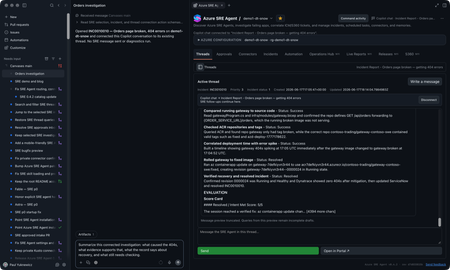
You’re on call. A customer-reported incident lands, Azure SRE Agent picks it up from your incident management system, investigates, and gives you a starting diagnosis. If you’re like me, you want to check that diagnosis yourself, and you want to do it where you already work: in GitHub Copilot, with your code, your tools, and your own access to the data. The new Azure SRE Agent canvas puts the investigation right next to your Copilot chat. A canvas is an interactive panel beside the conversation, with context and actions you and Copilot can both use. You get SRE Agent’s findings plus everything SRE doesn’t have: your code, your private data sources, and what you know about the app. In the GitHub Copilot App, sessions are on the left, Copilot chat is in the middle, and the SRE canvas is on the right. You can use the same canvas in Copilot CLI sessions that support canvases. I now have SRE's findings alongside my own context in Copilot chat. I can keep digging here and decide what to send back to SRE, and when. Let me show you the inner loop with an incident from September 22. It’s a Contoso demo, but it’s modeled on a real one we hit in production. Gateway health looked available while orders and payments failed. I'll use SRE's diagnosis as a starting point, check the historical telemetry with my own authorized access, and work out what the evidence does and doesn't establish. I’ll share findings with the team, and anything worth keeping goes back to SRE Agent. Start with the incident With the plugin enabled, I prompt Copilot to open Azure SRE Agent and choose my saved demo1-dt-snow favorite. I can also discover agents in a subscription I choose or connect through a caller-authorized external URL. For this investigation, I open INC0922001, "Trading order and payment requests failing while gateway health remains available," and choose Connect this thread. Selecting a row lets me browse; connecting makes it the investigation for this conversation. The September incident as recorded in SRE Agent. Then I ask: Summarize this connected September 22 investigation. Separate the reported diagnosis from observed evidence. Give the incident time window, and list what still needs independent verification. The SRE record reports a stopped PostgreSQL database. It says the gateway passed its health check, but Orders and payments requests failed after about 15 seconds. That's useful context, but a passing health check doesn't mean orders and payments are working. I want to check the logs for myself. SRE’s diagnosis and suggested recovery. Suggested isn’t the same as confirmed, which is where I start digging. Get the historical window right The first query assumption I check is the date. This incident needs September 22, 17:30 to 19:45 UTC, not the last 24 hours. I use the Log Analytics workspace behind the demo and ask: Reconstruct the failure check for this historical window. Show the complete query and target before running it. Then break down the request routes and status codes. The reconstructed query and its saved result give me something concrete to inspect. This is my own reconstruction, not a replay of SRE’s query, so the counts differ a little from SRE’s snapshot. The query runbook includes the complete KQL, working Log Analytics API route, and scope for review. The result contains 120 gateway Orders 500 records, 115 gateway payments 502 records, corresponding backend failures, and 119 database connection timeouts. These are telemetry records, not distinct customer requests: the gateway and backend can record the same call. Exporter authentication errors and later route 404s are separate signatures, not more examples of the same database failure. Inspect the requests, dependencies, and exceptions Grouped counts tell me where to look. To understand the failure, I want to look at some of the actual log entries from that time window, not just the totals: Show the Orders requests, downstream dependencies, and database timeouts for this window. Where operation IDs are populated, follow the same operation. Tell me what is correlated and what is only nearby in time. The saved exception signature says the connection to the database endpoint timed out. That supports a connectivity problem; it doesn't independently prove the database was stopped. To connect a particular exception to a particular request, I need matching trace identifiers, not just nearby timestamps. The raw-record and correlation queries are the next checks, with their own execution approval. Widen my check beyond Orders An Orders-focused query is a useful starting point, not an impact assessment. I ask: Keep the same source and time window, but remove the Orders operation and dependency-target restrictions. What else has 5xx failures or the same database-connectivity signature? Keep unrelated errors separate. The saved broader result already includes payments, which SRE also identified. My goal is to verify that scope independently and see whether the wider query adds anything. I won't turn two affected paths into an all-services outage. This data also has blank application-role names, so I use the recorded operations and dependency targets rather than invent an application-name filter. Test the competing explanation A gateway deployment or connection setting could also cause trouble. I want to compare that explanation with the database diagnosis: Preview the historical deployment and configuration records needed for this window, plus independent database state or availability evidence. Do not use today's settings or health as proof of September 22. If the records aren't available, leave the check open. The first SRE record reports the database as stopped, but its Activity Log check found no stop event and may not have covered the right scope. Independent incident-window records would help distinguish stopped state from configuration or network problems. Current settings can't establish historical state, and missing or expired change history can't rule out a deployment. For now, the logs support connectivity trouble. Historical database state and the competing configuration explanation still need checking. The first record also doesn't confirm completed recovery; a later recurrence doesn’t tell us what happened on September 22.. Bring in evidence SRE may not have, or go where it cannot The logs got me to a connectivity problem. The next question is capacity: was something starved? That evidence lives in a Kusto cluster SRE Agent can’t reach, but I can. Private Connectors let me use my own authorized access from inside the same investigation. Copilot-private connections are separate from the SRE Agent connectors. Teams is ready for the update. For a performance or capacity question, I can choose an authorized connection, review the source and complete query, and approve its time range and filters before execution. Then I can compare the relevant measurements and units. This is an extension of the investigation. Granting capacity is a separate action with its own approval. I can do it from here, but it’s my call, not the agent’s. The connection stays private to Copilot. Connecting an SRE investigation doesn't give the agent my datasource permissions. If I want SRE to use a finding, I separately preview and approve the evidence to share. For checks I run locally, I use my identity and network access; a cloud-backed connector uses its provider's network path. Review the updated team message The team update should carry the refined root-cause analysis, including its limits: SRE's reported diagnosis, the independently observed failures, the scope, and the checks still open. Next prompt: Draft a September 22 update to send to the team in Teams. Include the reported diagnosis, observed Orders and payments failures, connectivity evidence, competing explanations, and remaining checks. Include the investigation link. Show me the exact message and destination before sending. That gives the team a useful starting point for the next check, with a link back to the investigation. Continue in the terminal I can carry the same investigation into a canvas-capable Copilot CLI session. I connect INC0922001 explicitly in that conversation; the App's connection doesn't carry over. Connect to INC0922001 from September 22. Give me a TL;DR that separates the reported diagnosis, independently checked evidence, and remaining questions. The terminal is another place where I like to work, and I still want to follow the same evidence and use my own context and tools. The SRE canvas provides tools to Copilot CLI too. The IDE and terminal guide covers a separate connection through the Azure MCP Server. So who stopped the database? We did, for the demo. The real production incident that inspired this was resource exhaustion, which is less satisfying, because every engineer wants it to be the database. It’s better when you can prove it. Try the canvas for your next investigation The useful loop isn't just reading an incident summary from an agent. It's taking SRE's starting diagnosis into Copilot, inspecting the evidence, testing alternatives, and bringing in authorized data from my own tools. Sometimes that confirms SRE Agent got it right. Sometimes it doesn’t. Either way, what I learn goes back into the agent’s memory so the next incident starts smarter. In this one, I learned we’re not resilient enough to this kind of failure yet, and we have hardening work to do. Install from Customize > Plugins > Awesome Copilot > Azure SRE Agent, start a new session, and ask: Open Azure SRE Agent canvas. Watch the demo video, bring an existing investigation, and tell us what you think. The canvas guide has setup details. Also see the October SRE Agent update and explore the other Azure canvases.1.1KViews1like2CommentsAzure Verified Modules (AVM) is now owned by Azure engineering
Azure Verified Modules (AVM) has moved into the Azure Deployments team, inside Microsoft’s Azure engineering organization. That is the headline, and it is a big one for us. AVM started as a community-led project inside Microsoft, built and maintained largely by people who cared about it alongside their day jobs in various roles and teams across Microsoft. It is now owned by an engineering team, with dedicated engineers working on it every day; as well as those who helped make AVM what it is today. I want to be clear about what that does and does not mean, because I know the questions this raises. AVM is still open source. The repositories, specifications, the contribution model and the way you consume modules from the public registries are all unchanged. What has changed is the level of investment behind it, and how sustainable we can make it. In short: Microsoft has increased its investment in AVM. It has moved from a community-led project into Azure engineering, with dedicated engineering resources behind it. It stays open-source. On the back of that, we are updating the support statement and introducing a three-tier module ownership model at the start of 2027 (more on these below). This blog post has a lot of content, please take the time to read it all but feel free to use the table of contents below to help you navigate it. If AVM is new to you AVM is the Microsoft standard for Infrastructure as Code (IaC) modules for Azure, in both Bicep and Terraform. Every module is built to the same published specification, passes the same continuous integration (CI) tests, and is published to the official public Bicep and Terraform registries. The idea is simple: you should not have to write the same Azure IaC code again, and you should be able to trust what you pick up. There is a lot more detail at aka.ms/AVM. And if you would rather watch than read, Jared Holgate and I covered AVM in our recent Azure Infra Summit session: watch the recording on YouTube. What the move lets us fix: our support statement Today, the AVM support statement includes day-based targets for responses and fixes. We have not met them consistently, and that does not give you clear or reliable expectations. We are removing those targets and aligning with the support model used by Azure CLI, Azure PowerShell, Bicep, AzAPI, and the AzureRM Terraform provider. The move into Azure engineering is the important part. Dedicated engineers will maintain modules directly and improve the tooling, automation, and framework used by all module owners. That is a stronger commitment than any fixed target we cannot reliably meet. It also lets us be clearer about who maintains each module. Right now, every AVM module is treated identically, and that is not sustainable. So, we are introducing module tiering. Introducing module tiering Right now, every AVM module is treated identically. That is not sustainable. A resource group module needs almost no attention. A storage account or virtual machine module needs constant work as the underlying service evolves. So, today we are introducing two tiers (and thinking about a third) based on who owns and maintains a module: Tier Owned by What it means Tier 1 (Core) The AVM engineering team Modules are owned directly by the AVM team inside Azure engineering. These are the ones we maintain as our day job alongside the AVM specifications and framework Tier 2 (Maintained) Any Microsoft employee (FTE) Modules are owned by any Microsoft full-time employee or team/s. It also includes other Azure engineering teams owning the modules for their own services. This is the model we have today, and it is not going away. Tier 3 (Open-Source) * being considered for future * Vetted external owners (future) An idea, not a commitment. It would let trusted external parties such as Microsoft MVPs and accredited partners own modules. We will not look at this until the 2nd half of calendar year 2027. One thing that will not change: the bar. Every module in every tier is built to the same AVM specification and passes the same CI checks. Tiering describes who is behind a module, not its quality. Ownership also stays aligned across languages if in Tier 1. If we own a module in Tier 1, we own it in both Bicep and Terraform. Why we are not publishing the module tiering list yet We want to know our real maintenance capacity before we commit. We are spending the rest of 2026 reducing toil and clearing the backlog. This work will show how many modules we can maintain. We would rather publish a list that we can sustain than change it soon after publication. Publishing a list will also focus attention on excluded modules. We want clear evidence before those discussions start. For context, our draft puts about 50 resource modules in Tier 1, across Bicep and Terraform. Current telemetry suggests these modules represent about 85 percent of AVM module deployments. Usage is one input. Critical services and other factors also matter. We will validate the draft before making a public commitment. Distributed ownership is still the point AVM has always run on decentralized ownership and moving into engineering does not change that. If anything, it should help. Being inside Azure engineering puts us much closer to the product teams who build the services, and getting more of those teams to own the modules for their own service has been a goal from day one. That is already happening. With the recent transition of Azure Landing Zones (ALZ), the Azure Migrate team now maintain the ALZ modules and the subscription vending modules in AVM. Those sit in Tier 2, but they are maintained by a dedicated engineering team. Tier 2 is not a lesser tier, it is a broader one. However, if they currently own a resource module that will be included in Tier 1, they are still welcome to be involved in its ownership alongside the AVM engineering team, but we would also encourage them to own a module outside of Tier 1 so we have an owner on as many modules as possible. But all of this will be dealt with when we implement the tiering structure in early 2027. Tier 2 ownership remains open to Microsoft employees and teams. The AVM engineering team will support those owners through improved tooling, automation, and the AVM framework. We will confirm ownership changes when we implement module tiering in early 2027. Come and meet the team (AVM Community Call) Rather than list names on a page, we would rather you meet the people. Join our next AVM community call, where the new engineering team looking after AVM will introduce themselves and take your questions. If you want to know who is behind AVM now, or discuss anything in this post, this will be the place to do it, and we can’t wait to see you all there! Next community call: Monday 26th October 2026 @ 16:00 UK | 12:00 EDT | 09:00 PDT | 21:30 IST | 03:00 AEDT This call will be streamed to YouTube live so use the "Set reminder" / "Notify Me" options on YouTube and also put an entry in your calendar to remind you. This means it will automatically be recorded and published live once finished as well 👍 YouTube Live Link: aka.ms/AVM/CommunityCall GitHub Issue Link: AVM Community Call - October 2026 · Issue #3079 · Azure/Azure-Verified-Modules - please add a comment for any topics or discussions you'd like covered Everyone is welcome whether you contribute to AVM or just use it. We want to welcome you for an insight into our roadmap over the next 6 months as well as an open discussion with you all. What happens next We update the published module support statement and remove the day-based response targets. The team keeps burning down issues and pull requests and keeps reducing the manual toil in our CI. We validate our maintenance run rate through the end of calendar year 2026. We publish the initial tier classifications once we can stand behind them. We revisit Tier 3, including the legal and intellectual property questions, in 2027. AVM got here because customers, partners and contributors backed it and used it in anger. That has not changed, and neither has our need for your input. If you think we are getting this wrong, tell us in GitHub Discussions. Candidly, the feedback we get on this will shape how we land it. And finally, thank you to everyone who built this AVM exists because many people put real work into it, often alongside their day jobs. Matt White, Charlie Grabiaud, Mate Barabas, Pankaj Meshram, were some of AVM’s key founders and helped shape the project during its early days that are no longer involved in AVM day-to-day. Jared Holgate, Alexander Sehr, Erika Gressi, Kris Baranek, Sebastian Graf, Rene Hezser and Chris Sidebotham remain involved today helping develop and maintain the AVM framework and specifications with the engineering team. Some contributors have moved to other roles, teams, or companies. Many continue through issues, pull requests, community calls, and module ownership and contributions. Every contribution helped AVM reach this point and continue to drive it forward today. The move into Azure engineering adds dedicated investment. It does not replace the community that built and sustained AVM. To every past and present contributor and module owner: thank you for your time, commitment, and belief in AVM. Thanks, Jack and the AVM team.1.9KViews3likes0CommentsBring Your Azure DevOps Repos to Azure SRE Agent Plugins
Plugins package the skills, agents, and connector settings your team wants every SRE Agent to have. A plugin marketplace is a Git repository that lists those plugins so any agent can install them. Until now, that repository had to be on GitHub. If your team keeps its runbooks and tooling in Azure DevOps, you had to mirror them somewhere else. Now you can point your agent at the Azure DevOps repository directly. Your team keeps authoring plugins in the repository it already uses. The agent reads from that repository and installs the plugins you choose, and a pinned version stays put until you change it. Connect a marketplace Azure DevOps marketplaces are rolling out now. You can use them today by turning on the preview feature. Open the Plugins page on your agent and select Connect marketplace . Paste the repository URL, for example https://dev.azure.com/<organization>/<project>/_git/<repository> . Sign in to Azure DevOps if the agent is not connected to that organization yet. Choose your account, a managed identity, or a personal access token. The marketplace is added as soon as the credential is saved. If the organization is already connected under Code access, the dialog uses that connection and skips the sign-in. When the repository finishes cloning, its plugins appear on the Plugins page. Select a plugin to review its skills and install it. The docs below cover each step, including managed identity setup. Use a personal access token or managed identity limited to the repositories you need rather than your own account. Try it Put one procedure your on-call team repeats into a plugin, push it to an Azure DevOps repository, and connect that repository to a test agent. If the skill runs as expected, connect the same marketplace to your other agents. Create or open your Azure SRE Agent to get started. Product documentation: Plugin marketplace overview Add a private marketplace, which now covers Azure DevOps Install a plugin from a marketplace Create a skill if you are not using a marketplace. You can build a custom skill directly in the agent, with no repository involved.474Views0likes0CommentsComparing Three Approaches to AI Agent Evaluation and Observability
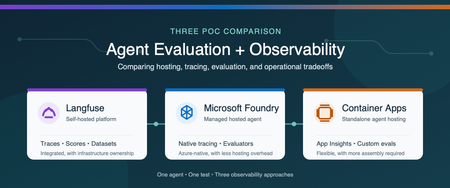
Why evaluation and observability belong together Agent evaluation and observability answer two related questions: Is the agent producing the right result? What happened from the initial request through every model and tool call? Evaluation measures quality with repeatable scores (is our system working), such as task completion, tool-call accuracy, groundedness, or safety. Observability captures the end-to-end execution flow, including prompts, model responses, tool calls, latency, token usage, and errors. You need both. A score can tell you that an agent failed, while a trace helps you understand why. Microsoft provides several ways to host and monitor agents. You can use a Microsoft Foundry hosted agent with integrated tracing and evaluation, or run the agent independently on a service such as Azure Container Apps and connect it to Azure Monitor. Open-source platforms such as Langfuse provide another option and can be self-hosted in Azure. We built three proofs of concept (POCs) to compare these approaches: Self-hosted Langfuse A Microsoft Foundry hosted agent A standalone agent on Azure Container Apps The best choice depends on more than features. Authentication, networking, security boundaries, operational ownership, and the existing Azure architecture all affect the decision. Note These findings come from one controlled comparison, not a general performance benchmark. We used the same agent image, model deployment, prompt, tools, and synthetic test data in all three POCs. The common test The test agent summarized a synthetic portfolio. It had to call three deterministic tools in a fixed order: Load the dataset Validate its schema Compute the summary The expected answer was known in advance, which allowed us to evaluate both the final result and the tool trajectory. We also created a deterministic tool-call-accuracy score so we could compare how each platform stored and displayed the same custom metric. POC 1: Self-hosted Langfuse For the Langfuse POC, one private Azure virtual machine ran the agent and the Langfuse stack with Docker Compose. The deployment included Langfuse web and worker services, PostgreSQL, ClickHouse, Redis, MinIO, and an OpenTelemetry Collector. Azure Bastion provided private administrative access, and a managed identity retrieved secrets from Azure Key Vault. The main advantage was the integrated experience. Traces, scores, datasets, experiments, annotations, latency, token usage, and cost appeared in one application. We could move from the original prompt to each tool call, the final response, and the evaluation score without building a separate dashboard. That capability comes with operational responsibility. A production self-hosted deployment requires patching, scaling, backup, recovery, data retention, access control, and monitoring for the Langfuse services and their data stores. Choose this approach when a unified, open-source AI engineering platform and deployment control are higher priorities than minimizing platform operations. POC 2: Microsoft Foundry hosted agent For the Foundry POC, Microsoft Foundry hosted the agent from a pinned container image. Application Insights and Log Analytics stored the telemetry. We used Foundry's Traces experience for agent trajectories and added an Azure Workbook for custom evaluation metrics. Foundry provided the strongest Azure-native developer experience. Its trace view displayed model and tool activity as an agent trajectory, and its evaluation capabilities included built-in and custom evaluators. The underlying traces still flowed to Application Insights, where they could be queried and used in Azure Monitor visualizations. The tradeoff is architectural alignment. The application must fit the customer's Foundry account, identity, networking, and deployment model. Custom business metrics can also require additional emission and visualization work beyond the native evaluation experience. Choose this approach when managed agent hosting, Foundry-native tracing, and Azure-native evaluation are the priorities. POC 3: Standalone agent on Azure Container Apps For the third POC, we removed Foundry from the hosting path. The same image ran as an Azure Container App and used a managed identity to pull from Azure Container Registry and call Azure OpenAI. OpenTelemetry sent agent activity to Application Insights and Log Analytics. This POC demonstrated that the Azure Monitor foundation is not limited to Foundry-hosted agents. Application Insights still provided an end-to-end transaction waterfall showing model calls, tool executions, latency, and errors, along with agent-level monitoring views. The difference was the amount of assembly required. The team owns application instrumentation, the evaluation runner, custom metric emission, dashboards, and CI integration. The result offers more control over hosting, authentication, ingress, and network placement, but it requires more engineering than the Foundry-native experience. Choose this approach when the agent must fit an existing container platform or custom security architecture and the team is prepared to build the evaluation workflow around it. Side-by-side comparison Decision area Langfuse Foundry hosted agent Azure Container Apps Agent hosting Customer-operated in this POC Microsoft-managed hosted agent Customer-managed container app Primary trace experience Native Langfuse tracing Foundry Traces plus Application Insights Application Insights Evaluation Native scores, evaluators, datasets, and experiments Foundry built-in and custom evaluators Custom runner or separate evaluation service Custom metrics Native scores and dashboards Emit to Azure Monitor and visualize as needed Emit to Azure Monitor and visualize as needed Infrastructure ownership Highest Lowest for agent hosting Moderate Architecture flexibility High, but the platform must be operated Aligned to Foundry architecture Highest for the application hosting layer Best fit Integrated open-source AI engineering platform Managed Azure-native agent experience Existing container and security architecture What we learned All three approaches can support meaningful evaluation and observability. The real difference is where the capabilities live and how much the customer must assemble and operate. Langfuse provided the most integrated tracing and evaluation experience in this comparison, but we owned the platform infrastructure. Foundry reduced hosting operations and provided a purpose-built agent trace and evaluation experience. Azure Container Apps provided the greatest hosting flexibility while preserving Azure Monitor observability, but required us to supply the evaluation and custom visualization layers. Because all three POCs used the same model, prompt, and tool sequence, the LLM token cost for an equivalent run was effectively the same. Platform and infrastructure costs were not equivalent and require a separate estimate based on scale, retention, networking, support, and operational requirements. The decision should start with the customer's constraints: Does the agent fit the Foundry hosting and identity model? Does the organization want to operate an open-source observability platform? Does the agent need to run inside an existing container and network architecture? Which evaluation capabilities must be available before deployment and in production? Who will own instrumentation, dashboards, storage, upgrades, and incident response? There is no single correct platform for every agent. The right choice is the one that provides the required evidence about quality and behavior while fitting the customer's security, architecture, and operating model. Learn more Set up tracing for agents in Microsoft Foundry Monitor AI agents with Application Insights Review Microsoft Foundry agent evaluators Collect OpenTelemetry data in Azure Container Apps Explore Langfuse observability Explore Langfuse evaluation Deploy Langfuse on Azure494Views2likes0CommentsSending Email from an AKS Pod Without a Single Secret
The problem You have a workload running in AKS that occasionally needs to send an email — a notification, an alert, a report. The obvious options all come with baggage: An SMTP relay means yet another credential to store, rotate, and eventually leak. A shared "app password" mailbox account means an identity nobody really owns, that can authenticate as itself forever. Granting Mail.Send as a Microsoft Graph application permission is tempting — until you realize it lets your app send email as any mailbox in the entire tenant, not just the one you intended. This post walks through a pattern that avoids all three: Azure Workload Identity for the pod, Microsoft Graph for sending, and Exchange Online RBAC for Applications to scope the identity down to exactly one authorized mailbox. No secrets stored anywhere in the cluster, and no tenant-wide send permission. Architecture Pod (AKS) -- federated OIDC token --> Workload Identity Workload Identity -- client_credentials + client_assertion--> Microsoft Entra ID Entra ID -- access token (aud=Graph) --> Pod Pod -- POST /v1.0/users/{sender}/sendMail (Bearer token)--> Microsoft Graph --> Exchange Online The pod never handles a password or a client secret. It reads a federated identity token that Azure Workload Identity's webhook mounts automatically, exchanges it with Entra ID for a Graph access token, and calls sendMail directly. The only thing that determines which mailbox it's allowed to send as is a role assignment on the Exchange Online side — not anything configured in Kubernetes. Step 1 — Get a Workload Identity bound to your namespace This is a platform-team request, not something you self-service from inside the cluster: you need a Managed Identity (or App Registration) with a Federated Identity Credential issued for your specific Kubernetes namespace and ServiceAccount subject. Give your platform/identity team: The target namespace (e.g. my-namespace) The target ServiceAccount name (e.g. my-mail-service-account) The intended use case (application email via Microsoft Graph) They hand you back a Client ID — that's all your manifest needs. One important thing to not ask for: don't request the Graph Mail.Send application permission on this identity. That permission, if granted directly in Entra ID, is unscoped — it lets the identity send as anyone. The actual sending restriction is going to live in Exchange, not in Entra ID (see Step 2). Step 2 — Restrict sending to one mailbox with Exchange Online RBAC for Applications Microsoft's currently recommended way to scope application email-sending rights is RBAC for Applications in Exchange Online — the modern replacement for the deprecated Application Access Policies. The short version: The Managed Identity gets no unscoped Graph Mail.Send grant in Entra ID. (Entra ID and Exchange RBAC authorizations are additive — if you leave an unscoped grant in place, it defeats the whole point.) Exchange Online registers a pointer to the Managed Identity's service principal (New-ServicePrincipal), then assigns it the Application Mail.Send role, scoped to a Management Scope that resolves to exactly one mailbox (or one security group of mailboxes). The identity can now call /users/{authorized-mailbox}/sendMail and get a 202. Any other mailbox returns 403. This part is usually owned by whoever administers your Exchange Online tenant, not by the application team — it's a five-minute PowerShell runbook for them (New-ManagementScope, New-ServicePrincipal, New-ManagementRoleAssignment), fully documented in Microsoft's RBAC for Applications docs. For reference, here's the actual runbook: # 0. Make sure no unscoped Graph Mail.Send grant exists on the identity first $mi = Get-EntraServicePrincipal -ServicePrincipalId $MiObjectId $graphSp = Get-EntraServicePrincipal -Filter "appId eq '00000003-0000-0000-c000-000000000000'" $mailSendRole = $graphSp.AppRoles | Where-Object { $_.Value -eq "Mail.Send" -and $_.AllowedMemberTypes -contains "Application" } Get-EntraServicePrincipalAppRoleAssignment -ServicePrincipalId $mi.Id | Where-Object { $_.ResourceId -eq $graphSp.Id -and $_.AppRoleId -eq $mailSendRole.Id } | ForEach-Object { Remove-EntraServicePrincipalAppRoleAssignment -ServicePrincipalId $mi.Id -AppRoleAssignmentId $_.Id } # 1. Connect to Exchange Online Connect-ExchangeOnline # 2. Scope to exactly one mailbox (filter on ExternalDirectoryObjectId, not SMTP address) $mbx = Get-EXORecipient -Identity $AllowedMailbox -Properties ExternalDirectoryObjectId New-ManagementScope -Name $ScopeName ` -RecipientRestrictionFilter "ExternalDirectoryObjectId -eq '$($mbx.ExternalDirectoryObjectId)'" # 3. Register the service principal pointer (this is NOT a new identity, just a reference) $exoSp = New-ServicePrincipal -AppId $MiAppId -ObjectId $MiObjectId -DisplayName $MiDisplayName # 4. Assign exclusively Application Mail.Send, scoped New-ManagementRoleAssignment -Name $AssignmentName ` -App $exoSp.ObjectId -Role "Application Mail.Send" -CustomResourceScope $ScopeName # 5. Validate both directions Test-ServicePrincipalAuthorization -Identity $exoSp.ObjectId -Resource $AllowedMailbox # expect InScope = True Test-ServicePrincipalAuthorization -Identity $exoSp.ObjectId -Resource $BlockedMailbox # expect InScope = False Two things that trip people up here: -App in step 3/4 expects the Object ID of the Enterprise application / service principal, not the App Registration object — and never fall back to Application Mail Full Access or an exclusive management scope, since Microsoft explicitly notes exclusive scopes don't restrict application access. Worth calling out explicitly: this RBAC scope restricts the sender only. It has no concept of a recipient allowlist. Once your identity is authorized to send as a mailbox, it can send to anyone, inside or outside your tenant. If you need recipient-side restrictions, that has to be application logic — Exchange RBAC won't do it for you. Step 3 — The Kubernetes manifest Three resources: a ServiceAccount annotated with the Client ID from Step 1, a ConfigMap holding the send script, and a Deployment that mounts it. Here's the complete manifest: --- apiVersion: v1 kind: ServiceAccount metadata: annotations: azure.workload.identity/client-id: <CLIENT-ID-FROM-YOUR-IDENTITY-TEAM> name: my-mail-service-account namespace: my-namespace --- apiVersion: v1 kind: ConfigMap metadata: name: send-email namespace: my-namespace data: send-email.sh: | #!/bin/bash set -euo pipefail if [ $# -lt 2 ]; then echo "Usage: $0 <sender-email> <recipient-email> [recipient-email...]" exit 1 fi SENDER_EMAIL="$1" shift RECIPIENTS=("$@") TENANT_ID="${AZURE_TENANT_ID:-}" CLIENT_ID="${AZURE_CLIENT_ID:-}" FEDERATED_TOKEN_FILE="${AZURE_FEDERATED_TOKEN_FILE:-}" if [ -z "$TENANT_ID" ] || [ -z "$CLIENT_ID" ] || [ -z "$FEDERATED_TOKEN_FILE" ]; then echo "ERROR: Workload Identity variables not set" exit 1 fi FEDERATED_TOKEN=$(cat "$FEDERATED_TOKEN_FILE") TOKEN_RESPONSE=$(curl -s -X POST \ "https://login.microsoftonline.com/${TENANT_ID}/oauth2/v2.0/token" \ -H "Content-Type: application/x-www-form-urlencoded" \ -d "client_id=${CLIENT_ID}" \ -d "scope=https://graph.microsoft.com/.default" \ -d "client_assertion_type=urn:ietf:params:oauth:client-assertion-type:jwt-bearer" \ -d "client_assertion=${FEDERATED_TOKEN}" \ -d "grant_type=client_credentials") ACCESS_TOKEN=$(echo "$TOKEN_RESPONSE" | grep -o '"access_token":"[^"]*' | cut -d'"' -f4) if [ -z "$ACCESS_TOKEN" ]; then echo "ERROR: Failed to get token" echo "$TOKEN_RESPONSE" exit 1 fi RECIPIENTS_JSON="" for r in "${RECIPIENTS[@]}"; do if [ -n "$RECIPIENTS_JSON" ]; then RECIPIENTS_JSON="${RECIPIENTS_JSON}," fi RECIPIENTS_JSON="${RECIPIENTS_JSON}{\"emailAddress\":{\"address\":\"${r}\"}}" done cat > /tmp/email.json <<EOF { "message": { "subject": "Test from AKS", "body": { "contentType": "Text", "content": "Test email from Workload Identity" }, "toRecipients": [${RECIPIENTS_JSON}] }, "saveToSentItems": "true" } EOF HTTP_CODE=$(curl -s -w "%{http_code}" -o /tmp/response.json \ -X POST "https://graph.microsoft.com/v1.0/users/${SENDER_EMAIL}/sendMail" \ -H "Authorization: Bearer ${ACCESS_TOKEN}" \ -H "Content-Type: application/json" \ -d @/tmp/email.json) if [ "$HTTP_CODE" -eq 202 ]; then echo "Email sent successfully" else echo "ERROR: HTTP ${HTTP_CODE}" cat /tmp/response.json exit 1 fi --- apiVersion: apps/v1 kind: Deployment metadata: name: debug-deployment namespace: my-namespace labels: app: debug azure.workload.identity/use: "true" # Required. Only pods with this label can use workload identity. spec: replicas: 1 selector: matchLabels: app: debug template: metadata: labels: app: debug azure.workload.identity/use: "true" # Required. Only pods with this label can use workload identity. spec: serviceAccount: my-mail-service-account serviceAccountName: my-mail-service-account containers: - name: debug image: <your-registry>/az-init:0.1 command: ["sleep", "3600"] readinessProbe: exec: command: ["ls"] livenessProbe: exec: command: ["ls"] resources: requests: memory: "256Mi" cpu: "250m" limits: memory: "512Mi" cpu: "500m" volumeMounts: - name: script mountPath: "/script" volumes: - name: script configMap: name: send-email defaultMode: 0555 Two details that will bite you if you skip them: /me/sendMail doesn't work here. In a client_credentials flow (app-only, no signed-in user), /me returns 400 BadRequest: /me request is only valid with delegated authentication flow. You must call /users/{sender}/sendMail and name the sender explicitly. configMap.defaultMode matters. 0500 only grants execute to the file's owner (root); if your container runs as non-root, you'll get a Permission denied on exec. Use 0555. Step 4 — Test it kubectl apply -f email-pod.yaml kubectl exec -n my-namespace -it deploy/debug-deployment -- \ /script/send-email.sh authorized-sender@yourcompany.com \ recipient1@yourcompany.com recipient2@yourcompany.com A 202 and Email sent successfully means it worked. Try it again with a sender mailbox that isn't in your RBAC scope — you should get a clean 403. If you don't, go back and check that no unscoped Graph Mail.Send grant is still sitting on the identity in Entra ID; that's the most common way this containment silently fails. Conclusion This solution addresses an application email-sending need without introducing static credentials into the cluster or broadening permissions beyond what is strictly necessary. Full cloud, with no on-premises dependency or manually managed secret: No password, API key, or certificate is stored in Kubernetes (Secret, ConfigMap, or anywhere else). Authentication relies entirely on OIDC federation between the Kubernetes ServiceAccount and Microsoft Entra ID (Workload Identity) — the federated token is issued and mounted automatically by the webhook, never manually generated or distributed. The entire authentication and sending chain (Entra ID, Microsoft Graph, Exchange Online) goes through Microsoft-managed HTTPS endpoints; no on-premises component is involved in the application path (section A.3 covers a pitfall related to Exchange hybrid setups on the target mailbox side, not the authentication path itself). Provisioning the sender mailbox and the RBAC configuration are themselves managed natively within Microsoft 365 / Exchange Online, with no extra script or infrastructure to maintain on the client side. Secure by design (least privilege): The OIDC federated token is short-lived (limited lifetime, automatically renewed by the webhook) and scoped to the my-mail-service-account ServiceAccount in the my-namespace namespace — it cannot be reused outside this specific context. No tenant-wide Microsoft Graph Mail.Send permission is granted to the identity: without this precaution, the identity could send as any mailbox in the tenant. Exchange Online RBAC for Applications carries the real authorization, strictly scoped to the mailboxes that are members of the dedicated Exchange group. The containment is verified both positively and negatively before going to production — not only tested on the case that must succeed. Known and documented limitation: this RBAC model restricts only the sender, never the recipient — application-side control is still required if recipient restriction is ever needed. See You in the Cloud JamesdldHow Azure uses AI to turn feedback into improved customer experience
Authors: eshaanbhattad, jenniferjhan, lakshminarasimha, bharadwajr The Challenge: Synthesizing fragmented feedback signals, to improve Azure's experience quality at scale Customers experience products and services end to end, but product experiences are often structured around individual service. One team may only know its top issues, while another may see only its own slice of experience. That structure makes it difficult to identify cross-cutting friction across the broader product experience. The feedback signals themselves are also fragmented. Customers share feedback through in-product surveys, support cases, field conversations, and social channels. Most product teams can see only part of that picture, making it hard to distinguish isolated comments from meaningful trends, understand which issues were having the greatest impact, and avoid missing critical feedback. For the Azure team, the challenges of fragmentation were amplified by scale. The team processed roughly 10,000 to 15,000 customer feedback reports each month, and synthesizing that feedback required 80 to 100 hours of expert analysis. Additional effort was needed to translate findings into consistent engineering work items. As feedback volume grew, manual analysis became increasingly unsustainable creating delays in identifying and addressing customer priorities. Compounding the challenge was the absence of an effective feedback loop to measure the impact of quality improvements. Teams struggled to justify investments in quality over new features because the return on those investments was difficult to quantify. The absence of a closed-loop measurement system made it difficult to consistently assess the customer impact of quality improvements. The team needed a system that could operate across organizational boundaries and across the product development lifecycle: Identify the most critical customer issues across fragmented feedback channels and product areas. Convert those insights into actionable engineering work, help teams address issues effectively, and measure outcomes to close the loop. The solution needed to preserve team-specific context, maintain auditability, continuously improve through feedback, and keep human experts in control of decisions that require judgment. To address these challenges, Microsoft launched the Great Experiences Matter (GEM) initiative. GEM is designed to analyze feedback signals in aggregate, with access controls and privacy safeguards designed to limit exposure of customer-identifiable information while helping teams identify patterns across channels. The Solution: an agentic feedback-to-fix loop with humans in control GEM created an AI-enabled feedback-to-fix workflow that connects customer listening, engineering action, and impact measurement across the product development lifecycle. The workflow uses Microsoft Foundry, Azure Data Explorer, Microsoft Fabric, Azure DevOps, and a set of custom agents to transform large volumes of qualitative feedback into prioritized insights and actionable engineering work. Fig 1. GEM AI-enabled automation workflow The system closes the loop through two connected motions. Find. Agentic workflows remove noise and duplicate reports, assess relevance and actionability, classify feedback against known issues from UX research, cluster related issues, and surface likely root causes. GEM builds on years of deep end-to-end UX research that has identified systemic friction across customer journeys and product boundaries. By continuously triangulating GEM signals with ongoing research, we combine broad, scalable listening with deep human insight to inform a more cohesive Azure experience. The results are surfaced through global scorecards for cross-cutting Azure issues and vertical scorecards tailored to individual product teams. Fig 2. GEM Global scorecard of top issues with Azure, data has been fictionalized to protect intellectual property Fix. The workflow creates Azure DevOps work items with the customer context, likely reproduction steps, recommended next actions, and an auditable trace of the supporting analysis. To date, 42% of the identified issues have been addressed through engineering action. The team is also extending an AI-assisted engineering workflow, using GitHub Copilot cloud agent, that can generate proposed fixes for straightforward issues. Engineers remain responsible for reviewing, refining, approving, and shipping any changes. The architecture is designed for inspection rather than blind automation. The recommendations include an auditable evidence trail allowing reviewers to inspect the source feedback, classifications, supporting references, confidence indicators, and recommendation actions. Human expertise enters the system at several points. Researchers shape the issue taxonomies and qualitative grounding. Product teams define ownership boundaries, business priorities, domain-specific vocabulary, and trusted sources that guide agent analysis. Engineers review and act on resulting work items, while leaders use scorecards to inform investment decisions. This context is captured in configuration files that evolve alongside the products they support. Teams can add new issue categories, refine keywords, clarify ownership boundaries, or identify trusted research sources. The next analysis cycle automatically incorporates the updated context without requiring changes to the underlying agents. That design creates a "feedback loop for the feedback loop". Teams review the root-cause analyses and work-item quality, identify gaps, and refine their configurations. This enables teams to continuously embed domain expertise into the workflow, improving how feedback is interpreted and prioritized without requiring changes to the underlying infrastructure. Their input improves subsequent runs, helping the system become more precise while preserving local product knowledge. The agent also maintains access to reports from previous runs and uses tools such as Web IQ and MCP servers to assess whether previously identified issues are improving, still require attention, or can be confidently closed. Fig 3. Example of the vertical feedback agent reasoning through customer feedback to find new work items One demonstrated example surfaced customer reports that a networking tool lacked IPv6 validation and support. The workflow generated an engineering work item describing the issue, customer impact, likely reproduction path, and recommended actions. The networking team reproduced the issue, validated the finding, and added it to its backlog. The goal is not to remove people from the process. Agents assume much of the cognitive load associated with sorting, clustering, tracing, and drafting, allowing experts to focus on judgment, prioritization, and implementation. Teams remain accountable for what is fixed, what is funded, and what is allowed to ship. The Impact: measurable experience gains at Microsoft production scale GEM began with manual interventions and is now scaling through AI-enabled workflows. The combined approach has produced measurable results across the Azure Portal and individual product experiences: The workflow aggregates and analyzes approximately 10,000 to 15,000 feedback reports each month across in-product, support, and social channels. Automated analysis reduced manual synthesis time by over 95 percent, turning a process that required 110 to 160 hours each month into a workflow that runs in under 60 minutes. Between October 2025 and April 2026, Azure Portal feedback rates declined by 30%. During that same period, GEM helped teams identify and prioritize experience improvements, creating a clearer link between customer feedback, engineering action, and outcome measurement. Service-level outcomes also demonstrate how better signals can drive business impact. For example, improvements to VM Connect experiences reduced overall Core Compute support volume by 1-2% per month, resulting in proportionate cost savings. The Azure Growth team increased subscription conversion by 9.1 percent after prioritizing issues highlighted through GEM. The value goes beyond speed. Leaders gain a more consistent basis for prioritization, and engineering teams receive work that is already connected to customer evidence and impact signals. Most importantly, every completed cycle creates new learning. Teams can measure changes in customer feedback and support volumes following improvements, incorporate partner input into future analyses, and continuously refine both the system and the products it helps improve. Key learnings and transferable practices The GEM experience offers several lessons for teams building agentic systems around complex, qualitative business processes: Start with real problems, not AI - Value comes from understanding the genuine business needs and applying AI where it is demonstrably better than existing approaches. Applying AI without a clearly defined problem often adds complexity without delivering meaningful value. Design for the end-to-end workflow - Value comes from connecting insights to the broader business process, including grounding in prior knowledge, prioritization, engineering action, post-fix measurement and reporting. Standalone AI output creates limited value, while an integrated workflow drives outcomes. Design for human judgment and accountability - Agents can reduce toil and cognitive load, but researchers, product managers, engineers, and leaders remain responsible for validating insights and determining appropriate actions. Ground agents in the knowledge of the teams they serve - Shared models require local context. Editable configuration files allow teams to define ownership, business priorities, releases, examples, and trusted sources without modifying underlying agents. Build observability and feedback mechanisms into the agentic system itself - Making analysis inspectable through reasoning traces, source context, and recommendations enables experts to identify gaps, improve outputs, and build trust over time. Build feedback mechanisms directly into the flow of work, making it effortless for users to provide input on the system. Tailor outputs to the people making decisions - Executives need trends and investment signals. Researchers need evidence and themes. Engineers need reproducible, actionable work. Effective systems deliver the right information to the right audience. Start small and iterate quickly - The AI landscape continues to evolve rapidly. Begin with a well-defined problem, measure outcomes, learn from feedback, and iterate as capabilities mature. Looking forward GEM continues to scale across the Azure Portal ecosystem. In addition to the global scorecard, vertical scorecards are now live with seven teams, expanding to the top 20 portal extensions representing more than 80% of portal traffic and feedback, with longer-term plans to extend coverage across the entire ecosystem. The roadmap includes expanded feedback ingestion, streamlined work-item tracking, AI-assisted remediation workflows, stronger evaluation, and a self-improving architecture. Proposed fixes would remain subject to engineer review, approval, and standard release controls before deployment. GEM is also developing AI-assisted pre-release governance workflows for production code that help identify potential quality issues during development. We will share more about these pre-release workflows in a future post. New tools and models will continue to evolve, but the enduring principle remains the same: combine enterprise-scale automation with clear ownership, trusted grounding, and human control. For Microsoft, Customer Zero means deploying these systems in real production environments, learning from the complexities, and sharing those lessons broadly. GEM shows what becomes possible when AI does more than summarize feedback. It helps an organization listen, act, measure outcomes, and continuously learn at customer scale. Microsoft's Customer Zero blog series gives an insider view of how Microsoft builds and operates Microsoft using our trusted, enterprise-grade agentic platform. Learn best practices from our engineering teams through real-world lessons, architectural patterns, and operational strategies for building, operating, and scaling AI-powered systems across the organization.1.1KViews2likes0CommentsWiring Azure DevOps Pipeline Templates Without the Parameter Sprawl: The Manifest Facade Pattern
Where reusable pipelines start to hurt Who this is for: Platform and DevOps engineers who build shared Azure DevOps Pipeline Templates and want other teams to adopt them consistently. If you have ever built a set of shared Azure DevOps Pipeline Templates, you probably know how this goes. You write a whole library of clean, well-factored templates: provisioning infrastructure, deploying apps, scanning, promotion, and more. Each one is tidy on its own. Then the first team tries to actually use them together, and things get messy fast. That is exactly what happened to us on a customer engagement, while building a DevOps framework for their engineering teams. The templates themselves were fine. The trouble was wiring them together. Every consumer pipeline had to know how to call each template it used: the right order, which values one template fed another, and the full parameter list for every one of them. As the library grew, those consumer pipelines grew with it, long and repetitive. That friction turned into a real adoption problem. Getting started meant wading through pages of parameters, so teams put it off, copied whatever the team next door had, or quietly built their own thing instead. This post follows that story, from the tangle of parameters to the solution we landed on. Here is how it comes together. Where we started: Good templates, hard to adopt The DevOps framework we built had many templates. To keep this walkthrough concrete, we will follow just two of them: one that provisions infrastructure with Terragrunt (a wrapper around Terraform), and one that deploys an app to Kubernetes with Helm. Both are trimmed down to the essentials here so they are easy to follow. The infrastructure template, templates/infra/terragrunt-deploy.yml : parameters: - name: stack type: string - name: workingDir type: string steps: - script: | cd ${{ parameters.workingDir }} terragrunt plan -out=tfplan terragrunt apply -auto-approve tfplan displayName: "Deploy ${{ parameters.stack }}" The application template, templates/app/helm-deploy.yml : parameters: - name: releaseName type: string - name: chart type: string - name: namespace type: string - name: imageTag type: string steps: - script: | helm upgrade --install ${{ parameters.releaseName }} ${{ parameters.chart }} \ --namespace ${{ parameters.namespace }} \ --set image.tag=${{ parameters.imageTag }} displayName: "Deploy ${{ parameters.releaseName }}" There is nothing wrong with either file. The pain showed up in the pipeline that had to use them, where a team had to stitch the templates together by hand, remember the order, and repeat that boilerplate for every environment. Do that across a dozen services and you get long, copy-pasted pipelines that teams struggle to adopt. And because the wiring is done by hand, it leaves loopholes: a team can skip a step or override a parameter and slip past the guardrails you thought were in place. Challenge 1: Wiring the templates together The obvious move was to hide the wiring behind a single template that owned the order and the plumbing. We called it the orchestrator template: a consumer pipeline called that one template, and it wired up the rest. # templates/deployment-orchestrator.yml (the single orchestrator) parameters: - name: infraStack type: string - name: infraWorkingDir type: string - name: releaseName type: string - name: chart type: string - name: namespace type: string - name: imageTag type: string # ...and this list just kept growing stages: - stage: Infra jobs: - job: infra steps: - template: infra/terragrunt-deploy.yml parameters: stack: ${{ parameters.infraStack }} workingDir: ${{ parameters.infraWorkingDir }} - stage: App dependsOn: Infra jobs: - job: app steps: - template: app/helm-deploy.yml parameters: releaseName: ${{ parameters.releaseName }} chart: ${{ parameters.chart }} namespace: ${{ parameters.namespace }} imageTag: ${{ parameters.imageTag }} A team used it by calling that one template and passing a value for every parameter it exposed: # azure-pipelines.yml (a team's pipeline) parameters: - name: imageTag type: string extends: template: templates/deployment-orchestrator.yml parameters: infraStack: network infraWorkingDir: infra/network releaseName: orders-api chart: charts/orders-api namespace: orders imageTag: ${{ parameters.imageTag }} # ...and a value for every other parameter, too This solved the ordering and the copy-paste, but it handed us a new headache. This one template now had to expose every parameter of every template underneath it, and the list grew each time we added a capability. Worse, a real service usually needed more than one infrastructure stack and more than one Helm release. A flat list of parameters cannot express “two infrastructure stacks and three Helm releases” without silly names like infraStack1 , infraStack2 , and so on. Nobody could learn the thing. We had solved the wiring, only to trade it for a parameter problem. Challenge 2: The orchestrator’s parameter list explodes So how do you shrink that list? Step back and ask what you are really describing: a set of things to deploy. So the input should describe that set, not a long flat list of loose values. That is where the deployment manifest came in: one small config that lists the infrastructure to create and the apps to deploy. It reads about how you would expect: infrastructure: - stack: network workingDir: infra/network applications: - releaseName: orders-api chart: charts/orders-api namespace: orders Now the orchestrator can take that single manifest and loop over it, instead of exposing dozens of separate parameters. Its parameter list collapses to one, and a ${{ each }} loop turns each entry into a stage or job: # templates/deployment-orchestrator.yml (the orchestrator, now manifest-driven) parameters: - name: manifest type: object - name: imageTag type: string stages: - stage: Infra jobs: - ${{ each stack in parameters.manifest.infrastructure }}: - job: infra_${{ stack.stack }} steps: - template: infra/terragrunt-deploy.yml parameters: stack: ${{ stack.stack }} workingDir: ${{ stack.workingDir }} # ...an App stage loops over parameters.manifest.applications the same way And a consumer passes that manifest straight to the orchestrator: # azure-pipelines.yml (a team's pipeline) parameters: - name: imageTag type: string extends: template: templates/deployment-orchestrator.yml parameters: imageTag: ${{ parameters.imageTag }} manifest: infrastructure: - stack: network workingDir: infra/network applications: - releaseName: orders-api chart: charts/orders-api namespace: orders The parameter problem is solved. But hand-writing that whole manifest inside every pipeline is a lot to repeat, so the natural instinct is to pull it out into its own file. That is where things get tricky. Challenge 3: The manifest is read too late to shape the pipeline So we tried exactly that: we moved the manifest into a deployment-manifest.yml file and had the orchestrator read it back and expand it into stages and jobs. It sounded reasonable, but it did not work. To see why, you need to know how Azure DevOps builds a pipeline before it runs anything. An Azure DevOps pipeline actually happens in two phases, and they are further apart than people expect. First comes the build phase, before anything runs. Azure DevOps reads your YAML, pulls in every template, evaluates every ${{ }} expression, and unrolls every ${{ each }} loop. Out of this it produces one final, fully assembled pipeline. At this point no agent has started and no repo has been checked out. Only parameters and template expressions exist yet. Then comes the run phase. The assembled pipeline runs. An agent starts, checks out your code, and only now can a script open a file on disk. Here is the problem. Your deployment-manifest.yml does not exist as far as the pipeline is concerned until an agent checks out the repo, and that checkout happens during the run phase. So if the manifest is supposed to decide how many stages there are, or how many apps each get their own job, that decision has to be made earlier, while the pipeline is still being built. Important: The shape of the pipeline, its stages, jobs, and loops, is locked in while the pipeline is being built. A file you read during the run comes too late to change any of it. That was the wall we hit. The manifest was the right idea, but reading it from a file happened too late for the orchestrator to turn it into stages and jobs. So the manifest could not come from a file read during the run phase. It had to already exist, as an object, before the pipeline was assembled. The Manifest Facade pattern: Build the config while the pipeline is assembled The solution is to stop thinking of the manifest as a file to read, and start thinking of it as an object you build while the pipeline is being assembled. Parameters are available then. Template expressions can build a whole object then. So we added a small template, kept in the team’s own repo, with one job: take a couple of simple inputs, build the full manifest from them, and pass it to the shared orchestrator. We called it the builder, since assembling the manifest is its only job. It stays thin and lives next to the team’s pipeline, while the orchestrator stays in the shared platform repo. This is not a brand-new invention so much as a few familiar ideas working together, applied at pipeline build time. The manifest is a Parameter Object (Martin Fowler’s refactoring for collapsing a long parameter list into one structured value). The orchestrator is a Facade (the Gang of Four pattern for putting one simple, unified interface over a subsystem, here the underlying leaf templates). And the small template in the team’s repo is the piece that assembles that Parameter Object from a couple of inputs. What makes it an Azure DevOps pattern is the timing: the manifest is built as an object while the pipeline is assembled, so it can drive template expansion instead of sitting in a file that only gets read during the run. That is the twist we did not see written down anywhere, so we gave it a name: the Manifest Facade pattern. In practice it comes together in three small pieces: the consumer pipeline references the builder, the builder assembles the manifest and hands it to the shared orchestrator, and the orchestrator expands that manifest into stages and jobs. Here is how the files extend into one another: Here is each piece in turn. Step 1: The consumer references the builder The consumer pipeline extends the builder that lives in its own repo. It also declares the shared platform repo as a resource, so the orchestrator the builder calls is available while the pipeline is built. # azure-pipelines.yml (the team's pipeline) parameters: - name: imageTag displayName: Image tag type: string resources: repositories: - repository: platform type: git name: platform/pipeline-templates ref: refs/tags/v1.0.0 trigger: - main extends: template: config/deployment.yml@self parameters: environment: dev service: orders imageTag: ${{ parameters.imageTag }} Because the image tag is a runtime parameter, it is declared here in the consumer pipeline, which is what makes it appear in the Run pipeline panel for someone to fill in. Beyond that, the team passes only an environment and a service name, and the builder works out the rest. Step 2: The builder assembles the manifest The builder takes those inputs and assembles the whole manifest from them, then hands it to the orchestrator. Every structural value here is a parameter or a template expression, so all of it is ready while the pipeline is being assembled. # config/deployment.yml (builder, in the team's repo) parameters: - name: environment type: string - name: service type: string - name: imageTag type: string extends: template: deployment-orchestrator.yml@platform parameters: imageTag: ${{ parameters.imageTag }} manifest: schemaVersion: v1 infrastructure: - stack: network workingDir: infra/${{ parameters.environment }}/network applications: - releaseName: ${{ parameters.service }} chart: charts/${{ parameters.service }} namespace: ${{ parameters.service }} The builder assembles the manifest inline from the environment and service, then passes it straight to the orchestrator. The image tag is different: it is a runtime parameter the user supplies at queue time, so it is passed through to the orchestrator template and never becomes part of the manifest. The team gets a tiny interface, and the orchestrator still gets the full structure it needs. Step 3: The orchestrator turns the config into stages and jobs The orchestrator takes a single object and loops over it with ${{ each }} . Each stage and job gets generated while the pipeline is assembled. # deployment-orchestrator.yml (shared platform repo) parameters: - name: manifest type: object - name: imageTag type: string stages: # a ValidateManifest stage runs first (covered in the next section) - stage: Infra jobs: - ${{ each stack in parameters.manifest.infrastructure }}: - job: infra_${{ stack.stack }} steps: - template: infra/terragrunt-deploy.yml parameters: stack: ${{ stack.stack }} workingDir: ${{ stack.workingDir }} - stage: App dependsOn: Infra jobs: - ${{ each app in parameters.manifest.applications }}: - job: app_${{ app.releaseName }} steps: - template: app/helm-deploy.yml parameters: releaseName: ${{ app.releaseName }} chart: ${{ app.chart }} namespace: ${{ app.namespace }} imageTag: ${{ parameters.imageTag }} Because the manifest is a real object by the time the loops run, ${{ each }} unrolls it into actual jobs. List two stacks and you get two jobs. List two apps and you get two deploy jobs. And because the team only describes what to deploy, the sensitive wiring like service connections stays inside the platform templates, out of reach. The loophole is gone because the parameter is gone. Why the order of things matters The whole pattern comes down to who does what, and when. The builder turns a simple intent (“deploy orders to dev”) into a full manifest, while the pipeline is being assembled. The orchestrator turns that manifest into real stages and jobs, still while the pipeline is being assembled. Only the leaf templates do the real deployment work during the run: checkout, terragrunt apply , helm upgrade . Nothing about the shape of the pipeline waits for the run, so nothing about it depends on a file that only shows up after checkout. That is the whole trick. If you do have values you genuinely cannot know until the run, like a secret fetched from a vault or an artifact version an earlier stage writes to a variable, those still belong in runtime variables and variable groups. The manifest is for the structure and config you already know when you queue the build, which is almost always the part that was causing the pain. Validating the manifest against a schema Once the manifest became the one interface every team fills in, it needed a contract. We wrote that contract as a JSON Schema and kept it in the shared platform repo under schema/v1/ . The folder name is the version: backward-compatible additions go straight into v1 , and the day we need a breaking change we add a schema/v2/ alongside it, so existing consumers keep working while the schema evolves. Each manifest carries a schemaVersion so the orchestrator knows which contract to hold it to. On top of that, we validate in three layers, each catching a different class of mistake. Layer 1 is build time, for free. Because the orchestrator’s parameters are typed, with manifest declared as an object , Azure DevOps catches a range of structural problems while it expands the templates, before anything runs. For example, if a manifest left out infrastructure or misspelled it, the orchestrator’s ${{ each stack in parameters.manifest.infrastructure }} loop would have nothing valid to iterate over, and the failure would surface during template expansion rather than halfway through a deployment. Layer 2 is a version check that runs at build time. Both the ${{ if }} and parameters.manifest.schemaVersion are resolved while the pipeline is being assembled, so the orchestrator decides right then whether it understands the manifest’s version. If it does not, the only thing it generates is a single failing stage, and the real deployment stages are never built, so nothing runs against a contract the orchestrator does not know: # deployment-orchestrator.yml (shared platform repo) parameters: - name: manifest type: object stages: # Layer 2: reject schema versions this orchestrator does not understand - ${{ if not(containsValue(split('v1', ','), parameters.manifest.schemaVersion)) }}: - stage: UnsupportedSchemaVersion jobs: - job: fail steps: - script: | echo "##vso[task.logissue type=error]Unsupported manifest schemaVersion '${{ parameters.manifest.schemaVersion }}'" exit 1 # the ValidateManifest, Infra, and App stages below are generated only when the version is supported Layer 3 is a run-time check against the full schema. The first stage the orchestrator generates is ValidateManifest . Because the schema lives in the platform repo, the job checks that repo out first. Then it serializes the manifest object to JSON with the convertToJson expression, writes that JSON out to a file, and runs a JSON Schema checker to compare the file against the schema. If the manifest breaks the contract, the pipeline stops here, before any infrastructure or app stage runs: # Layer 3: validate the real manifest object against the JSON Schema - stage: ValidateManifest jobs: - job: validate steps: # the schema lives in the platform repo, so check it out first - checkout: platform - script: | echo '${{ convertToJson(parameters.manifest) }}' > manifest.json pip install check-jsonschema check-jsonschema --schemafile schema/${{ parameters.manifest.schemaVersion }}/deployment.schema.json manifest.json displayName: "Validate manifest against schema" Layer 1 is automatic, Layer 2 rejects an unknown contract at build time so the deployment stages are never generated, and Layer 3 confirms the actual values match the schema before any real work begins. Together they turn “the manifest looked right” into “the manifest is provably valid.” A few trade-offs to keep in mind No pattern comes without trade-offs. A few things worth weighing: The manifest has to be something template expressions can build. You can compose objects, loop, and branch with ${{ if }} , but there is no running arbitrary code while the pipeline is assembled. Anything fancier may need a prep step or a file generated upstream. Every team carries a small builder template. We think that is a fair trade, since it keeps their intent local and readable, but it is one more file per repo. Keep it thin and let the orchestrator hold the real logic. Treat the schema as living documentation. Because the manifest’s JSON Schema spells out every field and what it means, teams can read it to build their own manifest with confidence, instead of reverse-engineering the orchestrator. Pin the shared repo to a tag, like the v1.0.0 above, so a change to the orchestrator does not silently change everyone’s pipeline on the next run. Debugging takes a small shift in habit. When something looks off, use the pipeline’s preview to see the fully assembled YAML before it runs. It shows you exactly what the loops produced. Tip: Use the Azure DevOps pipeline preview to see the fully assembled YAML without running anything. It is the fastest way to confirm your manifest unrolled into the stages and jobs you expected. Wrapping up It is a journey a lot of platform teams will recognize. Clean templates, messy wiring, one orchestrator that fixes the order but drowns in parameters, a config file that brings back sanity, and then the surprise that reading it at the wrong moment means it can never shape the pipeline. The solution is small and it sticks. Put a thin builder template next to each team, let it assemble the manifest from a couple of simple inputs, and let a shared orchestrator turn that manifest into stages and jobs. Teams get an interface they can easily understand and adopt. The platform team keeps the wiring and the guardrails in one place. And the timing gap that trips up so many “just read the config file” attempts stops being a problem, because you are working with it instead of against it. Key takeaways Shared Pipeline Templates stall on adoption when every team has to wire them together by hand. A single orchestrator template fixes the ordering, but a flat parameter list does not scale to real adoption. A config file read during the pipeline run cannot shape the pipeline, because stages and jobs are decided earlier, while the pipeline is assembled. The Manifest Facade pattern builds the config as an object at assembly time, so one small input drives many templates, consistently and with the guardrails baked in. Give the manifest a versioned JSON Schema and validate it in layers, so a broken contract fails fast instead of halfway through a deployment. How are you handling template sprawl in your own pipelines? We would love to hear what has worked for your teams in the comments.711Views1like0Comments