copilot
85 TopicsUnderstanding GitHub Billing and management: from licenses to fair AI credit controls
Buying GitHub Copilot licenses is only the beginning of the governance story. The licenses are purchased centrally, but administrators still need to decide who receives a seat, how usage is attributed to the right part of the business, and what happens when included AI credits run out. Those decisions happen through several related controls: - Copilot seat assignment determines which people are licensed. - Cost centers group attributable usage around a team or business owner. - AI credit included usage caps create boundaries around included credits associated with a cost center's licenses. - Cost-center budgets govern paid usage after included credits are exhausted. - User-level budgets (ULBs) limit how much an individual can consume. Why does this separation matter? Without it, an administrator can easily mistake one control for another. An included usage cap does not set an overage policy, and a cost-center budget does not guarantee every person an equal share. Each control answers a different question. This article follows the complete flow, starting before a cost center exists and ending with different policies for Business and Developers, where we place them each in separate cost centers with distinct included-usage boundaries, paid-usage budgets, and ULBs. Problem 1: A central purchase does not identify who is licensed Our story starts with a purchase, but purchasing seats does not yet tell us who can use Copilot. This is the first problem to solve because cost centers, budgets, and AI credit controls all depend on GitHub knowing which named users actually hold eligible licenses. Suppose an enterprise purchases 400 Copilot seats for a workforce that includes 600 employees. The purchase creates a centrally managed pool of seats. It does not automatically license 400 unspecified people, nor does every developer receive a fraction of a license. At this point, the enterprise knows how many seats it owns, but it cannot yet connect those seats to people, teams, or cost centers. Solution: Assign seats to named users An administrator assigns those seats to specific users, either directly or through the supported administrative assignment process. At that point, GitHub can distinguish between: - A person who belongs to the enterprise but has no Copilot seat. - A person who has been assigned an eligible Copilot seat. - A licensed person whose usage is attributable to a particular cost center. This distinction matters because cost-center included credits are based on attributable eligible licenses, not raw headcount. For example, imagine a Developers cost center containing 200 people: Developers in the cost center Developers with eligible Copilot seats Licenses that can contribute to the calculation 200 200 200 200 120 120 200 0 0 The cost center does not receive an included-credit boundary based simply on having 200 members. GitHub looks at the eligible licenses attributable to those members and calculates the included amount from those licenses. > NOTE: The exact included-credit amount is calculated by GitHub according to the applicable licenses and product terms. Administrators do not manually divide the enterprise's included credits by cost-center headcount. Now the enterprise knows who is licensed. That solves entitlement, but it creates the next question: when those users consume AI credits, which part of the business owns that usage? Fig 1: A developer cost center Problem 2: Licensed usage has no business owner A list of licensed users is not yet a governance model. Finance and administrators still need to connect usage to the team, program, or financial owner responsible for it. Why does this matter? A single enterprise can contain groups with very different usage patterns. Business Operations may have predictable demand, while Developers may run more intensive AI workflows. Treating both groups as one undifferentiated population makes it difficult to protect included usage or govern overage appropriately. Solution: Use cost centers to establish ownership Cost centers provide that attribution boundary around resources such as users, teams, or organizations. They do not purchase licenses or assign Copilot seats. Instead, they connect licensed activity to the part of the business responsible for it. For this scenario, create two cost centers: - Business, containing the relevant Business users or teams. - Developers, containing the relevant engineering users or teams. GitHub can then determine which eligible Copilot licenses are attributable to each cost center. Conceptually, the relationship is: Cost-center included credits= ∑(included credits from eligible licenses attributed to that cost center) This is accounting attribution, not a second license purchase. The enterprise still owns and manages the seats centrally. The cost center tells GitHub where the associated usage and included-credit entitlement belong for governance purposes. With that ownership structure in place, GitHub can tell which licenses are attributable to Business and which are attributable to Developers. Ownership is now clear, but both groups can still participate in the same included-credit pool. That creates the next risk. Fig 2: Developers and Business cost centers Problem 3: One group can consume another group's included credits By default, included AI credits can function as a shared enterprise resource. That is convenient, but it can produce an uneven outcome: one group may consume included credits funded by licenses associated with another group. Imagine Developers has an unusually intensive month. Without a separate boundary, its members may continue drawing from the shared pool, reducing the included credits available to Business. Attribution tells us who owns the usage, but attribution alone does not protect either group's share. Solution: Enable the included usage cap The AI credit included usage cap changes that behavior for a cost center. When enabled, GitHub calculates an included-credit boundary from the eligible licenses attributable to that cost center. For example, enable the checkbox for both Business and Developers. Each cost center can then use the included credits calculated from its attributable licenses without the other cost center consuming beyond its own boundary. The safest way to describe this is: > The cost center receives a protected included-usage boundary calculated from its attributable eligible licenses. It is tempting to call those credits "guaranteed to me," but that wording can imply more than the control provides. The boundary belongs to the cost center, not to an individual, and it does not guarantee that every member receives an equal allocation. The shared-pool problem is now addressed, but the checkbox also exposes the next question: what happens after a cost center exhausts its protected included credits? The cap separates included usage; it does not define the paid-usage policy. Fig 3: Included usage cap checked on a cost center Problem 4: The included usage cap does not stop overage Once a cost center reaches its included-credit boundary, additional eligible usage may become paid usage when paid AI credit usage is enabled. A cost-center budget determines how that overage is monitored or stopped. Why is a separate budget necessary? The included usage cap says, "Do not continue consuming included credits beyond this cost center's calculated boundary." It does not necessarily say, "Block all subsequent usage." A spending control is required to define that second outcome. Our two cost centers need different outcomes. Business should stop before overage, while Developers should be allowed to continue so the enterprise can observe real demand. Solution for Business: Use a $0 hard budget Business should use its included credits but create no overage. Configure a $0 cost-center budget and enable Stop usage when budget limit is reached. Together, the controls mean: 1. Business uses the included credits associated with its attributable licenses. 2. The included usage cap prevents it from drawing beyond its protected included boundary. 3. The $0 hard budget allows no paid usage after included credits are exhausted. The $0 budget does not prevent Business from using included credits. It establishes a zero-dollar allowance specifically for the paid-usage phase. > NOTE: If paid AI credit usage is disabled for the entire enterprise, a $0 cost-center budget may be redundant. It becomes important in this scenario because Developers must retain access to paid usage under the same enterprise account. Fig 4: Business cost center with a $0 hard budget Solution for Developers: Start with a soft budget Developers need more flexibility. Configure a funded cost-center budget, such as $20,000, but leave Stop usage when budget limit is reached disabled. This is a soft budget. It provides a target and supports alerts, but it is not a hard ceiling. Usage can continue beyond $20,000 unless another applicable control stops it. That behavior is useful while the organization learns the team's real demand. Administrators can monitor spending, review whether the usage produces value, and later decide whether to change the amount or turn on the stop control. At this point, Business and Developers have distinct overage policies: Cost center Included usage Paid-usage budget Stop usage Outcome Business Protected boundary enabled $0 Yes Use included credits, then stop Developers Protected boundary enabled $20 000 No Use included credits, then allow monitored paid usage We have now defined what paid usage means for each cost center. However, the Developers budget controls the group total, not the behavior of each person inside the group. One heavy user could still consume a disproportionate amount, which leads to the next problem. Fig 5: Developers cost center with a $20,000 soft budget and no stop control Problem 5: An aggregate budget does not create individual fairness The $20,000 Developers budget gives administrators visibility into aggregate paid usage, but it does not divide that amount fairly among the people in the cost center. A few heavy users could consume most of the available capacity while everyone else remains far below the group budget. Why add a ULB when Developers already has a $20,000 budget? The two controls operate at different levels: - The $20,000 cost-center budget monitors the Developers group's aggregate paid usage. - A cost-center ULB gives each person in Developers an individual ceiling. Solution: Add a cost-center ULB A user-level budget limits one person's total AI credit consumption during the billing cycle. It follows the user across included and paid usage and acts as a hard stop when the applicable limit is reached. For example, configure a $200-per-user cost-center ULB for Developers. This prevents a small number of heavy users from consuming a disproportionate amount while other users receive little opportunity to work. The $200 value is a maximum, not a reservation. It does not set aside $200 for every person, and unused capacity from one user is not a personal entitlement that another user can claim. It simply says that each covered user stops when their individual consumption reaches $200. This makes the policy more predictable and equitable without requiring administrators to create a separate budget for every member of the cost center. The common baseline solves the fairness problem, but a uniform limit can be too restrictive for specialized roles. Fig 6: Developers cost center with a $200 per-user ULB Problem 6: One baseline does not fit every role A shared baseline will not fit every role. A platform engineer, AI lead, or approved power user may have a legitimate need for more capacity than the Developers baseline permits. Raising the $200 limit for the entire cost center would solve that person's problem by giving everyone more capacity. That is broader than necessary and weakens the fairness policy we just established. Solution: Add an individual override For example, create an individual ULB of $400 for a specific user. That individual policy takes precedence over the $200 Developers cost-center ULB. The precedence is: 1. Individual ULB 2. Cost-center ULB 3. Universal ULB This lets administrators start with a broad enterprise default, apply a more suitable baseline to a cost center, and reserve individual overrides for documented exceptions. An individual override should still be reviewed. More capacity is not automatically better governance; it should correspond to an approved role or business outcome. We have now solved each problem at the narrowest appropriate scope. Fig 7: Individual ULB override for a specific user in the Developers cost center Resolution: See the complete control model Now that each control has been introduced separately, we can connect them into one end-to-end model. 1. Purchase Copilot seats centrally. The enterprise or organization owns the seat pool. 2. Assign seats to named users. This establishes who holds an eligible Copilot license. 3. Attribute users, teams, or organizations to cost centers. This connects licensed activity to Business or Developers. 4. Enable the included usage cap. GitHub calculates a protected included-credit boundary from eligible licenses attributable to each cost center. 5. Set cost-center budgets. Business receives a $0 hard budget; Developers receives a $20,000 soft budget. 6. Set a cost-center ULB. Developers users receive a $200 individual ceiling. 7. Add approved exceptions. A specific user receives a $400 individual ULB. The resulting Budgets and alerts view tells a coherent story: Type Scope Amount Purpose Cost center Business $0, stop enabled Prevent paid overage after included usage Cost center Developers $20,000, stop disabled Observe aggregate paid usage without an immediate hard stop User o Cost Center Developers $200 per user Apply a fair individual baseline across the cost center User A specific developer $400 Preserve an approved individual exception These four rows do not show the included usage caps themselves; those are configured on the cost-center details. The rows show the controls that govern paid usage and individual consumption after the attribution model has been established. Checkpoint: Avoid the most common misunderstandings The controls become easier to operate when their boundaries are explicit. Keep these distinctions in mind: - Purchasing 400 seats does not automatically license an unspecified 400 people. Seats must be assigned to users. - Putting 200 people in a cost center does not mean 200 licenses contribute to its included-credit calculation. Only attributable users with eligible licenses contribute. - An included usage cap does not assign an equal number of credits to every person. - An included usage cap does not, by itself, define the cost center's paid-usage policy. - A soft cost-center budget is an observation and alerting threshold, not a hard ceiling. - A cost-center ULB is a per-user maximum, not a guaranteed allocation for each person. - An individual ULB overrides a broader cost-center or universal ULB for that user. The easiest way to remember the model is: > Assign the license. Attribute the usage. Protect included credits. Govern paid usage. Limit the individual. Outcome: Different teams, appropriate controls Business and Developers now operate under the same enterprise purchase but follow policies suited to their work. Business can consume the included credits associated with its attributable licenses and then stops before creating paid usage. Developers can continue into paid usage while administrators observe demand against a soft budget. A cost-center ULB prevents a few users from dominating consumption, while individual overrides preserve approved exceptions. No single checkbox provides all of that behavior. The result comes from combining license assignment, cost-center attribution, included-credit boundaries, spending budgets, and ULBs in the right order. That order is the practical governance lesson: **protect included usage first, decide how paid usage should behave second, and then add per-user controls where fairness or predictability requires them.**
Distributing Agents to Microsoft Teams and Microsoft 365 Copilot Part 4/5
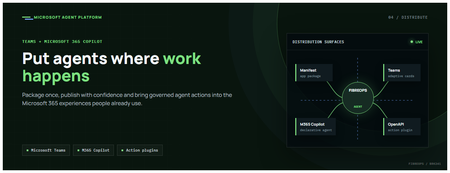
This is the fourth post in our series on the Microsoft agent platform. We cover the Distribute in M365 pillar — publishing your agents to Microsoft Teams and Microsoft 365 Copilot so they reach users where they already work. All examples reference the FibreOps repository, demonstrated at Microsoft Build BRK241. The Distribution Story Building a great agent is only half the challenge. The other half is getting it into the hands of users without asking them to learn a new tool, visit a new URL, or change their workflow. Microsoft 365 Copilot and Microsoft Teams are where enterprise users already spend their day, making them the natural distribution surface for agents. With the GA release, publishing an agent to Teams and M365 Copilot is a single command. No separate app registration portal, no manual manifest assembly, no multi-step approval workflow for development and testing. Publishing to Microsoft 365 Copilot (GA) FibreOps ships as a declarative agent + action plugin ready for sideload. A single CLI command produces the complete package: python -m fibreops.demo publish-m365 --out dist/m365 # Output: # ✓ wrote dist/m365/declarativeAgent.json # ✓ wrote dist/m365/fibreops-action.json # ✓ wrote dist/m365/manifest.json # ✓ wrote dist/m365/color.png (192x192) # ✓ wrote dist/m365/outline.png ( 32x32) # ✓ wrote dist/m365/fibreops-copilot.zip What Gets Generated File Purpose declarativeAgent.json Defines the agent's persona, capabilities, and conversation starters for M365 Copilot fibreops-action.json Action plugin that proxies tool calls to the deployed FastAPI backend via OpenAPI manifest.json Teams app manifest with publisher metadata, permissions, and capabilities color.png / outline.png App icons for Teams and M365 surfaces fibreops-copilot.zip Ready-to-upload package for Teams Admin Center Configuration Set the base URL to your deployed FastAPI app before publishing — the action plugin uses this to resolve the OpenAPI runtime: # Set the public HTTPS hostname of the deployed FastAPI app $env:M365_ACTION_BASE_URL = "https://fibreops-demo.azurewebsites.net" # Optional: customise publisher metadata $env:M365_PUBLISHER_NAME = "Contoso Network Operations" $env:M365_PUBLISHER_WEBSITE = "https://contoso.com/noc" # Generate the package python -m fibreops.demo publish-m365 --out dist/m365 Environment Variable Purpose M365_ACTION_BASE_URL Public HTTPS root for the FastAPI /openapi.json (e.g., Container Apps FQDN) M365_APP_ID Override the generated Teams app GUID (default: deterministic per repo) M365_PUBLISHER_NAME Publisher name shown in M365 Admin Center M365_PUBLISHER_WEBSITE Publisher website link Uploading the Package Upload the generated fibreops-copilot.zip through either path: Teams Admin Center → Manage apps → Upload new app M365 Admin Center → Integrated apps → Upload custom apps Once uploaded, the declarative agent: Inherits the publisher metadata you configured Advertises conversation starters from the FibreOps deck (e.g., "What is the current outage status?", "Dispatch an engineer to FN-LDN-001") Proxies tool calls to the deployed FastAPI app via the action plugin Appears in Microsoft 365 Copilot as a specialised agent users can invoke How Declarative Agents Work A declarative agent in Microsoft 365 Copilot is defined by metadata rather than code running in the M365 surface. The intelligence lives in your backend — Copilot handles the conversational UX, tool orchestration schema, and user authentication. The flow: User invokes the agent in Microsoft 365 Copilot or Teams Copilot renders conversation starters and accepts natural language input When the agent needs to act, Copilot calls the action plugin (your OpenAPI endpoint) Your FastAPI backend processes the request using the full agent pipeline Results return to the user in the Copilot/Teams UX This architecture means your agent logic stays in one place — the backend. The M365 surface is purely a distribution and interaction layer. Action Plugins and OpenAPI The action plugin ( fibreops-action.json ) references your FastAPI app's /openapi.json endpoint. FibreOps exposes a JSON API that the action plugin can call: /api/runs — List and query agent runs /api/optimiser — Get optimizer scores and suggestions /sdk/chat — Natural language interaction with the agent system /healthz — Liveness probe Because FastAPI auto-generates OpenAPI schemas from your typed Python endpoints, the action plugin gets accurate parameter descriptions, response schemas, and error codes without any manual specification work. Publishing as Autopilots (Public Preview) Autopilots take distribution one step further — agents that operate autonomously without requiring a user to initiate each interaction. An Autopilot can: React to events (e.g., a critical telemetry signal) without human initiation Take actions within defined guardrails Notify users only when human intervention is needed Operate continuously across Microsoft 365 surfaces For FibreOps, an Autopilot would monitor the Event Hub stream continuously and only surface to the NOC team when an incident exceeds automated resolution capability — a fully autonomous operations agent. Teams Adaptive Cards FibreOps posts rich Adaptive Card notifications to Microsoft Teams throughout the agent pipeline. This is separate from the declarative agent — it is a push notification channel for real-time operational awareness. # The NetOps agent posts an outage notice via Incoming Webhook def post_outage_notice(incident_id, node_id, severity, summary, engineer=None): card = { "type": "AdaptiveCard", "body": [ {"type": "TextBlock", "text": f"🚨 Outage: {node_id}", "weight": "Bolder", "size": "Large"}, {"type": "FactSet", "facts": [ {"title": "Severity", "value": severity.upper()}, {"title": "Incident", "value": incident_id}, {"title": "Summary", "value": summary}, ]}, ], "actions": [ {"type": "Action.OpenUrl", "title": "View in NOC Console", "url": f"{base_url}/runs/{incident_id}"} ] } # POST to Teams webhook or append to outbox for offline mode ... If TEAMS_WEBHOOK_URL is not configured, cards are appended to state/teams_outbox.jsonl for review in the NOC console's Teams panel. End-to-End: From Code to Copilot Here is the complete flow from development to distribution: Build — Develop agents with Microsoft Agent Framework, test locally with python -m fibreops.demo --backend local Publish agents — python -m fibreops.demo publish creates hosted Prompt Agents in Foundry Deploy infrastructure — azd up provisions App Service, ACR, Event Hub, Key Vault, and Application Insights Deploy hosted agent — azd env set FIBREOPS_DEPLOY_HOSTED true && azd up Generate M365 package — python -m fibreops.demo publish-m365 --out dist/m365 Upload to Teams — Upload fibreops-copilot.zip via Teams Admin Center Users interact — The agent is now available in Microsoft 365 Copilot and Teams Security Considerations Managed Identity — The deployed app uses system-assigned managed identity for all Azure service access. No secrets in code. Least privilege — Each role grant is scoped to the minimum required (Event Hubs Data Owner, Key Vault Secrets User, AcrPull, Azure AI Developer). Authentication — The M365 Copilot surface handles user authentication; your backend receives authenticated requests. Guardrails — Autopilots operate within defined boundaries; human-in-the-loop escalation is built into the Routine and agent decision logic. Key Takeaways Publishing to Teams and M365 Copilot is GA — a single command generates the complete package. Declarative agents separate distribution (M365) from intelligence (your backend). Action plugins leverage your existing FastAPI OpenAPI schema — no manual specification needed. Autopilots (Public Preview) enable fully autonomous operation within guardrails. Adaptive Cards provide real-time push notifications alongside the conversational agent surface. The same backend serves the NOC console, the Copilot SDK, and the M365 declarative agent. Next Steps Explore the FibreOps repository — try python -m fibreops.demo publish-m365 Microsoft 365 Copilot extensibility documentation Next in this series: Voice Live and Observability for Production Agent SystemsGitHub Admin UI + Billing API: Better together for smarter spend decisions
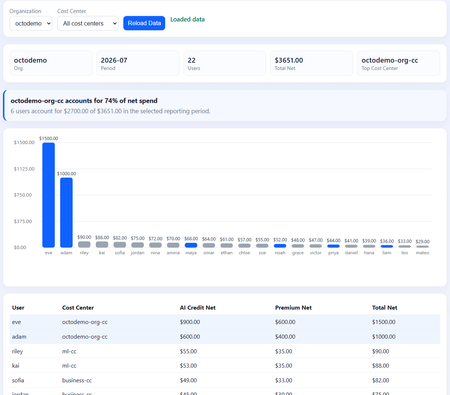
As a GitHub administrator, you already have a strong place to start when somebody asks, “Why did our AI spend go up?” In Metered usage, you can see the change, choose the period, and group the data by organization or cost center. That first investigation often leads to questions that are specific to your company. Finance may want a month-end report based on its own reporting calendar. An engineering leader may want to see whether an increase is spread across a team or concentrated among a few people. Answering those questions once is useful; answering them repeatedly calls for a reusable approach. Use each surface for what it does best The GitHub admin UI shows you where to look and gives you the controls to respond. The Billing Usage API helps you answer the recurring questions that are specific to your company. Neither replaces the other. Together, they give administrators a practical loop: spot the change in Metered usage, understand it through a reusable API-powered view, and act with a targeted budget. That means better cost control without treating every user or team as the problem. Let’s walk through this better-together approach using a common example: AI spend starts to rise, but the reason is not yet clear. The question: Spend is up, but what is driving it? Imagine that finance notices an increase in AI spend before the next close. It could be a sign that more developers are getting value from Copilot. It could also be one workload using far more than expected. At this point, nobody knows, and a broad restriction would be premature. The GitHub administrator needs to help finance and engineering answer three practical questions: - Which part of the business is driving the increase? - Is the spend concentrated among a few users or broadly distributed? - Which control should change without disrupting everyone else? The goal is not simply to reduce a number. It is to understand the increase well enough to protect useful work while addressing anything unexpected. 1. Start in the admin UI: Find the increase The admin UI is the natural place to begin because it lets you explore the data before you decide what kind of report or control you need. Open **Billing and licensing > Metered usage** and select the relevant reporting period. This first check matters. It confirms that the increase is real, shows when it happened, and gives you a shared starting point for the conversation with finance and engineering. Fig 01: Metered usage establishes the increase and the period that needs investigation. Narrow the increase by organization An enterprise total tells you that spend changed, but not where to look next. Group the usage by organization to see which part of the enterprise contributed most to the increase. Fig 02: Organization grouping narrows an enterprise-wide increase to an accountable business area. Suppose the octodemo organization stands out. You now know where to continue the investigation and which leaders can add context. You do not yet know whether the spend is justified, and that distinction matters. The increase could come from successful Copilot adoption, a migration, a seasonal workload, or an automated process that needs attention. Connect the increase to a cost center An organization can contain several teams, programs, and budgets. Grouping by **cost center** takes the investigation one step closer to the people who understand the work behind the spend. Fig 03: Cost-center grouping identifies the financial owner of the increase. In this scenario, octodemo-org-cc has the largest increase. In only a few clicks, the admin UI has taken us from an enterprise-wide signal to the cost center that needs a closer look. For a one-time question, this may be enough. Now imagine that finance asks for the same analysis every month, with a fixed reporting period and a ranking of spend by user. That is the point where the API adds value. It does not replace the investigation you just completed; it helps you repeat and extend it. 2. Continue with the API: Answer the repeatable question The Billing Usage API gives you access to the data behind a more tailored report. You can use filters to match the period finance cares about, focus on the cost center you found in the UI, and build a view that can run again tomorrow or next month. Fig 04: Billing usage endpoints and time filters provide the inputs for a reusable report. Define the reporting question first Before writing code, state the question the report needs to answer. In this example, it is: > Which users in the selected cost center account for the most net spend during this reporting period? That one question keeps the report focused. It also determines the workflow: 1. List the organization's members to establish the candidate users. 2. Resolve which members belong to the selected cost center. 3. Query organization AI credit and premium-request usage for those users and the selected period. 4. Combine the results into a per-user total. 5. Rank users and aggregate the result by cost center. The prototype uses year, month, and optional day filters so the output matches the finance period. It also accepts a cost-center filter. Because the admin UI has already pointed us to `octodemo-org-cc`, there is no reason to start with every member of the enterprise. Understand the per-user query pattern There is one API behavior to understand before building the report. The organization billing endpoints return an aggregate when the user filter is omitted. To create a spend-by-user ranking, the workflow makes a filtered request for each selected user and usage type. For example, this request asks for Eve's AI credit usage in July 2026: curl -L \ -H "Accept: application/vnd.github+json" \ -H "Authorization: Bearer $GITHUB_TOKEN" \ -H "X-GitHub-Api-Version: 2026-03-10" \ "https://api.github.com/organizations/octodemo/settings/billing/ai_credit/usage?year=2026&month=7&user=eve" The response contains one or more usage items, with amounts such as `grossAmount`, `discountAmount`, and `netAmount`. The prototype adds the `netAmount` values to calculate Eve's AI credit total for the period. It then runs the equivalent premium-request query and combines the two totals. We can now see one user's contribution during the same period we investigated in the UI. Repeating the request for the members of the selected cost center gives us the ranking that finance asked for. For a production workflow, a few practical details matter: - Limit the candidate list to the cost center under investigation. - Paginate organization membership and cost-center results. - Use bounded concurrency instead of sending every request at once. - Record partial failures rather than silently treating them as zero spend. - Keep an audit record of when the data was pulled and transformed. For a daily check, the report can use a narrow period and write a timestamped output. At finance close, the same workflow can produce the month-end rollup. The question stays the same; only the reporting window changes. Reveal concentration that totals can hide The result is a custom Spend by User view that brings the organization, cost center, reporting period, AI credit usage, premium-request usage, and total net spend into one place. Fig 05: A company-specific dashboard exposes per-user concentration inside the selected cost center. In the illustrative data, the octodemo organization has 22 users and $3,651 in total net spend for July 2026. The octodemo-org-cc cost center accounts for $2,700 of that amount. Two users stand out: User AI credit net spend Premium-request net spend Total net spend Eve $900 $600 $1500 Adam $600 $400 $1000 Together, Adam and Eve account for $2,500 of the $2,700 attributed to that cost center. That is approximately 93% of its total in this example. These figures are demonstration data, but they show why the extra view is useful. Instead of reacting to a $2,700 cost-center total, the administrator can talk to the owners of two workloads and understand what the spend supported. Concentration does not automatically mean waste. Adam and Eve may be doing approved, high-value work. The dashboard tells the business where to ask the next question; the people involved provide the context needed to answer it. 3. Return to the admin UI: Choose the right control The API has helped us understand the increase, but it does not make the decision for us. Return to Billing and licensing > Budgets and alerts to review the available controls and choose the narrowest one that fits what you learned. Fig 06: Budget scopes turn the investigation into a targeted governance decision. Set a cost-center user-level baseline A cost-center user-level budget applies the same per-user amount to every current and future member of that cost center. This is useful when the group needs a different baseline from the rest of the enterprise. For example, the administrator might give octodemo-org-cc additional per-user headroom because its work legitimately uses more AI credits. This avoids raising the universal user-level budget for everyone. A user-level budget counts both included and paid AI credit usage. It is always a hard stop for the individual. It does not reserve part of the shared pool, and it does not replace the cost center's paid-usage budget. Preserve justified exceptions If Adam or Eve has an approved role that requires more capacity, an individual user-level budget can replace the cost-center baseline for that person. The exception stays limited to the person who needs it instead of increasing the budget for the whole cost center. Fig 07: Cost-center baselines and individual overrides preserve useful work without widening access for everyone. The precedence is straightforward: 1. An individual user-level budget overrides the cost-center user-level budget. 2. The cost-center user-level budget overrides the universal user-level budget. In practice, you can set a universal baseline, add more headroom for a cost center with a clear business need, and use individual overrides for documented exceptions. Why the UI and API work better together At this point, the better-together pattern becomes clear: - Metered usage supports interactive discovery. - Billing Usage API supports repeatable, company-specific analysis. - Budgets and alerts supports targeted policy decisions. Each surface does the job it is best suited to do. The UI makes it easy to explore and manage GitHub. The API lets you repeat a company-specific analysis without rebuilding it by hand. Used together, they give finance, engineering, and administrators the same evidence before a control changes. Make it part of the operating rhythm A useful dashboard should lead to a useful conversation. Decide who receives the report, how often they review it, and what happens when a user or cost center stands out. For example: - Run a daily pull to detect unusual changes early. - Produce a month-end rollup aligned to finance close. - Route cost-center summaries to the relevant business owner. - Review high-consumption users with engineering before changing limits. - Record approved individual overrides and revisit them regularly. Over time, the conversation can move from “Who spent this?” to “What outcome did this spend support, and does the current policy still fit?” When the same users repeatedly appear at the top, leaders can inspect the workload, remove waste, validate business value, or approve more capacity. When usage becomes broadly distributed, the cost-center baseline may need adjustment instead. The report makes those patterns visible over time. The better-together workflow at a glance The story above introduces each surface when it becomes useful. This table summarizes their roles. Surface Primary role Best used for Important limitation Metered usage Interactive investigation Finding the affected period, organization, and cost center Manual exploration is not a reusable company report Billing Usage API Programmatic usage retrieveal Scheduled reporting, time-sliced analysis, and per-user views Per-user attribution requires filtered requests and careful handling of pagination and failures Custom spend by user view Company-specific interpretation Ranking users and aligning usage to internal ownership Concentration is evidence to investigate, not proof of waste Budgets and alerts Governance controls Cost-center baselines and individual overrides A broader budget cannot override a user who has reached their ULB The practical takeaway is simple: begin with exploration, automate only the question worth repeating, and adjust policy after the data has context. That sequence keeps governance precise while preserving useful AI work. Learn more - REST API endpoints for billing usage - List organization members] - Budgets for usage-based billing] - Using cost centers to allocate costsCreating Autonomous Teams Agents Using OpenClaw, MCP, and Azure Container Apps
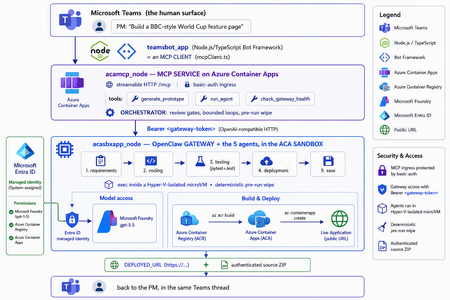
The one shift that changes everything For two years, "AI coding" meant autocomplete. A suggestion appears in your editor, you hit tab, you move on. The agent only existed while you were actively typing. That is no longer the only model. A new category of tools runs asynchronously and autonomously: you message the agent from a chat window — Teams, Slack, Telegram — describe what you want, and walk away. The agent plans, writes code, runs tests, deploys, and hands you back a result. Some of them never sleep: they hold a persistent memory, load their own skills, and act on a schedule without being prompted. This is the world of OpenClaw, Hermes Agent, and the other long-running autonomous agents that exploded across developer culture in 2026. OpenClaw alone crossed 377,000 GitHub stars and millions of active users, becoming — for a while — the most-starred project on GitHub. You install it with one line, connect a channel, and start delegating from your phone. The workflow moves from pair programming to delegation and review. The interactive copilot asks, "What should I write next?" The autonomous agent asks, "What do you need done?" And that reframing is exactly why three questions now keep architects awake: Is it safe? You are handing a self-driving process the ability to run shell commands, touch files, and call APIs. One community report memorably described these agents as a teammate in your group chat who happens to have root access to your codebase. That is not a compliment — it is a threat model. Can it fit into real multi-agent work? A single agent is a demo. Production is a fleet — specialists that hand off to each other with gates in between. Is it flexible and controllable? Autonomy is thrilling right up until the agent packages last week's stale files into this week's deliverable, or loops forever on a failing test. This post answers all three — not with hand-waving, but with a working reference implementation you can clone today: CustomCodingAgentApp in the Multi-AI-Agents-Cloud-Native repo, an "Agentic Prototype Factory" that turns a plain-language idea into a tested, live-on-Azure prototype without leaving the chat window. A product manager types "Build a BBC-style World Cup feature page" in Microsoft Teams. Minutes later they get back a running HTTPS URL and a downloadable source ZIP. Under the hood, five specialized OpenClaw agents powered by Microsoft Foundry gpt-5.5 collaborate in a shared sandbox, run real pytest/Jest suites, and ship the result to Azure Container Apps — all orchestrated behind a Model Context Protocol (MCP) service so any MCP client (GitHub Copilot, Claude, the Teams bot) can drive it. We'll build up to that architecture in the order you should learn it. Part 1 — Long-running autonomous agents, and their two hard problems What actually makes them different A traditional chatbot is text in, text out. It waits for you. An autonomous agent inverts that: Property Traditional chatbot Long-running autonomous agent Execution Responds to a prompt Acts proactively (a "heartbeat" wakes it on a schedule) Scope Words Files, shell, browser, APIs — the real machine Memory This session only Persistent across sessions Interface A web box Any chat channel + the terminal Autonomy None Plans and takes multi-step action on its own Architecturally, OpenClaw is not a library you import — it's a runtime. A single long-running process (the Gateway) bridges your messaging channels to an LLM backend, keeps sessions alive, queues work in ordered lanes, and drives the classic agent loop: call the model → execute the tool calls it asks for → feed results back → repeat until done. There is no rigid step-planner; the model itself steers. That is what makes it feel magical — and what makes it hard to contain. That containment problem has two faces. Hard problem #1 — Security The same properties that make an autonomous agent useful make it dangerous. Full system access + proactive execution + a 32,000-server tool ecosystem is a large, self-driving attack surface. OpenClaw's own short history is the cautionary tale: a critical one-click remote-code-execution CVE early in its life, hundreds of malicious community "skills" discovered on its marketplace, and tens of thousands of gateways found exposed on the open internet. None of this means "don't use autonomous agents." It means: never run one with ambient credentials on a machine you care about. The agent belongs in a box with a hard wall around it. Hard problem #2 — Persistence and continuity Real agent work is long. Refactoring a codebase, researching across dozens of pages, building-testing-deploying an app — these take minutes to hours, far past a single request/response. So the runtime needs durable sessions, a place to keep state, and a workspace that survives across steps. But a persistent workspace that is reused creates its own hazard: state leakage. Files from yesterday's task can contaminate — or get shipped inside — today's result. Continuity and cleanliness pull in opposite directions, and you have to engineer the tension out. One agent is a demo; production is a fleet A single monolithic agent asked to "gather requirements, write the code, test it, deploy it, and package it" will do all four mediocrely and blur the boundaries between them. The production pattern is orchestrator-worker: specialized agents, each with one job, handing off to the next through explicit gates. OpenClaw supports exactly this — it can spawn sub-agents and even dispatch external coding harnesses, acting as a meta-orchestrator rather than a single model. The open question is never whether to go multi-agent; it's where the seams and the guardrails go. The answer to "is it safe?": put the agent in a microVM If the agent needs root to be useful, then give it root — inside a disposable microVM, not on your host. In 2026 there are several credible ways to do this: Kata Containers on AKS — each pod gets its own lightweight VM boundary and guest kernel. Hyperlight Wasm — per-call, snapshot-restored Wasm microVMs for running LLM-generated code. Azure Container Apps dynamic sessions — prewarmed, Hyper-V-isolated sandboxes that start in milliseconds, scale to thousands, and are purpose-built for "secure execution of custom code" and "running LLM-generated scripts." That last one — the ACA sandbox — is the sweet spot for a chat-driven agent factory: strong isolation without you operating a Kubernetes cluster, and an exec API to run commands inside the box. It's what the reference implementation uses. Part 2 — Putting OpenClaw into the ACA sandbox Here is where the repo stops being a diagram and becomes running code. The Agentic Prototype Factory decomposes the "idea → live app" job into five specialized OpenClaw agents that run in sequence, all inside the sandbox: requirements → coding → testing → deployment → save Each is addressable as its own model target on the OpenClaw gateway's OpenAI-compatible API: model value Routes to openclaw / openclaw/default Default agent openclaw/requirements-agent Requirement Agent openclaw/coding-agent Coding Agent openclaw/testing-agent Testing Agent openclaw/deployment-agent Deployment Agent openclaw/save-agent Save & download Agent Control, not vibes: review gates with feedback loops Autonomy without gates is how you get an agent that confidently deploys a broken app. The orchestrator wires the five agents into a graph with hard, bounded gates: Every knob is explicit and lives in server.py: _MAX_TEST_ROUNDS = 3, _MAX_DEPLOY_REVIEW = 2, _DEPLOY_POLL_ATTEMPTS = 12, _DEPLOY_POLL_DELAY_S = 20. The Testing Agent must end each turn with a literal TESTS_PASSED / TESTS_FAILED verdict; the orchestrator won't declare success until it HTTP-checks the deployed URL and inspects the response body — because a ResourceNotFound can happily return an HTTP 200. That is what "flexible and controllable" looks like in practice: the LLM drives creatively inside a deterministic state machine. The deterministic pre-run wipe (solving state leakage) Because the sandbox is reused across runs (fast, cheap), the orchestrator does something disciplined before every run: it wipes all lingering agent workspaces. Stale files from a previous task can never leak into — or be packaged as — the new result. This is the engineered answer to Hard Problem #2. Working with the sandbox's limits, not against them The ACA sandbox exec API is hard-capped at ~120 seconds — shorter than a cold az acr build plus az containerapp create. A naive agent would time out and report failure. The clever bit: those commands finish server-side on Azure even after the client exec disconnects. So deployment is split in two: deploy-build <dir> <app> — installs the deploy helpers, writes a tight .dockerignore, and kicks off the ACR build tagged <app>:latest. If the client drops at ~120s, the image still lands in ACR. deploy-finish <app> — idempotent, polled up to 12×. It reports STILL_BUILDING until the image exists, then fires a --no-wait containerapp create, and finally returns DEPLOYED_URL=https://<fqdn>. This is the single most important lesson of the whole sample: an autonomous agent doesn't need a longer timeout — it needs to understand the durability semantics of the platform it runs on. Part 3 — MCP, and why its security is the whole ballgame The five-agent workflow is powerful, but it would be a silo if the only way to reach it were a bespoke API. Instead, the repo wraps the entire orchestration as a Model Context Protocol (MCP) service (acamcp_node) exposed over streamable HTTP at /mcp, with a tiny, legible tool surface: MCP tool What it does generate_prototype Run the full five-agent workflow end to end run_agent Invoke a single named agent check_gateway_health Liveness / readiness of the OpenClaw gateway The payoff is enormous: any MCP client can now drive the factory — GitHub Copilot, Claude, or the Teams bot we're about to meet. One protocol, many front-ends. But MCP is not just an integration convenience — it's a control plane, and every MCP tool is a privileged capability. In an ecosystem with 32,000+ community servers, "just add an MCP server" is a supply-chain decision. A tool call is code execution by another name. So the security posture has to be deliberate. Here is how the reference implementation hardens it — and the principles are portable to any MCP deployment: Auth in front of the protocol. The MCP ingress sits behind basic auth (MCP_BASIC_AUTH_PASSWORD); the gateway itself requires the gateway token as a bearer credential (Authorization: Bearer <token>). No anonymous tool calls. A tiny, named allowlist — not a blank check. The gateway routes only to six explicit model targets. There is no "run arbitrary agent" escape hatch; the routing table is the allowlist. No secrets in the workload. There are no model API keys anywhere in the running containers — model access is brokered entirely through Entra ID managed identities. The gateway token is stored as a Kubernetes secret and never baked into an image. Private by default. The gateway's OpenAI-compatible endpoint is operator-level access — it stays on private ingress, with TLS and authentication added before anything is ever exposed publicly. Least privilege at the identity layer. The gateway is granted exactly the Foundry roles it needs (Cognitive Services User / Cognitive Services OpenAI User) on the Foundry resource — nothing more. The takeaway for MCP is the same as for the agent itself: treat the protocol as a doorway, and put a guard on the door. Authentication, an explicit allowlist, private ingress, and brokered identity turn MCP from an open blast radius into a governed control plane. Part 4 — The complete solution: Teams + MCP on ACA + OpenClaw on the ACA sandbox Now assemble the three deployable components into one loop: The request lifecycle, end to end A PM sends one sentence in Teams. The teamsbot_app bot — acting as an MCP client via mcpClient.ts — opens an MCP handshake and calls generate_prototype. The MCP service on ACA (acamcp_node) runs the orchestrator: pre-run wipe, then requirements → coding → testing. The OpenClaw gateway in the ACA sandbox (acasbxapp_node) executes each agent, talking to Foundry gpt-5.5 through a managed identity — no keys in the box. Real pytest + Jest suites run inside the sandbox. Fail → loop back (bounded). Pass → deploy. Deployment uses the build + poll split to survive the ~120s exec cap; the app lands in Azure Container Apps and is health-checked body-aware at its live URL. The Save Agent produces an authenticated ZIP download URL. The bot streams each agent's progress back into the Teams thread and returns the running HTTPS URL + source ZIP — optionally auto-opening the project in VS Code Insiders. How the architecture answers the three questions The question How this solution answers it Is it safe? The autonomous agent runs in a Hyper-V-isolated ACA sandbox, not on anyone's laptop. No model keys in the workload — Entra ID managed identity brokers Foundry. MCP behind basic auth; gateway behind a bearer token on private ingress; token as a secret, never in an image. A deterministic pre-run wipe removes cross-run leakage. Does it fit multi-agent work? It is a multi-agent system — five specialist OpenClaw agents with A2A hand-offs and review gates — and because it's exposed via MCP, any client (Copilot, Claude, Teams) can orchestrate it. Is it flexible and controllable? Creativity lives inside a deterministic state machine: explicit TESTS_PASSED/FAILED verdicts, bounded retry loops (_MAX_TEST_ROUNDS, _MAX_DEPLOY_REVIEW), body-aware health checks, and a human approving in the Teams thread. Deploy it yourself The repo ships scripts for all three tiers (the gateway uses the platform's managed identity to reach Foundry — no key handling, no image rebuild): # 1) OpenClaw gateway + the 5 agents (acasbxapp_node) cd acasbxapp_node cp .env.example .env # gateway token, Foundry endpoint, sandbox ids ./scripts/build-openclaw-image.sh # build + push the OpenClaw image to ACR ./scripts/deploy-aks-gateway.sh # grant Foundry roles + deploy # 2) MCP service (acamcp_node) cd ../acamcp_node cp .env.example .env # ACR + cluster; gateway token read from ../acasbxapp_node/.env ./scripts/build-images.sh # build + push the MCP image ./scripts/deploy-aks.sh # secret + manifests to the openclaw namespace ./scripts/smoke-check.sh # verify the MCP handshake # 3) Teams bot (teamsbot_app) — Node.js/TypeScript MCP client cd ../teamsbot_app # configure + run per the folder README, then sideload the Teams app package The reference implementation targets Azure (ACA + AKS) — the OpenClaw gateway and MCP service run as containers, and the code-execution sandbox uses the ACA dynamic-sessions exec API. Keep the gateway on private ingress and add TLS before any public exposure. Final thought Strip away the World Cup demo and a reusable pattern remains — a blueprint for running any long-running autonomous agent in the enterprise: A message-driven agent (OpenClaw / Hermes) + a microVM sandbox (Azure Container Apps dynamic sessions) + an MCP control plane with auth + enterprise identity (Entra ID managed identity) + a human surface (Microsoft Teams). The autonomy that made these agents go viral is the same autonomy that makes security teams nervous. You don't resolve that tension by slowing the agent down — you resolve it by giving it a box with a hard wall, a control plane with a guard on the door, an identity instead of a secret, and a human in the loop. Do that, and "your PM types a sentence, Azure ships an app" stops being a scary demo and becomes something you can actually put in production. Clone it, break it, harden it further: kinfey/Multi-AI-Agents-Cloud-Native → code/CustomCodingAgentApp The chat window is the new terminal. Let's make it a safe one.1.5KViews2likes0CommentsBringing Enterprise File Data to Users with Azure NetApp Files, Microsoft Foundry, and M365 Copilot
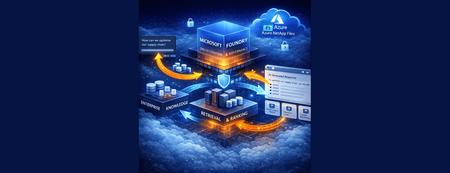
This is Part 3 of a 3-part series on extending AI to enterprise file data, showing how the knowledge pipeline is surfaced through enterprise AI agents and user experiences including Microsoft 365 Copilot.537Views0likes0CommentsFrom Enterprise File Storage to an AI-Ready Data Foundation using Azure NetApp Files and OneLake
This 3-part series shows how to extend AI to enterprise file data – without migration – by combining Azure NetApp Files, OneLake, and a RAG-based architecture that surfaces grounded insights through enterprise AI agents. This is Part 1 of a 3-part series covering the data foundation, knowledge pipeline, and user experience layers.528Views0likes0CommentsFrom File Data to AI‑Powered Knowledge Pipelines using Azure NetApp Files object REST API
This is Part 2 of a 3-part series on extending AI to enterprise file data hosted on Azure NetApp Files, building on the data foundation to create a knowledge pipeline that makes enterprise file data usable by AI systems.478Views0likes0Comments
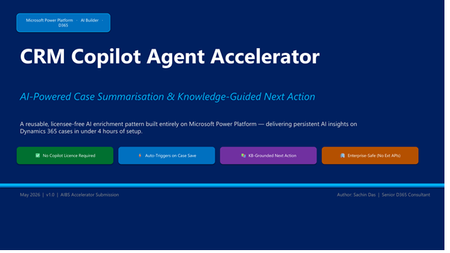
From AI Suggestions to Autonomous CRM Actions in Dynamics 365
Modern CRM AI solutions often stop at case summarization—but real transformation requires more. This blog introduces a CRM Copilot Agent Accelerator built on Microsoft Power Platform, designed to evolve AI from simple insights to predictive intelligence and ultimately to autonomous actions. By combining Dynamics 365, Dataverse, Power Automate, and AI Builder, and extending capabilities through modular add-on packs, this approach enables organizations to reduce manual effort, improve decision-making, and scale service operations efficiently—without additional Copilot licensing.
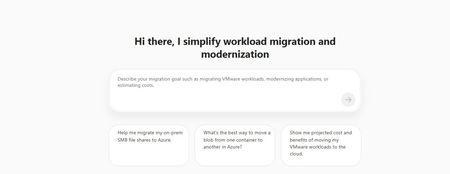
File share migrations simplified with Azure Copilot Migration Agent
Building on our earlier announcement of discovery and assessment support for SMB and NFS file shares in Azure Migrate, we are extending the experience to support end-to-end file share migrations within the same workflow. With Azure Copilot Migration Agent, customers can move from discovery and assessment to migration through a single guided experience in Azure Migrate. By bringing planning and execution together, the agent helps organizations streamline migration activity, reduce handoffs, and maintain continuity across stages. Overview Since the release of file share discovery and assessment in Azure Migrate earlier this year, customers have indicated that while visibility into their file share estate improved, the transition to execution remained fragmented. In many cases, teams still had to work across separate workflows for inventory, readiness planning, and migration, increasing operational friction and the risk of losing context between stages. Azure Copilot Migration Agent helps address this gap by bringing discovery, assessment, planning, and execution into a single guided journey. Azure Migrate provides visibility and recommendations, while Azure Storage Mover supports execution in a connected, agentic experience. The result is a more consistent migration path that reduces complexity, preserves context, and helps teams move file shares to Azure with greater operational confidence. Customer Value This update streamlines the migration journey by connecting each stage of the process and reducing operational overhead. Natural language guidance helps teams start and manage migration activities much faster, often in hours or days instead of weeks. The experience supports the following scenarios: End-to-end discovery, assessment, and migration for on-premises Windows and Linux file shares (SMB) to Azure Files. Discovery and assessment for on-premises Windows and Linux file shares (NFS). Data transfers from one Azure Blob container to another container. Design principles The experience preserves continuity across inventory, readiness insights, and execution planning, enables direct movement of validated shares when heavyweight orchestration is unnecessary, maintains approval and sequencing controls, and supports the file and object movement patterns commonly required in production environments. Getting Started with Storage Migration in Azure Copilot Migration Agent (ACMA) Launch Azure Migrate: Sign-in to the Azure portal, open Azure Migrate. From the Getting Started page, open Azure Copilot Migration Agent, then select or create an Azure Migrate project. Describe the migration in natural language. The agent detects storage migration intent and assists with storage migration planning and routes execution requests seamlessly. Examples scenarios and prompts Migration of on-premises Windows Server data over SMB to Azure Files 2. Prompt: Help me transfer data from one Azure blob container to another blob container Call to action Storage integrated capability is launching in Limited Preview at Microsoft Build. Sign up for the Preview here. For questions, contact storagemigrationcopilotagent@microsoft.com. Learn More File share discovery and assessment in Azure Migrate Azure Copilot Migration Agent Azure Storage Mover721Views2likes0CommentsToken economics–driven architecture: hybrid models, AI Runway, AKS Kata MicroVM, MCP
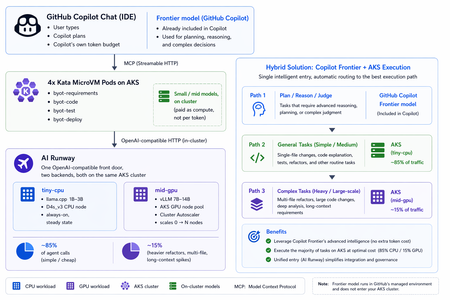
1. The moment the bill arrived For most of 2024 and 2025, "Agents" were a demo word. In 2026 they are a line item on the cloud invoice. Every major model provider — OpenAI, Anthropic, Google, Mistral, DeepSeek, and even the in-cluster open-weights serving stacks — now bills by the token. Input tokens, output tokens, cached tokens, reasoning tokens, tool-call tokens. The unit price has come down. The number of tokens an autonomous agent burns through has gone up by an order of magnitude. The slide deck I keep coming back to is module 02 of the Enterprise Agent Workshop — Token Economics and Cost Control. The short version: an agentic system is not a chat app. A chat app emits one model call per user turn. An agent emits a model call to plan, another to pick a tool, another to interpret the tool result, another to decide the next step, and another to summarize — and then it loops. Multiply by tools that themselves invoke models. Multiply again by retries and reflection. The bill is no longer "what does the model cost per million tokens." The bill is "what does my architecture cost per user request." This post is about an architecture that answers that question on purpose — and that does it without giving up the security properties an enterprise actually needs. The blueprint lives in this repo, BYOT_Dev: a four-agent SDLC tower (Requirements → Code → Test → Deploy) running on AKS, each agent boxed inside its own Kata MicroVM, each one exposing tools to GitHub Copilot Chat over the Model Context Protocol, and all of them sharing a single on-cluster small-language-model endpoint served by AI Runway 2. Why agentic workloads inflate the token bill Three forces compound: Autonomy multiplies call count. A user typing "build me a URL shortener" produces one prompt at the IDE. By the time a 4-agent pipeline has clarified requirements, generated code, written tests, and produced a Kubernetes manifest, you have spent 30–200 model calls — most of them invisible to the user. Reasoning eats output tokens. Modern reasoning models think before they speak. That hidden chain-of-thought is billed. A 5-line answer might charge you for 3,000 reasoning tokens. Context inflation. Every tool result is re-injected into the next call. A 50 KB code review answer becomes the context of the next refactor turn. Costs grow super-linearly with conversation depth. You can't out-prompt-engineer this. The only durable mitigation is architectural — and it has three levers: Lever What it means in practice Model tiering Use a small, cheap model for narrow tasks; reserve the frontier model for orchestration and judgement. Placement tiering Place each model where it's cheapest to run: on-cluster CPU for tiny SLMs, on-cluster GPU for mid-size models, cloud APIs for frontier reasoning. Protocol tiering Use a standard like MCP so the expensive orchestrator can hand off subtasks to the cheap workers without lock-in. The architecture this post describes pulls all three levers at once. 3. The mental model: frontier brain, small-model hands Look at this picture: spec: image: ghcr.io/kaito-project/aikit/llama3.2:1b model: { id: "kaito/llama3.2-1b", source: huggingface } engine: { type: llamacpp } provider: name: kaito overrides: resource: instanceType: Standard_D4s_v3 preferredNodes: ["aks-nodepool1-21523631-vmss000001"] nodeSelector: { agentpool: nodepool1 } resources: { cpu: "2", memory: "4Gi" } scaling: { replicas: 1 } AI Runway then takes care of: selecting the engine (llamacpp for CPU, vllm or dynamo for GPU); selecting the provider (kaito today, others coming); pulling the model image from the AIKit catalog; exposing an OpenAI-compatible Service at http://llama3-2-1b-cpu.airunway-models.svc:80/v1. A note on the CPU-only example. This repo deliberately uses CPU + Llama-3.2-1B to prove the architecture can run on the cheapest node SKU available. In production you should not assume CPU is always right. The right answer is scenario-driven: Scenario Suggested placement High-volume, narrow, latency-tolerant task (e.g. "expand a requirement into bullet points") On-cluster CPU SLM (1B–3B) — what this repo demonstrates Code generation, refactoring, multi-file reasoning On-cluster GPU mid-model (7B–14B) via KAITO vllm, on an AKS GPU pool that auto-scales from zero Privacy-sensitive enterprise data, must not leave the cluster On-cluster GPU, possibly with confidential compute Frontier reasoning, planning, judging tool output The Copilot seat's already-included frontier model, called sparingly via MCP — not a second pay-per-token endpoint you have to provision AI Runway makes that choice a YAML edit, not a refactor. The point of the abstraction is optionality — the right to change your mind about token economics quarter by quarter without rewriting agents. 5. Hybrid scaling: all inference on AKS, planning on the Copilot tokens you already pay for The single biggest token-economics mistake an enterprise can make right now is treating model placement as a binary — "all in the cluster" or "all on a pay-per-token cloud API." Real workloads are neither. The pattern that actually saves money has two ingredients, and both of them are already on your invoice: AKS that you already provisioned. A small CPU node pool for the steady-state workload, plus a GPU node pool that scales from zero when the small pool can't keep up. Same cluster, same Kata isolation, one invoice line. The Copilot seat the developer already pays for. Copilot Chat's frontier model has its own token allowance baked into the seat. Use that allowance — not a separately provisioned cloud inference endpoint — to do the planning that drives the cheap AKS workers via MCP. That is the whole "hybrid." No external Foundry endpoint, no second per-token meter for inference. Just AKS capacity that grows when you need it + a frontier brain you already pay for. The agent traffic split is roughly: ~85% of agent calls are short, narrow, predictable — "expand this requirement", "format this YAML", "summarize this diff". A 1B–3B model on a CPU node answers these in seconds; the bill is the node, not the token. ~15% are heavier — multi-file refactors, long-context reasoning, the 400-line FastAPI generation. They need a 7B–14B model on a GPU. Planning and judgement on top of all of it are done by the Copilot seat's frontier model, which the user is paying for whether you build BYOT or not. Lever A — a GPU node pool on the same AKS cluster, scaled 0 → N Keep the always-on tiny-cpu ModelDeployment for steady state. Add a second AI Runway ModelDeployment for the mid model on a GPU node pool that is created at size zero and managed by the AKS Cluster Autoscaler az aks nodepool add \ --cluster-name $CLUSTER --resource-group $RG \ --name gpupool \ --node-vm-size Standard_NC24ads_A100_v4 \ --node-count 0 --min-count 0 --max-count 4 \ --enable-cluster-autoscaler \ --node-taints sku=gpu:NoSchedule \ --workload-runtime KataVmIsolation # airunway/modeldeployment-mid-gpu.yaml (sketch) spec: image: ghcr.io/kaito-project/aikit/qwen2.5:7b engine: { type: vllm } provider: name: kaito overrides: resource: instanceType: Standard_NC24ads_A100_v4 nodeSelector: { agentpool: gpupool } tolerations: [{ key: sku, operator: Equal, value: gpu, effect: NoSchedule }] resources: { cpu: "4", memory: "32Gi", nvidia.com/gpu: "1" } scaling: { replicas: 0, maxReplicas: 4 } The key trick is replicas: 0 plus an autoscaler min-count 0. When nobody is asking the mid model anything, no GPU node is running and no GPU node is billed. The first request causes AI Runway to scale to 1, which triggers the Cluster Autoscaler to provision a GPU node, which gets scheduled with Kata Pod Sandboxing intact. When traffic dies down, both the replica and the node go back to zero. All of this is inside AKS — the agents never leave the cluster to find a GPU. Lever B — reuse the Copilot frontier tokens you already pay for This is the lever most token-cost writeups miss. Every developer using BYOT already has a Copilot seat. That seat carries a frontier-model token allowance which Copilot Chat consumes the moment the user types into the chat. The orchestration loop in docs/workflow.md — "plan which tool to call next, read the tool's output, summarize the result" — is paid out of that allowance, not out of a new inference endpoint you provision. This means: You do not stand up a separate cloud OpenAI / Foundry deployment for "the smart model." The smart model is already on the user's screen. You do not put a per-token meter on the agent-to-frontier path. The frontier is upstream of your agents — it calls them via MCP, not the other way around. The only per-token spend the architecture introduces is what Copilot itself charges against the seat, which is independent of how many BYOT agents you stand up. The net effect: the parts of the workload that are expensive per token (planning, judgement) run on tokens the company already buys; the parts that are cheap to compute (long-form generation) run on AKS compute you already pay for as node hours. How the agents pick between the two AKS backends The Agent Framework client in https://github.com/kinfey/Multi-AI-Agents-Cloud-Native/blob/main/code/BYOT_Dev/agents/app/airunway_client.py takes its base_url and model from the ConfigMap. Three strategies, in increasing sophistication: Per-role static binding. byot-requirements and byot-test (cheap, narrow) get AIRUNWAY_BASE_URL=tiny-cpu. byot-code and byot-deploy (heavier generation) get AIRUNWAY_BASE_URL=mid-gpu. One ConfigMap, one rollout. Try-then-scale-up inside the tool. Each tool tries tiny-cpu first; if the answer is too short, fails a quality check, or times out, it retries against mid-gpu. The small model handles the easy 85%; the GPU pool handles only the 15% that actually needed it. AI Gateway in front of both. Put Azure API Management as an AI Gateway in front of the two AI Runway services. The agent talks to one URL; the gateway does semantic caching, token budgeting, and load-aware routing between tiny-cpu and mid-gpu. Both backends remain in your AKS — the gateway only routes. A back-of-envelope token saving Assume one Copilot Chat session through the BYOT tower fires 30 model calls at the lower agents. If those 30 went to an external frontier API at, say, $5 / million output tokens with an average 2 K output per call, that is $0.30 / session in additional lower-tier model spend — stacked on top of what Copilot Chat already charges the seat for planning. With the hybrid AKS + seat-tokens pattern: 25–26 calls (~85%) → tiny-cpu on a CPU node that is already running for the always-on agents → ≈ $0 marginal 4–5 calls (~15%) → mid-gpu, billed as GPU node hours only while AI Runway has scaled up, and amortised across every concurrent BYOT user that lands on the same node → ≈ $0.02–0.05 Planning / judgement → already inside the Copilot seat allowance the developer is paying for → $0 additional A $0.30-per-session pay-per-token outcome collapses toward ≈ $0.02–0.05 of pure AKS compute, and the GPU bill returns to zero when nobody is asking hard questions. That is the lever. The reason it works is that AI Runway gives the agents a single in-cluster front door, AKS gives the cluster elastic GPU capacity it doesn't pay for while idle, and Copilot Chat brings its own pre-paid frontier brain. 6. Kata MicroVM: the hardware-level helmet for agentic code Cost is one half of the agentic-workload problem. The other half is what happens inside the box you put the agent in. Earlier this year I published Giving the Copilot SDK Agent a "hardware-level helmet" using Kata microVM on AKS. The argument, compressed: A traditional container is an apartment with shared roof — the host Linux kernel. For a hand-written service the tenant is predictable. For an agent, the tenant is the model, deciding at runtime which shell command to run, which file to read, which npx package to install. That's a new threat model. Container namespaces aren't sized for it. You want a dedicated guest kernel per Pod — a microVM. Kata Containers is the integration layer that gives Kubernetes microVMs. AKS ships it as Pod Sandboxing with the kata-vm-isolation RuntimeClass on top of Hyper-V — created automatically when the node pool is provisioned with --workload-runtime KataVmIsolation. In BYOT_Dev every agent Pod sets: spec: runtimeClassName: kata-vm-isolation containers: - name: agent securityContext: runAsNonRoot: true readOnlyRootFilesystem: true capabilities: { drop: ["ALL"] } seccompProfile: { type: RuntimeDefault } …and AKS does the rest. The Pod boots a real Hyper-V microVM, with its own guest kernel, before the container even starts. Verifying it is one command: kubectl -n agents exec deploy/byot-requirements -- uname -r # compare with the kernel on the node — they differ → microVM confirmed The repository also pins one agent per node via podAntiAffinity on kubernetes.io/hostname, so the four agents live on four physically distinct Kata hosts — a model escape in one cannot reach the others through a shared host kernel, because there is no shared host kernel. The connection to token economics is this: the moment you trust a cheap on-cluster model to run agent loops on real customer code, the security envelope has to be stronger than a normal container, not weaker. Kata is the thing that makes "cheap" and "safe" not a trade-off. And because AKS Pod Sandboxing applies the same way to the CPU pool, the GPU pool, and any future node pool you add for burst, the hybrid placement story above does not weaken the isolation story — every Pod, on every tier, still boots its own guest kernel. 7. MCP: how GitHub Copilot Chat actually drives this tower The final piece is the protocol. The agents inside the Kata MicroVMs are useless unless something can call them. The "something" the user already has open is GitHub Copilot Chat in VS Code. The Model Context Protocol is the standard Copilot Chat (and almost every other serious agentic IDE) speaks to remote tool servers. In this repo each role exposes its tools via FastMCP over Streamable HTTP — see agents/app/main.py and the per-role tool sets in agents/app/roles/. Service exposure is a small but important detail. The repo uses type: LoadBalancer for each role's Service — see k8s/services.yaml — because: kubectl port-forward does not work against Kata Pods (the listener lives inside the microVM, not in the host sandbox netns); kubectl proxy works but pins Copilot to localhost and requires a long-running local process; a LoadBalancer gives each agent a public Azure IP the IDE can hit directly. Once the four LoadBalancer IPs are in .vscode/mcp.json, Copilot Chat in agent mode sees four MCP servers — byot-requirements, byot-code, byot-test, byot-deploy — and the user can simply say: "Use the byot tower to take this idea — a URL shortener with click analytics — from requirements through deployment." What happens under the covers (docs/workflow.md): Copilot's frontier model plans the sequence. Frontier tokens spent: small, but smart. It calls byot-requirements.gather_requirements({"idea": "URL shortener…"}) over MCP. No frontier tokens; the cluster-side Llama-3.2-1B does the work. It calls byot-code.implement_from_requirements({...}). Same — cluster-side small model. It calls byot-test.generate_test_plan({...}). Same. It calls byot-deploy.generate_k8s_manifest({...}). Same. Copilot's frontier model reads the four results and presents a coherent summary to the user. Frontier tokens spent: small. The expensive model decided what to do five times. The cheap model did the actual long-form generation four times. That is the token-economics win, and the only reason it's possible without lock-in is that MCP is an open standard. 8. Reading the architecture as a budget statement Translate the picture into a unit-cost table — now with the hybrid tiers explicit: Layer Where the cost lives What controls it User input + IDE planning Copilot seat (per-user subscription) Already paid — flat rate Frontier orchestration tokens Copilot seat token allowance — already included, used for MCP planning, no separate endpoint Number of agent rounds Copilot does Tool-call traffic Azure LoadBalancer egress Negligible at this scale tiny-cpu inference (steady state, ~85%) AKS CPU node hours (1× D4s_v3 in this demo) Replicas, model size, batch size mid-gpu inference (autoscaled, ~15%) AKS GPU node hours on the same cluster, only while replicas > 0 Cluster Autoscaler / Karpenter min=0 max=N, scale-to-zero Hardware isolation AKS Pod Sandboxing (Kata) — same node hours Whether you turn it on (you should) Provider swap-out AI Runway YAML A kubectl apply Three things to notice. First, most of the per-request variable cost has moved from a token meter to a node meter. CPU hours are easier to forecast, easier to chargeback, and easier to cap than per-call token spend. You know how many D4s_v3 cores you're paying for; you do not know in advance how many tokens a frontier model will decide it needs. Second, GPU capacity is no longer a fixed bet, and it never leaves AKS. The GPU node pool sits at zero nodes until AI Runway needs it, and when it does, it scales up inside the same cluster under the same Kata RuntimeClass — no second region, no second tenancy, no second per-token bill. Third, the frontier brain is reused, not re-bought. The planning and judgement that drives the whole tower runs on the Copilot seat token allowance the developer already pays for. There is no separate "smart model" cloud endpoint provisioned by BYOT, so there is no second per-token meter to babysit. And because Kata Pod Sandboxing is included in AKS and applies the same way on the CPU pool and the GPU pool, the security cost on top of the compute cost is zero. That is what makes this architecture cost-aware and elastically-scalable and safety-aware at the same time. Those three used to be a trade-off. They no longer are. 9. Six commands, end-to-end For completeness, the repo's run order (README.md): # 0. one-time prereqs: az login, kubectl, helm, docker, aks-preview az login # 1. provision AKS with Kata + ACR + AzureLinux bash infra/01-create-aks-kata.sh # 2. install AI Runway controller + KAITO provider (pinned to v0.5.0) bash infra/02-install-airunway.sh # 3. deploy Llama-3.2-1B on CPU via AI Runway ModelDeployment bash infra/03-deploy-qwen.sh # 4. build & push the single agent image to ACR bash infra/04-build-push-agents.sh # 5. deploy the 4 Kata-isolated MCP agents bash infra/05-deploy-agents.sh # 6. print the public MCP endpoints for GitHub Copilot bash infra/06-show-mcp-endpoints.sh Drop the printed IPs into .vscode/mcp.json, open Copilot Chat, and you have a fully working, hardware-isolated, cost-aware agentic tower talking to a small model on a CPU node — driven by the frontier model the user is already paying a seat for. Add the mid-gpu ModelDeployment on a scale-to-zero GPU node pool alongside it whenever your traffic justifies the next tier; the agents and the Copilot integration don't change, and nothing leaves AKS. 10. Wrapping up: the through-line Let me trace it one more time: Token economics is the new SLO. Agentic workloads multiply model calls; every call has a price. Architecture, not prompts, is what bends the curve. Tier your models, tier your placement. Frontier reasoning at the top; small models for the bulk work; on-cluster CPU for steady state and on-cluster GPU for the heavy 15%. Mix AKS compute with the Copilot tokens you already pay for. Don't add a second pay-per-token cloud endpoint for inference. The heavy compute belongs on an AKS GPU pool that scales from zero; the planning belongs on the Copilot seat allowance the developer already has. That combination both saves tokens (no new per-token meter) and scales elastically (the cluster grows only when AI Runway asks). AI Runway makes placement a YAML edit. Today's CPU Llama is tomorrow's GPU Qwen on the same cluster. Same agent code. Kata MicroVM is non-negotiable for agentic code. The tenant is the model. The roof must be your own. AKS Pod Sandboxing makes it turnkey — and it applies the same way on the CPU pool and the GPU pool. MCP is the bridge. GitHub Copilot Chat is already an MCP client. Expose the cheap workers as MCP tools and the frontier brain calls them — burning the seat tokens, not new tokens. The reference build is in this repo. Six commands, four agents, one tiny CPU model, full microVM isolation, real Copilot Chat integration — and a hybrid scaling path you can layer on without changing the agents or leaving AKS. In the agentic era, a container is not just a box for your application — it is a box for uncertainty and for tokens. The microVM hardens the box; AI Runway lets you slide the model in and out of the box, between CPU and GPU nodes in the same cluster, without rewriting anything; MCP lets the user's expensive IDE drive the cheap box from the outside on tokens already on its tab. That is the through-line. Build the tower. Watch the bill. Further reading Sample Code Giving the Copilot SDK Agent a "hardware-level helmet" using Kata microVM on AKS. AI Runway and KAITO. Kata Containers · AKS Pod Sandboxing. Model Context Protocol · GitHub Copilot Chat MCP support.506Views0likes0Comments