
Forum Widgets
Latest Discussions

Search Service refuses to run
Ever since installing W11 64 in Novemeber my search function refuses to run. I have tried a half dozen fixes from DISM, to re-specifying Security settings to an re-install via ISO (keeping programs). My search settings still say my organization controls some settings even though I have tried to clean them off (no longer working) Outlook is useless to me without search capabilities. Do i need to wipe the drive and reinstall W11 and my programs. I am at mu exhaustive limits. Any help out there. TonyTonyPass_PersonalFeb 20, 2026Copper Contributor16Views0likes1Comment
User Folder displaying wrong name and icon
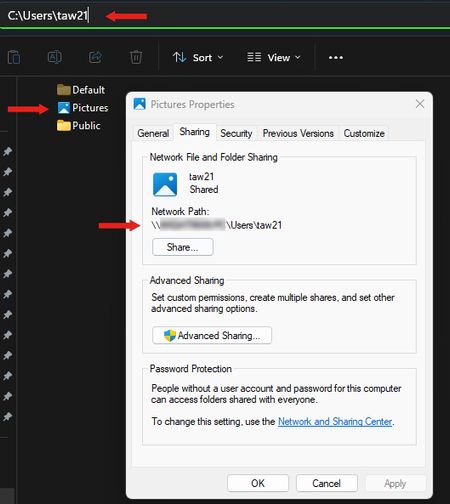
I recently noticed that my personal user file is displaying the name "Pictures" and has the Pictures icon. However, when I click on the folder, everything is correct within the folder and the address bar shows the correct folder name. I've attempted to attach an image here; I had to paste several images together to create the attached image, so I know that the address bar would not actually be visible at this point, but if I click on the Pictures folder then the address bar it becomes visible. Thanks, TomTAW211NAFeb 19, 2026Copper Contributor10Views0likes0Comments
Bluetooth Headset Microphone Constantly Disconnects
Hello, I have noticed this issue not only with myself, but several colleagues of mine using any bluetooth headset and its built-in microphone. When initially connecting bluetooth headsets to our Windows devices (Apple, Shokz, etc.) they work as intended. However, the microphone seems to disconnect and no longer be recognized by Windows randomly throughout the day and/or right before answering calls (through MS Teams). Audio continues working as intended. The only solution I have found is restarting the device. You can imagine this becomes extremely annoying and causes us to lose time working. I have tried several other solutions. Uninstalling the drivers through device manager just creates an endless loading screen loop and never completely uninstalls any drivers while the headset is paired. Removing the device in Windows Bluetooth settings also ends up getting stuck and doesn't allow you to un-pair or re-connect to the headset. Restarting Bluetooth services does not fix the issue either. Does anyone have a similar issue or a fix for this? It has only started happening recently, maybe within the past couple weeks.josephsluterbeckFeb 19, 2026Copper Contributor98Views0likes2Comments
Windows explorer bug: renaming files highlights file name while editing, removing entire name
This has been a problem for several years with Windows explorer. If you work decently fast editing a file name, either by clicking on it or pressing F2, and then start typing immediately, Explorer automatically selects the whole name after about a second. This is really annoying since it removes the entire name if you're typing when this happens.MatsBjurFeb 19, 2026Brass Contributor24KViews28likes28Comments
Comparing Notifications: Pop-ups vs. History
There appear to be two distinct components of Windows notifications: the brief pop-ups that appear for a short period of time (referred to as "toasts") and the notification history accessed by clicking the Notifications icon. Is it possible to manage these two elements separately? For instance, I find the pop-ups from Macrium Reflect notifying me of backup progress useful, but I do not require a log of these pop-ups. Conversely, in a scenario where I was configuring task scheduler to execute a script before the computer goes into sleep mode, a pop-up notification would be irrelevant, but having a record of the notification could offer valuable diagnostic insights. (In this particular case, either the script or the notification failed, as evidenced by the lack of information in the notification history.) Is there a method to independently control these distinct facets of notifications? Currently, the only option I can identify in the Settings is a binary choice for enabling or disabling specific notifications.AndrewBlakeFeb 19, 2026Copper Contributor306Views0likes1CommentWhere / How to find "Ask a question"
CAN ANYONE TELL ME how to reliably and repeatably find the Link to "Ask a question" or "Start a Discussion"! Yes, I am Starting a Discussion now ONLY because I accidentally stumbled upon a Start a discussion link. I am often wondering around in the various Community Hubs, Discussions, Screens, etc. trying to find that link - and don't laugh because I am serious, but sometimes for 30 minutes or more and sometimes finally giving up. I love the Community and the support here, but WHY is it so hard to "Ask a Question" I will post the question somewhere else when I finish here - if I can once again find the link to ask a question. And sorry to be such a pain over this and although a long-term Community participant, but this has been a lingering problem for me, going back years and years. ron in shawneeroninkansasFeb 19, 2026Brass Contributor77Views2likes4Comments
"Show all icons in system tray" option in windows11
Hello there. Subject said that all. This option was available till windows10 in taskbar and start menu settings, but in windows11, I found a settings to enable notification icons one by one, and not all icons remain enabled at the time. How to do this (show all icons in system tray) in windows11?Solvedabdullah5490Feb 19, 2026Brass Contributor457KViews30likes165CommentsWindows 11 ARM VM disconnects network share
I'm running Windows 11 ARM in VM on Mac, and am using Window Defender to scan over SMB folders.......Some folders large 40+gig in size, so scanng a fewb at a time, but maes no different.. it still hangs. During a can sometimes it looses connection and despite having IP address still i cannot reconnect... until i restart, which means i have to restart scan all over.. I've tried resetting network adapter using netsh int ip reset and netsh winsock reset both hang. Windows 11 arm is up-to-date with Updates,,,,,, The adapter i'm using on Mac is this one: https://www.amazon.com/UGREEN-Ethernet-Thunderbolt-Converter-Chromebook/dp/B082K62S48?crid=1W1RAIDHVHIFN&dib=eyJ2IjoiMSJ9.Z1hVGIdeIcKfZtt-mU1MaR0AMBVh4wYfj8eOItSdm4-YixNCTTr32VUNTB3sepW1pmbX-vfj300tos5rlB0802FJlf0hixLulk9MAdLF8rooZf63dpV10Hf8J5JPoL-F8RYShzDED0K0gdD2jp9nuFwsbi1xW1bHyRjcQSvObVuqeNQ19DfWY3JGBhbIPoyLuFQc61NcG0MAc16Jowq8yPUINVCedVfhRd5jOoGJdG8.jei67wmsVFeoEgNK0F3v7t2TWiMjRE2XtopL9IpRmks&dib_tag=se&keywords=ugreen%2Bthunderbolt%2Bto%2Bethernet&qid=1770521767&sprefix=ugreen%2Bthunderbolt%2Bto%2Beherne%2Caps%2C342&sr=8-1&th=1 When looking at Properties of driver Looking at the usb : ax88179_178a.sys in (/System32/drivers), there is NO signature .... but its not in use so should be ok.. Instead the adapter is connected to VM by Ethernet "Bridged (AX88179)" Is this issue just because it can't handle excessive sized? or what ?TECH198Feb 19, 2026Copper Contributor41Views0likes4CommentsWindows 11 24H2/25H2 System Freeze After January 2026 Updates – Lenovo ThinkPad G2
Dear Microsoft Support Team, We would like to raise a high-priority technical support case regarding a stability issue observed after installing the January 2026 cumulative updates on our Windows 11 devices. Environment Details: Device Model: Lenovo ThinkPad G2 (multiple units) OS Versions: Windows 11 24H2 and 25H2 Update Installed: January 2026 Patch Tuesday cumulative update (KB number can be provided) Deployment Method: WSUS / Intune / Windows Update (specify accordingly) BIOS Version: (Installed Latest available from Lenovo) Issue Description: After installing the January 2026 cumulative updates, devices intermittently experience a complete system freeze. The system becomes fully unresponsive: Mouse and keyboard input stop responding No BSOD is displayed Task Manager cannot be opened System recovery is only possible via hard reboot (power button) Frequency: The issue occurs randomly, both during active use and idle state. Multiple users across our environment are impacted. Troubleshooting Performed: Reinstalled OEM-certified Lenovo display drivers Disabled Fast Startup Ran SFC and DISM health checks (no integrity violations) Updated BIOS to latest version Setting power idle mode, then work normally Request: - Please confirm whether this is a known global issue under investigation. - Advise if any hotfix, Known Issue Rollback (KIR), or registry-based mitigation is available. - Provide guidance on additional diagnostic logging required at kernel or driver level. - Confirm whether crash dump analysis is recommended for this scenario. We are prepared to provide additional diagnostic logs, memory dumps, or reproduction steps upon request. Kindly treat this as a priority case due to multi-user impact in a production environment. Thank you for your support. #Windows11, #Windows 11 24H2, Windows Update, Cumulative Update, System Freeze, Lenovo ThinkPad, Display Driver, EnterpriseSupport_AdminFeb 19, 2026Copper Contributor738Views5likes8Comments¿Cómo Buscar archivos duplicados en Windows 11/10 de forma rápida y segura?
Estoy buscando una forma rápida y sencilla de encontrar y eliminar archivos duplicados en Windows 11/10. Mi disco duro se está llenando y sospecho que tengo muchos archivos repetidos (fotos, documentos y descargas), pero no sé exactamente cómo empezar ni qué método es más seguro para no borrar nada importante. He leído que se puede Buscar archivos duplicados usando herramientas integradas de Windows o programas gratuitos, pero no tengo claro cuál es la mejor opción para un usuario sin experiencia. ¿Alguien podría recomendar un método fácil paso a paso o una herramienta confiable para Buscar archivos duplicados y eliminarlos sin riesgo en Windows 11 o Windows 10? ¡Gracias de antemano por la ayuda!ElijahWoodFeb 19, 2026Iron Contributor525Views0likes7Comments

Tags
- Features1,953 Topics
- configuration1,880 Topics
- device management1,264 Topics
- Update management992 Topics
- Application Management869 Topics
- security762 Topics
- deployment539 Topics
- community428 Topics
- accessibility268 Topics
- licensing227 Topics