
Forum Widgets
Latest Discussions

Local account and MS account
I just did a windows 11 Home clean install and used my MS account for the installation. (Ready for the planned deactivation of local accounts.) Now I have two home directories and Windows is using the new MS account directory structure, but all my active files are in the local account directory structure. These questions will sound stupid, and they are, so we got that covered. Please reference howto documents. If I should read/study a book, please point me to the best Windows 11 Home admin book. How do I tell which UID I'm using? How to find the correct profile I'm using. Can I delete the local user account without deleting the active files? How to merge the two account files to the true active MS UID? Thank you, Ed T.etootill2185Apr 20, 2026Copper Contributor13Views0likes0Comments
Windows Defender Notifications Not Working — Even After Clean Installs, BIOS Reset & Full Repairs
Hi everyone, I’m facing a strange and persistent issue with Windows Defender notifications, and I’m hoping someone here may have encountered something similar. During routine system maintenance, I noticed that Windows Defender has completely stopped showing notifications — no scan completion alerts, no threat‑found pop‑ups, nothing at all. Troubleshooting I’ve Already Done To rule out corruption, configuration issues, or hardware‑related causes, I’ve carried out extensive testing across multiple clean installations: Reinstalled Windows using the Media Creation Tool → still no Defender notifications Reinstalled Windows again using Rufus → same result Reset BIOS / cleared CMOS Installed an older Windows 11 build (offline, before updates) → still no notifications Deleted all partitions on every reinstall (full clean install) Verified all Windows Defender notification settings, including Enhanced Notifications Checked Windows notification settings to ensure Windows Security is allowed Ran SFC Performed DISM /Online /Cleanup-Image /RestoreHealth Confirmed no registry or Group Policy entries suppressing notifications Reinstalled Windows Defender components Scanned with third‑party tools and Microsoft MRT — no issues found Ensured Windows Push Notification System Service is running Despite all of this, Defender notifications never appear on any fresh installation. Microsoft Support I opened a support ticket with Microsoft. One engineer performed an in‑place repair install Another advised me to post the issue here for deeper investigation Ticket reference: 710148747 Additional Technical Findings 1. Notifications are not being suppressed No GPOs applied No Intune configuration profiles No registry entries modifying notification behaviour Local notification settings fully enabled Defender notifications fully enabled It’s not a profile corruption It’s not a user hive issue It’s not a local DB issue It’s OS‑level 2. Windows Notification Platform (WNP) appears to be the root cause Across multiple clean installs: ShellExperienceHost exists on disk. Focus Assist toggle produces no toast (not sure it does) other apps like mail, Logitech, steam can toast notification, i don't see defender toasting any scan notification. WNP is partially working Defender is partially registering The scan‑completion channel is failing specifically This behaviour is consistent and reproducible. 3. Defender functionality validated using EICAR I manually created the EICAR test file and ran a scan: Defender detects and removes the file correctly Detection appears in Protection History A threat notification appears Scan completion notifications do NOT appear This confirms: Defender itself is functioning The notification delivery layer (WNP) is not working question at MS QA- https://learn.microsoft.com/en-us/answers/questions/5864084/windows-defender-notifications-not-working-even-afFaithBhasiApr 20, 2026Occasional Reader35Views0likes0CommentsWindows 11: Task Manager: Background Processes: Stop Unnecessary Ones from Starting Automatically
Greetings. For far too long, I see random instances when at least the following four unnecessary background processes are running automatically in Task Manager: Microsoft Content, Work or School Account, Windows OOBE Service, and Microsoft Store Background Task Host. I do not have and never have had a Work or School Account. I do not allow any of these applications to run in the background. Could someone at Microsoft please improve the software modules for at least the above four processes so they will not run automatically in Task Manager at random instances without my allowance? Thank you for your assistance, if indeed you offer it.Ferrell516Apr 20, 2026Occasional Reader10Views0likes0Comments
No wifi in the morning
I have a really strange problem with my Lenovo pc 9i, running Win 11 Home. From 7-8am it cannot access my wifi. The problem may occur again for an hour later in the day, maybe. My Samsung Tablet, our Pixel phones and my wifes Lenovo 71 all have no problems with the wifi. I've had the local repair shop look at it. They told me it was a problem with the Nordvpn I was using so I replaced it with Expressvpn. The problem remains. Last Saturday morning it worked fine all morning, but it had slipped into Airplane Mode. Those are the clues. Any help will be appreciated. Thanks in AdvanceJeff_S965Apr 20, 2026Copper Contributor59Views0likes5Comments
Windows 11 Desktop Background
Seeking to personalize my desktop background. I've selected a folder for images. The folder has sub-folders and Windows doesn't seem to know what to do with sub-folders, none of the images are being selected for desktop background. Any ideas?Badger51Apr 20, 2026Copper Contributor113Views0likes2Comments
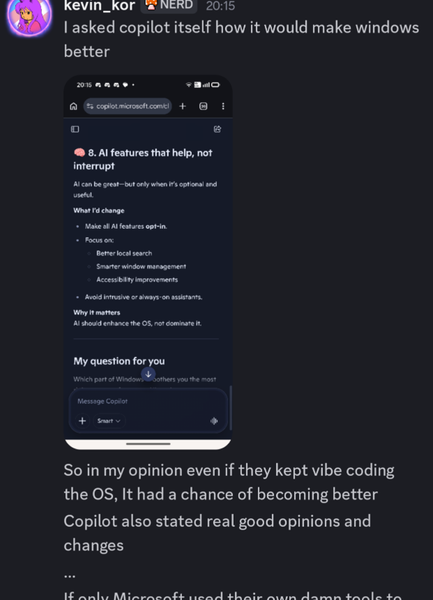
For Windows 11, Microsoft should ask its own AI what users really want
Microsoft spent heavily on AI and forced it everywhere in Windows 11, which most users dislike. It’s disappointing they never let the AI suggest real improvements for the system based on user feedback.AnselRhodesApr 20, 2026Iron Contributor52Views0likes2CommentsWindows 11 screen goes black after waking from sleep, only mouse moves
After waking my PC from sleep, the screen is totally black but the mouse cursor still works. Keyboard is unresponsive, I can only force restart. Tried updating graphics drivers and disabling fast startup, no luck.DaxxonFosterApr 20, 2026Iron Contributor45Views1like2Comments



Tags
- Features2,098 Topics
- configuration1,948 Topics
- device management1,356 Topics
- Update management1,054 Topics
- Application Management914 Topics
- security823 Topics
- deployment585 Topics
- community473 Topics
- accessibility299 Topics
- licensing247 Topics