User Profile

SteveMorley1
Brass Contributor
Joined Sep 28, 2017


User Widgets
Recent Discussions
Migrating from Hotmail to Outlook
Hi folks, I've had my Hotmail account for along time and I have recently created an alias for it. Now when I compose an email I get the choice of selecting my new Outlook account. Is there a setting that I'm clearly missing to make my new Outlook account the default?613Views0likes0CommentsBuilding a formula for Hours and minutes needing an IF Statement - probably
The information is being exported to Excel from another platform. Last Name First Name Hours/Quantity Minutes Smith Jane 1 hr. 30min Smith John 7 hr. McDonald Ron 30min Can anyone provide assistance to help me create the information needed in minutes?Solved642Views0likes2CommentsRe: Make Datacard Read Only When user is editing form, but editable when they're creating new form
derhallim just because this a couple of years later, when I tried the syntax of If(SharePointForm1.Mode = FormMode.New, DisplayMode.Edit, View) - the view at the end, now needs to be DisplayMode.View6.4KViews1like0CommentsRe: Shared accounts setting up recurring Teams meeting
I did some research with both the customer and Dr Bing and Mr Google. RealTime_M365, can you confirm that if a meeting is set to automatically record, that if a person tests the link that they've been emailed and they go into the meeting first, that person's OneDrive is where the recording will be stored?1KViews0likes1CommentShared accounts setting up recurring Teams meeting
Hi Teammates, We have a shared account in charge of booking meetings. Let's say the account is called mailto:email address removed for privacy reasons In Outlook, mailto:email address removed for privacy reasons has a second inbox set up with the meetings account. They have shared the meetings account with Person2 and Person3. Person1 has set up a recurring meeting with several stakeholders, and they have made Person2 and Person3 co-organizer of the meeting. The co-organizer of the meeting has the meeting set to automatically record. Yesterday they had a meeting, and Person2 was the lead organizer, but the recording went to the OneDrive of Person3. If I'm logged in to my Outlook as person1, 2, or 3 and I create a recurring meeting in the Meetings Outlook Calendar, would I expect the meeting recording to be stored in my OneDrive, or in the Meetings Account OneDrive? This is probably important to know. We don't have InTune turned on yet, but we do have Person1 logging in to our Azure AD when they turn their computer on.Error creating a personal view in a SharePoint document library
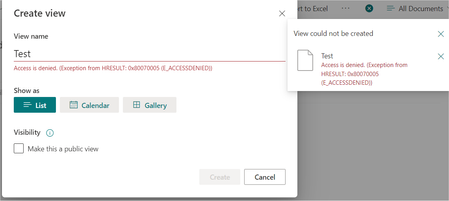
Hi everyone, This one seems odd to me. In my tenant I have one classic site collection that I've been trying to modernize for the last 2 years. On this one site in particular there is a reluctance on the customer's part to change. This morning they shared an error when they try to create a personal view. See attached. The error message is: Access is denied. (Exception from HRESULT: 0x80070005 (E_ACCESSDENIED). I also tried it from the library settings and I get a similar error. The people who receive the errors have full control on the library. I have a test account that I added to this group and it experienced the same error. When I log in as the site collection administrator I can create a personal view. I tried creating a new document library and it behaves the same way. I tried another site on this site collection and it works fine. Anyone ever see this before?Solved1.2KViews0likes2CommentsRe: ?source redirect not working for modern SharePoint lists
I found my own answer. Modern requires copying the link from the new form. See this blog from Code2care. But what if you want to redirect the user to the "Home page", custom "Thank you" page or any other page. https://code2care.org/2015/sharepoint-list-redirect-user-after-submitting-form-newformaspx2.6KViews0likes0Comments?source redirect not working for modern SharePoint lists
Hi SharePoint-ers, I'm working on a SharePoint list in SharePoint online, and I want to give people a link on a home page to a form, and when they have completed or cancelled the form it goes to a Thank You page. If the list is set to Classic, it works fine. When the list is modern once you cancel the form it places on the default view of the list, which I don't want. The syntax for the link is: https://my.sharepoint.site/Lists/myform/NewForm.aspx?SOURCE=https://my.sharepoint.site/SitePages/Thankyou.aspx I have tried the following modern web parts: Text Quick links Links Buttons Wiki pages Is this a bug/feature, or is there something I need to turn on in my site, or do I have to switch back to classic for this to work? Any help, as always, is appreciated.Solved2.6KViews0likes1CommentHelp with an Excel formula with conditions based on a single text cell with multiple values
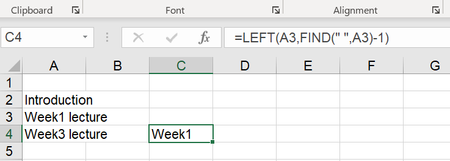
I have a column with multiple values possible in it. I'm trying to extract the first word from each cell in the column. As above, you can see I've got a formula for the condition if there are multiple words in the cell. In cell A2, you see there are no spaces, so the formula of =LEFT(A2,FIND(" ",A2)-1) won't work. What I would like is a formula that would capture both conditions: If there is one word, display that word, if a space is found, display the left-most word. Any help would be appreciated.Solved1.2KViews0likes2CommentsNeed help with a Calculated field with multiple IF statements
I have a list that I want to create a calculated field for. I have a large lookup list that I'm trying to break up. I have those working fine, as pictured below. Now I want to create a calculated field called Active Lecturers 2.0 that will display the information from one of the 3 columns to the right in the screenshot. The calculation I have now is working for the column: Lecturers A-M but it is still showing empty in the Active Lecturers field for the other two columns. Here's the calculation I have so far: =IF( NOT( ISBLANK([Lecturers A-M]) ), ([Lecturers A-M]), IF( NOT( ISBLANK([Lecturers N-R]) ), ([Lecturers N-R]), IF( NOT( ISBLANK([Lecturers S-Z]) ), ([Lecturers S-Z]) ) )568Views0likes0CommentsLimit in a lookup field and "More results" doesn't resolve any new items
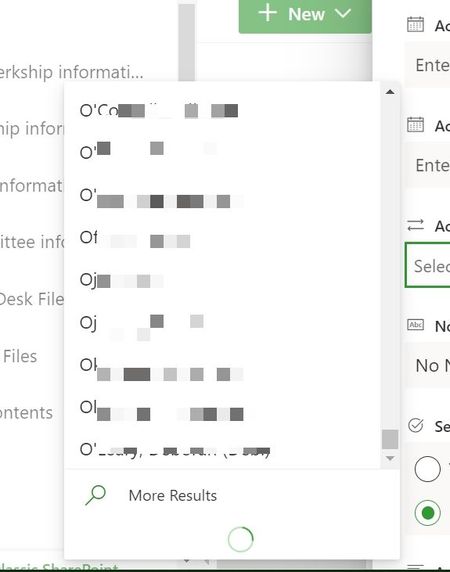
Hi folks, I've had a lookup field for teaching faculty in use for several years. This lookup field is rather large - 2800 items. It has now stopped at the 1992nd record, and then you get to click on "More results", but it never resolves. I was thinking about creating a calculated field called "Teaching faculty O-Z, so I was looking for help with the syntax.515Views0likes0CommentsColumn formatting json to narrow the width the new form page
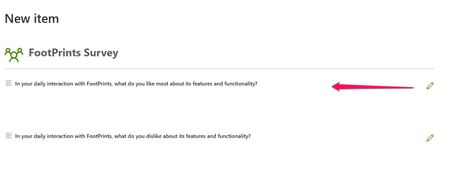
Hi SharePointers, Help a friend out with narrowing the NewItem form. I have a small survey that I just want to have a little narrower than the default. When it's on a big monitor, the eye doesn't immediately go all the way to the right for the pencil. It should be closer to the actual question in the survey. I was looking for some Json help.Solved2.2KViews0likes1CommentUsing @mention to set up a Teams meeting
Hi Everyone I've been playing around with "Meet Now" and "Schedule Meeting" features in Teams. We are a department of 30 people, and just like in the chat, I'd like to be able to "@departmentname" instead of having to individually select each person. Any thoughts? Or is this something to be addressed in User Voice?1.3KViews0likes1CommentIs there a way to convert a classic site into a modern site
Hi SharePoint-ers. I have a classic site collection: Level 1. My Company SP farm Level 2. Operations (site collection) everyone in operations has read access Level 3. Project 1 (team site) We had a breach on project 1, where a new site owner deleted all unique permissions, and that site then inherited from the parent. All is well, we found out about the breach quickly, cleaned it up, did an audit, nobody saw what they weren't supposed to. However, the risk is still there that it could happen again. What I'm wondering, is there a way (other than creating a brand new modern site which is it's own site collection and site all at the same time and copying all the original content, permissions, and recreating workflows) to move/promote my classic Project 1 site to a modern site? PS. We are looking at permission levels. Taking away Full Control from Team Owners and substituting "Team Owners" permission levels, so they can't delete unique site permissions and inherit from the top more permissive site.Solved2.2KViews1like2CommentsSharePoint properties in Microsoft Word not accepting a date field
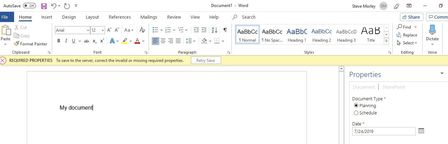
Hi SharePointers, I have an Office 365 tenant and I have recently noticed a much needed update to MS Word for Office 365. When I create a file in the desktop version and want to save it to a SharePoint document library, I was pleasantly surprised when the SharePoint Properties dialog box appeared on the right side of the screen. When I fill in the required fields for my document, and click "Retry Save", nothing happens. Here is an example of the screen. Upon further investigation, I have discovered that when the field is date/time field, that's when retry save doesn't work. If the field is a choice field that is required, the feature works fine. Is anyone else aware of this situation, and can you provide any insight into working out the problem. Thanks in advance.1.3KViews0likes0CommentsRe: SharePoint Designer to Microsoft Flow Limitations
Thanks ChrisWebbTech. I got that information from Microsoft at the conference in Boston, plus we have been told that based on our license, which is for an educational institution. I would love to be wrong on that one, and thank you for the recommendations.1.5KViews0likes1Comment


Recent Blog Articles
No content to show