responsive
361 Topics
SPFx Web Part Not Visible for External User in Client Tenant
Hi everyone, One of our team members has developed an SPFx web part that we have deployed and published in our client's SharePoint tenant using a service account. The web part is working as expected when we access the client tenant using the service account. However, when I access the same client tenant using my external/guest user account, I cannot see or use the SPFx web part. Current setup: The SPFx web part was developed by one of our team members. The solution has been deployed and published in the client's SharePoint tenant using a service account. The service account can see and use the web part successfully. My account has also been added to the client tenant as an external/guest user. However, when I access the same SharePoint site using my external account, the SPFx web part is not visible/available. I would like to understand whether this is expected behavior for SPFx web parts when accessed by external/guest users, or if we are missing some configuration. Could this be related to SharePoint permissions, Entra ID guest-user settings, the App Catalog, API permissions, or the SPFx solution deployment configuration? Are there any specific permissions or tenant-level settings that we should check to allow external users to access the SPFx web part? Is there any Microsoft-side restriction that prevents external/guest users from accessing SPFx web parts? Any guidance on what could be causing this issue and how we can troubleshoot or resolve it would be greatly appreciated. Thanks in advance!104Views0likes0Comments
SPMT Needs True Mirror Mode and Resource Throttling
Subject: SPMT Needs True Mirror Mode and Resource Throttling SPMT incremental migration does not behave like a true synchronization or mirror operation. New and modified files are copied, but deleted, renamed, or moved files are not reconciled at the destination, often resulting in orphaned content and duplicates. Microsoft has previously confirmed this as expected behavior. Administrators have had reliable mirror-style functionality available since the circa 1990s through tools such as Robocopy. In comparison, SPMT's incremental migration capability feels incomplete for modern enterprise migration scenarios. Requested enhancements: Optional mirror mode similar to robocopy /MIR Delete destination content that no longer exists in the source Detect and process renames Detect and process moves Pre-migration analysis and dry-run reporting Configurable safeguards for deletions Additionally, SPMT appears to consume storage resources aggressively. During migrations, disk I/O activity can become saturated and disk idle time can fall close to zero regardless of migration batch size. This behavior can negatively impact file servers and production workloads. Requested performance controls: I/O throttling CPU throttling Concurrency controls Bandwidth limits Scheduling and business-hours policies Dynamic backoff based on source-server load Current behavior requires administrators to perform manual cleanup and reconciliation after incremental migrations while also managing significant infrastructure impact during migration runs. A modern migration tool should provide both synchronization intelligence and resource governance controls. Frankly, from an infrastructure perspective, your complaint about the I/O behavior is probably the stronger one. Many migration tools deliberately maximize throughput, but not providing an obvious way to cap I/O, threads, or overall system impact can be problematic in production environments. The lack of mirror semantics combined with aggressive scanning/copy behavior is what tends to frustrate admins the most.226Views0likes0Comments
Recycle Bin and Site Content Hidden for Site Members and Site Visitors
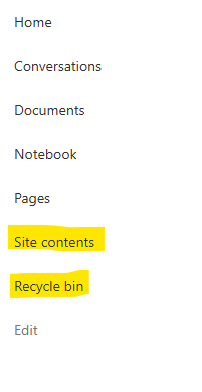
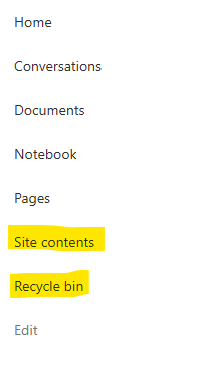
I posted this before but made a mistake with my write up, so I am reposting. I have a requirement that the Recycle bin and Site Contents should be be hidden from the Site Members and Site Visitors. Please how can I achieve this because the Server Infrastructure activation is not working for me. Any workarounds? Please help754Views0likes1Comment
SharePoint modern page, can you adjust responsive design?
Specifically, is there any way to control the window width at which webparts start to stack? My specific situation is similar to the one in this discussion. In my case, I have 3 tall, thin photos that need to display on a page. I have placed 3 image webparts, one in each column of a 3-column section. This looks fine in a wide window. But as I narrow the window, at far too wide of a window width, the section switches to stack the "columns," leaving the user looking at the top 25% of the first photo only. (Which not surprisingly is pretty useless; one needs to see all of a photo.) In both my case and the previous discussion, the problem is that the responsive design thresholds are far too wide (often wider than the physical computer monitor that some are using). Is it possible to fix the thresholds?545Views0likes2Comments
SHAREPOINT online performance monitoring tool, audit, backup and migration
Hi, I am looking for a tool forSHAREPOINT online which does performance monitoring ( to track details of slow pages, user hits etc.) tool, audit, backup and custom classic publisher sites migration. Pls suggest.2.6KViews0likes8CommentsDynamic Mandatory Fields
In a SharePoint library, I have folders which are = a. Admin b. Events c. Furniture and Moves d. Janitorial and Maintenance e. Parking and Transportation f. Shipping and Receiving g. Supplies and Equipment h. Waste and Recycling I have Meta data across the library whose data type are all choices and are: a. Document Type = Contract, Financial, planning b. Building = Gym, Garage, Heating c. Asset Category = Office, Playground d. Fiscal Year = FY23, FY24, FY25, FY26, FY27 e. Vendor = Maple Leaf, Canadian Tire, Home Depot f. Status = Active, Pending, Not Active g. Retention Label = 3 years, 5 years h. Service Type = Admin, Events, Furniture and Moves, Janitorial and Maintenance, Parking and Transportation, Shipping and Receiving, Supplies and Equipment, Waste and Recycling Service Type and Retention Label are mandatory fields, with the Rule below for all the files in the various folders: IF Folder Name = Admin, then Service Type = Admin and Retention Label = 5 years; the mandatory fields should be Document Type, Status and Fiscal Year IF Folder Name = Events, then Service Type = Events and Retention Label = 3 years; the mandatory fields should be Document Type, Status and Fiscal Year, Building and Vendor IF Folder Name = Furniture and Moves, then Service Type = Furniture and Moves and Retention Label = 3 years; the mandatory fields should be Document Type, Status and Building IF Folder Name = Janitorial and Maintenance, then Service Type = Janitorial and Maintenance and Retention Label = 3 years; the mandatory fields should be Document Type, Status and Fiscal Year IF Folder Name = Parking and Transportation, then Service Type = Parking and Transportation and Retention Label = 3 years; the mandatory fields should be Document Type, Status and Fiscal Year IF Folder Name = Shipping and Receiving, then Service Type = Shipping and Receiving and Retention Label = 3 years; the mandatory fields should be Document Type, Status IF Folder Name = Supplies and Equipment, then Service Type = Supplies and Equipment and Retention Label = 3 years; the mandatory fields should be Document Type, Status and Fiscal Year IF Folder Name = Waste and Recycling, then Service Type = Waste and Recycling and Retention Label = 3 years; the mandatory fields should be Document Type, Status and Vendor I have used Column Default Value Settings for SharePoint to display Auto-Display the Service Type and Retention Label, but I cannot seem to perform the conditional mandatory fields using Validations setting for the other requirements. Please help633Views0likes1CommentRecycle Bin and Site Content Hidden for Site Members and Site Visitors
I have a requirement that the Recycle bin and Site Contents should not be be hidden from the Site Members and Site Visitors. Please how can I achieve this because the Server Infrastructure activation is not working for me. Any workarounds? Please help597Views0likes2CommentsClarification on SharePoint Macro Consent Flow and Permissions
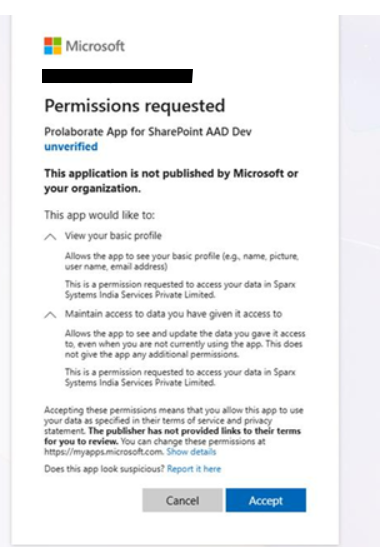
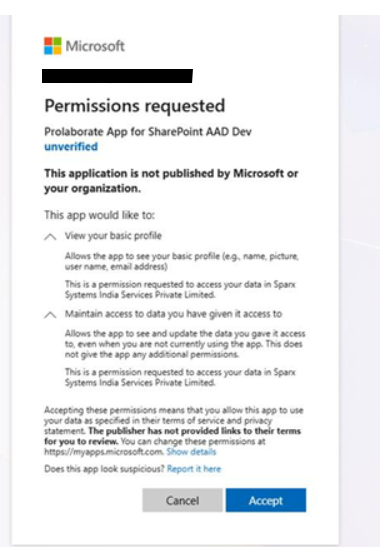
Hi Team, We have a customer using SharePoint in a secure environment. While configuring the Prolaborate SharePoint Macro on their site, a consent popup is displayed during the approval process. Previously, our macro implementation used the Admin Consent flow. Based on the customer’s security and approval requirements, we have modified the consent to use the User Consent flow instead. The customer has requested additional clarification regarding the consent process. Specifically, they would like to understand: The exact API calls triggered for these two consents View your basic profile Maintain access to data you have given it access to The permissions being requested from Microsoft Graph or SharePoint Whether the application requests any tenant-wide or high-privilege permissions Whether minimal permissions such as Sites.Selected can be used instead of broader scopes Current concern: The customer feels the current permission request is too broad for approval within their secure environment (Banking customer). Reason: Their internal approval process requires clear visibility into the exact API and permission scopes being requested, as different permissions are reviewed and approved by different internal teams (for example, User.Read is managed by the Identity team). From our implementation side, we are using only custom APIs and are not directly calling Microsoft Graph APIs. This information will help us provide a clear response to the customer and support their internal approval process.334Views0likes1CommentClarification on SharePoint Macro Consent Flow and Permissions
Hi Team, We have a customer using SharePoint in a secure environment. While configuring the Prolaborate SharePoint Macro on their site, a consent popup is displayed during the approval process. Previously, our macro implementation used the Admin Consent flow. Based on the customer’s security and approval requirements, we have modified the consent to use the User Consent flow instead. The customer has requested additional clarification regarding the consent process. Specifically, they would like to understand: The exact API calls triggered for these two consents View your basic profile Maintain access to data you have given it access to The permissions being requested from Microsoft Graph or SharePoint Whether the application requests any tenant-wide or high-privilege permissions Whether minimal permissions such as Sites.Selected can be used instead of broader scopes Current concern: The customer feels the current permission request is too broad for approval within their secure environment (Banking customer). Reason: Their internal approval process requires clear visibility into the exact API and permission scopes being requested, as different permissions are reviewed and approved by different internal teams (for example, User.Read is managed by the Identity team). From our implementation side, we are using only custom APIs and are not directly calling Microsoft Graph APIs. This information will help us provide a clear response to the customer and support their internal approval process.303Views0likes2Comments