Forum Widgets
Latest Discussions

New Sharepoint Quick Access - Want "Sites" back
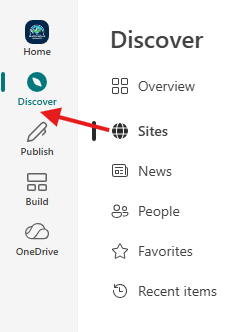
I want the Sites back on my quick access menu - I don't want to have to go through "Discover" it just adds an obnoxious extra step and I can get there clicking on the Sharepoint logo on the top left - having another button to take you to the hub is pointless. How do I get Sites back on the quick access?RachaelSRSJun 26, 2026Occasional Reader12Views0likes1Comment
SharePoint Online - Issues Saving Site as Template and Activating .wsp Solutions
Hello everyone, Recently I have been experiencing issues when saving a SharePoint site as a template and activating .wsp files within the Solution Gallery. This appears to be a recent change, as the same process and templates have worked successfully in the past. I wanted to see whether anyone else has recently experienced issues with SharePoint site templates (.wsp) in SharePoint Online. Findings: Site type is a Classic Team Site. Custom Script is enabled (DenyAddAndCustomizePages = Disabled). The .wsp file is successfully generated and appears in the Solution Gallery. The .wsp file does not activate. Activation fails with the error: "Activation of solutions with sandboxed code has been disabled." - Prior to this, SharePoint was only displaying a generic "Sorry, something went wrong" error. (All I did was turn content approval on and off in the Solution Gallery Library) Previously working .wsp files also fail to activate. The behaviour has been reproduced across multiple Microsoft 365 tenants. A Microsoft support ticket has already been raised. Has anyone else encountered this behaviour recently, or is aware of any changes affecting .wsp template activation in SharePoint Online? Thank you in advance for any insight or suggestions._BonezJun 26, 2026Copper Contributor330Views2likes19CommentsAssign rating to individual Choice items?
Hello, I'm trying to create a Sharepoint list of employees and their respective skills. Each skill has a rating from 1-4 indicating how proficient they are in it. Is there any way to implement this in a Sharepoint list besides manually creating 4 different versions of each skill? If not, is there a better way of implementing this? If possible, I want to keep this in Sharepoint to make it easy to access.Stephen-14853Jun 26, 2026Copper Contributor28Views0likes1Comment
Add name of user in page
Hi, I am trying to add the users name like Hi Sylvian, How can I do this ? Thanks for your help!tifanny034Jun 25, 2026Copper Contributor36KViews1like10Comments
SharePoint on-prem issue with OneNotes
Hello guys, have you experienced the same issue? I’m on the Current Channel of M365 desktop apps (build 20026.20182), and the OneNote desktop app is not syncing notebooks from either a SharePoint 2016 on-prem farm or a SharePoint Subscription Edition farm. The OneNote app crashes after 10 seconds while trying to sync. Microsoft OneNote desktop error: We couldn’t open that location. It might not exist, or you might not have permission to open it. (However, I do have sufficient permissions.) It was working perfectly fine on the previous build (20026.20166).LolzerJun 25, 2026Occasional Reader17Views0likes0CommentsHow do I get quick actions to show up in Gallery view for a list?
Hello, I'm creating a sharepoint list of employees. I create quick actions for sending an employee a teams message or an email, and they work fine in list view. However, in gallery view they don't show up. The field title is displayed, but there's nothing inside, which I've highlighted with a red box. Is it possible to get the quick action buttons to appear in this view?Stephen-14853Jun 24, 2026Copper Contributor14Views0likes0Comments
Sharepoint versioning bug with tables
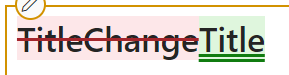
Hi, So i have discovered a bug with the versioning in my sharepoint sitepage. When i edit a random piece of text ie. the title, in a text webpart with a table inside. The table shows up as changed in the version history of the sitepage. Below is an example of the issue. Here i've changed the title from "TitleChange" to "Title" and nothing else. The tables however still show as if they were changed. The first 2 tables are created with the built in tool in the text webpart, but the bottom 2 tables were created in word and then copied over to sharepoint. And as you can see the last table does not change as its suppose to, but the 3. table does. I figure its because something happens when you merge cells. So sharepoint does some sort of formatting that changes nothing but shows as changed. It only affects the table either when its made in sharepoint (1. & 2. table) or have merged cells (3. table), but not when its copied from word and has no merged cells. I've tried taking the html out and compared the before and after using powershell, but theres no change there. So can i stop this from happening or is there perhaps some sort of work around, so the tables dont show up as changed when they're infact not?Jacob_MarcussenJun 24, 2026Copper Contributor601Views1like2CommentsNew Button Greyed Out on Initial Page Load
Our client has reported a rather odd behavior involving list view web parts on a page on a classic page after installing the May CU. The “(+) New” button is greyed out on the initial load of the page and is not clickable. But if you click anywhere inside the webpart, it lights up and turns blue. Every time the page is reloaded or revisited, the New button reverts to grey and unclickable. The source list works fine in both classic and new experience. This is a new behavior change. Has anyone else observed this?TobyLeongJun 24, 2026Occasional Reader5Views0likes0CommentsNews Posts created via PnP PowerShell using a Page Template don't reflect in News Webpart Properly
I've created some News Posts via PnP PowerShell based on a Page Template which has a single image and some sample text. I then update the text via PowerShell and publish the changes. Everything looks great on the News Post, but when I go into the News Web Part it doesn't show the image (just a placeholder image) and shows the original sample text from the Template and not the text I updated. If I then go into the News Post, Edit and click on Update news (with or without making any changes to the page), the News Webpart then picks up the image and text correctly. $newsTemplate = Get-PnPPage "Templates/News-Template.aspx" $pageName = $newsTemplate.Save("MyNewsPost.aspx") $clientPage = Get-PnPPage -Identity $pageName Set-PnPPageTextPart -Page $pageName -InstanceId $clientPage.Controls[1].InstanceId -Text "Text I want to display in the News Post" Set-PnPPage -Identity $clientPage.Name -Title "Title Of News Post" -PromoteAs NewsArticle -CommentsEnabled:$false -Publish Any ideas on whether this is a known bug? Or is there something that I'm not doing? What it looks like in the News Webpart after initial creation via PowerShell. Note the placeholder image and text from the Page Template. What it looks like in the News Webpart when I go into the News Post, click on Edit, then click on Update news. News Webpart now picks up the image and my text correctly.grant_jenkinsJun 23, 2026Steel Contributor2.7KViews0likes2CommentsThe uploaded documents are not shown on page reload for document library web part
We observe a very strange behavior with all of document library web parts on all tenants where we tested. Problem Definition Newly added document disappears after page refresh. If you refresh second time the file appears. Steps to Reproduce 1. We have a document library web part with modern experiences. 2. A user uploads a document - the document is immediately visible in the UI. 3. The user reloads a page 4. The uploaded document disappears. You can use drag-n-drop upload, or upload button, it doesn't matter. Sometimes you need a few refreshes until file appears in the UI. It doesn't matter how many time you wait after the initial upload - for example you can upload a file, wait 5 minutes, then refresh - the file will disappear, then refresh again - it will appear. This is the video demonstrating the problem (uploaded on github): Video Expected Behavior: The recently uploaded document should not disappear after the page refresh. Additional Information: Browser: Chrome 149.0.7827.104 (Official Build) (64-bit) Anybody has the same problem?16Views1like0Comments




Tags
- SharePoint Online18,347 Topics
- Document Library3,239 Topics
- Lists3,156 Topics
- Sites2,637 Topics
- admin2,262 Topics
- sharepoint server2,055 Topics
- Permissions1,996 Topics
- files1,731 Topics
- developer1,614 Topics
- microsoft lists1,587 Topics