

Forum Widgets
Latest Discussions

What are the system requirements for hardware-accelerated BitLocker announced in ignite 2025?
Microsoft has recently announced hardware-accelerated Bitlocker (Ref. Link: https://techcommunity.microsoft.com/blog/windows-itpro-blog/announcing-hardware-accelerated-bitlocker/4474609) I would like to know system requirements (Specifically Hardware) that supports this functionality. The article also says below "Coordinate with your suppliers and keep an eye on listings from us and other vendors as PCs become available on the market." But I am unable to find any link for the listing from Microsoft. Does it support all the devices that has TPM 2.0 or does it require any other hardware?116Views0likes1Comment
Unable to deploy out of band update 26200.7628
Hello, I need to deploy OOB 26200.7628 on our computers. We use deployment rings. The 2026.1 OOB update appeared in Releases on January 24. I created an expedite policy with a group of users I want to target with this update (with a restart within 0 days). But nothing has happened since Monday, everyone is still on 26200.7623. Where am I going wrong? Thank you.SolvedMartas133Feb 20, 2026Copper Contributor856Views1like6CommentsWill Intune device-only subscription get additional value in FY27
Will the Intune device-only subscription (Microsoft Intune announces device-only subscription for shared resources | Microsoft Community Hub) get the additional features which Intune P1 will get in FY27 (Microsoft 365 adds advanced Microsoft Intune solutions at scale - Microsoft Intune Blog), Intune Remote Help, Intune Advanced Analytics and Intune P2? This would have a huge impact of our planning how to manage special purpose devices in production environments without any user affinity. Deploying security and configuration settings, Windows Autopilot for Windows IoT Enterprise LTSC kiosk deployment, Windows Autopatch (servicing), Remote Help and FOTA for Zebra devices would be drivers to add these production devices to Intune.
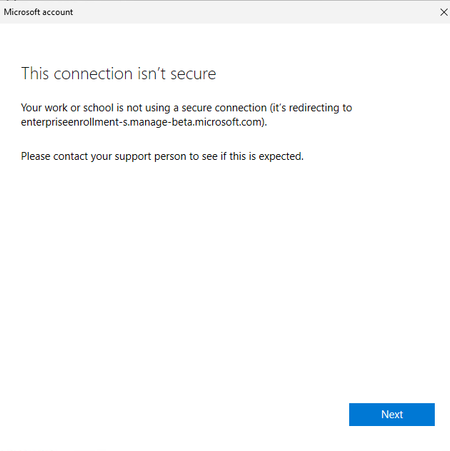
Cannot enroll azure vm(windows 24H2) in Microsoft company portal
I created a windows VM in Azure. To access company resources on this machine, I attempted to enroll the device through the Company Portal. However, the enrollment failed while setting up the work or school account, with the error message “This connection isn’t secure.” How should I fix this issue?yanxxuFeb 18, 2026Microsoft109Views0likes6Comments
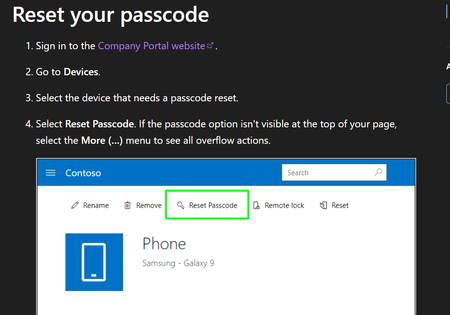
How to Disable Self-Service Passcode Reset for Standard Users in Microsoft Intune
Hi, We are using Microsoft Intune to manage Android corporate-owned devices. Currently, standard users can reset their own device passcode remotely. The problem is: Users reset the passcode themselves Then they get confused They call IT saying they cannot open their phone We want to prevent users from doing self-service passcode reset. Only admin should be able to reset the device passcode. I already checked configuration profiles and compliance policies in Intune, but I cannot find any setting to disable this. Has anyone successfully disabled this feature? Thank you.tarunograa29Feb 17, 2026Occasional Reader24Views0likes0CommentsEntra Shared Mode - Force App Stop
Hi All I hope you are well. Anyway, I was asked this yesterday and think I already might know the answer, but here goes. We had an instance of Microsoft Excel stuck in "getting things ready" on an Android Entra Shared Mode Device. Technical Support wondered if there was a way to Force Stop Excel or clear the app data. We had a look in Exit Kiosk Mode, Android Settings, and the Force Stop of Excel said "Action not allowed" and the clear the app data said "Unable to delete data for app" So, my question(s) would be, is going into Exit Kiosk Mode and even trying to force stop / clear data on apps even a valid option, or is this by design? Would adding Excel to this setting help? Any help or confirmation would be greatly appreciated. StuartStuartK73Feb 17, 2026Steel Contributor95Views0likes2CommentsHelp creating Device groups
Hi, I'm new to using Intune on a day to day basis, after adding our devices to Intune via our On-prem Active Directory. What's the best practice for organizing our Devices, such as Staff devices and Student devices? I want to create a group for all staff devices and another for student devices. Also, is there any way to auto enroll these pcs in to the correct groups once they're new ones added via our on Prem AD and Entra?MaxReboFeb 17, 2026Copper Contributor47Views0likes1Comment
Autopilot enrollment through serial number
I’m working for a reseller, and one of my customers has asked us to enroll their device serial numbers into their Intune/Autopilot tenant. We only have permission to upload devices because we are not their CSP partner. Now the customer wants us to enroll the devices, including their Purchase Order (PO) number, in the Purchase Order field in Intune. The issue is: Because we are not their CSP, the tenant does not allow us to enter or modify the Purchase Order field when we upload devices. My question: Is it possible for a non‑CSP reseller or partner to add a Purchase Order number during Autopilot device enrollment? If not, what options exist for a reseller to ensure that the Purchase Order field is populated?HarisNadeem1Feb 17, 2026Copper Contributor69Views0likes1CommentUnmanaged Microsoft 365 Applications in Intune-Managed Windows 11 Devices
Hello Everyone, We have identified in our Intune environment that several users have installed Microsoft 365 applications outside of Intune on their managed Windows 11 devices (Corporate). Could you please confirm whether these users receive configuration profiles (for Microosft 365 app update enforcement for example)? Additionally, we would appreciate guidance on the best practices for addressing unmanaged application replacements. Thank you for your assistance. :) Best regards,IbteeaFeb 17, 2026Copper Contributor87Views0likes1CommentIntune MAM BYOD: Remove Account message for iOS devices
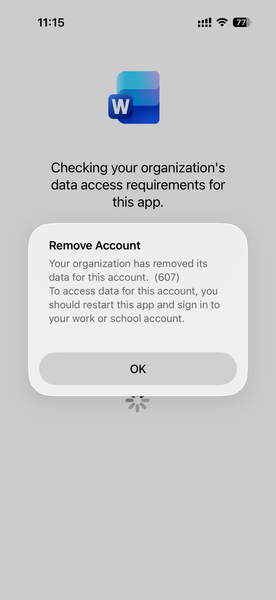
Hello, I am seeing an issue for Intune MAM BYOD(iOS) users. After a user account password reset, it causes Intune to remove the account configured from mobile applications like MS Outlook, Work, OneDrive, etc. Current Intune Configuration: Done - App Protection Policy Done - Conditional access policy --> Grant --> Requires app protection policy (checked) Users had to re-enrol to access his/her data. Here is the screenshot, Thank you,79Views0likes1Comment




Tags
- Intune4,295 Topics
- mobile device management (mdm)2,305 Topics
- Mobile Application Management (MAM)843 Topics
- Software Management470 Topics
- Conditional Access455 Topics
- Graph API250 Topics
- Azure Friday166 Topics
- Autopilot116 Topics
- android75 Topics
- ios59 Topics