
Forum Widgets
Latest Discussions

Disallow O365 access from 'outside' of the Android for Work work profile?
Is there a way to block Android for Work users to connect to Office 365 with apps that are installed outside of the work profile? For example on my Android for Work capable device I have a work profile with eg. Outlook, which I can use to read my mail. However, i'm also able to use the Outlook app in my personal space to connect to Office 365, I was kinda expecting to only be able to connect to Office 365 from my work profile (?)13KViews0likes24Comments
problem with Auto-Enrollment for windows devices in Hybrid enviroument
Hi everyone, I am in the process of setting up Intune for automatic enrollment on Windows devices within our hybrid environment. Here are the steps I have taken so far: 1. Configured Entra ID sync to synchronize a selected OU with Entra ID. 2. In the Intune Portal, set the Automatic enrollment MDM user scope to "All." 3. Created a GPO linked to that OU, which includes the settings to "register domain-joined computers as devices" and "Enabled automatic MDM enrollment using default Azure credentials" based on User Credential. 4. Prepared a clean computer, free of any software, and joined it to the Domain (on-prem server). 5. Moved the computer to the appropriate OU for syncing with Entra ID. 6. At this point, I can see the computer listed in the Entra ID portal under devices as Entra Hybrid joined 7. A regular domain user with a Business Premium license logged into the computer.( Only sign-in to windows, we don't have office app or add this account to windows.) 8. I ran GPupdate /force and rebooted the computer several times, but it still does not appear in the Intune portal. 9.Windows client is windows 11 Pro version 25H2 OS build 26200.8893 Dsregcmd output shows: ✅ Device is domain joined ✅ Device is synced to Entra ID ✅ Device authentication is working ✅ User has a valid PRT (Primary Refresh Token) ✅ Hybrid Join is successful On second test computer2, I installed office desktop app, then sign-in with test user to activate it. After few minutes the computer appeared on Intune portal. but on test computer 1 without user's interaction, it doesn't show up. would you be able to help me with this? Does it really need user to attach his/her account manually to "work or school account" or sing-in to any office desktop apps?Amir GhAug 03, 2026Copper Contributor84Views0likes6Comments
INTUNE: Problems with the Google address (Managed Google Play)
Hello everyone, Ever since we added our email address under “Managed Google Play” (in the Intune Admin Center), we can no longer use that address to sign in to Google, Google Docs, Google Drive, or similar services... Is this normal? - If not, what settings do I need to adjust, and where, to get it working again? The error message looks something like this: "Error message: We’re sorry, but you don’t have access to Google Docs. Please log in to your Admin Console to enable it" Thanks and best regards ChrisChristianEdwardsen365Aug 03, 2026Occasional Reader11Views0likes0CommentsCompliance Policies - Device Health Attestation failing (Syncml 404 / 0x87d10194)
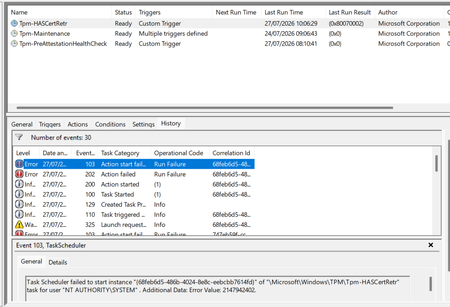
Windows 11 devices are non compliant in Intune against BitLocker, Secure Boot and Code Integrity, all three returning the Syncml 404 error. The settings are genuinely enabled. The real cause is the device can't retrieve a Device Health Attestation certificate, so the health cert status sits at 65535 and the retrieval task fails. What I've found: the TPM is healthy (present, ready, attestation capable, firmware not vulnerable), and the endorsement key cert is valid, chaining to Nuvoton TPM Root CA 2111. But the EK chain check comes back invalid with zero intermediate certificates, because the Nuvoton key is signed straight off the root with no intermediate for the chain walk. A Hyper-V VM on the same build and tenant works fine, but only because it has no manufacturer EK cert, so it skips that chain check entirely. What I've tried: patching TPM firmware (ruled out the older ADV190024 issue), refreshing the local trusted TPM certificate store, and rerunning the retrieval task. None fixed it. This matches Rudy Ooms' well known call4cloud writeup, where he concluded it's a service side trust problem that can't be fixed from the device. It's now appearing on brand new Dell hardware too, so I can't just exclude the old kit and move on. Is this a known issue with the Nuvoton root chain, and is there a supported fix or position from Microsoft? Screenshots below showing the compliance errors and the failure.DurranteAug 03, 2026Brass Contributor197Views0likes4Comments
Intune Install Printer Driver
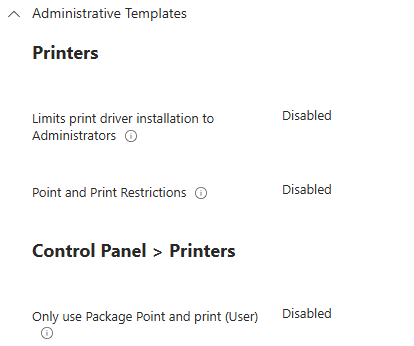
I am trying to install a Printer driver via a Win32app using System to install. Have set configuration as below: Its a simple powershell script which runs perfectly when installing on a device as an administrator. $printdriver = "PCL6 V4 Driver for Universal Print" C:\Windows\system32\pnputil.exe /add-driver "r4600.inf" /install Add-PrinterDriver -name $printdriver However installing it via Intune I get an event id 215 with failed error code 0x0 HRESULT 0x80070705 on the device. Any help appreciated.tonybap1Aug 02, 2026Copper Contributor217Views1like4Comments
Advanced Microsoft Intune capabilities - Coming to Education A5?
The Advanced Microsoft Intune capabilities (what was the Intune Suite has now arrived for E5 customers (and some of the features to E3 customers. Can anyone give any clarity as to if/when these features will be coming to A5 customers? I can see we seem to have some of the features (Remote Help, Endpoint Privilege Management) but could really do with knowing if the rest of the features are coming. Can't seem to find any information online about it.MarkBerryAug 01, 2026Copper Contributor42Views0likes2CommentsStarting Wait for ODJ Blob
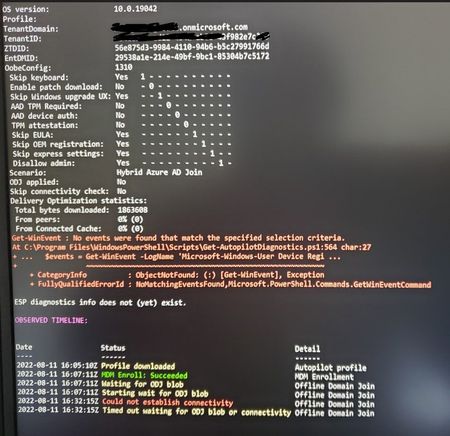
This is the status where I am having problems joining the device to Hybrid Autopilot domain. Not sure whether this is a connectivity issue between the laptop to the INTUNE connector? I can ping the domain controller from Intune connector and no problem.Solvedoryxway390Jul 31, 2026Brass Contributor43KViews0likes43CommentsAndroid Multi-App Kiosk. (Required apps not installing)
Hi I have an issue on my devices, I set Microsoft Teams as a required app for all devices (filter for corporate android devices) But It get's stuck, Saying installing for hours, nothing happens, this is for all apps I set as required except applications as Managed Home Screen , Authenticator, etc. But extra apps all have this issue. If I manually press Cancel in Google Play store and the press install again, it installs instantly. But without me manually doing that the apps are stick at Installing. Device install status in Intune. The application failed to install, possibly because of insufficient storage or an unreliable network connection. The installation will be retried automatically. (0xC7D24FBA). In Google Play you just see the app saying Installing. Now this is for all apps I add. Running Android 11 Samsung tablet, managed dedicated multi app kiosk.JimmyWorkJul 31, 2026Iron Contributor2.9KViews0likes2Comments
AD Naming Conventions vs Intune/AutoPilot Conventions
In Active Directory we use a 20 or so character naming convention of all of our PC's, basically it is the location, cart, and serial number, and this works well for us as we are a school district, and it allows us to locate the pc's quickly. However, we are moving to Intune and eventually AutoPilot. Currently AutoPilot has a 15-character limitation. And to the best of my knowledge that cannot be changed or extended, correct? But here is my question, as we want to move to Autopilot for deploying our new machines, can a Group Tag or other automated device be used to allow me to use a longer name, or at least a way of filtering and finding a name more efficiently in Intune? And also, from a reporting standpoint to create reports of School 3's computer inventory vs schools 2's inventory? As I don't believe this is possible, we will continue to build pc's using Kace or SCCM and then import them into Intune and manage them as a hybrid machine, rather than as a Joined machine. Our ultimate goal is to have them all be Joined, and eliminate AD, but we have not figured out a way of doing this yet. Would switching from standard Intune to Intune for Education benefit us in any way for this situation?StevenTPowers1961Jul 31, 2026Copper Contributor2.9KViews0likes2Comments
iOS Enrollment and Conditional Access
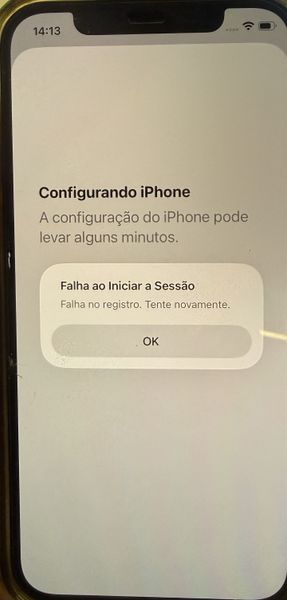
Hello everyone, I need some help! We are configuring Intune to allow BYOD on iOS devices using the Account Driven User Enrollment method. In this scenario, the user enrolls the device by following the path: Settings > General > VPN & Device Management > Sign in to your Work or School Account The enrollment process was working correctly until we configured a Conditional Access policy to ensure that only BYOD-managed devices can access company resources. In other words, only devices that have successfully completed enrollment and are marked as Compliant in Intune should be allowed to use corporate applications. However, after applying the policy, we are no longer able to complete the enrollment process. During one of the enrollment steps, the device displays the following message: Translate English "Setting Up iPhone iPhone setup may take a few minutes. Sign-In Failed Enrollment failed. Please try again. OK" 1. Target resources (Include) 2. Target resources (Exclude) 3. Device Platform: iOS 4. Filter for devices: device.mdmAppId -notIn ["0000000a-0000-0000-c000-000000000000"] 5. Grant: Require device to be marked as compliant This is our current Conditional Access policy configuration. Has anyone encountered this behavior before, or can identify whether there is any setting that might be blocking the enrollment process during the compliance validation stage?GuilhermeSoaresJul 30, 2026Copper Contributor30Views0likes1Comment

Tags
- intune4,362 Topics
- mobile device management (mdm)2,323 Topics
- Mobile Application Management (MAM)851 Topics
- Software Management476 Topics
- Conditional Access463 Topics
- Graph API255 Topics
- Azure Friday166 Topics
- Autopilot118 Topics
- android75 Topics
- ios62 Topics