intune
4388 Topics
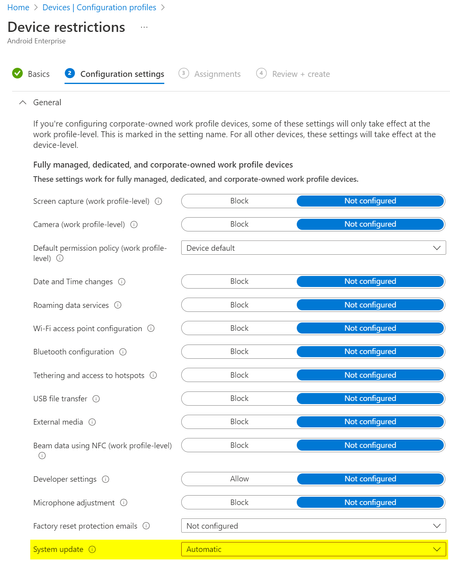
Android Enterprise System update expected behavior
What would be the expected behaviour when we set the System update to Automatic in the Android Enterprise Device restriction profile? We have several devices rebooting "randomly" and without notification and when we check the dumpstate logs, these reboots were triggered by an update: Canonical boot reason: reboot,enterprise,mainline_updbug. According to the Android documentation this could be correct: https://source.android.com/devices/tech/admin/ota-updates Since we don't see the same behaviour on all devices, while they share the same Update policy, I'm not sure what to expect from this setting?4.5KViews0likes4Comments
Fully Managed Android Devices Constantly Restarting
Hi all, We have had users with our Fully Managed Android devices regularly rebooting without warning, sometimes multiple times a day. These devices are already fully updated when these restarts are happening. It's been hard to catch it as it's random and sometimes when it does, it will reboot multiple times. When the device turns back on, the phone says it is 'Optimising apps'. We also have the 'Auto Optimisation' function disabled in device care within settings. I know that's not much info to give but does anyone have any idea why this is happening or how to resolve it? As you can imagine it's causing a lot of issues within our business. This is occurring on both Samsung A32 devices and Samsung Tab Active 3 devices, both Fully Managed with the device firmware update setting in our configuration profile set to default.6.4KViews1like5CommentsWHFB - Intune - Only PIN works and it causes print issues
Hello, I have personally attempted to deploy this for my environment and so has a colleague. We deploy windows hello specifically to a single machine or user, the PIN ends up being the only option which can be used, the device will say every other option is not available. It will constantly pop up at the bottom right that the password needs to be put in again to authenticate the user and printing will not work at all. The devices are fully capable of using facial recognition. Has anyone encountered any of these issues in a similar fashion with an AD > Entra environment ? Thank you, Jamie.247Views0likes3Comments
Mapping legacy server shares in Intune on Windows 10 MDM
In a Windows 10 full MDM (AzureAD+Intune) scenario, you’ll move your email, app and file workloads to Office 365 (or alternatives). In your pilot or hybrid phase, you may still need access to certain file shares on your servers, so here’s a simple PowerShell script you can deploy using Intune Device Configuration that maps your desired share. Deploy multiple times for multiple shares (or groups of users). It will create a shortcut in a location you define, so the mapping is always user-driven, it will automatically suggest your user’s AzureAD login as username. You can of course customize the script to your liking if you did not change your local AD upn yet. https://www.lieben.nu/liebensraum/2018/06/mapping-legacy-server-shares-in-your-windows-10-mdm-intune-pilot/ Solved49KViews3likes10Comments
Keyboard reverting on reboot
I'm having an issue with the keyboard reverting after OOBE. I'm using an English (UK) Windows 11 25H2 base image (deliberately — I want English display language, with Swedish keyboard/regional settings applied without needing to install a Swedish language pack). Deployment is native Windows Autopilot, no third-party tooling involved. Autopilot deployment profile: Language (Region) = Swedish (Sweden), Automatically configure keyboard = No. During OOBE, I manually select Swedish keyboard, and it's correctly applied — it's still Swedish through the first user logon. But after rebooting the keyboard silently reverts to English (UK). This is regardless of if I run pre-provisioning or user-driven. Is this a known/new behaviour, and how can I fix it?468Views0likes3Comments
Microsoft Edge plans to retire its legacy direct-WAM - version 157
Hello, I’m not sure if you are already aware of the above. Do you know of any way I could create a detection mechanism in Intune for the recommendation below? Thank you Action recommended for administrators: Check edge://signin-internals under Edge Auth Library Information → Library to see if any managed profiles still show WAM. Organizations wishing to validate early or test profiles that previously disabled the transition can test with --enable-features=msForceOneAuthWAM. Report any sign-in issues to Microsoft Support prior to the Microsoft Edge 157 release.201Views0likes2CommentsCall for perspectives: Endpoint Management Experiences of IT Professionals Survey
Hi Endpoint management community, we’d love to hear from you! How do you manage employee devices today? Where do you turn for guidance and support? And how are you thinking about AI-enabled ways of working? 🔗 Share your perspective in our 15-minute survey: https://lnkd.in/gmjkFx8P We’re especially interested in hearing from people in their first five years in the field, but all experience levels are welcome. If someone in your network comes to mind who has relevant experience, feel free to pass the survey along!88Views0likes0Comments
Microsoft Edge default browser with Intune
Hello everyone, I am looking for the best way to configure Microsoft Edge as the default browser for Windows devices managed through Microsoft Intune. I have reviewed the available Microsoft Edge settings in the Settings Catalog but have not been able to identify a specific setting that configures Edge as the default browser. Is there a supported and recommended way to enforce Microsoft Edge as the default browser for managed Windows 10/11 devices? If there are multiple approaches available, I would appreciate recommendations on the preferred method for enterprise environments. Thank you.473Views0likes2Comments