Forum Widgets
Latest Discussions

Can't access Microsoft Authenticator for business accounts
Hello. I am the tech support for a small church, where I am the admin for our MS 365 accounts, which are set up as "business accounts". I have been using Microsoft Authenticator for MFA for years. Recently I switched to a new phone and installed Microsoft Authenticator. All of my personal Authenticator accounts transferred over just fine, but all of the church's business accounts say "Scan the QR Code provided by your organization to finish recovering this account". The thing is, I am the "organization" and I don't know how to generate any QR code to recover the accounts. It was suggested that I could do something about this by logging into my Microsoft 365 administrator account, but when I try to log into my admin account, the only MFA option is "enter the code from Microsoft Authenticator". It's not offering a text or alternate email, only Microsoft Authenticator, which is what I'm locked out of. So I'm stuck in a loop. I opened a ticket with Microsoft Support nine days ago. I have received one phone call since then. The support person insisted that they needed to talk to the account's "alternate administrator", which I set up as my pastor, who is pretty computer savvy but not a deep IT person. They tried to call him one time, but he was not available to answer right then. There has been no communication since then. I'm hoping someone in this group can help me figure this out.KFBC_TechApr 28, 2026Copper Contributor179Views1like2Comments
Broken Account Recovery (discontinued product)
Hello everyone, We have the MSFT Office Family plan which has the now discontinued custom domain support that used to be an option as a "Premium" feature. Back in August we upgraded the phone of one of the account members on the family plan and lost connection to their MS Office account with the only device that was accessing to the account (the phone with access was reset as part of the upgrade/trade in process). I have tried the account recovery form and it simply doesn't work. I have tried to explain to MSFT support that the tool is broken but can't get anywhere. For the account in question we have an Outlook email client (with non working password) that has a cache of all of the email until loss of access occurred. So when I do the account recovery form, I have name, DOB, region, past passwords and data for all fields including sent email Id's and send subjects, But every time the MSFT recovery mechanism says "Unfortunately, we have determined that the information provided was not sufficient...". WTF. Every time I contact MSFT support I get the same answer, an explanation of the point system used to reset the the account. Same steps to recover....based on this, the recovery should work...yet it doesn't. I have tried somewhere 50+ attempts now over the last 9 months. I even have a contact who is VP level at MSFT who sponsored a support ticket internally but that just ended up with the support person sending me a link to the account recovery form and closed the ticket without looking in the details of the ticket. I can't modify / add a new account as MSFT has as a discontinued product no longer allow members to add/change id's. So I'm locked at the current user set. I have created another email address by saving the cached data to OLM file and importing via the Outlook client but that doesn't restore use of the @mydomain.com for that person. I even retained a lawyer who send a demand to MSFT legal...but the email address didn't go anywhere so at the point of needing to do this on headed paper/send via snail mail. Does anyone have any idea how to get through to MSFT explain the recovery tool is broken? I assume there are so few accounts using custom domains pin family plans that they simply don't test this recovery path. At this point without some internal guidance is a) lawyer and force a demand for password reset b) give up, ditch all of the users using the custom domain, configure an alias for all of the accounts and then change my MX record to a company doing email forwarding and then forward to the new/old legacy accounts (i.e. the ones with the mailto:email address removed for privacy reasons).anewhamApr 23, 2026Copper Contributor47Views0likes1Comment
Authenticator
I need your help. I broke my Iphone and after replacing it I cannot log into my Microsoft admin account since the authentication app is not working. I am the administrator of my own small business account. I have gone through all the account recovery help but neither the send text to my number or call my number works. All online support depends on having an the code from the Authenticator app I am completely lost here ☹ hope someone can help Dadi JohannessonDadJoApr 21, 2026Copper Contributor1.4KViews0likes2CommentsAlternative hostname for ADFS proxy possible?
Dear Community, I have setuped a ADFS server with "adfs.customer.com" and a ADFS proxy, who also externally listening on this URL. Here is my question: Can I configure an additional "external" URL like "adfs.bla.com" in the ADFS proxy so, that its listening to incoming requests and redirect it to adfs.customer.com? Thanks AndréAndreeSApr 08, 2026Brass Contributor778Views0likes1Comment
Outlook 2016 blank MFA screen for some users
I have a Conditional Access rule so that when someone connects from outside a trusted IP it requires MFA, I have a few users that get the "Requires password" message come up, they get a window and type in their username and click next, then the window disappears without prompting for MFA and it's back to where they were. Same thing if they go to File->Accounts if they are signed out and try to sign in they get asked for Email and then it just closes and they are still signed out. It's not for all users and everyone is using the same Office 365/2016 installation, monthly channel 1903, we use ADFSDaniel SchmidtApr 08, 2026Brass Contributor2.1KViews0likes1Comment
Frequent Account lockouts
We are having passthrough authentication setup and we see lot of errors recently with the below process Process Information: Caller Process ID: 0x8e4 Caller Process Name: C:\Program Files\Microsoft Azure AD Connect Authentication Agent\AzureADConnectAuthenticationAgentService.exe Users are getting locked out too frequently. The auditing software points to the server where AD connect is installed. I am not sure why this is happening but need your advice and suggestions please. Thank you all.sysadmin945Apr 08, 2026Copper Contributor1.2KViews0likes1Comment
Admin Login
I created $admin = Get-Credential, but next time re-login, can't saved my credential and password.toelwinmyintApr 08, 2026Copper Contributor1.1KViews0likes1Comment
Config Question: Microsoft 365, Microsoft Authenticator, Mac Mail Users
Hello All, We are currently using Microsoft 365 which is "hosted" or "federated" through GoDaddy. I want to pilot Microsoft Authenticator, so that we can have either MFA, SSO, or a combo of both. I'm running into a possible issue when I enable MFA for myself, as an enduser. We run TEAMS, and I only get asked to re-login into Teams to authenticate, which does work. However, if Mac Mail running as a client on the endpoint machine, should I assume that MFA will not work, since it is always communicating to the "hosted/federated" backend? That it never disconnects the connection? If there is something I should do differently with the config, I'd appreciate the guidance here.61Views0likes1CommentSSO from PingOne to Entra app failing; Not matching on sub value and can't find by email
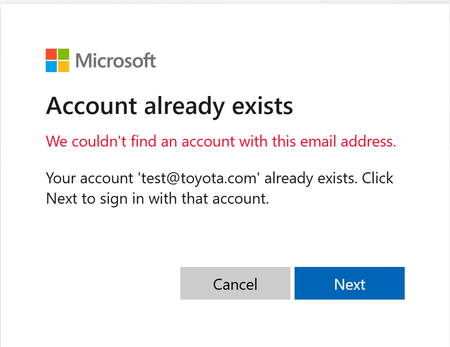
I am trying to implement SSO from PingOne to my Azure app I have registered in Entra External ID. When I don't have the PingOne account pre-provisioned, the sign-in flow provisions the account but with a bad value for the "Issuer" (the tenant id is incorrectly appended to the end of the issuer URL). This leads to a AADSTS500208 error. If I use Graph API to pre-provision the user with the proper "Issuer" URL, I get a message on the Entra prompt that says "Account Already Exists. Click next to sign in". Clicking Next gives the following error message: We couldn't find an account with this email addressewhitesideApr 01, 2026Copper Contributor49Views0likes1Comment

Tags
- Authentication357 Topics
- office 365218 Topics
- security164 Topics
- Identity73 Topics
- admin67 Topics
- multi-factor authentication64 Topics
- Azure AD52 Topics
- Authenticator app50 Topics
- exchange43 Topics
- microsoft 365 apps40 Topics