Forum Widgets
Latest Discussions

HP Pinter Wi-Fi Connectivity problems
I bought a new HP DeskJet 2700, and I am trying to connect my printer to the Wi-Fi. My network is working fine, yet the printer is unable to detect it and keeps showing offline. Is there anything that I am missing while doing the wireless setup?toddjeanstarlingJul 03, 2026Copper Contributor307Views1like5Comments
Color mode Greyscale doesn't reflect on client
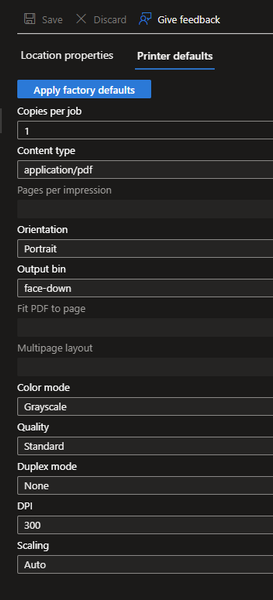
I've set the color mode from our printer from 'Auto' to 'Greyscale': It seems this change doesn't reach the Universal Print Class Driver on the client. The color mode remains 'Color': I'm not able to change this setting via PowerShell, PrintTicket or fancy Registry changes. I just want that our user print in Black/White by default. It woould be good to know if there is a known issue or I do something wrong. Thanks.SchroediJun 09, 2026Copper Contributor61Views0likes1Comment
Ricoh printer not printing jobs larger than 20Mb
New Ricoh C4510 Printer... smaller documents prints perfectly. The only information about failed job is a "Aborted" state in the universal print job list We are using the integrated Ricoh universal print connector integrated in the machine ("App for universal print" (https://www.ricoh-usa.com/en/app-for-universal-print) We have other two konica printers that can print the same print job perfectly (connected to universal print using the konica integrated app) Any help? ThanksprofetadelmusMay 05, 2026Copper Contributor322Views1like2CommentsUnable to register HP M430 - Error Code 1
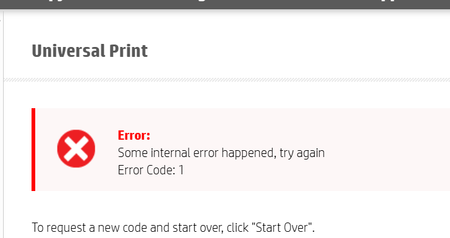
printer is on corp communicating via FW. Not using connector.ITSTorgApr 30, 2026Copper Contributor233Views0likes3CommentsSlow Printing HP Futuresmart 5.9.0.2
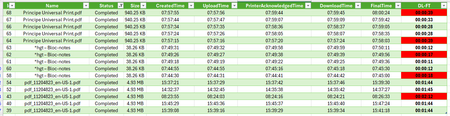
Hello everyone, I am testing Universal Print with an HP MFP running Futuresmart 5.9.0.2, and overall I find it quite interesting 😀 However, it is extremely difficult to get support from printer manufacturers, and there is very little feedback or shared experience available 😢 During my tests, I noticed internal processing delays (=DownloadTime–FinalTime) on the HP MFP that vary without any apparent Reason (printing PDF from W11/EDGE and content-type is Application/PDF). In addition, I observed significant differences in internal processing time for certain documents (such as plans) between Universal Print Cloud printing and direct TCP/IP 9100 printing. The delay increases from 2 minutes of processing to 3 minutes. I contacted HP support, but it is very complicated to get assistance regarding Universal Print. Do you have any insights? How should I proceed? Thank you in advance, and have a great day ☀️Antoine26Apr 21, 2026Copper Contributor679Views0likes11CommentsUniversal Print Client for IOS based devices
Is there a private preview for the Universal Print Client for IOS devices? We have rolled out the universal print to our Windows and Mac devices. With this done, I was now wanting to be able to see if there was a way to get on a private preview for testing out IOS devices with the universal print client on it. Thanks SteveSolvedSteve-LeblondApr 21, 2026Tin Contributor2.8KViews1like10CommentsKonica Universal Print App
Looking for others that are using this app. It seems the app crashes weekly on various models (C300i with latest firmware). We can resume printing by logging in with admin access and re-enabling the app. We also see other issues like jobs printing (output produced) but not going to a completed state. These have been sitting like this for about 30 minutes. When this happens, we have to reboot the printer. We got nowhere working with our local support vendor. We're trying to get national support involved.Marv_GordonApr 11, 2026Copper Contributor2.3KViews1like19Comments
Unversal print & Azure virtual desktop (pooled/multisession)
Hello all, We have Univeral print(UP) setup, and i want to introduce it into our AVD setup that is running 24h2-multisession. Now normally a UP printer is mapped via Intune or GPO as i understood. But in multisession OS the Intune user configuration is not applicable to the multisession OS... and GPO is not a option here. so i was thinking of creating a scripted action to map the univeral printer(s) but i cant find any way to map a univeral printer via scripting(thinking to run it as-user) Redirection of printer from local device is not a option here https://learn.microsoft.com/en-us/universal-print/fundamentals/universal-print-avd any help is much appreatedOverlookedandovercookedApr 03, 2026Copper Contributor177Views1like1Comment
Universal Print Connect 2.4.9459.590 Service keeps stop /start
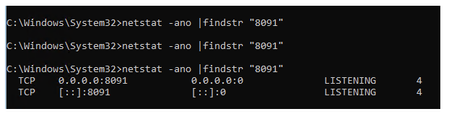
Hi Support, I installed Universal Print Connector 2.4.9459.590 on a Windows Server 2025 Standard server. The Print Connector Service keeps stopping and restarting. When the service starts, I am briefly able to log in, but it stops again shortly after. I have change the ports to 8095 and that did not help. I verified that the required port is not already in use. Could this be an issue with this version of the connector, or is there anything else I should check or configure? Thank you. netstat -ano |findstr "8091" when I run the program I get this after a quick second i am able to get to the site it will stopRFhelp0Apr 03, 2026Copper Contributor79Views0likes1Comment
Problems with printing
Hello, I am adding a new printer to Universal Print using a Ezeep-adapter. I print on a Win10 22H2 machine and everything is fine, then I print on a 24H2 or 25H2 Windows 11 pro it does not work. We get this error opening printer settings in the eventlog GetIntegerPairValue (pdf-k-octets-supported) - not an integer pair type: 0x12 Any ideas?Mikael KarlssonMar 26, 2026Copper Contributor131Views0likes1Comment


Tags
- universal print25 Topics
- announcements13 Topics
- Universal Print Connector8 Topics
- UniversalPrint5 Topics
- Cloud Print3 Topics
- question3 Topics
- Universal2 Topics
- Paper Size Mismatch2 Topics
- intune2 Topics
- Ricoh2 Topics