Forum Widgets
Latest Discussions

Color mode Greyscale doesn't reflect on client
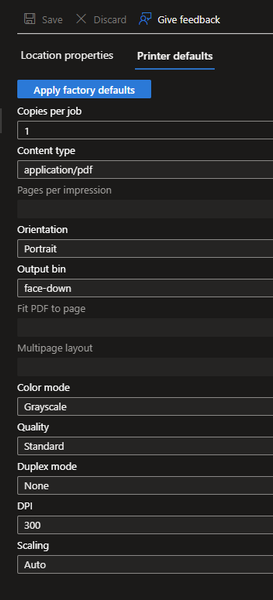
I've set the color mode from our printer from 'Auto' to 'Greyscale': It seems this change doesn't reach the Universal Print Class Driver on the client. The color mode remains 'Color': I'm not able to change this setting via PowerShell, PrintTicket or fancy Registry changes. I just want that our user print in Black/White by default. It woould be good to know if there is a known issue or I do something wrong. Thanks.SchroediMay 19, 2026Copper Contributor59Views0likes1Comment
Universal Print Connect 2.4.9459.590 Service keeps stop /start
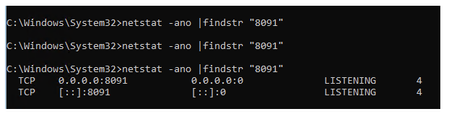
Hi Support, I installed Universal Print Connector 2.4.9459.590 on a Windows Server 2025 Standard server. The Print Connector Service keeps stopping and restarting. When the service starts, I am briefly able to log in, but it stops again shortly after. I have change the ports to 8095 and that did not help. I verified that the required port is not already in use. Could this be an issue with this version of the connector, or is there anything else I should check or configure? Thank you. netstat -ano |findstr "8091" when I run the program I get this after a quick second i am able to get to the site it will stopRFhelp0Mar 11, 2026Copper Contributor78Views0likes1Comment
HP Pinter Wi-Fi Connectivity problems
I bought a new HP DeskJet 2700, and I am trying to connect my printer to the Wi-Fi. My network is working fine, yet the printer is unable to detect it and keeps showing offline. Is there anything that I am missing while doing the wireless setup?toddjeanstarlingFeb 20, 2026Copper Contributor300Views1like5Comments
Windows 11 January 2026 update breaks universal print
Hi: I had logged this ticket with Microsoft support on January 18th when the problem started. However, today they closed the case without notifying me. When I followed up to see why it had been closed. They did not consider this a break fix, and nobody else has reported the issue. I want to find out if this is true. I'm sure Azure Universal Print is used by a large number of customers. We have been using Azure Universal Print for well on three years without any issues, until Microsoft released the KB5077744 (OS Builds 26200.7627 and 26100.7627). We use a staggered update schedule, so not all computers receive the update. As soon as machines started to receive it, printing errors started to show the errors when trying to print: When trying to view printer properties Machines who never received the update could still print. Here are the errors we see when selecting or printing to a universal printer. The only thing mentioned about this update regarding printing was no new third-party drivers would be added to Windows Update. Operation could not be completed (error 0x00000003) The system cannot find the path specified when trying to print. AND The ‘Universal Print Class Driver’ printer driver is not installed on this computer. Some printer properties will not be available….. Sorry, I tried to attach pictures, but it would not let me post. Ill see if I can add them after the initial post. Microsoft support had a look in Print Management on a Windows 11 machine to see the version of the Universal Print Class Driver on machines that could and could not print. On a computer that could not print (10.0.26100.7627). On a computer that can print and never received the updates (10.0.26100.7623): Since then, we have built some new computers that just received the OOB patch released on January 28th (KB5074752) and they have no issues printing. The only other difference was the computer received 25H2. However, I tried 25H2 on a broken computer, and it had no impact. Just to make sure.JDBaggsFeb 10, 2026Tin Contributor3.9KViews0likes10CommentsProblems with printing
Hello, I am adding a new printer to Universal Print using a Ezeep-adapter. I print on a Win10 22H2 machine and everything is fine, then I print on a 24H2 or 25H2 Windows 11 pro it does not work. We get this error opening printer settings in the eventlog GetIntegerPairValue (pdf-k-octets-supported) - not an integer pair type: 0x12 Any ideas?Mikael KarlssonDec 29, 2025Copper Contributor131Views0likes1Comment
Removing an old Universal Print printer automatically and printing issues
Hi smart people of the Microsoft Community Hub, I have a requirement to remove a particular old Universal Print printer on all Windows devices automatically (via an MDM solution such as Microsoft Intune). As the printer is mapped via Intune originally, I tried to just simply remove the printer from the Intune configuration policy but the printer stays mapped. I checked for PowerShell cmdlets that would help to automate this process, but the Universal Print PowerShell module has very limited documentation and it does not seem to support unattended removal of a Universal Print printer via PowerShell script. In addition, I have another issue relating to printing where Universal Print print jobs may sometimes print off 20 or more pages of Wingdings characters. The only pattern I've noticed with this is that it is related specifically to PDF files. If Universal Print wasn't involved I'd chalk this up to a printer driver issue or mismatch, but I don't know how to troubleshoot this specifically on Universal Print. The printer models that have had this issue are HP LaserJet MFP H577, LaserJet MFP M578 and LaserJet MFP M633. Please can you assist me with either issue? Thanks!danieldavies997Dec 16, 2025Copper Contributor244Views0likes0CommentsStatus - Aborted
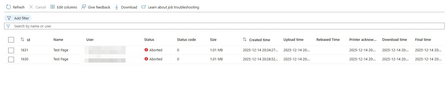
I have 2 Brother printers. Recently, I encountered an 'Aborted' error for every print from a Windows computer. I deleted the printer and reconnected it, but that didn't resolve the issue. The printer communicates directly with the cloud, eliminating the need for a connector.np9090Dec 14, 2025Copper Contributor99Views1like3Comments
Unversal print & Azure virtual desktop (pooled/multisession)
Hello all, We have Univeral print(UP) setup, and i want to introduce it into our AVD setup that is running 24h2-multisession. Now normally a UP printer is mapped via Intune or GPO as i understood. But in multisession OS the Intune user configuration is not applicable to the multisession OS... and GPO is not a option here. so i was thinking of creating a scripted action to map the univeral printer(s) but i cant find any way to map a univeral printer via scripting(thinking to run it as-user) Redirection of printer from local device is not a option here https://learn.microsoft.com/en-us/universal-print/fundamentals/universal-print-avd any help is much appreatedOverlookedandovercookedDec 09, 2025Copper Contributor177Views1like1Comment
Slow Printing HP Futuresmart 5.9.0.2
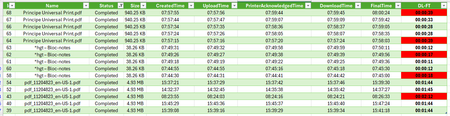
Hello everyone, I am testing Universal Print with an HP MFP running Futuresmart 5.9.0.2, and overall I find it quite interesting 😀 However, it is extremely difficult to get support from printer manufacturers, and there is very little feedback or shared experience available 😢 During my tests, I noticed internal processing delays (=DownloadTime–FinalTime) on the HP MFP that vary without any apparent Reason (printing PDF from W11/EDGE and content-type is Application/PDF). In addition, I observed significant differences in internal processing time for certain documents (such as plans) between Universal Print Cloud printing and direct TCP/IP 9100 printing. The delay increases from 2 minutes of processing to 3 minutes. I contacted HP support, but it is very complicated to get assistance regarding Universal Print. Do you have any insights? How should I proceed? Thank you in advance, and have a great day ☀️Antoine26Nov 27, 2025Copper Contributor678Views0likes11Comments
How does a Universal Print Ready Printer communicate with IPP infrastructure printer?
The Universal Print Ready Printer is acting as an IPP proxy, is it correct? According to PWG 5100.18, the IPP proxy inside a printer should send Update-Output-Device-Attributes to the Infrastructure printer. After obtaining Device Access Token following https://learn.microsoft.com/en-us/universal-print/hardware/universal-print-oem-printer-device-token , which URL is used to post Update-Output-Device-Attributes with that device access token?KinlinNov 24, 2025Copper Contributor116Views0likes1Comment
Tags
- universal print25 Topics
- announcements13 Topics
- Universal Print Connector8 Topics
- UniversalPrint5 Topics
- Cloud Print3 Topics
- question3 Topics
- Universal2 Topics
- Paper Size Mismatch2 Topics
- intune2 Topics
- Ricoh2 Topics