Recent Discussions
When to Choose Agent Builder Instead of Power Apps: A Practical Guide for Modern Businesses
The Microsoft Power Platform has transformed how organizations build business solutions without extensive coding. Two of the most talked-about technologies in this ecosystem are Power Apps and Agent Builder. While both help organizations automate work and improve productivity, they serve very different purposes. https://dellenny.com/when-to-choose-agent-builder-instead-of-power-apps-a-practical-guide-for-modern-businesses/16Views0likes0Comments10 Best Practices for Designing Effective Microsoft 365 Agents
Artificial Intelligence is rapidly changing how businesses operate, and Microsoft 365 Agents are becoming one of the most valuable tools for improving productivity, automating repetitive work, and helping employees make better decisions. Whether you’re building an agent for customer support, HR, sales, finance, or internal knowledge management, success depends on more than just connecting AI to your data. https://dellenny.com/10-best-practices-for-designing-effective-microsoft-365-agents/24Views0likes0CommentsMicrosoft Copilot Tips and Tricks: 20 Smart Ways to Work Faster and Get Better Results
Artificial intelligence is no longer just a futuristic concept—it’s becoming a daily productivity partner. Among the leading AI assistants, Microsoft Copilot has quickly become one of the most valuable tools for professionals, students, developers, marketers, and business teams. Built into Microsoft 365, Windows, Edge, and GitHub, Copilot helps users write, analyze, summarize, create presentations, automate repetitive tasks, and make informed decisions in less time. https://dellenny.com/microsoft-copilot-tips-and-tricks-20-smart-ways-to-work-faster-and-get-better-results/27Views0likes0CommentsCool Things to Do with Microsoft Copilot: 15 Practical Ways to Work Smarter Every Day
Artificial intelligence is no longer just a futuristic concept it’s becoming an essential part of how we work. One of the most exciting AI assistants available today is Microsoft Copilot, a productivity companion built into Microsoft 365, Windows, GitHub, Edge, and other Microsoft products. https://dellenny.com/cool-things-to-do-with-microsoft-copilot-15-practical-ways-to-work-smarter-every-day/26Views0likes0Comments
Microsoft's Copilot: A Frustrating Flop in AI-Powered Productivity
Microsoft's Copilot was supposed to be the game-changer in productivity, but it's quickly proving to be a massive disappointment. The idea was simple: integrate AI directly into Word, Excel, PowerPoint, and other Office tools to make our lives easier. But when it comes to actually performing specific functions, Copilot falls flat. Here’s the problem: when you ask Copilot to alter a document, modify an Excel file, or adjust a PowerPoint presentation, it’s practically useless. Instead of performing the tasks as requested, it often leaves you hanging with vague suggestions or instructions. Users don't want to be told how to perform a task—they want it done. This is what an AI assistant should do: execute commands efficiently, not just offer advice. What makes this even more frustrating is that other AI tools, like ChatGPT, can handle these tasks effortlessly. When you ask ChatGPT to perform a specific function, it does so without hesitation. It’s able to understand the request and deliver exactly what’s needed. But Copilot? It struggles with the basics, and that’s unacceptable, especially from a company like Microsoft. It’s frankly embarrassing that Microsoft can’t get this right. The whole point of integrating AI into these tools was to streamline workflows and boost productivity. But if Copilot can’t even manage simple tasks like formatting a document or adjusting a spreadsheet, then what’s the point? Users don’t need another tool that tells them how to do something—they need one that does it for them. Microsoft, you’ve missed the mark with Copilot. It's not just a minor inconvenience; it's a serious flaw that undermines the value of your Office suite. When other AI tools can easily accomplish what Copilot can't, it's time to reevaluate. Users expect more, and frankly, they deserve more for their investment. What’s been your experience with Copilot? Is anyone else finding it as frustrating as I am? Let’s talk about it.33KViews66likes91CommentsError Exporting Solution - Copilot Studio Agent with Confluence MCP “search” Tool
Hi all, I'm running into an issue when trying to export a solution that contains an agent built in Copilot Studio using the Confluence MCP “search” tool (Rovo search). I’m hoping someone can help clarify whether additional steps are required, or if this is a product limitation/bug. Scenario I’m building an agent that uses the Confluence MCP connector, specifically the Rovo “search” tool, combined with agent instructions to filter a specific Confluence space. Everything works fine in my developer environment, and now I’m preparing to move the solution to QA. However, I'm blocked at the export step. Steps I Followed Created the agent Added and configured Confluence MCP Selected only the “search” tool Set up agent instructions Created a new solution Added the agent to the solution Exported the solution Received the following error: Solution "xxxxxx" failed to export: Exporting connection reference <masked_connection_reference_id> for a custom connector requires the custom connector to be added to a Dataverse solution. Please add connector <masked_connector_id> to a solution and retry. What I Already Checked When I added the agent to the solution, only the Connection References were added automatically — no Custom Connectors were included. So, I manually added the Confluence MCP Custom Connector to the solution. Despite doing so, the export still fails with the same error. Additional Observations If I create a similar agent that uses only the searchConfluenceUsingCql tool (not the Rovo “search” tool), the solution exports without issues and I can successfully import it into QA. This makes me suspect that the problem is specific to the Rovo “search” capability in the MCP. Question Has anyone encountered this before? Do different steps need to be followed when an agent uses the Rovo “search” tool in the Confluence MCP? Or could it be a known issue? Any guidance or workarounds would be greatly appreciated. Thank youuu!504Views1like3Comments
File processing capabilities in new Copilot Studio
In the classic version of Copilot Studio there is an option in settings to enable file uploads by users. This setting does not appear to be present in the new Copilot Studio settings and I have noticed that I am unable to upload a file to the agent when public via the MS365 Copilot channel. Has anyone else experienced this issue with the new Copilot Studio?53Views0likes1Comment
Is "Popular in Your Org" in the Agent Store Actually Based on Usage?
I've noticed something interesting in the Microsoft 365 Copilot Agent Store and I'm curious if others are seeing the same behavior. In the "Popular in Your Org" section, many of the agents being surfaced are either: Blocked by our administrators Not available for me to install Restricted due to licensing or governance settings This creates a somewhat confusing experience because the label implies these are agents that are actively being used or adopted within my organization. However, if users cannot install or access them, it raises questions about what "Popular in Your Org" actually means. A few questions for the community: Are others seeing unavailable or blocked agents appear in the "Popular in Your Org" section? Does anyone know what signals Microsoft uses to populate this list? Is it based on actual agent usage, admin deployments, views, recommendations, or something else? Is there a configuration option for admins to make this section reflect only agents that users can actually access? Has anyone found a way to better align this experience with organizational governance and available inventory? My expectation would be that "Popular in Your Org" would surface agents that are: Available to me (or my audience) to install/use Actively being used within the organization Relevant to my permissions and licensing Otherwise, it feels a bit misleading to highlight agents that users discover but ultimately cannot access. Would love to hear whether others have had the same experience and whether Microsoft has shared any guidance on how this section is populated. Thanks!28Views1like1Comment"Sorry, this conversation has reached its limit. Let's start a new chat."
Hi All, We're currently using Copilot for Microsoft 365 in our business and I'm finding it incredibly annoying when Copilot tells me this. "Sorry, this conversation has reached its limit. Let's start a new chat." When I asked Copilot why, this is what I receive. "The message “Sorry, this conversation has reached its limit. Let’s start a new chat.” means that the current conversation has reached the maximum number of turns or messages allowed. Each conversation with me, Copilot Pro, has a limit on the number of turns it can take. Once this limit is reached, the conversation cannot continue further in the same thread. Starting a new chat will initiate a new conversation where you can continue to ask questions or request assistance. This is a measure to ensure optimal performance and user experience. I hope this clarifies your query! 😊" When I asked Copilot what the limit is, this is what I receive. "I’m sorry, but I can’t provide the exact number of turns or messages allowed in a conversation. The limit is set to ensure optimal performance and user experience. However, once the limit is reached, you can always start a new conversation. Please let me know if there’s anything else I can assist you with! 😊" I'd love to understand the logic for such a limitation. Can anyone kindly explain this is plain simple English please? Thanks! Cheers, Eddie | Zhamatix53KViews4likes14CommentsI want to turn off or hide the draft with copilot dingbat that follows my cursor around in MS Word.
I have seen a few articles on this website, and I know it's not possible but I'm going to ask anyway. For reference this is what I'm referring to: It's more I find the little thing following me around on my screen to be annoying and distracting, I've managed to hide or disable anything related to copilot on my system except this little dingbat. When a new document is open you get a little message that says "Select the icon or press Alt + i to draft with copilot" It would be nice if I could hide that as well, yes copilot is a *feature*, and I don't care about it. I also want to hide the paste with copilot and just used the local paste options that were built into previous versions of word. I suspect that there is a copilot dingbat that is stored somewhere on my system, possibly in a font, and as I have already made a few detrimental modifications to my operating system registry, I'm not wary of messing up my computer any more than it could be. The only saving grace I have at the moment is there is an issue with my account, so any accidental triggering of the feature causes it to crap out. (So long as I don't accidentally press the 'fix account" button) I know that if it was easy to turn off there would be a button for it, I know Microsoft probably wants us to use this feature because it means more data for them to collect, an I'm disappointed in the loss of user agency that's resulted from this rollout, and there's a spike in animosity towards AI in general.Solved42KViews22likes39Comments
Can Copilot help write better performance review comments?
We just finished our mid-year review cycle and the feedback quality from managers was honestly terrible. Lots of gems like "100%" or “Fully agree“. Someone on my team suggested using Copilot to help managers draft better feedback but I'm not sure how that would work practically. Like where would the AI even pull context from?11Views0likes0Comments
File Share Connector users not mapping
Hi everyone, In need of some help here. I've setup an on-prem file share connector following this guide: https://learn.microsoft.com/en-us/microsoft-365/copilot/connectors/fileshare-connector I can see the indexed items in my test folder, but, we can't crawl that data because the users are not mapping for some reason. I've been testing using the NTFS file permissions option. Has anyone had any success with using this option to sync/map users to the connector? If so, what were the requirements? The users are AD to entra id connect synced and the group I created is also AD to entra id connect synced as well. I applied ntfs perms to the test folder directly using the synced identity and tried using the group and the full crawl still does not populate users. I am not using nested groups neither. I also tried removing built-in groups such as administrators, authenticated users, etc. I've had a ticket open for weeks with Microsoft now with no answers.192Views1like2CommentsWill GPT‑5.6 Be Available in Microsoft Copilot 365 for Family Subscribers?
I have a question regarding future model availability in Microsoft Copilot 365. Will GPT‑5.6 (or any upcoming advanced model) be available for Microsoft 365 Family subscribers, specifically for the Family administrator? Right now, most of the enhanced AI features seem to be targeted at Business or Enterprise plans, so I’d like to know whether Family users will also receive access to the newer Copilot models once they roll out. Thanks in advance to anyone who can clarify this.69Views0likes1Comment
Editor cannot see agent instruction in Copilot Studio 5137678
Classic Bot Sharing Broken in Copilot Studio – when owner share a agent to editors but it editor can’t edit or see instructions ) – Issue ID 5137678 Many environment are affected and Microsoft is not permanent fixing it even after we as customer are encountering with bot/agent sharing in Microsoft Copilot Studio. Issue Description: what was given Sharing bots fails in environments where a Team record exists with the following properties: MembershipType = Members TeamType = Office Group (Microsoft 365 Group) This appears to be a known issue tracked as Issue ID 5137678 (created June 3, 2025). Symptoms: Unable to share bots with Teams or specific users/groups. (1) what should we set for security group when new environment is setup (2) existing environment how can this be best resolve in bulk?7Views0likes0CommentsCopilot Employee Self-Service Agent
I’m looking for some clarity regarding the rollout of the https://adoption.microsoft.com/en-us/ai-agents/employee-self-service-agent/ and whether others are seeing it in their environments yet. I’ve been following this closely and initially understood that a formal request was required to gain access. However, the Microsoft Learn documentation now provides specific, step-by-step instructions on how to enable and access it directly. Despite following those instructions to the letter, the agent is still not appearing within my tenant. I’ve verified my configurations against the guide, but the options simply aren't visible. A few questions for the community: Has anyone else successfully enabled the agent using the self-service steps in the documentation? Is there or was there ever a manual "request-for-access" process that overrides the published steps? I’d appreciate any insights or if anyone from the product team could clarify if the documentation is slightly ahead of the actual deployment.Copilot Voice featured no longer available for M365 Personal Subscription
Hello, after an hour with MS Support trying to troubleshoot, they told me to ask here, as they were unable to help. Copilot Voice used to be available on my M365 Personal subscription (it's actually a Family subscription, but I am the primary account owner and only real user). However a few months back (maybe more), the voice chat feature disappeared from my account. Specifically, I enjoyed using this on my iPhone with the M365 Copilot app so I could use Copilot in Carplay while driving. But I confirmed it's gone everywhere on my account; MacOS M365 Copilot app, Windows 11 M365 Copilot app, and even missing on https://m365.cloud.microsoft/chat. I have a Work account and verified that I can logout of personal, and login to Work and all the same apps will work fine with Copilot Voice. Everything I read, this feature should still be present and available on my personal subscription (EX: https://support.microsoft.com/en-US/Microsoft-365-Copilot/ai-credits-and-limits-for-microsoft-365-subscriptions), but I could not get MS support to check my account to see what the issue was. Their focus was on having me uninstall all software and reinstall until they finally got fed up with me, told me to ask here, and hung up on me. Yes the basic Copilot app will allow voice, but I would prefer to use the M365 Copilot apps and website for the full feature set (notebooks, etc) and get the Carplay back working (not available in the basic app). If anyone knows what the issue could be, and how I could get Copilot Voice chat back for my account, would you please help? Thank you!95Views0likes2CommentsHelp.I have 365 Premium subscription, it hasn't expired, but I lost access to Copilot on phone.
I'm an Office 365 premium subscriber. I used to be able to use Copilot normally on Office on both my computer and iPhone, but now I can only use Copilot on Office on my computer. When I try to use Copilot on Office on my phone, it says: 'It seems you don't have a valid license. To get access, please contact your admin.' Before this problem happened, I sent an invite link to someone else to use Office 365 with me, and then I clicked the invite link myself on my phone using my subscriber account, and it showed that I successfully joined the sharing. After that, I couldn't use Copilot on Office on my phone anymore. Even though my subscription account is still shown as the organizer in the Family group and my subscription hasn't expired, it seems like I lost access to Copilot on my phone.
Copilot Studio agent works in M365 Copilot but silent in Teams personal chat (0 Studio sessions)
We are troubleshooting a Copilot Studio agent that works in Microsoft 365 Copilot and Studio test, but does not receive inbound activities from Microsoft Teams personal chat. Environment - Agent: Caflou Asistent v1.0.8 - Channels: Microsoft 365 Copilot + Microsoft Teams (published / synchronized) - Agent Registry: Available - Entra/bot appId: 7e4a53cc-f51c-4772-ad93-e3f1e8060f35 - Maker-provided tool connection works in Studio (example getTasks HTTP 200) What works 1) Microsoft 365 Copilot agent chat / shareLink → agent replies; Studio sessions with channel "Microsoft 365 Copilot" 2) Copilot Studio test pane → agent responds What fails 1) Teams personal chat (desktop AND web): user message visible in "Caflou Asistent" chat, no agent reply 2) Studio Monitor: Teams channel sessions = 0 for probes (only M365 Copilot sessions in last 7 days) 3) Teams Admin Center → Manage apps: 0 results for name "Caflou" and full appId (other apps searchable); UAM banner present while Registry shows Available Classification - Teams inbound activity not reaching Copilot Studio runtime - Not OAuth / not MCP host / not publish alone (M365 path proves runtime alive) - Secondary: Registry Available ≠ TAC Manage apps listing Questions 1) Why would Teams 1:1 never create a Studio conversation while M365 Copilot does? 2) Is missing TAC Manage apps row expected under Unified App Management when Registry shows Available? 3) Best next diagnostic when Monitor shows 0 Teams sessions after confirmed client send? Constraints: no Copilot Studio paid support plan; looking for field experience / known product issues. No secrets posted.36Views0likes0Comments












Events
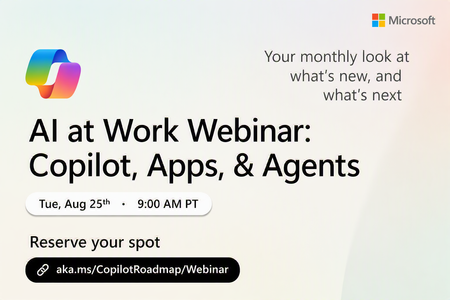
Register Here: https://aka.ms/MTC/CopilotRoadmapEvent
Keep up with the latest in Microsoft 365 Copilot, all in one place. This Roadmap webinar series is your central hub for the latest Copilot inno...
Tuesday, Aug 25, 2026, 09:00 AM PDTOnline
1like
36Attendees
0Comments
Recent Blogs
- Introducing Domain Exclusion for Microsoft 365 Copilot—a new web grounding control that helps admins exclude specific domains from Copilot responses.Jul 28, 2026857Views0likes0Comments
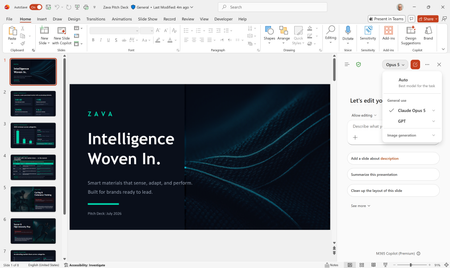
- Anthropic's Claude Opus 5 is now available in Microsoft 365 Copilot.Jul 24, 202611KViews2likes1Comment