copilot studio
64 Topics
Copilot Studio agents problems connecting to Sharepoint knowledge source
Hello, Since last week users in my tenant are experimenting issues regarding the connection between copilot studio agents and Sharepoint. The agents are not able to extract information from Sharepoint sites, printing there is not information in the Sharepoint site regarding the user's question when that information is in Sharepoint. These agents used to work well till last week. Does have been any update in Microsoft 365 services that can be affecting these agents ability to retrieve information from Sharepoint?945Views1like16Comments
What is the best file format for an AI agent knowledge base?
This is a best practice sharing the best format for an agent and show you why you should convert your PPT, PDF, WORD into a TXT markdown. I had an issue with my agent, time taken to answer was too long, and usually we spend a lot of time asking: What is the best prompt? Why is my agent slow? Why does retrieval sometimes work and sometimes fail? How can I improve answer quality? But I realised I was asking another question much less often: What is actually the best file format for the knowledge base? PDF? Raw text? Markdown? Pre-chunked text? Semantic sections? Context-enriched text? And more importantly: How much does the format alone affect agent performance? I tried to find a quantified benchmark answering this specific question, with the same agent, same source knowledge and same questions, but different knowledge representations. I couldn't find one that really answered what I wanted to measure. So I decided to run the experiment myself on a real case. My first exploratory tests were already surprising: depending on the representation, the agent could be significantly faster and more accurate, despite working from the exact same source information. So I decided to push the test further. My objective I want to identify, without assumptions and based on actual evaluation data, how a long document should be prepared for an LLM knowledge base so that the agent can retrieve, understand, ground and answer from it as reliably as possible. I focused on five dimensions: Answer quality Retrieval reliability Source grounding / citations Execution time Robustness across single-turn and multi-turn questions The broader question I'm trying to answer is: How should we structure knowledge so that an LLM can retrieve and use it as reliably as possible? The test case I deliberately chose a document that isn't particularly friendly for RAG: a 46-page European regulation, https://eur-lex.europa.eu/eli/reg/2011/1169/oj?locale=fr, on the provision of food information to consumers. The information is distributed across articles, definitions, exceptions, annexes, tables, numerical thresholds and cross-references. That makes it useful for testing retrieval: answering correctly often requires finding a very specific piece of information while preserving enough context to understand how it applies. I used the native PDF as the baseline and created 6 additional knowledge-base representations of the same document: Raw TXT Markdown Chunk-ready TXT RAG-oriented units Semantic TXT Contextual TXT One rule: same knowledge, same agent, same instructions, same questions. Only the knowledge representation changes. The benchmark I used two evaluation sets: 42 single-turn questions testing broad coverage of the document: direct facts, thresholds, exceptions, annexes, lists and cross-references. 5 multi-turn conversations containing 13 questions, to see what happens when a user asks a question and then follows up with things like: "And in this case?" "What are the exceptions?" "And for dietary fibre?" This gave me: 47 evaluated test cases / 55 actual questions per format Across all 7 formats: 329 evaluated conversations 385 user questions executed First results Metric Native PDF Best structured representation Overall pass rate 66.0% 85.1% - Contextual TXT Best single-turn score 69.0% 88.1% - Chunk-ready TXT Multi-turn benchmark 40% 80% - Contextual TXT Multi-turn execution time 14m24 5m54 Total benchmark time 44m31 24m49 The quality gap was already substantial: 66.0% → 85.1% That's +19.1 percentage points while keeping the underlying knowledge unchanged. I also saw a major difference in execution time. On the multi-turn test: 14m24 → 5m54 That's approximately 2.4× faster. Across the complete benchmark: 44m31 → 24m49 Around 44% less execution time. These timings represent the complete agent evaluation pipeline, so they shouldn't be interpreted as pure LLM inference latency. But the difference under identical test conditions is large enough that I want to understand it better. Findings There wasn't one format dominating every benchmark. Chunk-ready TXT scored highest on independent questions: 88.1%, while Contextual TXT performed better across multi-turn conversations and finished with the highest overall score. That may suggest that the way we optimise a document for isolated retrieval isn't exactly the same as the way we should prepare it for conversational retrieval. In the contextual version, I tried to make every section understandable when retrieved independently by keeping useful information around it: Source references Section context Retrieval cues Relevant cross-references For regulatory documents, this seems particularly important. A numerical value retrieved alone can be meaningless without knowing which rule it belongs to, under which conditions it applies, and whether another article contains an exception. Where I am now This remains an exploratory benchmark: One document One domain One agent setup One evaluation framework One run per configuration There are plenty of things I still want to test: repeated runs, retrieval-level evaluation, token consumption, larger knowledge bases, other document types, chunk sizes, overlap, contextual headers, and more. But these first results already convinced me that the preparation of the knowledge base deserves much more attention when evaluating an agent. We often spend hours refining instructions while the same information may behave very differently depending on how it reaches the retrieval layer. Next step I'll share the prompts, knowledge-base formats and evaluation methodology on GitHub so the experiment can be reproduced and challenged. I'll keep enriching the repository as I test new formats, improve the evaluation set and add new results. If people here have ideas, edge cases or formats worth testing, I'd genuinely like to include some of them in the next iteration. What would you test next?81Views0likes1CommentUpdate: Root Cause Identified
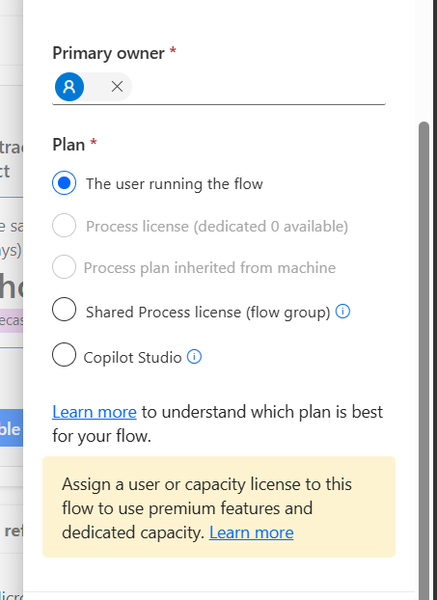
Hi everyone, I would like to share the root cause and solution in case someone else encounters the same issue. The Problem I created several agent flows directly in Power Automate using: https://make.powerautomate.com The flows were configured correctly: The flow starts with When an agent calls the flow The flow ends with Respond to the agent The flow and agent are in the same environment The flow is included in a solution The flow is published and fully functional The flows could be added to an agent and executed successfully. However, unlike flows created directly from Copilot Studio, they did not appear in the Global Tools directory. What I Investigated I verified: Trigger configuration Respond to the agent action Environment consistency Solution membership Publish all customizations Asynchronous response settings Synchronization delays between Power Automate and Copilot Studio None of these were the root cause. Root Cause The issue was related to the workflow Plan. I discovered that: Flows created directly in Power Automate were assigned: Plan = The user running the flow Flows created directly in Copilot Studio were assigned: Plan = Copilot Studio Although the Power Automate flow was fully functional and could be used by the agent, it was not visible in the Global Tools directory. Solution After changing the workflow Plan to: Plan = Copilot Studio the flow immediately appeared in the Global Tools directory. Configuration Location The setting can be found in the workflow properties under: Primary owner → Plan Important Note Based on my testing, changing the Plan to Copilot Studio appears to be a one-way operation and may not be reversible. It may be a good idea to export or save the flow before making the change. Acknowledgements Special thanks to sohnash for reproducing the scenario and providing troubleshooting suggestions, and to Patty_Velasquez for sharing similar observations that helped confirm the behavior. Hopefully this helps others who encounter the same issue. Best regards, Adhonaï KOUKA28Views1like0CommentsPower Automate Flows Created Outside Copilot Studio Not Appearing in Tools
Hello everyone, I'm facing an issue with Copilot Studio and would appreciate your advice. Context I have several Power Automate flows that I created directly from: https://make.powerautomate.com My goal is to use these flows as tools within a Copilot Studio agent. All components are in the same Power Platform environment. What I've verified The flows use the "When an agent calls a flow" trigger. The flows end with "Respond to the agent". The flows are saved and published. The agent and flows are added to the same Solution. The solution has been published. I am using the same account and environment for both Power Automate and Copilot Studio. The Issue Flows that are created directly from Copilot Studio appear correctly under: Tools → Add Tool However, flows created from Power Automate (make.powerautomate.com) do not appear in the Tools list, even though they have the same trigger and response configuration. Question Are there additional requirements for a Power Automate flow to be discoverable by Copilot Studio? For example: Does the flow need to be an Agent Flow rather than a standard Cloud Flow? Are there known synchronization or caching issues between Power Automate and Copilot Studio? Is there a specific setting, solution configuration, or publishing step that I may have missed? Any guidance or experience with a similar issue would be greatly appreciated. Thank you!134Views0likes5CommentsFree Copilot Credits for MCTs/ MVPs ?
Hello All The new Copilot Studio experience, powered by the GitHub Copilot harness, requires Copilot Credits for building, testing, and evaluating agents. In contrast, classic Copilot Studio requires Copilot Credits only after publishing. Is there a way for MCTs or MVPs to get Free access to Copilot Credits so they can test agents in the new Copilot Studio experience?52Views0likes1CommentMore powerful agents and workflows for autonomous business processes: Introducing a new harness for Copilot Studio
Over the past two months, we’ve been previewing a new capability within Copilot Studio that lets you build agents capable of taking on more complex business processes. Today, we’re excited to share that this capability is now generally available for production use and to introduce its new name: the GitHub Copilot harness in Copilot Studio. Meet the GitHub Copilot harness The GitHub Copilot harness gives Copilot Studio the coding and reasoning capabilities behind our most advanced agent experiences (like Copilot Cowork and the GitHub Copilot coding agent). This means your agents can now handle work that used to be out of reach, including processes that have many steps, many sources, and ambiguous decision points. The new harness is built for complex, long-horizon work using the latest frontier reasoning models like Opus 5, GPT-5.6 Sol, and Fable 5. It can plan, reason through dynamic problems, run an agentic loop, use skills, integrate workflows, connect to tools and agents in other platforms, and produce rich, multi-part outputs. In our own testing with real world business process evals, Copilot Studio shows significant performance and quality gains when using the GitHub Copilot harness. Improvements in multi-tool use, file analysis, code analysis, and knowledge quality mean these agents are more capable of taking on your most complex business processes. To help you build these more capable agents, we’re also delivering new experiences for makers building agents with the GitHub Copilot harness. The agent designer is more intuitive for authoring, putting the most important tools right within reach to make authoring faster, while retaining full agent lifecycle management features. Then, the workflow designer gives a visual canvas to understand and edit workflows, including adding agent nodes and running workflow evals. And soon, natural language authoring will let you describe your business goal and assemble the right combination of agents and workflows through a multi-turn conversation. Agents running on the GitHub Copilot harness use usage-based billing for all work, regardless of Microsoft 365 Copilot licensing. You pay for your agent’s usage based on the models you choose, the organizational context and tools you add, and runtime used. Certain AI-driven maker experiences, like natural language authoring, evaluations, and testing, will also fall under usage-based billing if building with the GitHub Copilot harness. You can learn more about Copilot Studio usage-based billing here. Continued Support for Copilot Chat and Standard harnesses Adding a new harness does not change the ones you already rely on. Different harnesses can be optimized for different outcomes, so rather than relying on a single one-size-fits-all approach, Copilot Studio now lets you choose the harness that best fits your scenario. This means Copilot Studio supports three harnesses today: The Copilot Chat harness, which uses the same harness as Microsoft 365 Copilot Chat and is ideal for customizing Copilot Chat experiences. The Standard harness, which most agents built in Copilot Studio use today and is great for conversational agents with rules-based topics. The new GitHub Copilot harness, which uses the power of GitHub Copilot SDK to automate complex, agentic business processes. We will continue to support the Copilot Chat and Standard harnesses in Copilot Studio for both existing agents and authoring of new agents. Microsoft 365 Copilot licensed users continue to benefit from fair use of Copilot Chat or Standard harness agents included in their Microsoft 365 Copilot license. For all other usage, the Copilot Chat and Standard harnesses will continue to be billed using the existing fixed rate card. Get started today The GitHub Copilot harness is generally available now, and you can start creating these agents directly from the Copilot Studio homepage. We can’t wait to see what you build. Share your thoughts using the feedback control in the top right corner of the product. Your input directly shapes what we build—and how you build—next. Try Copilot Studio today!39KViews10likes11Comments
Copilot Studio: “Get file content using path” fails for table-heavy DOCX files
Hi everyone, I'm investigating an issue with a Copilot Studio Standard Harness agent and would like to know whether others have encountered similar behavior. Scenario I have configured a tool in my agent using: Get file content using path The document is stored in my own OneDrive/SharePoint location and I have full access to it. This is not a chat file upload scenario and not a knowledge source indexing scenario. The agent is retrieving the document through a configured tool action. Behavior Observed Case 1 - Works The Word document contains approximately: ~4.1K words ~20 tables The agent successfully: Finds the file Retrieves the file Reads the content Generates a summary Case 2 - Fails I increase the document slightly: ~4.2K words More tables added The agent now returns a message similar to: The file was retrieved, but its content could not be converted to text. The response still indicates that: File found File retrieved Text extraction/conversion failed Important Observation Initially I thought this might be a word-count limitation, but additional testing suggests otherwise. I tested another document containing: More than 4.3K words Very few or no tables The agent processed that file successfully and generated a correct summary. Because of this, the issue appears to be related more to table-heavy DOCX content than to the total number of words. What Has Been Ruled Out The following do not appear to be the cause: File path issues Permissions/access issues File not found issues Connector authentication issues Large file size issues Chat file upload limitations Knowledge source indexing limitations The same tool and same retrieval approach continue working until the document becomes more table-heavy. Questions Has anyone experienced similar behavior with Get file content using path in Copilot Studio? Does Copilot Studio Standard Harness perform an internal DOCX-to-text conversion step after retrieving the file? Are there known limitations around processing Word documents that contain a large number of tables? Has anyone identified practical thresholds around table count, table complexity, or table-heavy technical documents? Is there a recommended workaround besides splitting the document into smaller files? Any insights, similar experiences, or Microsoft guidance would be greatly appreciated. Thanks!96Views0likes1Comment
Agent response duplicated in email
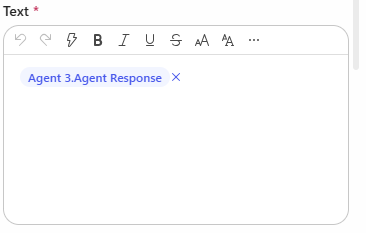
Hi, I have created a Copilot Studio Flow which has 3 agents. 2 agents do some research in parallel, I catch the results in 2 different string variables and hand the variables over to a third agent. The third agent should merge both variables, format them and hand them over to "Send Email". In the email body I add the output of agent 3. The workflow itself works. But I always have the complete email body text twice in the email received by the recipients. Where is the duplicate of the agent output coming from? I have this issue also when I add the agent response of agent 1 and agent 2 directly to the "send email" node. Does anyone have an idea? Would be great to get feedback. Appreciate it. Thanks!130Views0likes6CommentsUnanswered Questions on GitHub Copilot Harness in Copilot Studio
We're piloting the GitHub Copilot harness in Copilot Studio (GA August 2026) and several operational and architectural details remain undocumented in the GA FAQ, Microsoft Learn, or licensing guides. Looking for official answers or PM contacts on: Architecture & Execution – When the harness breaks tasks into subtasks, does it use internal sub-agents or only skills/connected agents, what are the exact timeout/retry/max-execution-duration limits for long-running workflows, and are planning/context-retrieval/orchestration internals documented anywhere or is the orchestrator a black box? Model Selection – Can individual skills within one agent use different models or is selection strictly agent-level, how are models chosen internally when multiple skills execute, are any internal models developer-configurable, and what's the roadmap for models being added/retired/deprecated plus the lag between public release and Copilot Studio availability? Cost & Token Optimization – How exactly is the ~45% token reduction achieved, how much control do makers have over context/caching/retrieval/tool calls, what are per-model credit consumption characteristics, which models are most cost-effective for specific workloads, and what's the minimum credit cost for trivial interactions? Memory Management – What are retention periods for session/working/agent memory beyond the documented 28-day user-memory expiry, is true long-term memory supported, and what changed versus earlier implementations? Knowledge Retrieval – Can skills or system instructions influence retrieval strategy/document selection/prioritization/filtering, can planning stages perform conflict/duplicate/version detection before retrieval, and how does the harness decide which sources to search? Apps Feature – What is the "Apps (preview)" capability for, when does it GA, and how does it differ from workflows/skills/adaptive cards/agents? Billing & Credit Sizing – Is there a framework to classify users/agents by expected consumption and size credit allocation per group (citizen vs pro developers), and what's the minimum/typical consumption for simple/medium/heavy interactions? Governance & Admin – Can usage limits be set at user level (not just environment/agent), is there an API/IaC path for large-scale credit assignment, can non-admins view their own consumption/remaining allocation, and is there a self-service request-more-credits dashboard? ALM & Environments – What's the recommended path to move harness agents across Dev/Test/UAT/Prod (Solutions/ALM "setup differs" per parity chart—how?), does GitHub integration replace or complement solution-based deployment, are there recommended AgentOps practices for source control/releases/versioning, and what baseline credits and onboarding model are suggested for citizen developers under usage billing—any enterprise reference implementations?99Views0likes0Comments
All Copilot Studio Workflow Tools Suddenly Returning HTTP 403 Before Execution
Hello Copilot Studio Community, I am experiencing an authorization issue with multiple workflows connected to an agent built using the Copilot Studio new experience and new Workflows experience. These workflows worked successfully for multiple users yesterday. Today, all workflow tools connected to the agent began returning an immediate HTTP 403 authorization error. I did not intentionally change the agent, workflows, environment, or workflow permissions before the issue started. Error message: You don’t have permission to use this tool. You’re signed in, but access to this resource is blocked. Error details: Authorization - 403 Example error information: Status: Failed Error message: Flow returned HTTP 403 Error code: Http403 Inner error code: NotSpecified Tool duration: Approximately 93 milliseconds Configuration: - Copilot Studio new agent experience - Copilot Studio new Workflows experience - Agent and workflows are in the same Power Platform environment - Workflows use the "When an agent calls the workflow" trigger - Each workflow includes a "Respond to the agent" action - Workflows are saved and published - Agent is saved and published Observed behavior: The problem affects several independent workflows, including: - New-request submission - Current-user identity resolution - Approval decisions - Requester justification - Executive decisions - Fulfillment updates For every affected workflow: - The agent fills the workflow inputs correctly. - The tool call fails almost immediately. - No corresponding run appears in the workflow Activity history. - The workflow trigger is never reached. - No workflow actions execute. Because no workflow run is created, the rejection appears to occur before workflow execution, possibly within the Copilot Studio agent-to-workflow authorization or invocation layer. Troubleshooting already completed: - Confirmed that all workflows are published. - Confirmed that the agent is published. - Tested in a completely new conversation. - Removed an affected workflow tool from the agent. - Saved the agent. - Added the same published workflow back to the agent. - Reconfigured and verified the tool inputs. - Republished the agent. - Confirmed that no workflow Activity run is created. - Confirmed that the issue affects multiple workflows rather than one specific workflow. Removing and re-adding the workflow did not resolve the problem. Questions for the community: 1. Is anyone else currently experiencing HTTP 403 errors when Copilot Studio agents invoke workflows? 2. Is this a known issue or regression in the new Workflows experience? 3. Is there an environment-level or tenant-level permission that controls agent-to-workflow invocation? 4. Could a tenant policy, Conditional Access change, service principal, connection reference, or workflow-sharing configuration cause all workflow tools to fail simultaneously? 5. Where can an administrator find detailed authorization logs when the workflow never creates a run? 6. Has anyone found a workaround for this issue? Any guidance or confirmation from others experiencing the same behavior would be appreciated. I can provide screenshots, complete error details, timestamps, and additional configuration information if needed. Thank you.179Views3likes3Comments