microsoft 365 copilot admin
93 Topics
Cannot Access Cowork
Hi, I'm based in the UK and have a M365 Copilot (Premium) Licence. I am trying to use Cowork and submitted a request a few weeks ago - it now states 'Request Sent'. I'm a Global Admin and have been all around the various Admin Centers trying to find where I can approve the request/enable Cowork and setup Copilot credits. Just wondering if anyone can point me in the right direction. Thanks.73Views0likes1Comment
Disabling Agent Creation for End Users with Copilot for Microsoft 365
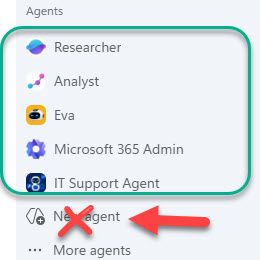
Hello! I am an IT admin at my organization, and we recently rolled out Copilot for Microsoft 365 for all end users. I would like our end users to be able to access agents published by my organization and Microsoft (Analyst, Researcher, etc.) but I do not want them to be able to create agents in Copilot Studio OR Agent Builder. We have disabled Copilot Studio at the license level, but our end users are still able to create agents in the M365 Copilot app with the "New Agent" button. To summarize, I want our users to be able to access Agents created by our organization and Microsoft, but I do not want them to be able to create any agents of their own at this time. Is there a way to do this? Thank you in advance, stevenwagner555Views0likes8Comments
Copilot API for usage
From the microsoft admin backend it is possible to download usage from copilot, so it is possible to see how many prompts users have made etc. But i struggle to find an API that support that lookup. If have found API that show last activity date - but need an API that shows how many prompts etc has been used. I don´t want to see what is prompted of course - but just to show amount of prompts, so we can verify how much usage there is and make some automation in case copilot is not used, as license then can be removed155Views0likes2CommentsRecent Bug or issue i got for last 3 days when i am using Chat sessions.
Recent Bug or issue i got for last 3 days when i am using Chat sessions after creating New Projects and saving outside chats there. But in New chats when i opened and used attachment to it from Notta Memo it is clearly working its taking transcript and giving Summary and details i asked. Please help if any one faced same issue and you guys got any resolution in fixing this issue. Thanks in advance.28Views0likes0Comments
Disable Agent Creation for Select Users
When will we be able to allow declarative agent use but disable creation for some users? We want only selected users to be able to create agents. We currently have not way to restrict this. If users can use agents, then they get the Create and agent option.3.5KViews4likes8Comments
Seeking Guidance on Microsoft 365 Copilot Adoption Support for an Enterprise Customer
Hi Everyone, We are a newly enrolled Microsoft partner currently working with a customer to accelerate Microsoft 365 Copilot adoption across their organization. We are exploring how we can best support the customer and would like to understand whether there are any Microsoft programs, resources, partner managers, or engagement channels available to help us collaborate with Microsoft on Copilot adoption opportunities. Could anyone advise on: The recommended Microsoft channel/team to engage for an enterprise Copilot adoption opportunity Any Microsoft programs or resources available to support customer adoption How partners can collaborate with Microsoft for customer-specific Copilot adoption support Any guidance on the appropriate Microsoft team, program, or point of contact would be greatly appreciated. Thank you!50Views0likes0CommentsHelp.I have 365 Premium subscription, it hasn't expired, but I lost access to Copilot on phone.
I'm an Office 365 premium subscriber. I used to be able to use Copilot normally on Office on both my computer and iPhone, but now I can only use Copilot on Office on my computer. When I try to use Copilot on Office on my phone, it says: 'It seems you don't have a valid license. To get access, please contact your admin.' Before this problem happened, I sent an invite link to someone else to use Office 365 with me, and then I clicked the invite link myself on my phone using my subscriber account, and it showed that I successfully joined the sharing. After that, I couldn't use Copilot on Office on my phone anymore. Even though my subscription account is still shown as the organizer in the Family group and my subscription hasn't expired, it seems like I lost access to Copilot on my phone.135Views0likes3Commentsdeactivate the Microsoft Copilot Consumer App
Hi support .. would like to deactivate the Microsoft Copilot Consumer App while ensuring that Microsoft 365 Copilot (work/enterprise) continues to function normally for users. Here is my Questions Is it possible to disable only the Copilot Consumer App while keeping Microsoft 365 Copilot fully functional? If this is supported, what is the recommended Microsoft approach to achieve this? Are there any known limitations or potential impacts on Microsoft 365 Copilot or other Microsoft 365 services after disabling the Consumer App? Is this configuration officially supported by Microsoft? noticed that in Microsoft Defender for Cloud Apps (Cloud App Catalog), both the Copilot Consumer App and Microsoft 365 Copilot appear as Sanctioned automatically through the App Connector. Is this expected behavior, and can the Consumer App be managed independently without affecting Microsoft 365 Copilot?123Views0likes2CommentsCopilot pain points....
Guys… seriously… we need some improvements here. I’m not asking Copilot to solve quantum physics or decode alien transmissions. I’m asking a Microsoft program for help with a Microsoft program. You’d think that would be the one scenario where Copilot would shine, right? Like, “Ah yes, my home turf, allow me to demonstrate competence.” But no. I can’t even get Copilot to correctly explain how to do basic SharePoint tasks. BASIC. As in, “click the thing, then click the other thing.” Instead I get a TED Talk about SharePoint philosophy and a guided meditation on patience. And then there’s the folder comparison fiasco. I want Copilot to do something so simple it should practically be a reflex: Compare two folders on my hard drive and tell me if they’re identical. Copilot’s response? “Absolutely, I can do that!” Followed immediately by an ever‑expanding scavenger hunt of things I apparently need to do first. It’s like asking someone to hand you a screwdriver and they say, “Sure, but first you’ll need to assemble this IKEA shelving unit, install three dependencies, sacrifice a goat, and agree to a quest.” I’m glad to hear you’re merging all the copilots into one “super Copilot.” Great idea. Fantastic. But let’s be honest — I’m praying the one that survives is the personal Copilot, because Copilot 365… whew. That thing feels like it was built by a committee that communicates exclusively through interpretive dance. And don’t even get me started on the wrapper versions. Those are like Copilot wearing a Halloween costume of itself, but the costume is made of cardboard and disappointment. And by the way — I’m STILL waiting for Copilot to create an app or program that automatically files my Outlook emails into folders. This is not a moon landing. This is not a Mars rover. This is not a Nobel Prize category. This is a simple, everyday, normal-person task. Yet somehow Copilot treats it like I’ve asked it to build the next Windows release from scratch using only a spoon and positive thinking. Come on, guys. We love the vision. We love the potential. But the basics need to work before the magic tricks do.79Views1like1CommentCopilot Employee Self-Service Agent
I’m looking for some clarity regarding the rollout of the https://adoption.microsoft.com/en-us/ai-agents/employee-self-service-agent/ and whether others are seeing it in their environments yet. I’ve been following this closely and initially understood that a formal request was required to gain access. However, the Microsoft Learn documentation now provides specific, step-by-step instructions on how to enable and access it directly. Despite following those instructions to the letter, the agent is still not appearing within my tenant. I’ve verified my configurations against the guide, but the options simply aren't visible. A few questions for the community: Has anyone else successfully enabled the agent using the self-service steps in the documentation? Is there or was there ever a manual "request-for-access" process that overrides the published steps? I’d appreciate any insights or if anyone from the product team could clarify if the documentation is slightly ahead of the actual deployment.295Views0likes5Comments