Recent Discussions

Change 'Find' default from "Within: Sheet" to "Within: Workbook"
Title says it all, really. I am almost always searching for a name across different tabs, so it would be great for it to automatically search the whole workbook instead of having to change from sheet to workbook for every. single. search. Thanks!Solved43Views0likes1Comment
How to Compare 2 Columns
Hello, Would appreciate help on comparing column B to column A of these email addresses. Thanks!!Solved2.3KViews0likes4Comments
What type of chart please
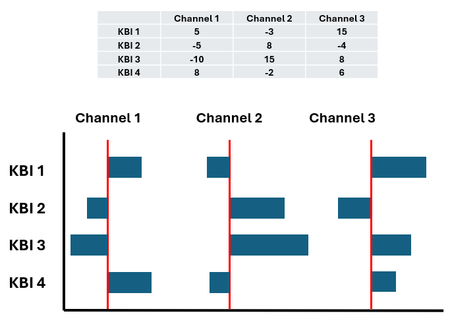
Hi guys, I am looking some help. Can anyone advise on what type of chart is needed (if at all possible) to present the below set of data exactly in the way I have created the below mockup. I have tried various bar/cluster/waterfalls, etc but I cannot get the data to be in the same axis format as below. Thanks ClarkeSolved68Views0likes2Comments
Alternative to Pivot Table in Dashboard for better UI Experience
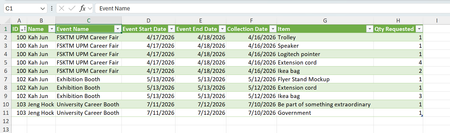
Hi, currently I am using Excel to build a dashboard for asset management, in particular it is used to track how many items remain after someone borrow it for a particular date range. The data comes from MS Form and has been populated into Excel. I have cleaned up and transform the original data using Power Query and the final form of my data to build the dashboard look something like this. I wish the dashboard to be able to show the following part bracket in red, which represent the details of items being borrowed. Currently I am using pivot table as my solution, as you can observe above. Is there any idea or solution to enhance the overall look of the dashboard? Basically, what I want is instead of directly on the Excel grid, can this be turned into draggable table pane?Solved159Views1like2Comments
Problem with footnotes
When I add a footnote in (all) Word files, it automatically adds an Enter key below the footnote. When I close Word and reopen it, it duplicates that Enter key. Microsoft Help has already been contacted; he performed updates and also checked options and paragraphs options, but found nothing. He referred me here because it appears to be an underlying problem. How can I solve this?Solved133Views0likes6Comments
Identifying the highest values from multiple sources
I'm working on putting together seasonal statistics from a sporting league (Cricket). One of the stats I need is each player's highest individual score from the season, but with more than 300 players in the League, manually finding each player's top score during the season is not practical. So far I have used "sortby" to produce an alphabetical list of each player and their individual scores from the season in descending order. I have a small example below of where I am. Player Scores Not Out Player A 66 0 Player A 47 0 Player A 45 0 Player A 42 0 Player A 33 0 Player A 18 0 Player A 14 0 Player A 11 0 Player A 5 0 Player A 4 0 Player A 4 0 Player A 2 0 Player A 1 0 Player A 0 0 Player B 7 0 Player B 4 0 Player B 3 0 Player B 2 0 Player B 2 1 Player B 1 0 Player B 0 0 Player B 0 0 Player B 0 0 Player B 0 1 Player C 105 1 Player C 50 0 Player C 31 0 Player C 23 0 Player D 97 0 Player D 94 0 Player D 69 0 Player D 69 0 Player D 20 0 Player D 15 0 Player D 13 0 Player D 11 0 Player D 10 0 Player D 7 0 Player D 2 0 Player D 0 0 Player D 0 0 Now I just want extract each player's highest score from the season, so that I end up with just the top score for each player. What I am trying to end up with from the above array would look like the following Player Scores Not Out Player Scores Not Out Player A 66 0 Player A 5 0 Player C 105 1 Player D 97 0 I've tried the 'Unique' Formula, but no luck.Solved84Views0likes4Comments
Triple nested if statement fails on different column
I'm working on an audit template. Auditors are texting websites against a standard. The standard is listed on a sheet named 'Formula Values' and a column in the 'Findings' sheet has a drop-down driven by the standard list. Typically the report lists failures on the Findings page. I have been requested to also list what standards have passed and which were not applicable in the context of the particular audit. I created a list of the most-likely not-applicable standards on the 'Test Target' sheet. All the standards are listed on the 'Formula Values' sheet, so I added a column named Pass/Fail/Not Applicable. I've written a formula that first checks if any of the standards on the list appear in the 'Findings' sheet. If yes, "Failed" is written in the cell. If no, another IF checks if any of the standards on the list do not appear in the 'Findings' sheet. If yes, "Passed" is written in the cell. If no, another IF checks if any of the standards on the list appear in the list of not applicable standards in the 'Test Target' sheet. This last check fails. If I extract the IF statement and put it by itself in a cell, it correctly compares each standard with the list of not applicable standards and writes "N/A" in the cell for those standards so found. If I put it back in the triple nested IF it fails. I need to know how to get this to work, and I need to know what to do with the final "does not match" so it doesn't overwrite any previous "Failed" or "Passed" values. =IF(COUNTIF('Test Target'!K2:K50,'Formula Values'!B2:B92)>0, "N/A", IF(COUNTIF(Findings!G2:G500,'Formula Values'!B2:B92)>0,"Failed", IF(COUNTIF('Test Target'!K2:K80,'Formula Values'!B2:B92)>0,"N/A","") ))Solved91Views0likes4Comments
Conditional field code
Hi, I'm trying to create some conditional code as seen in the screenshot below: But when I update the field it just shows a field code saying STYLEREF I need it to insert the paragraph number from the referenced paragraph if it's above 0 and if it's zero I need it to not insert anything. Where it says "Error!*", I tried removing that and inserting "0" but this had no effect. I was wondering if someone could help me out? Thanks in advance.Solved142Views0likes11CommentsCOUNTIF Formula
I have an assignment where I have a sheet of student test scores. My sheet contains the students in my class and if they got the answer right or wrong on a 20 question test. I have already averaged out their percentage on the test. I am to find the percentage of 90's, 80's, 70's, 60's and 50's. When I put the formula in and the rows of data that I want evaluated, I get an error message that says "you have entered too few arguments for this function. Here is what my formula looks like: =COUNTIF(V2:V19), ">.895" Can anyone tell me what I am doing wrong?Solved138Views0likes5CommentsFill out other cells based on selection
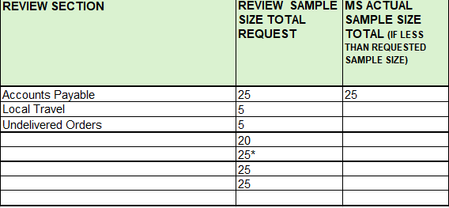
Hello all, brainstorming some ideas. Want to make it easier for my colleagues to fill out. Currently for review section I made it into a dropdown list so user can select from a list than typing it out every time. What i want is based on the selection in 'Review Section', I want it to populate the sample size and total. I could do a switch statement based on what was chosen but i want to see if there is another easier option. Trying something new, any suggestions are welcomed. My Org did restrict VBA so I can't use those. tySolved80Views0likes2CommentsOverlapping times within one row
Hello, What I would like to do is identify if two time ranges within the same row overlap with each other. My ideal end goal would look like: Start 1 End 1 Client Start 2 End 2 Service Overlap? 8:55am 8:59am NAME 12:09pm 12:19pm SERVICE FALSE 10:01am 10:48am NAME 10:00am 11:10am SERVICE TRUE 10:17am 11:17am NAME 10:40am 10:58am SERVICE TRUE 10:30am 11:00am NAME 10:30am 11:14am SERVICE TRUE 10:50am 11:05am NAME 2:01pm 2:38pm SERVICE FALSE 10:50am 11:00am NAME 9:00am 10:05am SERVICE FALSE I have attempted methods like SUMPRODUCT to identify overlaps, but each one appears to work until I double check and find that it does not identify all overlapping times. For instance, these two rows will be listed as false, even though the times are overlapping. 9:59am 11:04am NAME 10:00am 10:45am SERVICE FALSE 9:58am 10:55am NAME 9:45am 10:25am SERVICE FALSE Thank you in advance for your help!Solved63Views0likes3CommentsBold Duplicates (Conditional Formatting)
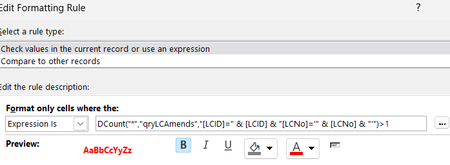
Hello experts I have a form based on qryLCAmends I want to bold the [LCNo] if there is a duplicate but ONLY where LCID = LCID here is what I have but it doesnt bold anything: DCount("*","qryLCAmends","[LCID]=" & [LCID] & "[LCNo]='" & [LCNo] & "'")>1 LCNo is text. I am using the "expression" in conditional formatting: Example: How can I do this with conditional formatting?Solved99Views0likes6Comments"Clear Filter From" Option is Never Available
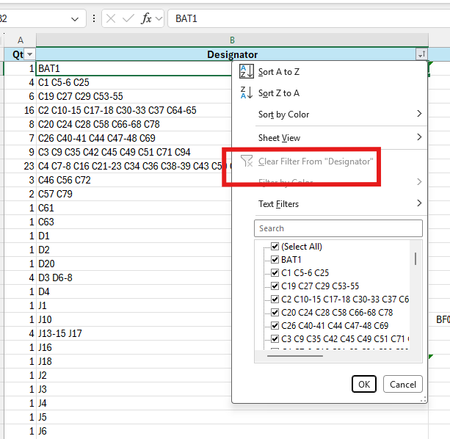
Once a column is filtered, the option to remove that filter just from that column is always greyed out in my Excel (Microsoft 365, v2604, Build 19929.20090). I have seen multiple references advising to remove protection, check for hidden columns, or ungroup workbooks. None of these apply, since I have also tested this with a new worksheet containing a single column, with nothing possibly hidden, and with no shared access. Here is a screen shot of what I see: Thanks to anyone who may have some advice on how to re-enable this feature.Solved125Views0likes3CommentsODBC error (incorrect syntax) since 2604
Overnight i have the problem that many inserts in my MS Access app do not work anymore. I get the error Run-time error '3155': ODBC--insert on a linked table 'tablename' failed. [Microsoft][ODBC SQL Server Driver][SQL Server]Incorrect syntax near '='.(#102) I have been able to isolate this issue on a column of type NVARCHAR(MAX). If I insert any value except null in this column the error above will show on save. I tested with other variants of NVARCHAR. The problem happens starting from NVARCHAR(256), thus what is Long Text for Ms Access. When i insert the record first with a value null for this column, no error is generated and the record is saved. If i 'Update' the record later with a text value in this column, that is no problem. So, the ODBC connection generates a sql insert statement that is mallformed in case of a long text. I have this problem consistent on all apps and all tables where i have NVARCHAR(>255). My solution is to go back to office release 2508 (semi annual support).Solved473Views1like2CommentsDrop-down list
Good afternoon! Could you please tell me what I need to do to make the drop-down list in the visible part contain more rows? I have a list of 15 rows. I need all of them to be displayed in the visible part of the drop-down list window, without scrolling the listSolved185Views2likes7CommentsMacros en excel xlsm que están guardados en onedrive
Buenas tardes, tengo un problema con archivos xlsm que están guardados en carpetas compartidas de onedrive, si lo guardo en una carpeta compartida por mí no hay problema me sale un mensaje amarillo que dice: ADVERTENCIA DE SEGURIDAD Las macros se han deshabilitado y en ese mensaje puedo darle a habilitar contenido y funciona la macro sin problema. el problema lo tengo si ese mismo archivo está guardado en una carpeta compartida que ha creado otra persona, en ese caso me aparece un mensaje en rojo que dice: RIESGO DE SEGURIDAD Microsoft ha bloqueado la ejecución de macros porque el origen de este archivo no es de confianza y sólo aparece obtener mas información pero no puedo habilitarlo. a ver si me puede ayudar alguien y poder utilizar las macros con normalidad. he probado a añadir la carpeta a carpetas de confianza (no funciona) también intento en propiedades darle a autorizar (no aparece entonces no puedo hacerlo) también con soporte microsoft he probado a crear un archivo en editor de registro (tampoco ha funcionado) agradezco vuestra ayuda. Muchas gracias Fco javierSolved111Views1like2CommentsApi in every row of excel.
Hi Currently I have an excel file with the following columns. MFund Code I Bought at I Mutual fund name I latest Price 112092 I 100.00 I Fidelity world fund I 112.00 I 100.00 56432 I 25.00 I Stanley index fund I 20.00 I 25.00 There is a website which provides access to latest price through API. There arre many Mfundcodes so I use a text file to be read in a python program and extract the data. Following is the main part of the program. for x in f: # Add number variable to the api call x = x[:6] api = f"https://api.mfapi.in/mf/{x}/latest" # Get text data from api call idata = requests.get(api).text; # Convert json data into dictionary format d = json.loads(idata) # Get the first record of data if not d['data']: exit else: l = d['data'][0] k.write(f"{x} {l['nav']} {l['date']} \n") Later I import this text file into the excel for further calculations. I was wondering if there is a way to have these values load into the excel columns regards JyothsnaSolved72Views0likes2Comments
Excel - COUNTIF Function
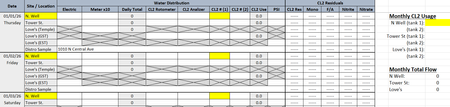
Happy Friday! I am trying to use the COUNTIF Function on a worksheet that tracks how much liquid chlorine is used at 3 different water wells each month, each well having 2 chlorine cylinders. I'm not sure if my brain is fried from reading/watching all kinds of videos for the past 3 hours and trying to follow their instructions, but any time I put in a formula, I get a pop-up saying I've entered too many arguments. Even if I enter individual cells and use only the 3 that it highlights for me (more than 3 does not highlight). I've attached a screen shot of the worksheet (Figure 1) and have highlighted the area I'm trying to figure out. As you can see, it will be for multiple dates, on multiple lines, going through to the end of the month, with the total chlorine (CL2) tallied up on the right hand side. Chlorine tanks are changed out quite often and each tank begins at 150, depleting down to 0. Figure 2 shows a screen shot of what I'm getting when trying to enter the formula. Am I misunderstanding how the formula works or am I using the wrong formula all together? Figure 1 Figure 2Solved163Views0likes4Comments[DataFormat.Error] We received a malformed web response and credentials issue
Hi team :) Happy Friday !! There is an excel spreadsheet being connected with data sources and shared with users. Upon, hitting data refreshes it asks every user to edit credentials every time they hit data refresh or shows dataformat.error with malformed web response. There is no data format error though. Can anyone please assist here or know how to solve this issue ?? Thanks HappySolved118Views0likes1CommentConditional formatting for a whole column, based on same-row-cells, but in one single rule
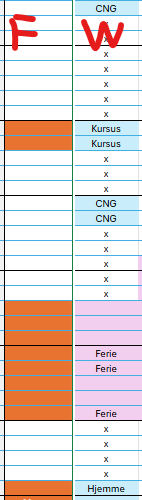
I need conditional formatting, where the color of the cell in column F is changed based on the value in the cell in column W in the same row: I have done it like this: The cell F119 changes colour to orange if this is true: =OG($W$119<>"x";$W$119<>"CNG") This works fine. But I have not been able to find a way to make one rule do this for the entire column. So I have set an individual rule for each cell in column F and I have 376 rows so far. When I need to change the rule, or troubleshoot the rule, this is not operable. Also a lot of the cells have been edited with copy-paste, and now the conditional formatting is all over the place 😒 I would prefer one single rule, that checks the cell in column W in each row, and changes the colour in cell F in the same row, if the conditions are true.Solved98Views0likes2Comments



Events
Recent Blogs
- Edits made with the help of Copilot are now visible to users and collaborators, bringing transparency to the changes made in your workbook.May 12, 2026127Views0likes0Comments
- The ability for Copilot to better connect to your content when using a keyboard and screen readers has evolved.May 11, 20261.1KViews4likes8Comments