
Forum Widgets
Latest Discussions

Employment verification rejected and unable to create support ticket due to Workspace error
Hello Microsoft Team, My account's employment verification was rejected (Verification Status: Rejected). When I try to submit a support ticket in Partner Center to resolve this, the Workspace dropdown shows "No results found", which completely locks me out from creating a support request. I am stuck in a loop. Could a moderator please help escalate this case to the Vetting and Verification team, or advise how I can submit my documents? Here are my account details: - Company Name: 长沙天籁奇迹网络科技有限公司 - Seller ID: 95445230 - Email: email address removed for privacy reasons Thank you for your assistance!cstlqj666Aug 14, 2026Occasional Reader30Views0likes0CommentsCSP July 2026 Monthly Partner Update
This month's updates covered key changes to partner agreements, security requirements, pricing capabilities, growth margins, and promotional offerings designed to support partner readiness and adoption of upcoming CSP enhancements. Please use the survey link to share your feedback on the these updates. Survey Link. Visit the Launch Enablement Guide for additional readiness resources, guidance, and partner actions. This Month's Topics: (click title to jump to video) MPA Refresh | MFA for Partner Center APIs | End-of-Sale Software Price List | FY27 Growth Margins | Azure & per User Promos MPA Refresh The updated Microsoft Partner Agreement takes effect on 1 December 2026, and partners are encouraged to review the summary of changes and updated CSP Program Guide to prepare their organizations. If the player doesn’t load, open the video in a new window: Open video MFA for Partner Center APIs Prioritise implementing MFA for app-plus-user Partner Center API scenarios to reduce operational risk and help maintain business continuity ahead of future enforcement. If the player doesn’t load, open the video in a new window: Open video End-of-Sale Software Price List Partners can now access the end-of-sale price list for software through both the Partner Center user experience and API, helping them identify software products that have reached end of sale. If the player doesn’t load, open the video in a new window: Open video FY27 Growth Margins The new growth margins capability will provide eligible partners with an additional upfront margin for selected commercial AI workloads across new-to-offer, seat-expansion, and strategic SKU-mix scenarios, with sandbox testing available ahead of the October launch. If the player doesn’t load, open the video in a new window: Open video Azure & per User Promos New Azure promotion capabilities will enable percentage-based discounts across eligible consumption scenarios, including pay-as-you-go, reserved instances, and pre-purchase plans, with discovery and redemption experiences available for sandbox testing. Upcoming per-user promotion enhancements will support more precise customer targeting by seat count and introduce greater flexibility for qualifying customers in new-to-offer scenarios. If the player doesn’t load, open the video in a new window: Open video Need More Information? Visit the Launch Enablement Guide for additional readiness resources, guidance, and partner actions. Follow this tag for email notifications to all future update publications.233Views0likes4Commentsexperiences with “MS incentives new experience”
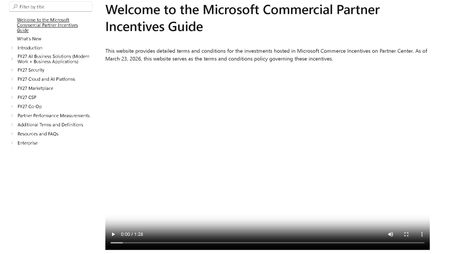
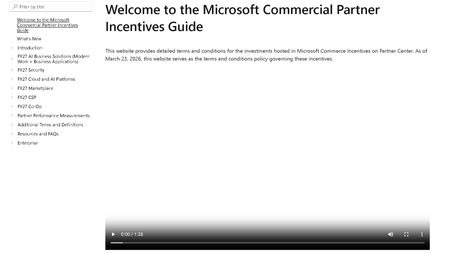
Dear Microsoft, dear fellow partners, Please find below first experiences with the new "incentives experience" where the annual incentives guide was replaced with a website. This fine product can be found at: https://incentiveguide.partner.microsoft.com/en-US/ Site only shows a video, no matter which link you click. We want text, not video. I want the CSP M365 incentives info, not that video overlay again. 2. Site refers to a ‘product addendum’ but no such is found in the guide itself (it is in the MCI collection on OpsReadiness luckily - https://assetsprod.microsoft.com/mpn/en-us/microsoft-commerce-incentive-product-addendum.xlsx ) 3. The MCI collection (https://partner.microsoft.com/en-US/asset/collection/microsoft-commerce-incentive-resources#/) links to various files/links. The link to the FY27 coop guide is broken ☹ (https://incentiveguide.partner.microsoft.com/en-US/fy27-co-op/how-to-use-the-co-op-guidebook) p- luckily the definitions of what cannot be found are present (at https://incentiveguide.partner.microsoft.com/en-US/additional-terms-and-definitions/glossary-cooperative-marketing-funds) 4. There are no rates mentioned in the website/download of the guide. For CSP you would need to view the MSFY27 documentation in collection mentioned earlier we eagerly await an updated & improved version of this site!MartijnBreetJul 02, 2026Iron Contributor131Views0likes1Commentexperiences with “MS incentives new experience”
Dear Microsoft, dear fellow partners, Please find below first experiences with the new "incentives experience" where the annual incentives guide was replaced with a website. This fine product can be found at: https://incentiveguide.partner.microsoft.com/en-US/ Site only shows a video, no matter which link you click. We want text, not video. I want the CSP M365 incentives info, not that video overlay again. 2. Site refers to a ‘product addendum’ but no such is found in the guide itself (it is in the MCI collection on OpsReadiness luckily - https://assetsprod.microsoft.com/mpn/en-us/microsoft-commerce-incentive-product-addendum.xlsx ) 3. The MCI collection (https://partner.microsoft.com/en-US/asset/collection/microsoft-commerce-incentive-resources#/) links to various files/links. The link to the FY27 coop guide is broken ☹ (https://incentiveguide.partner.microsoft.com/en-US/fy27-co-op/how-to-use-the-co-op-guidebook) p- luckily the definitions of what cannot be found are present (at https://incentiveguide.partner.microsoft.com/en-US/additional-terms-and-definitions/glossary-cooperative-marketing-funds) 4. There are no rates mentioned in the website/download of the guide. For CSP you would need to view the MSFY27 documentation in collection mentioned earlier we eagerly await an updated & improved version of this site!MartijnBreetJul 02, 2026Iron Contributor33Views0likes0Comments
CSP June 2026 Monthly Partner Update
To help you stay informed and prepared for operational changes, Microsoft publishes monthly self-service readiness content for CSP partners. This month's updates focus on actions, impacts, and resources across several important CSP topics. Each update is available as a short on-demand video designed to help you quickly understand what is changing, what it means for your business, and where to find additional guidance. This Month's Topics: (click title to jump to video) Microsoft 365 Updates | MFA Requirements in Partner Center | Multi-Party Private Offers (MPO) | Licensing Navigator in Partner Center AI Assistant | CSP Authorization Microsoft 365 Pricing & Packaging Updates Review upcoming pricing and packaging changes and understand how they may impact your customers and business planning. If the player doesn’t load, open the video in a new window: Open video MFA Requirements in Partner Center Stay up to date with Partner Center security requirements and understand the latest guidance relating to multifactor authentication. If the player doesn’t load, open the video in a new window: Open video Multi-Party Private Offers (MPO) Understand the latest MPO capabilities and available resources for partners participating in Marketplace transactions. If the player doesn’t load, open the video in a new window: Open video Licensing Navigator in Partner Center AI Assistant Learn how Licensing Navigator can help you find Microsoft licensing guidance and answers more efficiently. If the player doesn’t load, open the video in a new window: Open video CSP Authorization Understand the latest authorization requirements and the actions partners should take to remain compliant. If the player doesn’t load, open the video in a new window: Open video Need More Information? Visit the Launch Enablement Guide for additional readiness resources, guidance, and partner actions.358Views0likes7CommentsCSP Transactional TTM Revenue Not Loading for Indirect Reseller - Anyone Else Seeing This?
Hello everyone, We are a Microsoft CSP Indirect Reseller and have been actively transacting through our distributor for more than two years. In the past, including during a Microsoft support review in December 2025, we regularly used the "Partner Global - CSP Transactional TTM Revenue" metric in Partner Center to monitor our CSP performance and eligibility requirements. At that time, the data loaded correctly and was fully visible to our Global Admin account. Recently, the report stopped loading completely. The widget appears, but the CSP Transactional TTM Revenue value never loads. The issue occurs across multiple browsers and devices, so it does not appear to be a local browser or cache problem. The affected report is: Insights > Cloud Product Performance > Subscriptions Reference documentation: https://learn.microsoft.com/en-us/partner-center/insights/analyze-subscriptions-licenses?utm_source=chatgpt.com I opened a support ticket and received a response stating that my account does not have the required permissions and that I should contact my distributor. However, this explanation does not seem consistent because: The same account previously had access to this metric. We can access all other Insights reports normally. Under Account Settings > My Access, access to the relevant workspaces is granted. We are an active CSP Indirect Reseller with paying customers and active subscriptions. My questions are: Has Microsoft changed the visibility or permission model for CSP Transactional TTM Revenue recently? Is this metric still available for CSP Indirect Resellers, or is it now restricted to certain partner types? Is anyone else experiencing the same issue where the widget appears but never loads the revenue data? Has anyone received official communication regarding changes to this report? Any feedback or confirmation from other CSP partners would be greatly appreciated. Thank you.Solved221Views0likes9CommentsPartner Collaboration – Copilot AI Readiness Sprint (MPN ID: 7110817)
Hello Microsoft Partner Community, We’re seeing increasing demand from clients exploring Microsoft 365 Copilot — and a consistent gap in readiness across licensing, data, governance, and security. ArcSecureAI (MPN ID: 7110817) is offering a virtual Copilot AI Readiness Sprint designed to support partners working with SMBs, nonprofits, and organizations preparing for adoption. What the sprint includes: • Readiness assessment (licensing, data, governance, workflows) • Security and Zero Trust alignment review • Identification of automation opportunities (Power Automate + Copilot Studio) • Scored readiness report (0–100) • Practical 30–60–90 day adoption roadmap Partner collaboration options: • White-label delivery • Co-delivery with CSPs and MSPs • Fast turnaround (typically 48–72 hours) • Microsoft-aligned approach Goal: Help partners start the Copilot conversation with structure, deliver immediate value, and position follow-on services. If you’re currently working with clients evaluating Copilot, I’d be open to connecting and exploring collaboration opportunities. – Sreita Wheeler ArcSecureAI LLC MPN ID: 711081742Views1like0CommentsTax ID Update -- no support
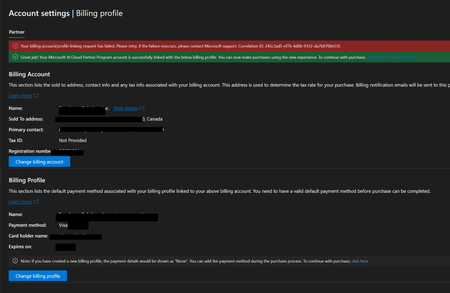
Hi there. I cannot add my TAX ID in the account settings workspace. Or any other place seemingly possible according to the Partner Center AI Assistant help feature, Google articles, and so on. I have followed various instructions for updating my TAX ID but none resemble precisely what I am seeing. I have been trying to resolve this myself for weeks now. I have two support tickets in with MS, have followed them each up in the tickets, all to no avail. I am part of the MAICPP, a CSP etc., and have been for a while. As you can see, my bill information is not linked which may be why I cannot edit/add the TAX ID according to the myriad instructions I've found. BOTTOM LINE: I do not know how to obtain support assistance from MS. Anyone have any suggestions? Thanks.SolvedacarstensMay 15, 2026Copper Contributor123Views0likes1CommentPartner Center Enrollment Blocked – Trust Code 715-123160 – Requesting Manual Review
Hello Microsoft Partner Community Team, We are attempting to enroll our company in the Microsoft AI Cloud Indirect Seller Program, but our registration is being blocked by the automated trust verification system. We are a legitimate, legally registered business operating in the cloud connectivity industry. Our DUNS number and all company information entered during enrollment are accurate and match our official government records. Error details: Reference Number: 715-123160 Transaction ID: 0e136d6b-9164-41c3-be26-9b301c9aac24 Correlation ID: e827ab99-6dc9-4901-a464-cff43d00f5c7 Due to this block, our Partner Center account has no active workspaces, which means we are completely unable to create a support ticket through the standard Partner Center portal. We have also tried the partner.microsoft.com/support page, but it redirects us back to Partner Center — creating a loop with no resolution. We are kindly requesting: Escalation to the Partner Center Vetting / Trust & Safety team for manual review A reset or unblock of our enrollment so we can complete registration Guidance on any documentation required (business registration, address proof, domain ownership, etc.) — we are ready to provide everything immediately for email contact, please contact the email address we leave on the request (format as: email address removed for privacy reasons) Thank you in advance for your assistance.healtheworldplzMay 04, 2026Copper Contributor55Views0likes0Comments




Tags
- CSP183 Topics
- Partner question114 Topics
- direct86 Topics
- Indirect reseller76 Topics
- Indirect66 Topics
- Indirect Provider47 Topics
- Pricing & Licensing2 Topics
- csp monthly updates2 Topics
- CSP Hoster1 Topic