Recent Discussions

Cannot Connect to VMs in Windows Admin Center
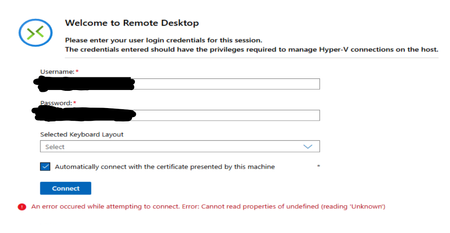
Hi all, I have 1 Server Cluster made up of 3 Server 2022 Hosts on which there is a large number of VMs running on Hyper-V. The typical process for accessing the VMs has been through Windows Admin Center, which is hosted on one of the VMs in the cluster. Around 1 week ago, it was no longer possible to connect to the VMs through Windows Admin Center as an infinite loading screen was presented. Sometimes, the following error shows up in VMConnect: The cluster and servers are still connected to WAC and all the VMs that are expected are present on WAC. Since then, the following things have been attempted: - Restart all servers - Rebuild WAC on Current VM - Build WAC on Fresh VM with the same and different network configuration, using current (2606) and previous (2511) versions of WAC - Build WAC on one of the hosts All these attempts result in the same error as seen before. Has anyone experienced this issue before? Or does anyone have any advice? Thank you in advance!56Views0likes1Comment
Resize-StorageTier / Expand Volume on Windows Server 2025 Campus Cluster does not work
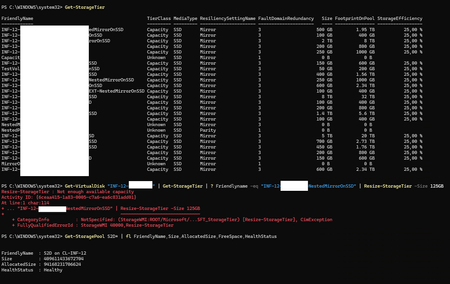
Hi Insider Community! Want to expand a CSV on an S2D Windows Server 2025 Campus Cluster. (4-nodes) I get an error message. Resize-StorageTier : Not enough available capacity FullyQualifiedErrorId : StorageWMI 40000,Resize-StorageTier Any hint for me? Does Microsoft know about the issue? Best regards Thomas55Views0likes1Comment
Windows Server Datacenter: Azure Edition preview build 29621 now available in Azure
Hello Windows Server Insiders! We welcome you to try Windows Server vNext Datacenter: Azure Edition preview build 29621 in both Desktop experience and Core version on the Microsoft Server Operating Systems Preview offer in Azure. Azure Edition is optimized for operation in the Azure environment. For additional information, see Preview: Windows Server VNext Datacenter (Azure Edition) for Azure Automanage on Microsoft Docs. For more information about this build, see Announcing Windows Server vNext Preview Build 29621 | Microsoft Community Hub.
How to check RDP access to the server
Hello, I have a virtual machine running Windows Server 2019 Datacenter with Active Directory, and all users access it via RDP. No specific access configurations have been set up; I wanted to know if it is possible to check how many times a specific user has connected and from which IP address—is that possible? Also, I wanted to ask if it is possible to determine whether a specific user copied files to their local PC using copy/paste during a session. Thank you60Views0likes2Comments
HLK test failing for a KMDF driver with error “A lower driver failed IRP_MN_QUERY_STOP_DEVICE”
Subject: HLK DF‑PNP Rebalance Fail Restart Device: E: target widens to all volumes; QueryStop fails even without my driver installed. Hi all, I’m trying to pass all HLK tests for my driver. Driver: KMDF PnP volume upper‑filter (attached via UpperFilters to the Volume/Disk class) OS: Windows Server 2016 Datacenter, build 14393 HLK: 10.1.14393.8069 Test: DF - PNP Rebalance Fail Restart Device (Reliability) Target volume: E: (NTFS) Storage: PERC H330 Mini (DELL) (HBA) Observed behavior The DQ initially targets E:, but the test later widens to all STORAGE\Volume devnodes: WDTF_TARGETS : INFO : - Query("IsDevice AND (DriverBinaryNames!='i8042prt.sys') AND (Class!=hdc) AND (Class!=scsiadapter) AND (DsmDevice!=TRUE) AND (IsDevice AND (DriverBinaryNames!='i8042prt.sys') AND (Class!=hdc) AND (Class!=scsiadapter) AND (DsmDevice!=TRUE) AND (DeviceID='STORAGE\VOLUME{01FEB6F1-3717-11F1-9707-806E6F6E6963}#0000000001000000'))") WDTF_TARGETS : INFO : Target: Volume (E:) STORAGE\VOLUME{01FEB6.. WDTF_SUPPORT : INFO : - ClearSetupAPILogs() WDTF_TARGETS : INFO : - Query("IsDevice AND (SemiUniqueTargetHardwareIdentifier='STORAGE\Volume')") WDTF_TARGETS : INFO : Target: Volume STORAGE\VOLUME{01FEB6.. WDTF_TARGETS : INFO : Target: Volume STORAGE\VOLUME{01FEB6.. WDTF_TARGETS : INFO : Target: Volume (C:) STORAGE\VOLUME{01FEB6.. WDTF_TARGETS : INFO : Target: Volume (E:) STORAGE\VOLUME{01FEB6.. Failures report A lower driver failed IRP_MN_QUERY_STOP_DEVICE and PNP.RestartDevice() Win32=1 - Incorrect function. For each of the 4 target volumes, it shows this error, DTF_PNP : INFO : - EDTTryStopDeviceFailRestart() WDTF_PNP : INFO : Target: Volume (C:) STORAGE\VOLUME{01FEB6EF-3717-11F1-9707-806E6F6E6963}#000000001F500000 WDTF_PNP : INFO : Result: A lower driver failed IRP_MN_QUERY_STOP_DEVICE. Rebalance tests cannot proceed... WDTF_PNP : INFO : - EDTTryStopDeviceFailRestart() WDTF_PNP : INFO : Target: Volume (E:) STORAGE\VOLUME{01FEB6F1-3717-11F1-9707-806E6F6E6963}#0000000001000000 WDTF_PNP : INFO : Result: A lower driver failed IRP_MN_QUERY_STOP_DEVICE. Rebalance tests cannot proceed... WDTF_PNP : ERROR : PNP.RestartDevice() Win32=1 - Incorrect function. WDTF_PNP : ERROR : PNP.RestartDevice() Win32=1 - Incorrect function. Q1. I have tried multiple variations of the DQ query, and each successfully targets the E volume only. Why does this test later widen to all volumes even when DQ targets only E:? How can I force it to stay on E: ? Q2. I also ran this on a physical server client and a VM client, but faced the same issue both times. I understand the system/boot volume may veto QueryStop, but why does each volume report ‘a lower driver failed IRP_MN_QUERY_STOP_DEVICE’ in this test? Q3. I uninstalled my driver completely and still see the same failures when the test is running with only inbox drivers (e.g., msdmfilt.sys, volsnap.sys, volume.sys) listed by Driver Verifier for target E in the logs. That makes me suspect setup/config rather than my driver. Why would only these drivers fail the test as well, what am I missing here? WDTF_DRIVER_VERIFIER : INFO : - EnableOnAllDriversOfDevices() WDTF_DRIVER_VERIFIER : INFO : Target: Volume (E:) STORAGE\VOLUME{01FEB6F1-3717-11F1-9707-806E6F6E6963}#0000000001000000 WDTF_DRIVER_VERIFIER : INFO : Driver: msdmfilt.sys WDTF_DRIVER_VERIFIER : INFO : Driver: volsnap.sys WDTF_DRIVER_VERIFIER : INFO : Driver: volume.sys Thanks for any guidance!27Views0likes1CommentAnnouncing Windows Server vNext Preview Build 29621
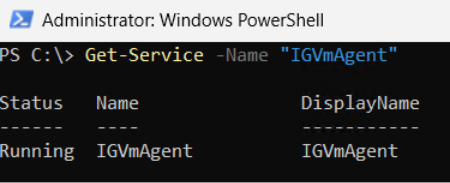
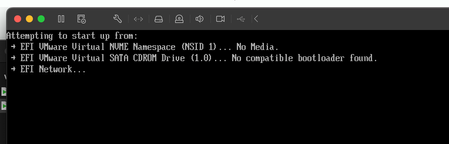
Hello Windows Server Insiders! Today we are pleased to release a new build of the next Windows Server Long-Term Servicing Channel (LTSC) Preview that contains both the Desktop Experience and Server Core installation options for Datacenter and Standard editions and Azure Edition (for VM evaluation only). Branding remains Windows Server 2025 in this preview - when reporting issues please refer to Windows Server vNext preview. Build 29531 established a new Server preview baseline build. Please perform a clean install of Build 29531 (or later) using the installation media linked below. Please note: Upgrades from Windows Server vNext preview builds older than 29531 are not supported. We encourage all Windows Server vNext preview users to perform a clean install using 29531 or later to successfully upgrade to future Windows Server vNext preview builds. While upgrades from earlier Windows Server previews (Build 26525 and older) are not technically blocked by setup.exe, a number of known issues have been identified related to upgrades necessitating the establishment of a new baseline build for our Server vNext Preview Program. The new baseline build (29531) will not be Flighted due to upgrade issues. Flighting support resumed with preview build 29550 or later. What's New [NEW] We're excited to announce Trusted Launch for virtual machines (TVMs) on Windows Server—a security feature you can enable when creating Generation 2 VMs. This initial preview supports TVMs with Secure Boot, vTPM, and vTPM state protection (at rest), managed via PowerShell. ⚠ Not supported in this release: Moving TVMs to another server TVMs in failover clusters or Hyper-V Replica Boot integrity verification TVMs in Windows Admin Center (WAC) Instructions 1. Install the latest ServerInsider preview build. 2. Enable Hyper-V (restarts the server): Install-WindowsFeature -Name Hyper-V -IncludeManagementTools -Restart 3. Set the registry keys: New-Item -Path "HKLM:\SOFTWARE\Microsoft\AszIgvmAgent" -Force New-ItemProperty -Path "HKLM:\SOFTWARE\Microsoft\AszIgvmAgent" -Name "TvmWinServer" -Value 1 -PropertyType DWord -Force 4. Enable Trusted Launch: Enable-WindowsOptionalFeature -Online -FeatureName "IsolatedGuestVm" -NoRestart 5. Verify IGVmAgent is running (should show Running): Get-Service -Name "IGVmAgent" If it isn't running, report the issue with the IGVmAgent and IGVmSystem Operational logs (Event Viewer → Applications and Services Logs → Microsoft → Windows). 6. Create an external virtual switch (if needed): (Get-VMSwitch | Where-Object { $_.SwitchType -eq "External" }).Name 7. Create the TVM. With an existing Gen 2 VHDX: New-VM -Name <VMName> -Generation 2 -GuestStateIsolationType TrustedLaunch -SwitchName <switch> -VHDPath <path to vhdx> -Path <config path> Or with a new VHD, then attach a Gen 2–compatible guest OS ISO: New-VM -Name <VMName> -SwitchName <switch> -NewVHDPath <new VHD path> -NewVHDSizeBytes 40GB -Generation 2 -GuestStateIsolationType TrustedLaunch -Path <config path> Add-VMDvdDrive -VMName <VMName> -Path <Guest OS ISO path> Ensure the DVD drive is first in the firmware boot order so the VM boots from it. 8. Verify isolation type (should return TrustedLaunch): (Get-VM -Name <VMName>).GuestStateIsolationType 9. Verify guest state protection: Stop the IGVmAgent service and restart the VM—without IGVmAgent running, a Trusted launch VM with guest state protection won't start. For more information, please review our blog post: Announcing Trusted Launch for Virtual Machines for Windows Server Insiders | Microsoft Community Hub Quick Machine Recovery available in Windows Server vNext Insider Previews. Quick machine recovery (QMR) is now available for Server vNext Insiders to test. This feature enables the recovery of Windows Server devices when they encounter boot critical errors that prevent them from booting. QMR can automatically search for cloud‑based remediations to recover from widespread boot failures significantly reducing the burden on IT administrators when multiple devices are impacted. This supports the goals of the Windows Resiliency Initiative by enabling applicable fixes to be delivered through trusted Windows Update to restore affected devices, helping reduce downtime and minimize manual recovery efforts across enterprise environments. This feature is currently enabled in the latest Server vNext Insider builds for customers to experience test mode. A Group Policy option to enable or disable the feature will be introduced in upcoming builds to provide additional administrative control. To simulate the quick machine recovery experience, use the following commands from an elevated command prompt: Enable test mode: reagentc.exe /SetRecoveryTestmode Configure Windows to boot to Windows Recovery Environment on the next boot: reagentc.exe /BootToRe Reboot your device. The system goes through autoremediation of a simulated crash safely and reboots back to Windows Server. For more information, please review Quick machine recovery (QMR) and Windows Resiliency Initiative. When providing feedback using Feedback hub, please select QMR from the Recovery and Uninstall category in the app. NVMe-over-Fabrics (NVMe-oF) extends the NVMe protocol—originally designed for local PCIe-attached SSDs—across a network fabric. Instead of using legacy SCSI-based protocols such as iSCSI or Fibre Channel, NVMe-oF allows a host to communicate directly with remote NVMe controllers using the same NVMe command set used for local devices. In this Insider build, Windows Server supports: NVMe-oF over TCP (NVMe/TCP), allowing NVMe-oF to run over standard Ethernet networks without specialized hardware. NVMe-oF over RDMA (NVMe/RDMA), enabling low-latency, high-throughput NVMe access over RDMA-capable networks (for example, RoCE or iWARP) using supported RDMA NICs. For more information, please visit: Introducing the Windows NVMe-oF Initiator Preview in Windows Server Insiders Builds | Microsoft Community Hub ReFS Boot is enabled for Windows Server vNext preview builds. Known Limitations ReFS Boot systems create a minimum 2GB WinRE partition. When WinRE cannot be updated due to space constraints, the system may disable WinRE. Disabling WinRE does not remove the partition. If the WinRE partition is deleted and the boot volume is extended over it, this operation is unrecoverable without a clean install. For more information, please visit: Resilient File System (ReFS) overview | Microsoft Learn Feedback Hub app is available for Server Desktop users! The app should automatically update with the latest version, but if it does not, simply Check for updates in the app’s settings tab. Known Issues A race condition in the TLS hybrid key exchange implementation may cause the LSASS service to crash when hybrid groups are negotiated by a TLS server. To avoid this issue until the fix is released, please disable hybrid groups (X25519_MLKEM768, SecP256r1_MLKEM768, SecP384r1_MLKEM1024) using TLS cmdlets or Group Policy, as outlined here. Server Core Upgrades and AppCompat FOD: Enabling AppCompat FOD after reinstall may fail due to legacy 3rd-party license compatibility issues on Server Core devices. Server Core users may be unable to install the latest AppCompat FOD after upgrading to build 29574. This appears to be limited to Server Core installations with 3rd-party application licenses that fail compatibility checks after upgrade. This will be addressed in a future build. Upgrading from older builds of Windows Server vNext previews (26525 or older) are not supported. Please perform a clean install of build 29531 or later. Users may experience failures when attempting to upgrade from earlier previews (build 26525 and older). VMs may fail to upgrade or start after upgrade from older preview builds impacting live migration and failover cluster scenarios. Download Windows Server Insider Preview (microsoft.com) Flighting: The label for this flight may incorrectly reference Windows 11. However, when selected, the package installed is the Windows Server vNext update. Please ignore the label and proceed with installing your flight. This issue will be addressed in a future release. Available Downloads Downloads to certain countries may not be available. See Microsoft suspends new sales in Russia - Microsoft On the Issues. Windows Server Long-Term Servicing Channel Preview in ISO format in 18 languages, and in VHDX format in English only. Windows Server Datacenter Azure Edition Preview in ISO and VHDX format, English only. Microsoft Server Languages and Optional Features Preview Keys: Keys are valid for preview builds only Server Standard: MFY9F-XBN2F-TYFMP-CCV49-RMYVH Datacenter: 2KNJJ-33Y9H-2GXGX-KMQWH-G6H67 Azure Edition does not accept a key. Symbols: Available on the public symbol server – see Using the Microsoft Symbol Server. Expiration: This Windows Server Preview will expire September 15, 2026. How to Download Registered Insiders may navigate directly to the Windows Server Insider Preview download page. If you have not yet registered as an Insider, see GETTING STARTED WITH SERVER on the Windows Insiders for Business portal. We value your feedback! The most important part of the release cycle is to hear what's working and what needs to be improved, so your feedback is extremely valued. Please use the new Feedback Hub app for Windows Server if you are running a Desktop version of Server. If you are using a Core edition, or if you are unable to use the Feedback Hub app, you can use your registered Windows 10 or Windows 11 Insider device and use the Feedback Hub application. In the app, choose the Windows Server category and then the appropriate subcategory for your feedback. In the title of the Feedback, please indicate the build number you are providing feedback on as shown below to ensure that your issue is attributed to the right version: [Server #####] Title of my feedback See Give Feedback on Windows Server via Feedback Hub for specifics. The Windows Server Insiders space on the Microsoft Tech Communities supports preview builds of the next version of Windows Server. Use the forum to collaborate, share and learn from experts. For versions that have been released to general availability in market, try the Windows Server for IT Pro forum or contact Support for Business. Diagnostic and Usage Information Microsoft collects this information over the internet to help keep Windows secure and up to date, troubleshoot problems, and make product improvements. Microsoft server operating systems can be configured to turn diagnostic data off, send Required diagnostic data, or send Optional diagnostic data. During previews, Microsoft asks that you change the default setting to Optional to provide the best automatic feedback and help us improve the final product. Administrators can change the level of information collection through Settings. For details, see http://aka.ms/winserverdata. Also see the Microsoft Privacy Statement. Terms of Use This is pre-release software - it is provided for use "as-is" and is not supported in production environments. Users are responsible for installing any updates that may be made available from Windows Update. All pre-release software made available to you via the Windows Server Insider program is governed by the Insider Terms of Use.
Unable to Build Switchless Storage using Network ATC
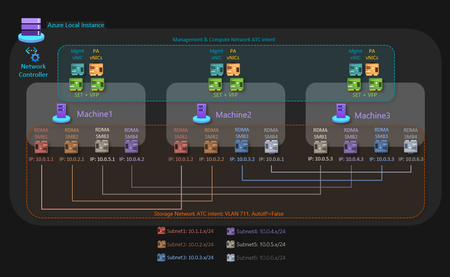
3-Node HV/S2D Cluster using Switchless Storage and Network ATC getting Network HUD Error I have a Dell 3-node server cluster being used to host Hyper-V with S2D. Each node is identical and certified to pass S2D requirements. The networking consists of 2 onboard 1 Gbps and 2 quad-port PCI(e) NICs at 10/25 Gbps. The 2 onboard ports are being used for the management intent, 2 ports from each of those NICs are being connected to 2 top-of-rack switches for the compute intent at a total of 12 10 Gbps connections, and the other 2 ports from each of those NICs are being connected directly to the other nodes in a dual mesh method for the storage intent at a total of 6 25 Gbps connections. Very similar to the Microsoft diagram for a three-node storage switchless, dual TOR, dual link deployment network reference pattern for Azure Local, but I am using Windows Server 2025 Datacenter, not Azure Local. The problem I am encountering is when I attempt to create the switchless storage intent, I get an error (shown below) that reads "Failed to fetch physical NIC mapping from the Network HUD service. Please diagnose..." If I leave off the switchless option, it builds without issue. The error only occurs when I attempt to use the switchless option. I tried without configuring the NIC IP addresses first, as well as trying configuring the NIC IP addresses beforehand. I tried without having a cluster built first, as well as building a failover cluster without storage before running the network intent command. The error I posted below shows my last attempt after having the NICs configured with IP addresses and having a failover cluster established before running the command. The error has remained the same throughout the process. Has anyone else run into an issue like this with switchless storage? It seems like everything that I am trying to do is within scope and should be a supported solution. My fallback plan is to use my existing switches, but that drops my connection speeds down from 25 Gbps to 10 Gbps due to hardware limitations.140Views0likes3Comments
PowerShell DSC Pullserver stops working with SQL database
After updating Windows Server 2025, our DSC Pull Server stopped communicating with its SQL backend database. The issue was not present before the update, and reverting to the previous version of Microsoft.PowerShell.DesiredStateConfiguration.Service.dll immediately restored normal functionality. With the newer DLL version, the service starts successfully and the endpoint remains available, but no connection is established to the SQL Server database. As a result, database initialization does not occur, required tables are not created or updated, and node registration fails. No database sessions are observed on the SQL Server during registration attempts, indicating that the service does not reach the SQL connection phase. We compared the previous working DLL version with the updated version and confirmed that the regression is introduced by the newer DLL. Replacing the updated DLL with the earlier version consistently restores SQL database connectivity and normal Pull Server Operation.76Views0likes3CommentsStorage migration service operational log is empty
Hi I can not find logs for operational but only for debug and admin for Storagemigrationservice and storagemigrationservice-proxy. I justy disable and re-enable operational log from the gui and also from powershell but nothing change. There is some trick in the registry? I find the registration in C:\ProgramData\Microsoft\StorageMigrationService but there is a edb and their relative logs that are not txt format. I need to trace the duration of the past process because I need to sync the migration in scheduled manner26Views0likes1CommentWindows Server 2022 File Server Cluster | Network Teaming
Hello Microsoft Community, I have a Windows Server 2022 File Server Cluster (all physical nodes) running with SMB shares. At present, it is not configured with NIC teaming. We are planning to setup NIC teaming. I am going to add an additional network adapter to achieve this. Since this is a production file server server. It tried to perform NIC teaming in a test environment. Upon setting up network teaming, File server clustered roles do not come online and fail. It registers an Event ID 1049 about duplicate IPs despite the fact that I have deleted old network adapter via device manager (show hidden devices). New network adapter comes online without any previous knowledge of IPs. When setting up old IP scheme on a new individual network adapter, File server clustered roles come online successfully. However, setting up the old IP scheme on teamed network adapter, it registers Event ID 1049 about duplicate IPs and roles shows a status of Failed instead of Stopped. Duplicate IPs are only registered for clustered file server roles. They are not registered for node IPs and cluster management IPs. What would be a best way to achieve network teaming on an existing file server cluster without setting up the cluster from scratch?77Views1like2CommentsIssue with winlogon on Remote Desktop Services:
We are investigating intermittent session establishment failures on Windows Server 2019 servers used as CyberArk PSM / RDS hosts. At unspecified intervals, new privileged sessions fail to establish or are disconnected during the initial session/logon phase. The issue is intermittent and affects new sessions. Existing sessions may continue to work. The strongest and most consistent correlation identified so far is: Microsoft-Windows-TerminalServices-LocalSessionManager/Operational – Event ID 36 Application / Microsoft-Windows-Winlogon – Event ID 4005 We observed that TerminalServices-LocalSessionManager Event ID 36 can occur without a subsequent Winlogon Event ID 4005. However, every observed Winlogon Event ID 4005 is correlated with TerminalServices-LocalSessionManager Event ID 36 in the same incident window. This suggests that Event ID 36 is a consistent precursor or required condition for the Winlogon 4005 cases. Environment Operating system: Windows Server 2019 Role: CyberArk PSM / RDS session host Issue type: intermittent failure during new RDP/PSM session initialization Impact: affected users cannot establish privileged sessions or are disconnected during session startup Similar issue exists on previous windows server 2012 R2 and was fixed : August 16, 2016 – KB3179574 (During virtual channel management, a deadlock condition occurs that prevents the RDS service from accepting new connections.) https://support.microsoft.com/en-us/topic/august-2016-update-rollup-for-windows-8-1-and-windows-server-2012-r2-d472b5d5-4b3a-8e6e-c22a-f62fed604caf I'm looking forward for any ideas how to resolve this issue. Many thanks!!76Views0likes2Comments
Server 2025 to server 2022 downgrade keys
Hello, We bought licenses with these part #'s MFR# P73-08495 and MFR# EP2-25187 which, according to searches on the internet, have downgrade rights. We need to get downgrade keys for server 2022 standard. Our reseller referred us to Microsoft for this. Could someone help? The activation portal does not give us an option to do this and a microsoft support agent told us to make a post here which seems weird to us. We don't know why they couldn't help us via the phone. Thanks63Views1like2CommentsWindows Server 2025 Failover Cluster Live Migration Issue
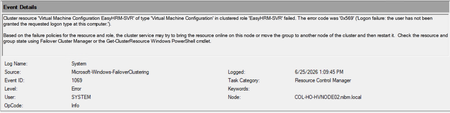
Hi Everyone, I am facing an issue in a Hyper-V Failover Cluster environment where Live Migration intermittently fails due to a service logon-related problem. The environment was previously working normally, but now whenever we attempt to Live Migrate a VM between cluster nodes, the migration fails unless we manually run “gpupdate /force” on the Hyper-V host first. After running gpupdate /force, the migration works temporarily, but the issue returns again during the next migration attempt. This makes it appear that some policy or permission is not being applied consistently on the cluster nodes. During troubleshooting, I attempted to add “NT VIRTUAL MACHINE\Virtual Machines” to the “Log on as a service” policy under Local Security Policy > Local Policies > User Rights Assignment. However, the account does not appear or resolve in the Object Picker when trying to add it manually. At this stage, I am trying to understand whether this is related to a domain GPO overwriting local policy settings, a Failover Cluster permission issue, or something specific to Hyper-V virtual machine accounts. Has anyone encountered a similar issue where Live Migration only works after running gpupdate /force? Also, is there a correct method to add “NT VIRTUAL MACHINE\Virtual Machines” to the “Log on as a service” policy, or should this permission already exist by default on Hyper-V hosts? Any guidance or recommendations would be greatly appreciated.86Views0likes1CommentSecure Boot update still pending on deadline day
After checking the registry keys on 2x VMs which run services for a number of important customers I found they both have: UEFICA2023Error 2147942750 Apparently this means they're pending a reboot. https://blog.mindcore.dk/2026/04/secure-boot-certificate-update-intune/ I can't reboot the VM inside working hours, can they be rebooted after the deadline or do I need to disable Secure Boot on the VMs? I'm concerned I'll have to disable Secure Boot before they're next rebooted for Windows updates.59Views0likes1CommentSave the date: Secure Boot Q&A in July
To help, Microsoft is continuing its Q&A series with several opportunities to connect directly with Microsoft experts. Whether you're managing physical servers, virtualized workloads, or working with your hardware partners on firmware readiness, you can get answers to the questions that matter most to your environment. Learn more and add the events to your calendar: 8:00 AM PDT July 1 - Windows Server Secure Boot AMA 8:00 AM PDT July 8 - Secure Boot Office Hours for virtualized environments 7:00 AM - 7:00 PM PDT July 15 - OEM Secure Boot Office Hours If there's a question that's been holding up your rollout—or one you simply want to validate before moving forward—this is a great opportunity to ask. Feel free to post questions ahead of time or join the conversation live. We look forward to seeing you there.138Views1like0CommentsEvent 4768 for one user
Hi all, We have two domain controllers running server 2019 with Domain Functional Level 2016. We have one user who has been with us for almost a year, and they were suddenly getting a message in the last week that username or password were incorrect even though we confimed they were not. They were able to initally switch to another user and re-enter their username and log in, but now it won't allow that. On the domain controller I see events for the user Audit Failure 4768 with Result Code 0x6. This result suggests the username doesn't exist which isn't true. The account isn't being locked. Has anyone seen this before and know what the issue might be? thanks jm84Views0likes2Comments
Windows Crash During NVMe Over TCP Disk Disconnect
While evaluating the Windows NVMe Initiator, we have observed that disconnecting an NVMe disk frequently results in a Windows system crash. This occurs during the disconnect operation and appears to be reproducible in our test environment. Questions: Has anyone else encountered similar behavior? Are there any known issues related to NVMe/TCP disconnect handling? Are there recommended troubleshooting steps, logs, or diagnostics that we should collect to help identify the root cause? Any insights would be greatly appreciated.49Views0likes1CommentMultiple Namespace Detection in Windows NVMe Over TCP Initiator
We are evaluating the Windows NVMe Initiator and have observed an issue with namespace handling. Our NVMe subsystem contains multiple namespaces. When we connect to the subsystem over TCP and establish connections to all namespaces, they are all shown as connected under the controller. However, only one namespace (shared block device) is exposed and accessible within Windows. Based on our testing, it appears that the initiator may be mapping only the first namespace associated with a given Friendly Name. We were able to connect another subsystem, whose friendly name was different. Questions: Is support for multiple namespaces within a single subsystem currently available in the Windows NVMe Initiator? If so, are there any configuration requirements or known limitations related to namespace discovery and mapping? Is the initiator expected to expose all connected namespaces as separate disks within Windows? We would appreciate any guidance or clarification on the expected behavior.73Views0likes2Comments



Events
Recent Blogs
- Trusted Launch for virtual machines We are excited to announce Trusted Launch for virtual machines (TVMs) in Windows Server Insider Preview. Trusted Launch is a security feature you can enable whe...Jul 14, 2026476Views4likes5Comments
- 5 MIN READFor decades, applying a security fix to core OS components meant swapping files on disk and restarting so the loader could map the new image into memory. Rebooting to patch is a workaround for a limi...Jul 13, 2026584Views3likes3Comments