powershell
223 Topics
PowerShell DSC Pullserver stops working with SQL database
After updating Windows Server 2025, our DSC Pull Server stopped communicating with its SQL backend database. The issue was not present before the update, and reverting to the previous version of Microsoft.PowerShell.DesiredStateConfiguration.Service.dll immediately restored normal functionality. With the newer DLL version, the service starts successfully and the endpoint remains available, but no connection is established to the SQL Server database. As a result, database initialization does not occur, required tables are not created or updated, and node registration fails. No database sessions are observed on the SQL Server during registration attempts, indicating that the service does not reach the SQL connection phase. We compared the previous working DLL version with the updated version and confirmed that the regression is introduced by the newer DLL. Replacing the updated DLL with the earlier version consistently restores SQL database connectivity and normal Pull Server Operation.192Views0likes4Comments
Active Directory Schema Attributes vs Version
Hi all, i'm searching documentations about the attributes used in active directory schema based on its version. My versions range is from "Windows 2008 R2" (v47) to "Windows 2019" (v88). The target of my search is a document/wiki that i can use to check if an attribute exist in my versions range, or, if the usage change in some versions, to prevent exception when a software try to access to it. At the moment, i find only this wiki: https://docs.microsoft.com/en-us/windows/win32/adschema/attributes-all Here i can find all attributes vs schema version and the related information (data type, name, access, etc), but seems not cover the newer schema versions. For example, if i want to check the attribute "department", i can go to the detailed description: https://docs.microsoft.com/en-us/windows/win32/adschema/a-department an see the implementation in older versions (typically the newer is windows server 2012). Exist a list that include newer versions (from windows server 2012 r2 to 2019)? Thanks for any info Stefano1.7KViews0likes1Comment
Error while running New-VHD cmdlet on Windows Server 2019
Hi, I am trying to create an empty .vhd file using the PowerShell cmdlet New-VHD on Windows Server 2019 virtual machine hosted on Hyper-V. I am seeing the attached error while running the cmdlet: I suspected that it could be related to Hyper-V role on the machine. But, it seems to be all good. Here is the screenshot of what I see on my machine. Strangely I don't see the Hyper-V Services feature on the Windows Server 2019 VM that I am working on. I see Hyper-V Services feature on other VMs on the same Hyper-V for example Windows 10 VM. Any help here will be greatly appreciated. Thanks, Yojana1.7KViews0likes1Comment
Azure VM Agent Status not ready
I have created a red hat openshift private cluster but the VMS are stuck in the state of "agent status not ready." I have followed these troubleshooting steps: Linux Virtual Machine Agent Status "Not Ready" - Microsoft Community Hub However, all of them seem to point to trying to check and see what is on the VM itself. I am unable to do this because I can't SSH into the machine. Has anyone else ran into this issue and been able to resolve it? I am deploying it via CLI as I was not able to do it via GUI for some reason. This is my script: #az login az account set --name "accountnamehidden" #az provider register -n Microsoft.RedHatOpenShift --wait #az provider register -n Microsoft.Compute --wait #az provider register -n Microsoft.Storage --wait #az provider register -n Microsoft.Authorization --wait $LOCATION= "eastus" # the location of your cluster $RESOURCEGROUP= "sample-rg" # the name of the resource group where you want to create your cluster $CLUSTER= "K8sDev1test" # the name of your cluster $arovnet= "sample-vnet" $mastersubnet = "k8sDev1-master-ue-snet" $workersubnet = "k8sDev1-worker-ue-snet" az aro create --resource-group "samplerg" --vnet-resource-group "sample-vnet-rg" --name $CLUSTER --vnet $arovnet --master-subnet "k8sDev1-master-ue-snet" --worker-subnet "k8sDev1-worker-ue-snet" --apiserver-visibility Private --ingress-visibility Private --fips true --outbound-type UserDefinedRouting --client-id hidden --client-secret hiddenWindows Server 2022 Datacenter Azure Edition: unable create a ODBC source
I need create a ODBC datasource on the server for a IIS web site. Using the ODBC Data Sources (64-bit) don't have any error but DSN is not create. If I use powershell the same problem (and no error): Thanks for any help263Views1like1Comment
Strict users to use specific software windows server 2022
I have MT5 installed on (C:\Program Files\MetaTrader 5) there are the meta trader 5 terminal64.exe and MetaEditor64.exe applications, mt5 data folder as follow C:\Users\Administrator\AppData\Roaming\MetaQuotes\Terminal\ MT4 on (C:\Program Files (x86)\MetaTrader 4) there are applications terminal.exe and metaeditor.exe and data folder as follow C:\Users\Administrator\AppData\Roaming\MetaQuotes\Terminal\ I use windows server 2022 and I want to create user accounts each account have access only to MT4 or MT5 and the meta editor and data folder only and each user can use the software MT4 or MT5 based on assigned group, users can use the same software at the same time in their own accounts I need 2 windows powershell scripts 1-create 2 user groups for MT4 and MT5 with the access restrcicted to all windows software and features execpt the MT4 or MT5 and the meta editor, and the data folder and desktop showing these icons/shortcuts and webview2 runtime to installed be allowed because it is needed by meta trader ( user cannot see windows bar cannot use any windows software, and the most important that the MT4 or MT5 software to be always running and start always after windows reboot/restart not when user log on, these software run trading algoeithms and must be working around the clock even if the user is not logged in 2- interactive script that use to create the users111Views1like0Comments
Hyper-V Converged Networking for VEEAM Backups
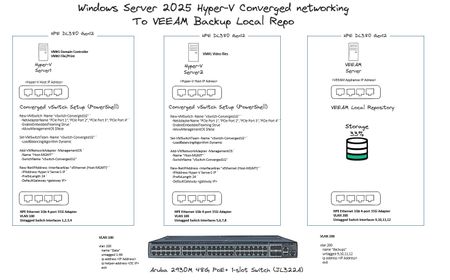
Hi All, As per the image below, I have 3 x HPE DL380 Gen 12 Servers, Server1 and Server2 are ADDS domain joined, VEEAM Local Repo is not. For the converged networking to work, is there anything else I need to perform in terms of additional power-shell commands, VLAN tagging etc? Thanks!343Views0likes2CommentsPS script for moving clustered VMs to another node
Windows Server 2022, Hyper-V, Failover cluster We have a Hyper-V cluster where the hosts reboot once a month. If the host being rebooted has any number of VMs running on it the reboot can take hours. I've proven this by manually moving VM roles off of the host prior to reboot and the host reboots in less than an hour, usually around 15 minutes. Does anyone know of a powershell script that will detect clustered VMs running on the host and move them to another host within the cluster? I'd rather not reinvent this if someone's already done it.400Views0likes3CommentsUnable to Uninstall Security Update (KB5094128) on Azure Hosted Windows Server 2022 VM
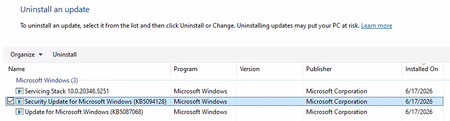
Hi All, I'm building up a system on Azure of Windows Server 2022 VMs for a PoC. Each Windows Server 2022 VM has been created using a company hardened golden image. After configuring the VM successfully, I am unable to run a software. Through research, the solution to run the software is to uninstall 'Security Update for Microsoft Windows (KB5094128)'. The issue is that I cannot uninstall the update normally. I have looked up various solutions and the following have been unsuccessful: Attempt #1 Powershell (Admin): sfc /scannow wusa /uninstall /kb:5094128 Result: Error 0x800f0905. Attempt #2 Powershell (Admin): Dism /Online /Cleanup-Image /CheckHealth Dism /Online /Cleanup-Image /ScanHealth Dism /Online /Cleanup-Image /RestoreHealth wusa /uninstall /kb:5094128 Result: No corruption detected, error 0x800f0905. Attempt #3 Powershell (Admin): net stop wuauserv net stop cryptSvc net stop bits net stop msiserver ren C:\Windows\SoftwareDistribution SoftwareDistribution.old ren C:\Windows\System32\catroot2 catroot2.old net start wuauserv net start cryptSvc net start bits net start msiserver wusa /uninstall /kb:5094128 Result: All services started and stopped. Error error 0x800f0905. Attempt #4 Windows Update Troubleshooter: Running the windows update troubleshooter gives the following output. The event viewer is suggesting there is a corrupted file error, but as seen above nothing is wanting to remove that file. Does anyone have any other options they could suggest? Or has anyone had success with this issue before? Is it a lost cause as we have to use company hardened golden images? Any suggestions would be appreciated!332Views0likes2Comments