Recent Discussions

Surface Pro 8 Signature Keyboard Defect: Internal bulge at hinge breaks connection
Hi everyone, I am writing to the community to report and seek advice on a connection failure with my Surface Pro 8 Signature Keyboard. While the exterior of the hinge looks mostly normal at a casual glance, there is a distinct abnormality hidden within that strongly suggests a structural defect. The Issue and Diagnosis: Tactile Anomaly: Although difficult to spot visually without close inspection, there is a noticeable internal bulge or swelling that can be clearly felt by touch on the backside of the hinge area. This indicates that internal components, likely the flexible cable, have deteriorated and are pressing outwards from the inside. Angle-Dependent Connection: The keyboard only works when the pen storage flap is opened to a very specific angle. Moving it to use the device or closing the flap causes the connection to drop instantly. My Usage History and Treatment of the Device: I am a university student, and shockingly, this is the second time a Surface Signature Keyboard has failed on me within my 5 years of study. This current keyboard has failed in less than two years since I purchased it. I have treated this premium accessory with the utmost care. I always store and carry my Surface in a soft, padded PC sleeve to protect it from any external stress. It has never been dropped, bent backward forcefully, or exposed to liquid. This failure occurred purely from the inside out, despite my extremely gentle usage. My Demand for Microsoft Support: This tactile internal deformation is a clear sign that this is not a user-inflicted physical damage issue, but rather a severe material or design failure in the hinge mechanism that should not happen in a premium product of this price point. I am extremely disappointed and frustrated. While I know this issue is difficult to capture in a photograph, it is very real to the touch. I am hoping a Microsoft moderator or support agent can review this unique case. My priority is to ask for a replacement as a special exception due to the nature of the failure. If that is absolutely not possible, I would at least expect a significant discount code for a replacement purchase as a necessary relief measure. Has anyone else encountered this same issue? Any advice on how to get Microsoft to investigate this as a manufacturing weakness would be appreciated. Thank you.51Views0likes1Comment
Microphone issue on multiple Surface Pro Copilot+ devices
Afternoon, hoping someone can help with the below issue as we are not getting anywhere with it, the live chat hasnt been able to assist either. We have purchased two Surface Pro Copilot+ devices and both of them have the same issue with their microphones where it pick up speech very quietly but it will pick up other noises much louder, for example when testing on the sound recorded app when talking loudly and also tapping on the surface pro, my talking plays back extremely quiet but the tapping is loud and clear. We have installed all updates, ensured the microphone levels are high, disabled any microphone enhancements or effects but no luck. Has anyone else had this issue? Thanks83Views0likes1Comment
Surface Pro 11th Edition with Snapdragon Issues with Slim Pen 2
I am the IT manager at work and we got two new surface pro 11th edition with snapdragon with windows 11 pro and cellular for our techs to use in the field. We got them slim pen 2's along with the devices for ease of use. When I set up the surface pros they worked great and speedy out of the box. After set up I decided to test the slim pen 2 as they came with a bundle from amazon with the keyboard. When I go to grab the pen from the charging dock/keyboard case the surface does a quick flash of a black screen and then my search bar disappears and the surface is notably more laggy and inputs (whether on touch screen or keyboard) are delayed. I have flashed reset these two devices with windows 11 usb boot up drives twice and the issue always starts when I take the pen out to use it for the first time. I have tried all the suggestions I have seen online and in copilot, but nothing seems to work. The only way I have gotten the device back to working order was to reset it, but once that pen is taken from the charger the whole issue starts over again. The issue is not fixed by logging into another user, disconnecting the pen, changing pen setting, restarting windows explorer, stopping searchhost in task manager. I have also tried changing all the setting on the pen and checking for driver updates but I have had no results. It seems to me to be a software issue between these two specific devices. Can someone please tell me if they have had this problem and what worked for them to fix it?59Views0likes1CommentMay 2026 Status – HDMI & Miracast Screen Share
Hello Microsoft team, After moving to Surface 3 with MTR, honestly, the experience hasn’t been as good as what we had with Surface Hub. Screen sharing is one of the main things we rely on daily, and right now HDMI and Miracast are not working the way we expected. It’s quite a step back for us. We really hope you can help bring back these functions. If it can’t be done directly in the MTR interface, at least allow it through the Windows side. This is important for our daily usage, so please don’t ignore this. We’d really appreciate your support on this.191Views0likes1Comment
Surface IT tookit - unusable
I hate Microsoft with a passion everyday they get more greedy, more incompetent, and continue to force PWA (Websites that pretend their programs so that they can advertise to you within your programs. Just wanted to get that out there how much I hate dealing with Microsoft. I'm a 20 year Computer tech, so I'm Ok with computers. Trying to download an image for a customer surface pro 4 laptop. Download the surface It Toolkit - over the last 2 days it says Creative recovery USB Failed Every single Time. Tried multiple USB ports, tried re-downloading the image again, tried cleaning the partition and formatting the partition and USB stick. Do you think that MS would know how to make software usable - absolutely not - they can't even come up with an error message apart from Failed. Yes it's a 16 GB USB Stick. Can anyone assist with why Microsoft is so incompetent at basic programs to download images and to give proper error messages apart from a simple Failed when it comes to formatting USB - right after it completes the Validating Image. Do people on this forum get paid from Microsoft? Or do all of these people simply give out their own time so that MS can continue to focus their efforts on how to make more money while allowing the community to sort out there mess? I hate you Microsoft.87Views0likes0Comments- 41Views0likes0Comments

Surface Laptop keyboard problem
Hi, I need help for Surface Laptop (7th generation) keyboard issue. We just received a brand new Surface Laptop (2036 model) from our supplier in France. At the first start, i choose, in win11 wizard, the "French (Traditionnal, AZERTY)" Keyboard. The end of wizard and installation went smoothly But the problem is that when I press certain keys, the caracter that is displayed is wrong. From A to Z keys it's ok. But some others are wrong. Ex : "!" shows "_", Alt-Gr @ displays tild (~), key "-" "_" displays ")" or "°" (with maj associate). I check the language, region, keyboard parameters, I see nothing inconsistent. I've download the Surface Laptop 7 update 26.033.32430.0 msi and installed it. Nothing changed. I've deleted the 4 keybords in device manager and reboot the Surface. Still the same problem. I did a factory reset. At the first start, i choose this time the "French (Standard, AZERTY)" keyboard. Not better... I've download The Surface Diagnostic Tool, but it doesn't help me. We installed 4 other Surface laptops a few months ago, and we haven't encountered any problems (with the same keyboard). Does anyone have any idea what the cause of this problem might be? Hardware ? Thanks a lot for help. Jean-Alain148Views0likes1Comment
Network connection
I’ve three Surface Pros: two 7+ running Windows 11 Pro and an older Pro 5 running Windows 10 Pro. All fully up to date. All exhibit the same problem, even when placed next to each other and barely 2 metres from a wireless repeater that’s part of a TP-Link Deco mesh network. The problem is that randomly any one or two of them will claim there’s no internet connection while the other one or two are rock solid with a 90 plus score on my Orb app. Then a random time later the disconnected device will find the network. There’s no obvious pattern – sometimes the problem exhibits itself on a full cold start, sometimes on waking from sleep when the typecover had simply been closed. Other devices such as a phone or Android tablet never show this so I conclude it’s something to do with the Surface tablets – but what is it and how can I fix it? Grateful for any suggestions.65Views0likes0Comments
Miracast not working on Surface Hub 3 (Windows 11 IoT mode)
Hi everyone, we’re currently experiencing issues with Miracast on our Surface Hub 3 devices when running in Windows 11 (IoT) mode. As far as we recall, Miracast used to work correctly in Windows 11 mode without any issues. We are also aware of the planned rollout for this functionality in MTR mode around May 2026. However, since this was already working for us in W11 mode, we’re wondering if something has recently changed that could have impacted this behavior. So far, we’ve tried all the usual troubleshooting steps, including: - Device reboots - Policy/configuration checks and changes - Full device reinstallation Unfortunately, none of these actions resolved the issue. Has anyone experienced something similar or is aware of recent changes that might explain this? Thanks in advance, Andrea195Views0likes0CommentsDual Boot on Surface Hub 3
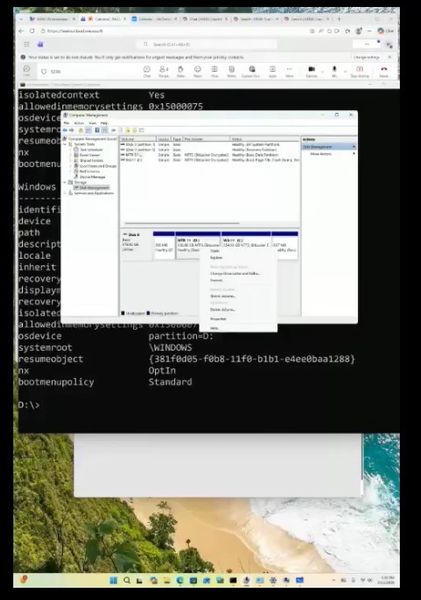
Has anyone else shrunk the Surface Hub partition to support dual boot between MTR and Windows 11? I know it’s a niche case, but since the Surface Hub 3 has plenty of resources (memory & disk) to do more than just a meeting room, it might be interesting to explore! I created a video demonstrating setting it up in this way for testing. https://www.linkedin.com/posts/stilldrey_how-to-microsoft-surface-hub-3-dual-boot-ugcPost-7427475939858554880-l6pq?utm_source=share&utm_medium=member_ios&rcm=ACoAAADpC5gBtRjG2ffA5dQj2Vy6zWx7DvhK55A #SurfaceMVP LinkedIn video - dual boot Surface Hub 395Views0likes0CommentsSurface Thunderbolt 4 Dock monitor(s) support
Hi Everyone! I am planning a setup with my Surface Thunderbolt 4 Dock and three monitors: 1x HP M24 23.8 inch webcam monitor (connected using USB-C) 2x HP 524sh 23.8 inch monitors (connected through DP ports DP-> HDMI cables) I want to know if it's possible to run all three monitors simultaneously as I have shown above with my Microsoft Surface Pro 11. Any tips, experiences, and limitations will be appreciated. I am already running the 2x HP 524sh monitors and want to purchase the M24 monitor for my meetings. This is for a Home Office setup!! :)76Views0likes0Comments
Screen protector for surface pro 11 and slim pen
Hi everyone. I’ve had my surface pro 11 for a few weeks now and have been avoiding using the pen much because I haven’t been able to find a good screen protector. I hand write a lot for work and don’t want any scratches. I got a tempered glass matte screen protector and I can barely write with the slim pen. It’s not great with responsiveness but it’s also really tough to write on. The pen barely moves and just gets stuck. Any suggestions that will allow me to use my slim pen properly but also protect my screen?94Views0likes0CommentsIs Microsoft planning firmware updates for Surface Laptop 3 devices for 2011 Secure Boot key?
As many people know, the UEFI Secure Boot Key provided as part of the Windows devices firmware is expiring in June of 2026. Microsoft have announced plans to update these keys for most Surface devices, but have not made any such announcement for Surface Laptop 3 devices. Will the company issue updated firmware for these devices before June? Or, does the company recommend that users replace these devices before the 2011 key expiration date? The information publicly available is sparse, but it does appear that Microsoft no longer intends to update firmware for Surface 3 Laptops - which is fine, except that the after the key expiration, these devices will be substantially unusable, with impacts to UEFI Secure Boot, BitLocker and more... This is a Windows problem, and I will personally be very disappointed if Microsoft chooses to abandon users of these machines...107Views0likes0CommentsMiracast by end of 2025?
It is now 2026. MS said early last year that Miracast was coming to SurfaceHubs by the end of 2025 and I haven't seen an update since. Has anyone seen something maybe I haven't? Why aren't there more posts about this exact topic? It seems like this should be core functionality...455Views0likes1Commentsurface pro x for business needs constant graphics driver reset, how to fix?
I have a surface pro x for business that is up to date and has no company or IT restrictions, it is my device for home use and I have control of everything. I am noticing that whenever my device wakes up from sleep, restarts, or turn on after shutting down, I have to do ctrl+shift+windows key+B to get all the content to fit into the screen. For instance, if I have the microsoft store page open, and my windows are maximized (I even tried this on several browsers after minimizing and maximizing again) the bottom of the page at any given position does not fit the screen. Another example is ctrl+f, I cannot see that bar that searches and highlights the result or on word I cannot see the bootm row that has word count and language until I reset the graphics driver. I saw an optional update and it temporarily fixed it but the issue has returned. Any advice on how to fix this on windows 11 (I have the i7)?86Views0likes0CommentsSurface Laptop Power Issues?
Hi, I have a Surface Laptop that’s 5? 6? years old. The other day it acted like it was no longer connected to AC power and shutdown when the battery got low. It was plugged in the whole time. The power adapter lights up when connected to the laptop like there is no issue. I took it to Best Buy to try one of their adapters and they let it sit, plugged in, for 5 minutes but it does not look to be charging. Pressing the power causes it to act like it turns on, but displays a battery on the screen after the Microsoft logo. My only recourse seems to be to ship it to uBreakIFix but I would like to avoid that route. Any ideas or suggestions? Thank you, Mike91Views0likes0CommentsWill the 26H1 be available to Snapdragon-powered Surface Laptop 7?
The news mentioned that the next Windows 11 update is specifically for Snapdragon-powered X2 ARM64 PCs. Since Surface Laptop 7 is also using the same ARM architecture, would it be great if these laptops receive the same update so that the performance will be optimized too?377Views1like1Comment
Surface Pro 8 – Hardware-Liquid Damage
Device: Microsoft Surface Pro 8 Pre-incident condition: Fully functional, no known hardware faults Incident Details A small Coca-Cola spill occurred around the Type Cover (keyboard) connector area only Area exposed cleaned immediately No liquid exposure to USB-C ports, Surface Connect charging port, vents, or display Type Cover remained attached following the spill Device was left connected to the charger for approximately 3 hours after the spill, with the keyboard still attached Observed Behaviour (Following Morning) Device will not power on unless connected to AC power Investigated- Found liquid around type cover (nothing visible on the ports) When powered on: Boots normally Reaches Windows login After login and loading the desktop, the system shuts down abruptly without warning Shutdown occurs consistently after OS load No shutdown occurs during UEFI/POST Security / Firmware Event Device subsequently displayed a BitLocker recovery prompt Correct recovery key was entered System successfully decrypted and booted into Windows Device again shut down abruptly after reaching the desktop Current Status Device is currently powered off No factory reset, OS reinstall, or internal cleaning attempted Type Cover and charger have been disconnected No visible external corrosion or physical damage Assessment Context SSD, display, and CPU appear functional (successful OS load) Failure appears load-dependent and occurs post-login Behaviour suggests possible power delivery, embedded controller, or internal board-level instability No user-replaceable component has been identified as a definitive failure point Please advise on: Viability of the device for reliable continued use Whether the observed behaviour is consistent with recoverable hardware condition or non-economical repair Whether Microsoft recommends replacement vs. repair given the described failure pattern174Views0likes0Comments
Surface Hub 2s with MTR-W no Miracast support!
We have 3 Surface Hubs 2S, which are recently have been updated to MTR-W (W11) (What a bummer...) What we desperately need is Miracast support! We've tried to set this up with the admin account, and once you are in admin mode you are able to configure 'Projecting to this PC' but back in normal mode, you can't use Miracast (Windows-K) anymore. I've read Miracast will become available for Surface Hub 3 but there are no plans to support the Surface Hub 2s. Anyone out there who is/was facing the same problem? Did you manage to solve this? If so, how did you solve this? Thank you, Gerrit384Views1like0Comments


Events
Recent Blogs
- 3 MIN READWe recently announced new Surface Pro for Business and Surface Laptop for Business devices powered by Intel ® Core™ Ultra Series 3 processors and Snapdragon ® X2 processors. Across the lineup, thes...Jul 14, 2026520Views0likes0Comments
- Surface Pro for Business and Surface Laptop for Business powered by Snapdragon® X2 Series processors are now available for commercial customers. With up to 80 TOPS of on-device AI performance, enhanc...Jul 14, 20261.9KViews2likes0Comments