Recent Discussions

Critical Pen Hover & Stray Ink Issue on New Surface Pro 11 for Business with Slim Pen 2
Hello Microsoft Community and Support Staff, I am writing to report a critical and seemingly widespread issue with the pen input on the brand-new Surface Pro for Business, 13-inch (Intel model, often called Surface Pro 11 "Luna Lake"). The Core Problem: Pen Draws Without Touching the Screen When using the Surface Slim Pen 2, the device begins to register ink input while the pen is still hovering a few millimeters above the screen. It does not require any physical contact or pressure. This "hover-inking" makes handwriting completely unusable. As I write, any time I lift the pen to start a new letter or stroke, the pen continues to draw a line as it moves through the air to its next position. This results in messy, connected handwriting with unwanted "tails," completely defeating the purpose of having a premium inking device. This is Not a Defective Unit - It's a Replicable Problem Initially, I thought I had a faulty device. However, to isolate the issue, I have performed extensive testing: I have personally tested this on [3] brand-new Surface Pro 11 (Intel) devices. I have used [4] different Slim Pen 2s. The exact same hover-inking problem occurred on every single combination of device and pen. Furthermore, I have already performed all standard troubleshooting steps, including: Clean OS installation via Surface Recovery Image. Ensuring all Windows, driver, and firmware updates are installed. Running the Surface Diagnostic Toolkit (which reported no errors). However, the same issue continues to occur even after trying these methods. Additionally, it has been reported that the issue also appears on the latest Surface Pro 12-inch model with the Snapdragon X Plus, just like on the Surface Pro 11 that uses the Qualcomm Snapdragon X Elite instead of Intel’s Lunar Lake. (I do not own any Snapdragon devices myself. If you own a Snapdragon device and are experiencing the same issue, please share your feedback.)" Video Evidence: I have recorded a clear video demonstrating the problem. It shows the pen drawing while hovering on the Surface Pro 11 and makes unwanted tails on handwriting letters. Video Link: https://youtube.com/playlist?list=PLG_7BXFA-cL4evqe0RmRz--iFjDC1HVgT&si=EmEypaAqSyRozr67 Questions for Microsoft: Is this a known issue with the new Surface Pro 11 (Intel) model's firmware or drivers? What are the official steps to escalate this issue directly to the Surface engineering team for a fix? This is a major flaw in a flagship product that severely impacts its core functionality. I have submitted a formal bug report through the Feedback Hub, which can be found here: Feedback Hub Link: https://aka.ms/AAxzh27 I urge the Microsoft team to investigate this with high priority and release a firmware or software update to recalibrate the pen's Initial Activation Force (IAF). Thank you for your attention to this serious matter.953Views11likes9CommentsWelcome to the Surface Hub Community!
Hello and welcome to the Devices Community! We are so glad you are here and excited to have this forum to collaborate and discuss all things Surface. You will find spaces for each one of our products in the Devices Community, so go ahead and take a look at them all. This one is dedicated to Surface Hub. I am a Devices Program Manager at Microsoft and along with my team we want to ensure that anyone with an interest in our Devices has a place to share experiences, questions, and feedback. Even more exciting is the opportunity to network and find others with your same interests. In this community you will find customers, partners, MVPs, and our own Devices product and engineering teams in a single location, all with the objective to create healthy discussions that will help us all improve. The comments here are moderated to ensure we maintain a learning environment were arguments and content matter. It's time to start your own conversations and speak up. Be an active participant in this community, it works best when we are all talking. In doing so, you will earn badges within the community. Check them out by going to your profile and clicking ‘Achievements’. I also invite you to browse existing conversations within the Devices and other communites and share your opinion. To get you started, check under the hood of Surface Hub with Paul Barr and discover the amazing features that will introduce you to a new collaboration experience! While you're at it check out the rest of the Microsoft Mechanics videos in YouTube and subscribe to receive the latest news. One last time: welcome, it is great to have you join us! NydiaSolved11KViews11likes12CommentsSurface Hub user - need interactive Whiteboard
Excellent! I'm an early adopter of the Surface Hub and we have (5) total right now, also looking to purchase 15-20 more in the next year with some pending features. We have (3) 55" and (2) 84" units, and we use them allll the time. The adoption rate of these units, compared to the typical "smart board" or VTC units in other rooms is crazy - people just walk up and start using it. There are some day-1 features that are lacking, and we are really hoping to get some updates soon on this as they are pretty significant in our workflow. Please (MS) don't take this as a dig, just as a serious point of interest if not a linchpin in getting our internal customers to purchase these things. Main item - whiteboard needs some additional functionality and needs to support bi-directional input from all attendees whether the other attendees are on Skype for Business (windows or mac, via that Whiteboard) or via another Surface Hub joined into the same SfB meeting with the whiteboard app. This is so powerful when in the room, but having a collaborative experience when you have other Surface Hub-enabled rooms, or even Surface Pro/Book/Studio attendees that also have touch/stylus capacity; it is just a major issue that needs to be addressed. There are also little nice-to-have features that would be nice in this Whiteboard app, such more colors in the palette, ability to expand the canvas or move it around with limitless scale or size, or change the brush size or type. Lots of nice-to-haves, but generally the basic out of the box is pretty great and we use it all the time. We also really want to see the use of MS built-in apps (like OneDrive for Business, PowerBI, etc.) to have the ability to logon with NFC, which other 3rd party apps are already supporting. This would be a huge benefit to saving and interacting with files stored elsewhere on O365 services. Again, not a deal-breaker - we can logon with the keyboard/mouse, but NFC would be a huge win and easy functionality to really Wow people with the ease of use. Those are my opening thoughts, but really I am psyched to see the MS Surface product group reach out and create a community base like this. Who else already has Surface Hubs, and what are you experiences like? Who is 'on the fence' and wants to know more about the capability and how it can deliver on the hype? I'm sure the community can share great stories with you about how they work in our daily lives already, but I'd love to hear what other people are thinking about the products as well. Cheers! Chris CIO Not-for-profit healthcare org in Alaska3KViews10likes4Comments
SurfaceHub Gen1 violation error at several devices
Following Error occured 2 day's ago on several SurfaceHub Gen1 in our company: SurfaceHub error: secure boot violation invalid signature detected. Check secure boot policy in setup. Solution could be to disable Secure Boot and other UEFI details. But following process to enter UEFI / Bios is not working at all: Shut down the Surface Hub completely. Press and hold the volume up button on the side of the device. While holding the volume up button, press and release the power button. Continue holding the volume up button until the Surface logo appears. The device should now boot into the UEFI (BIOS) settings menu. We did test with several different SurfaceHub devices and all kind of pressing and holding these buttons, even with external cabled Keyboard. Not able to enter UEFI. Does anybody have same issue? Know in detail how to enter UEFI at Surface Hub Generation 1. thx for any hints Bruno9.9KViews8likes32CommentsAn engineer’s tour of the hardware and design of the Surface Hub is now live!!!
Hello fellow Tech bloggers! I'm happy to share that we have released the first of our new Microsoft Mechanic's video-series: An engineer's tour of the hardware and design of the Surface Hub! The series kicks off with a 6-minute overview of the hardware and design of the Surface Hub led by Director of Engineering, Peter Oehler. Peter details the level of innovation, from the silicon to the Operating System, as well as the intricacies of the embedded devices and sensors. This combination of attributes makes the Surface Hub able to detect presence and be ready-to-use as soon as you walk into the room, while greatly enhancing the video teleconference experience for meeting participants. Please go check out the video below, subscribe, and leave your comments =)!. Also, we posted a blog detailing the features in TechNet, give it a look and start getting your Hubs running! Thank you for reading (and watching), see you soon! Nydia 3.2KViews8likes7Comments
Default behavior for Dual Screen Seem (Hinge GAP)
When an app is spanned across two screens, there is going to be a seam — the space between the two screens. This is a byproduct of making a dual-screen device. This section talks about some of the ideas and techniques you might consider to make your app work with the seam. By default Display driver must skip (should not render behind seem) the content behind the hinge GAP. It should be continuous across screens. In fact the app developer should not be even aware of the seem. It should see as one continuous screen. It enables all web sites and apps usable by default. If any app or site wants to do differently to take advantage of dual screens then they use your API to handle it. This is a very simple approach and I think somebody at Microsoft screwed it up up by opting to ask every developer in the world to optimize their content. This will never happen. Duo will fail if not fixed. If I don't get this behavior in the next DUO update I will return my DUO and start a campaign to return all duo owners. I'm Software Architect love this duo and don't want it to fail. This is the only feature missing in this duo. I use only 3 apps on this. Edge, Chrome and Remote Desktop. All three are hiding content behind seem. This default behavior would have made made all these three apps usable.6.6KViews7likes13Comments
Windows 11 Surface Pro 5
Hello, I'm Shawn, a proud Surface Pro 5 user who wishes to get Windows 11 officially, it has outperformed Windows 10 during betas and the official version is great. but that had to be done through the registry. I would like to ask that the surface team please ask the windows team or get this sorted out so I can windows 11 offfically. Thank you 🙂 Shawn PS: Cross posted from Windows 11 thread89KViews6likes12Comments"A Surface Hub Tour" app is live!!!
Hi all! "A Surface Hub Tour" app is live!!! We created it for you, it's awesome, please go ahead and use your Admin credentials to download it on your Hubs, or simply download it in your PC from the Windows Store at: http://aka.ms/SurfaceHubApp Also, please share your feedback with me in this conversation =). Thank you! Nydia3.9KViews6likes14Comments[Thread] Showcase your Surface Duo apps!
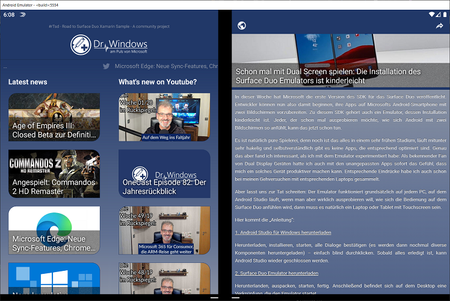
This thread is meant to be a showcase of your awesome apps that are based on thr Surface Duo SDK. Share your hard work and ideas on how the unique features of this dual screen device could be used. ---------- Name #rTsd (Road to Surface Duo) Genre News Development ecosystem Xamarin.Forms Abstract This is a work in progress https://dotnet.microsoft.com/apps/xamarin Android project which is intended to feature most of the new features that makes the upcoming https://www.microsoft.com/en-us/surface/devices/surface-duo phone unique. It will use the awesome German https://www.drwindows.de/ as data source for its articles. Screenshots Links The source is open source on a https://github.com/tscholze/xamarin-road-to-surface-duo. This app will not be released in the Google Play Store.3KViews5likes7Comments
Please restore HDMI screen share via Share button and Miracast screen sharing after migration to MTR
The changes you have made make no sense whatsoever and are not end-user friendly. In our company, all MTR-based rooms have an HDMI cable available for screen sharing and I find it hard to understand why you have stripped these two functionalities from Surface Hubs after the migration (especially as Miracast worked brilliantly on SH2S!).1.1KViews4likes4CommentsWelcome to the Surface Pro 4 Community!
Hello and welcome to the Devices Community! We are so glad you are here and excited to have this forum to collaborate and discuss all things Surface. You will find spaces for each one of our products in the Devices Community, so go ahead and take a look at them all. This one is dedicated to Surface Pro 4. I am a Devices Program Manager at Microsoft and along with my team we want to ensure that anyone with an interest in our Devices has a place to share experiences, questions, and feedback. Even more exciting is the opportunity to network and find others with your same interests. In this community you will find customers, partners, MVPs, and our own Devices product and engineering teams in a single location, all with the objective to create healthy discussions that will help us all improve. The comments here are moderated to ensure we maintain a learning environment were arguments and content matter. It's time to start your own conversations and speak up. Be an active participant in this community, it works best when we are all talking. In doing so, you will earn badges within the community. Check them out by going to your profile and clicking ‘Achievements’. I also invite you to browse existing conversations within the Devices and other communites and share your opinion. To get you started, check out this amazing tour of the Surface Pro 4 with Dave Mitchell in our Microsoft Mechanics YouTube channel! One last time: welcome, it is great to have you join us! Nydia 1.6KViews4likes1Comment
Surface Hub Skype for Business TLS 1.0/1.1 Deprecation
For those of you waiting for updates on the support of TLS 1.0/1.1 deprecation and the Skype for Business app support on Surface Hub, please view the following statement: The following devices are actively working on supporting TLS 1.2 and are committed to providing support for TLS 1.2 before TLS 1.0/1.1 deprecation. Skype Room System (a.k.a. 'SRSv2' or Rigel) and Surface Hub guidance - Microsoft Surface Hub and Skype Room Systems Version 2 (SRS v2) will continue to work past October 31, 2018. Microsoft will update Surface Hub and Skype Room Systems V2 to support TLS 1.2 before TLS 1.0 and TLS 1.1 will be deprecated. Skype for Business on premise customers should not enable TLS 1.2 until Surface Hub and Skype Room Systems V2 provide a software update." (Source)2.9KViews4likes0CommentsNew Microsoft Whiteboard App
For those who may not have seen, there is a new version of Microsoft Whiteboard currently available in preview. It was released a couple of days ago into the Microsoft Store. It's available for Surface Hub, but more importantly, also Windows 10 devices! We've been testing it for a couple of days and, suffice to say, it's FREAKING AWESOME! Our favourite things so far: Co-authoring between any device Whiteboard collections in one place, so no need to save different boards to OneDrive Nice new gestures when using pen actions, like the eraser dynamically resizing depending on how fast you erase Gridlines while resizing Sticky notes and stacks are pretty cool Did I mention co-authoring between any device? You do need an Office 365 account to use it, and you'll need to turn it on in your tenant (from the Admin settings) to use it. But **bleep**... this is so so good! Our users are actually excited about getting their hands on this... never quite seen hype for a work product before, but it's there this time!Solved15KViews4likes35CommentsExample SyncML for Surface Hub MDM management
Here is some sample SyncML code for management of Surface Hub. The code as a whole can be used with Airwatch or broken down and used with InTune. You'll need to replace the data fields with your specific configuration. This profile does not contain all of the management options available, but hopefully it will help get some folks started with some ideas. <Replace> <CmdID>101</CmdID> <Item> <Target> <LocURI>./Vendor/MSFT/SurfaceHub/InBoxApps/WirelessProjection/PINRequired</LocURI> </Target> <Meta> <Format xmlns="syncml:metinf">bool</Format> </Meta> <Data>true</Data> </Item> <CmdID>102</CmdID> <Item> <Target> <LocURI>./Vendor/MSFT/SurfaceHub/MOMAgent/WorkspaceID</LocURI> </Target> <Meta> <Format xmlns="syncml:metinf">chr</Format> <Type>text/plain</Type> </Meta> <Data><WorkspaceID_Text></Data> </Item> <CmdID>103</CmdID> <Item> <Target> <LocURI>./Vendor/MSFT/SurfaceHub/MOMAgent/WorkspaceKey</LocURI> </Target> <Meta> <Format xmlns="syncml:metinf">chr</Format> <Type>text/plain</Type> </Meta> <Data><WorkspaceKey_Text></Data> </Item> <CmdID>104</CmdID> <Item> <Target> <LocURI>./Vendor/MSFT/SurfaceHub/InBoxApps/Welcome/CurrentBackgroundPath</LocURI> </Target> <Meta> <Format xmlns="syncml:metinf">chr</Format> <Type>text/plain</Type> </Meta> <Data><PathToPNG></Data> </Item> <CmdID>105</CmdID> <Item> <Target> <LocURI>./Vendor/MSFT/SurfaceHub/InBoxApps/Welcome/MeetingInfoOption</LocURI> </Target> <Meta> <Format xmlns="syncml:metinf">int</Format> </Meta> <Data>1</Data> </Item> <CmdID>106</CmdID> <Item> <Target> <LocURI>./Vendor/MSFT/SurfaceHub/DeviceAccount/PasswordRotationEnabled</LocURI> </Target> <Meta> <Format xmlns="syncml:metinf">int</Format> </Meta> <Data>0</Data> </Item> <CmdID>107</CmdID> <Item> <Target> <LocURI>./Vendor/MSFT/SurfaceHub/DeviceAccount/ExchangeServer</LocURI> </Target> <Meta> <Format xmlns="syncml:metinf">chr</Format> </Meta> <Data><ExchangeServerActiveSync></Data> </Item> <CmdID>108</CmdID> <Item> <Target> <LocURI>./Vendor/MSFT/SurfaceHub/DeviceAccount/CalendarSyncEnabled</LocURI> </Target> <Meta> <Format xmlns="syncml:metinf">bool</Format> </Meta> <Data>true</Data> </Item> <CmdID>109</CmdID> <Item> <Target> <LocURI>./Vendor/MSFT/SurfaceHub/Properties/ScreenTimeout</LocURI> </Target> <Meta> <Format xmlns="syncml:metinf">int</Format> </Meta> <Data>30</Data> </Item> <CmdID>110</CmdID> <Item> <Target> <LocURI>./Vendor/MSFT/SurfaceHub/Properties/SessionTimeout</LocURI> </Target> <Meta> <Format xmlns="syncml:metinf">int</Format> </Meta> <Data>15</Data> </Item> <CmdID>111</CmdID> <Item> <Target> <LocURI>./Vendor/MSFT/SurfaceHub/Properties/SleepTimeout</LocURI> </Target> <Meta> <Format xmlns="syncml:metinf">int</Format> </Meta> <Data>60</Data> </Item> <CmdID>112</CmdID> <Item> <Target> <LocURI>./Vendor/MSFT/SurfaceHub/Properties/AllowSessionResume</LocURI> </Target> <Meta> <Format xmlns="syncml:metinf">bool</Format> </Meta> <Data>false</Data> </Item> <CmdID>301</CmdID> <Item> <Target> <LocURI>./Vendor/MSFT/Policy/Config/Browser/Homepages</LocURI> </Target> <Meta> <Format xmlns="syncml:metinf">chr</Format> </Meta> <Data><BrowserHomepage></Data> </Item> <CmdID>702</CmdID> <Item> <Target> <LocURI>./Device/Vendor/MSFT/NetworkQoSPolicy/SfBAudioQoS/AppPathNameMatchCondition</LocURI> </Target> <Meta> <Format xmlns="syncml:metinf">chr</Format> </Meta> <Data>microsoft.ppiskype.windows.exe</Data> </Item> <CmdID>703</CmdID> <Item> <Target> <LocURI>./Device/Vendor/MSFT/NetworkQoSPolicy/SfBAudioQoS/SourcePortMatchCondition</LocURI> </Target> <Meta> <Format xmlns="syncml:metinf">chr</Format> </Meta> <Data>50020-50119</Data> </Item> <CmdID>704</CmdID> <Item> <Target> <LocURI>./Device/Vendor/MSFT/NetworkQoSPolicy/SfBAudioQoS/DSCPAction</LocURI> </Target> <Meta> <Format xmlns="syncml:metinf">int</Format> </Meta> <Data>46</Data> </Item> <CmdID>705</CmdID> <Item> <Target> <LocURI>./Device/Vendor/MSFT/NetworkQoSPolicy/SfBVideoQoS/AppPathNameMatchCondition</LocURI> </Target> <Meta> <Format xmlns="syncml:metinf">chr</Format> </Meta> <Data>microsoft.ppiskype.windows.exe</Data> </Item> <CmdID>706</CmdID> <Item> <Target> <LocURI>./Device/Vendor/MSFT/NetworkQoSPolicy/SfBVideoQoS/SourcePortMatchCondition</LocURI> </Target> <Meta> <Format xmlns="syncml:metinf">chr</Format> </Meta> <Data>58000-58119</Data> </Item> <CmdID>707</CmdID> <Item> <Target> <LocURI>./Device/Vendor/MSFT/NetworkQoSPolicy/SfBVideoQoS/DSCPAction</LocURI> </Target> <Meta> <Format xmlns="syncml:metinf">int</Format> </Meta> <Data>34</Data> </Item> <CmdID>708</CmdID> <Item> <Target> <LocURI>./Device/Vendor/MSFT/NetworkQoSPolicy/SfBAppShareQoS/AppPathNameMatchCondition</LocURI> </Target> <Meta> <Format xmlns="syncml:metinf">chr</Format> </Meta> <Data>microsoft.ppiskype.windows.exe</Data> </Item> <CmdID>709</CmdID> <Item> <Target> <LocURI>./Device/Vendor/MSFT/NetworkQoSPolicy/SfBAppShareQoS/SourcePortMatchCondition</LocURI> </Target> <Meta> <Format xmlns="syncml:metinf">chr</Format> </Meta> <Data>42000-42099</Data> </Item> <CmdID>710</CmdID> <Item> <Target> <LocURI>./Device/Vendor/MSFT/NetworkQoSPolicy/SfBAppShareQoS/DSCPAction</LocURI> </Target> <Meta> <Format xmlns="syncml:metinf">int</Format> </Meta> <Data>26</Data> </Item> <CmdID>801</CmdID> <Item> <Target> <LocURI>./User/Vendor/MSFT/EnterpriseModernAppManagement/AppManagement/AppStore/Microsoft.Office.Whiteboard_8wekyb3d8bbwe/AppSettingPolicy/EnableInkShapes</LocURI> </Target> <Meta> <Format xmlns="syncml:metinf">chr</Format> </Meta> <Data>true</Data> </Item> <CmdID>802</CmdID> <Item> <Target> <LocURI>./User/Vendor/MSFT/EnterpriseModernAppManagement/AppManagement/AppStore/Microsoft.Office.Whiteboard_8wekyb3d8bbwe/AppSettingPolicy/EnableInkTables</LocURI> </Target> <Meta> <Format xmlns="syncml:metinf">chr</Format> </Meta> <Data>true</Data> </Item> </Replace>5KViews3likes7CommentsAny idea on how to use Team's video chat w/ Surface Hub?
I work on a highly collaborative, yet dispersed team. We have a Surface hub at one location that we use for all our daily standup meetings. I would love to be able to switch to Microsoft Teams for our calls, however I can't figure out how to best "join" the meeting from the Hub. Anyone have ideas? Thanks, Derek5.1KViews3likes11CommentsSurface dial and One Note
So I'm really disappointed that the surface dial doesn't have any one note integration. Even the zoom function doesn't work, and that's just one of the general presets. The dial being fully integrated with onenote makes perfect sense, and its ridiculous that it doesn't work.5.9KViews3likes4CommentsWindows Hello & External 3D Webcams
My Surface Book spends much of its time running "lid-closed" while connected (through a Surface Dock) to a pair of 34" LG monitors. Of course, that means that I can't use the Surface Book's depth-sensing camera for Windows Hello logins -- and Windows Hello is something that I REALLY like about Windows 10 and the Surface Book! No problem, I thought, since there are a few external 3D webcams on the market that support Windows Hello. So I purchased a Creative BlasterX Senz3D webcam for this purpose. This should allow me to mount a 3D webcam atop one of my monitors and keep my Windows Hello login. WRONG!!! Unfortunately, the Windows Hello Settings does NOT provide the ability to choose a specific webcam. It exclusively uses the built-in webcam on the Surface Book, meaning Windows Hello is looking at a black picture from the closed lid of the Surface Book at login time. Is a fix in the works for this? At the very least, the Windows Hello Settings should be permit switching between available video sources. An even better solution would be the ability to specify a separate webcam when running "lid open" vs "lid closed" or "Docked" vs "Undocked".2KViews3likes0CommentsDial support in Adobe CC products
With their newest update, the 2022 editions of their software, Adobe broke the spaces plugin the Surface Dial depended on for integration into applications like Photoshop. Adobe has stated publicly that they have no intention of remedying the situation, and suggests that Microsoft creates a plugin for Photoshop if they intend the Surface Dial to work with Photoshop. (unsure if links to other software makers' forums are permitted, but they can be provided on request). Are there any plans at all within the Microsoft Surface programming team to create such a plugin for a third party piece of software, or have Adobe just made my surface dial a completely worthless purchase/overpriced volume control?2KViews3likes2Comments






Events
Recent Blogs
- 3 MIN READWe recently announced new Surface Pro for Business and Surface Laptop for Business devices powered by Intel ® Core™ Ultra Series 3 processors and Snapdragon ® X2 processors. Across the lineup, thes...Jul 14, 2026520Views0likes0Comments
- Surface Pro for Business and Surface Laptop for Business powered by Snapdragon® X2 Series processors are now available for commercial customers. With up to 80 TOPS of on-device AI performance, enhanc...Jul 14, 20261.9KViews2likes0Comments