surface hub
27 Topics
Miracast not working on Surface Hub 3 (Windows 11 IoT mode)
Hi everyone, we’re currently experiencing issues with Miracast on our Surface Hub 3 devices when running in Windows 11 (IoT) mode. As far as we recall, Miracast used to work correctly in Windows 11 mode without any issues. We are also aware of the planned rollout for this functionality in MTR mode around May 2026. However, since this was already working for us in W11 mode, we’re wondering if something has recently changed that could have impacted this behavior. So far, we’ve tried all the usual troubleshooting steps, including: - Device reboots - Policy/configuration checks and changes - Full device reinstallation Unfortunately, none of these actions resolved the issue. Has anyone experienced something similar or is aware of recent changes that might explain this? Thanks in advance, Andrea388Views0likes0CommentsMeeting Control, Now Within Reach: Surface Hub 3 + MAXHUB Universal Console
Modern meeting spaces require flexibility, simplicity, and consistency for IT teams managing collaboration environments. Announced at Microsoft Ignite 2024, center-of-table console support for Surface Hub 3 extends Microsoft Teams Rooms on Windows by enabling certified third-party touch consoles for in-room meeting control. Center-of-Table Console Support Surface Hub 3 now supports Teams Rooms Certified Universal Consoles, introducing an additional option to control meetings beyond the interactive display. This includes the MAXHUB TCP33T Universal Console, a certified hardware solution in this ecosystem. By connecting a touch console directly to Surface Hub 3, users can join meetings, manage controls, and share wired content from their PCs while seated at the table. Benefits of Certified Universal Consoles Teams Rooms Certified Universal Consoles can help provide IT admins with: Microsoft Teams Rooms integration through certified accessories Flexible room design options including front-of-room deployments Consistent user experience across meeting spaces Simplified meeting controls for table-based interaction MAXHUB TCP33T Universal Console Overview The MAXHUB TCP33T is a Teams Rooms Certified Universal Console designed to work with Windows-based touch board devices such as Surface Hub 3. It delivers touchscreen control for Microsoft Teams Rooms meetings and serves as a dedicated entry point for wired content sharing. Common Deployment Scenarios Large conference rooms requiring table-based control Standardized Teams Rooms deployments across buildings Collaborative meetings requiring easy content sharing Requirements Deployments require Surface Hub 3 running Microsoft Teams Rooms on Windows and a Teams Rooms Certified Universal Console such as the MAXHUB TCP33T. Looking Ahead This new Universal Console ecosystem reflects Microsoft's commitment to flexible, scalable collaboration experiences. By pairing Surface Hub 3 with certified accessories like the MAXHUB TCP33T, organizations can design meeting spaces that meet modern collaboration needs. Live Webinar Wednesday the 14th of January... Sign up now! Join us for an exclusive webinar with Microsoft and MAXHUB as we explore how the MAXHUB Universal Console enhances the Microsoft Surface Hub experience. Hear from industry experts and learn how to: ✔ Reduce friction in the room ✔ Streamline collaboration workflows ✔ Centralize meeting controls — without leaving your seat! Featured Speakers: • Frank Buchholz, Director, Product Marketing — Microsoft • Jean Barrett, Technology Solutions Professional — Microsoft • Alan Nicholls, Microsoft Teams Professional — MAXHUB Register for a session and secure your spot👇 January 14 @9AM PST session: Register here January 14 @5PM PST session: Register here Resources Center-of-table console support Teams Rooms app version needed Center-of-table console support announcement during Microsoft Ignite 2024841Views1like0CommentsQuestion about Microsoft Support Structure
My Surface Pro 9 needs what I think is an easy firmware repair. Is it possible to avoid shipping it to Microsoft? The part of the firmware that contains the SKU Model Number is corrupt. It shows as "OEMLO Product" instead of Surface Pro 9. That part of the firmware is protected. It can only be accessed by a Microsoft employee using internal tools and physical access to the Surface Pro. Microsoft Device Support offers only a mail-in program, which would mean a lot of work for everyone that's probably not necessary. I don't know much about Microsoft support structure. So I don't know if it's flexible enough for a kind-hearted employee with access to the right tools to fix this. I live near several large Microsoft facilities in the Washington DC area. I think it's a quick easy repair. It could save me and Microsoft Device Support a lot of work that's probably unnecessary. The corruption may have occurred either as a result of participation in the Windows Insider program or during a Surface Pro 9 firmware update in late August 2025. The absence of a valid SKU Model Number prevents Microsoft's driver package from repairing drivers. It also prevents both business and consumer versions of the Surface Diagnostic tool from running. Meanwhile the SMF Core Driver is not loading. I could probably fix that with the correct driver package, but the driver package won't run without the correct SKU number. Otherwise, the Surface works fine. So I can afford to wait until December 2025 to send in for a complete overhaul. That's when I'll be able to lose access to it for an extended time. The rest of the firmware seems to be okay. Other than the SKU model number the information, including the serial number, appears correct.261Views0likes0Comments
Surface Provisioning package
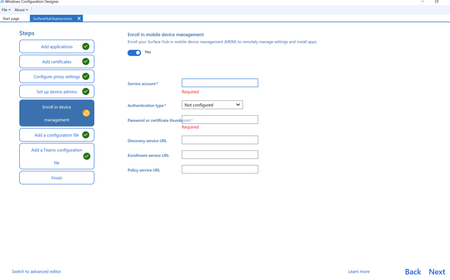
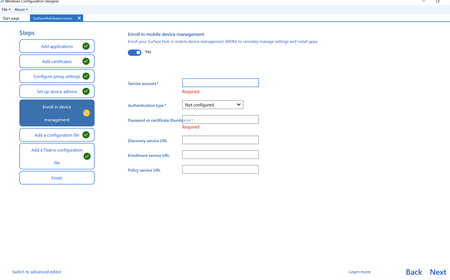
I need some assistance with MDM enrolment for provisioning packages. I can't find what credentials I should be using for building devices and thus after assistance please. When this option for Enrol in mdm is off, some devices have gone into Intune and some haven't. I can't think or see why this is happening. They go into Entra but not Intune. I thought this was a build issue with the devices but i've tried various i.e. upgrading from a Windows 10 teams room to Teams Rooms for Windows 11, and a build media of the New Teams rooms for Windows 11 but still the same issue. I understand i need to complete this Enrol in MDM, so I need some assistance as to what credentials i should be using please. Apologies, if this is a duplicate, for some reason i was certain i had published this yesterday but i can't see this post.211Views0likes0CommentsProvisioning does not add to MDM - Surface hub
When using the Windows Configuration Designer to create a provisioning package I'm unsure what to add for the MDM devices. Some devices seem to enter the MDM and some don't. Unsure if it's the build on these devices. I've looked for documentation and can't find any for what credentials to use for the following on the Enrol in device management I need to know what to enter for the following fields please. So that I can insure these devices populate into Intune. I don't know why MS make it so hard for this as the setup of the older 2s devices was much easier. Thanks Michael191Views0likes0CommentsCheck out Surface at Microsoft Ignite 2024
Explore the latest Microsoft Surface innovations at Ignite 2024 in Chicago and online. Discover AI-driven productivity, advanced security, and enhanced collaboration tools in must-attend sessions, hands-on labs, and interactive demos.1KViews2likes0Comments"Something went wrong and we couldn't show that page" error in Teams for Surface Hub
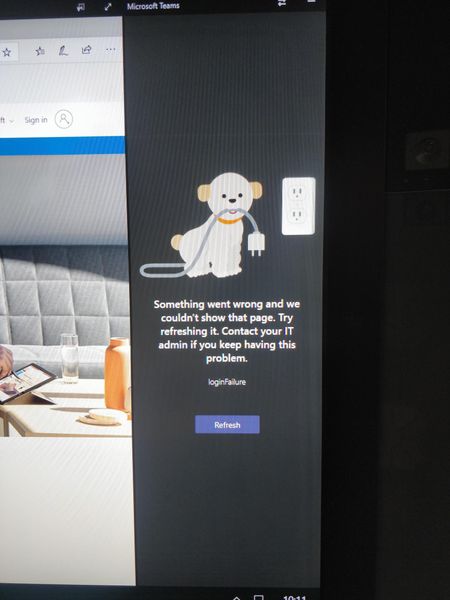
I literally cannot get any other assistance for this error when I try and Google for it. It appears nobody has had it before. I start up my surface hub, it is domain-joined so I can login with a domain account on o365 and it syncs my calendar. However, when I launch Teams it consistently shows the bellow error. The Hub is up to date in terms of Quality and Feature updates. I have also tried uninstalling teams and reinstalling it, to no avail. The internet is working over the WiFi as I can launch Edge and browse around. I am out of options as to what else to try. Any thoughts?4.4KViews0likes3Comments
Surface Hub 2S Overheating
Has anyone else out there come across the Hub 2S overheating? Basically the device will shut down mid use, then come up with a black screen with a thermometer icon. Eventually it will come back up normally but it's been disruptive to meetings. These are all the 55" 2S model using the "Microsoft Approved" Steelcase Roam wall mount. To me this seems like a design flaw with the mount itself. I know the Hubs have an airflow intake/output on the top and bottom of the back CPU component, but this mount essentially puts the device flush against the wall and any heat that radiates off the back essentially just redirects back to itself. Mainly curious if anyone else has come across this and what they might've done to remedy it.10KViews1like23Comments
Surface Hub Certificate Deployment
Hi All, I was wondering if anyone here can help me? Last week I experienced the Windows 10 Team 2020 update and so far I really like the update regarding accessing content and the experience of signing in to the device (Surface Hub 2S). But what about certificate deployment via Microsoft Endpoint Manager? I noticed the https://msdn.microsoft.com/library/windows/hardware/dn904970.aspx but nothing about SCEP or PKCS certificate deployment? Can we deploy these certificates to the hub as we do it on our regular Windows 10 devices? Haven't got the chance to test it out myself unfortunately. Thanks!3.8KViews2likes2Comments