Recent Discussions

Classic outlook - Teams add-in not loading
We recently had a partner experience an issue that is causing the teams add-in feature to not load properly in classic outlook when creating a new meeting. For some background info, we are using a Virtual environment within remote desktop running windows 11. Our servers are provided by AWS. The issue only began as recently as December, as far as we can ascertain with the customers information. I have noticed this issue occurs with numerous partners but is inconsistent, as some load and others do not. I followed troubleshooting steps such as an uninstall/reinstall, verifying the load behavior in the registry was set to 3, and tried to re-register the related teams.addinLoader.dll. A colleague did implement a script to the environment task scheduler that will run every time outlook is launched to re-install that add-in as a break fix, but this still requires closing outlook and reloading it to work. I was curious if anyone else had encountered this within remote desktop with classic outlook, and if they had any success in fixing it. The easiest thing, obviously, is moving over to new outlook since teams' integration is native, but we have some that prefer classic. Though, with it being retired in 2029 it may be worth starting the move away while in a remote environment.22Views0likes0CommentsWhen will Microsoft fix the IMAP Search BUG in Outlook for Android?
There has been a BUG with Outlook For Android Search and IMAP email accounts for many years. If you use an Outlook or Gmail email address all seems Ok. But if you use a different IMAP email provider, and use Folders to save read emails in, the Outlook Search function will never find those emails in the folders. It will find emails within the Inbox, but the moment you move them to another folder nothing will ever be found. I have reported this to Microsoft many times, and have had confirmation from them there is a BUG and they are aware of it... But the BUG never gets fixed, and the next time I report the BUG they start all over again saying they have never heard of such a BUG and it must be my phone, etc., etc... But a quick Google finds many users have issues with the exact same BUG - I guess Microsoft Support don't know how to use Google??? Anyway, I am stuck in this loop with Outlook For Android Support yet again! So I have a request: CAN EVERYONE PLEASE REPORT THIS BUG TO OUTLOOK FOR ANDROID SUPPORT??? Please use the "Settings/Help & feedback/Contact Outlook mobile support" option within the app, and report you have the "IMAP Folder Search BUG". Maybe, just maybe we can get Microsoft to take this years old bug seriously! (I have found reports of the BUG back to 2019...)48Views0likes0CommentsOutlook For Android Search Not Working with IMAP Folders
There has been a BUG with Outlook For Android Search and IMAP email accounts for many years. If you use an Outlook or Gmail email address all seems Ok. But if you use a different IMAP email provider, and use Folders to save read emails in, the Outlook Search function will never find those emails in the folders. It will find emails within the Inbox, but the moment you move them to another folder nothing will ever be found. I have reported this to Microsoft many times, and have had confirmation from them there is a BUG and they are aware of it... But the BUG never gets fixed, and the next time I report the BUG they start all over again saying they have never heard of such a BUG and it must be my phone, etc., etc... But a quick Google finds many users have issues with the exact same BUG - I guess Microsoft Support don't know how to use Google??? Anyway, I am stuck in this loop with Outlook For Android Support yet again! So I have a request: CAN EVERYONE PLEASE REPORT THIS BUG TO OUTLOOK FOR ANDROID SUPPORT??? Please use the "Settings/Help & feedback/Contact Outlook mobile support" option within the app, and report you have the "IMAP Folder Search BUG". Maybe, just maybe we can get Microsoft to take this years old bug seriously! (I have found reports of the BUG back to 2019...)30Views0likes0Comments"Add to Calendar" functionality in the New Outlook
When a user receives an email with a Calendar meeting attached to it, they are able to click on the dropdown in the attachment and select "Add to Calendar". This functionality is supposed to add the meeting to the calendar without opening the attachment/invite itself. However, when the user clicks on "Add to Calendar", the meeting is displayed temporarily on the Calendar and then disappears. If another calendar meeting is being "Added to Calendar", it doesn't show up at all, even temporarily. Occasionally, the second meeting is added successfully, however, the first meeting then disappears. This behaviour is reproducible using different, independent accounts and devices - personal devices, corporate devices, personal Live accounts, corp email accounts, etc. The only thing that does work is to open the attachment and use "+Add to Calendar" feature from the invite. Any ideas on what is causing this or how to address this?55Views0likes0Comments
Major journal's email does not pass Microsofts arbitrary standards nothing I can do about this
https://learn.microsoft.com/en-us/answers/questions/5755307/emails-not-being-recieved-from-sender-******@hotcr And to everyone thats defending this please tell me one advantage this has over putting it in the spam folder with warnings and blocking links etc. Tell me how this isn't the technological equivalent of not letting you buy laundry detergent because its poisonous if consumed. Look at all the people that were hospitalized from eating laundry detergent, clearly laundry detergent needs to be baned.9Views0likes0CommentsOutlook for Mac issue with contacts when saved
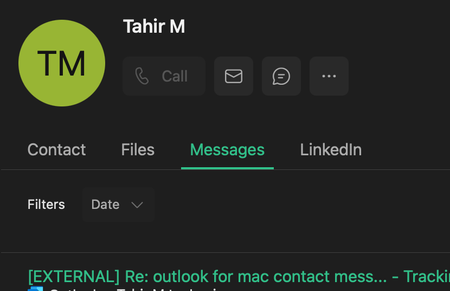
very strange issue with outlook for mac, if I add to contacts, the FILES, Messages and Linkedin tabs disappear. I contact microsoft support and they said this is a outlook for mac limitation but will look into it with internal team. Can anyone confirm they have the same issue ?39Views0likes0Comments
Outlook - 2 step verification on Android device
I received an email on my phone from Microsoft that I needed to sign in and go through their app and fill out info or I would not be able to access my email. Instructions were nonexistent or not intuitive and ended up in a rabbit hole. I ended up with 2-step verification and would like to get rid of it. Every time I have to access my phone I have to go through entering email and passwords. I need to get out of this mess26Views0likes0CommentsOutlook solution 50+ email accounts?
I'm looking for a solution for the following: I have about 50 email accounts that I want to manage from a single interface. I'd also like to add some rules so that certain messages containing, for example, a specific word in the subject line are automatically archived. In Outlook Classic, I can only add a maximum of 10 email accounts. Or rather, I can add 50 accounts, but messages from only the first 10 are loaded via IMAP. Is that correct? What's the solution if you have, for example, 50 email accounts? In Outlook Light/365 (1.2026.114.100), I can add more than 10 email accounts, but the order of the accounts can't be changed and creating rules is not possible. Does anyone know a good solution?98Views0likes0Comments
MS Mail servers claim Hotmail domain does not exist
In my Gmail account I have a rule that forwards everything to my Hotmail/Outlook account where I primarily read all of my mail. This has worked well for a long time until the 16th January 2026 when I started to realise I was missing a few mails. Looking in the Gmail inbox I could see a few NDRs from Googlemail saying that it had failed to forward a message. I'm assuming this is an issue at the Microsoft end as the NDRs say it is a remote (i.e. Microsoft) mail server claiming that the domain Hotmail.co.uk doesn't exist, so the mail gets bounced. BTW, this is not an issue with my individual account, my wife and I have similar setups (both our Gmails forward to our Hotmails) and we both started having the same issue from that date. The key NDR details are always of this form: Address not found Your message wasn't delivered to ***@hotmail.co.uk because the domain hotmail.co.uk couldn't be found. Check for typos or unnecessary spaces and try again. The response from the remote server was: 501 5.5.4 Invalid domain name [AM4PEPF00027A67.eurprd04.prod.outlook.com 2026-01-20T22:06:56.421Z 08DE543D7B61AE38] So, it looks like some server in the chain is claiming that the whole domain "hotmail.co.uk" cannot be found!!! Surely I can't be the only one with this issue? I guess many people will be unaware they're missing mails as the original senders will be the ones receiving the NDRs, and where that is a company (rather than an individual) they probably just bin them and never investigate. This seemed to get worse over a few days and then stabilise to ~25% of mails failing: 16th Jan - 3 of 31 emails had this issue 17th Jan - 0 of 19 failed 18th Jan - 3 of 16 emails had this issue 19th Jan - 1 of 34 emails had this issue 20th Jan - 5 of 27 emails had this issue 21st Jan - 10 of 34 emails had this issue 22nd Jan - 8 of 31 emails had this issue 23rd Jan - 8 of 28 emails had this issue The issue seems to be random, there is no pattern with the times of day or senders - sometimes a particular sender is fine (e.g. Netflix, eBay), sometimes they suffer this issue. In the NDRs I'm not sure what the naming convention of the Outlook servers is but re. the above example's "AM4PEPF00027A67.eurprd04.prod.outlook.com", I've looked at all the servers mentioned in each NDR (up to 22nd) and again there's no real pattern - the hostname's always begin with either AMS0, AMS1, AM3, AM4, DB1, DB3, DB5, DU2, DU6, with the 4 character ones being followed by "EPF000xxxxx" and the 3 character ones being followed by "PEPF000xxxxx". The following subdomain is always eurprd02-eurprd05 with just two examples using EURPRD83. I did try and report to Outlook.com but their online help system currently gives an error (Error 500.30 - ASP.NET Core app failed to start). I hope this is a better place where someone might have a chance of convincing someone that there is a mail server config error somewhere?168Views0likes0CommentsDeleting Outlook Emails automatically from a folder without AutoArchive
Is there any way to delete all the emails from a folder at a set time everyday, when AutoArchive is disable on my system ? Typically I would like to use AutoArchive to resolve this but currently this is not an option.8Views0likes0CommentsNew Outlook: Copying text & images into a blank email often only pastes the text (images disappear)
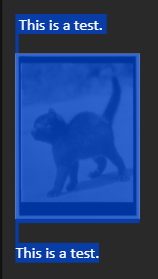
We've reproduced this on multiple devices with multiple users - it seems to be specific to the New Outlook. Here's my version as an example: Microsoft Outlook Version: 1.2026.105.100 Client Version: 20260116004.02 WebView2 Version: 144.0.3719.82 (Stable) The best way to see this is if you go to your sent items, find an email you've sent that has an embedded image (for example, I used my signature which has an image). Drag to select, like this: Then press CTRL+C to copy, and then try to paste that in a new email. In many cases when I do this, only the text will appear - regardless of my Copy/paste settings in New Outlook, whether I choose to keep source formatting, or not. To copy the images reliably, I need to right-click each image, click "Copy image", then "Paste" manually into a New Outlook new e-mail window. However, my colleague figured out that if you press Reply All or Forward on the same email, and THEN copy the range of text and images, then... when you try to paste that content into a New Outlook e-mail, the text AND images will be pasted correctly. It's almost like the "read-only" view of an email doesn't load embedded content fully, preventing the copy from actually copying images. Try it out. It doesn't always appear to be an issue. I've encountered this more often when trying to copy my own signature - but it also happens in other cases when the embedded image is in the body. In all cases I've seen, it's been with JPGs.706Views0likes0Comments
Teams meeting email invites do not display "Add to Calendar" header when there's an attachment.
Trying to solve an issue when someone sends out Teams meeting invites that include attachments. The header that typically appears directly above the body of the email showing the time and date of the meeting and the option to add the meeting to your calendar does not appear, this issue is consistent across outlook and gmail inboxes of the recipients. The attachment takes over the space that the 'Add to Calendar' would appear, I have been able to replicate this issue consistently. Removing attachments rectifies the issue but is not really satisfactory as they want to include relevant files to the meeting in the invitations that are sent out. Thanks, L114Views0likes0CommentsHow to change order of accounts on Android (with many accounts) ?
I'm using Outlook for Android with more than 10 accounts (needed for personal, office, associations, ...) When I add a new account it's added at the end of the list. If I try to edit the list and change the order, the list need more that one screen to display everything. And I can't scroll down ! I can change the order by holding the double line on the left and moving up or down. But only for the accounts displayed on the screen (upper part of my account lists). I can't move the screen to the bottom of the list. If I put my finger on the name of the account (middle of each line), it's like holding the double line on the right. And only possible to reorder these first accounts. I've tried to use "My mobile app" on my computer and accessing the screen of my phone (expecting, that with my mouse I'll be able to scroll down) but not working ! And also trying to connect a USB mouse, but no more chance to scroll down. How can I access to the bottom ? Hope there is a trick to reorder instead of disconnecting all accounts and adding them again in the correct order 🤞103Views0likes0Comments'Ghost' To Do Task Visible in Counter of 'All' - But Nowhere Else - Unable to View 'All'
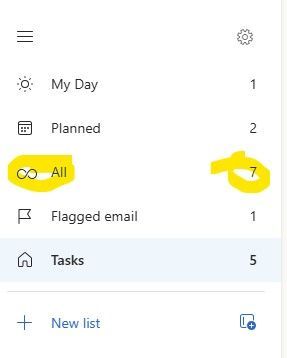
I have an interesting case in Classic Outlook (Version 2511). There is an extra item in the 'All' counter in To Do that is only visible in one instance of Outlook. If I use Outlook on the web or the To Do app itself - all tasks and counts are accurate. Even the Planner app in Teams shows the correct tasks and number of them. In my Outlook Classic at home it works properly and displays the number of tasks correctly. But not in my Outlook Classic at work. In fact - if you try to click on the 'All' itself - the display simply blanks out and you have to close and re-open Outlook to get To Do to open again. I've tried the obvious already. Thinking because it only happens in Outlook Classic at work - I've already completely wiped my ost file and rebuilt it from scratch. I've started outlook with various 'clean' flags. None of them have been able to clear the phantom count that will crash To Do from within classic Outlook. What is being overlooked? As you can see below - the number of 'All' is always one more than what it should be.35Views0likes0Comments
Outlook calendar not able to sign in Teams
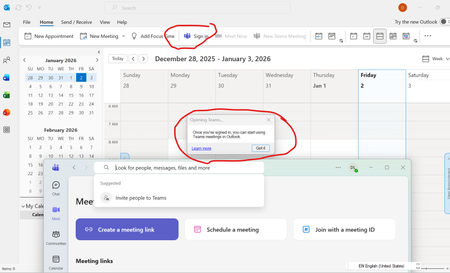
Outlook calendar cannot view Teams. It always asks for 'Sign in'. If I click it, it opens up Microsoft Teams windows. Both app are using the same account. I have already re-installed Teams; add-in on outlook is also done. I am using 365 personal account. What else I can do?51Views0likes0CommentsSuspicious calendar invite
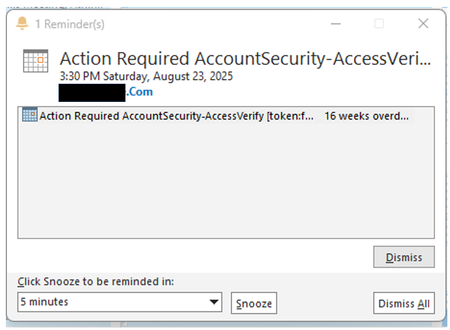
Hi, Today, when I open my Outlook, I got a 16-week overdue calendar invite reminder pop-up (screenshot attached). The calendar event is dated 23 Aug 2025. From admin email trace, I found out that the email was sent 19-Dec (today). Suspected of phishing or scam activity, I attempted to open the calendar event to view the content and the sender's email address. After I double click on the calendar invite, the email kind of hang/loading. I immediately go to Windows Task Manager > End Task, afraid that there is some malware running/executed. Since I did not manage to open the email, without clicking on any URL links or Attachments, will there be any possibility of any infection (malware/spyware...) by just opening the calendar invite? Thanks.88Views0likes0CommentsI can't log in to my Microsoft account
This is incredibly frustrating, to put it mildly. Over 48 hours ago, I changed the passwords for my three email accounts. Once I made the change, I could log into Hotmail and see my emails and everything. Now, when I try to access them through my mobile phone, it says the password I'm entering is incorrect (obviously, I'm entering it correctly for each account). I also had access on my PC. Just in case, I thought, "Okay, I'll change it again," and when I try to change it through my mobile phone, it says "Not available at the moment, please try again later." I thought it was just a one-off... A while passes, I try again, and it still says the same thing. On one of the accounts, after trying several times with the code they sent me, it locked the account. They told me to wait 24 hours and it wasn't fixed. Then they told me to wait a week because after so many attempts to remove the "block" (you can check if it's blocked by entering it in the help section)... Are we crazy or what? This afternoon I spoke with Spanish support, and the woman who helped me really tried. We tried to log in and change the password through a VPN, but this time I didn't receive the code, so she opened a ticket and escalated it to a higher level, telling me to wait 3 to 5 business days. I know what that smells like: wait and then the same thing again. The real surprise was that I couldn't access my other two accounts for 48 hours, so I thought, "Okay, I'll check." I entered the password correctly, but it still said it was incorrect (even though it was correct), and I tried mobile verification, but it wasn't available... even using a VPN. I checked the status of both accounts in the help section, and they said there were no problems with them. Why am I never going to be able to access my three Hotmail accounts again? What's the solution? It doesn't matter if I use a VPN, if the account is blocked, or if it's unblocked. It's always the same. It doesn't accept the correct password -> you try to reset it -> you don't receive a code -> if you try again, it blocks you. Can someone tell me WHAT I NEED TO DO TO FIX THIS ATROCITY? Because waiting is clearly pointless, since the other accounts aren't blocked and I can't log in or reset my password. Furthermore, the account I blocked for trying to access it was unblocked after 24 hours, but it was still the same until it was blocked again. The other two accounts have gone 48 hours without me trying to log in, and I'm still stuck. MICROSOFT, do you plan to offer any solution other than "waiting"? I'm sorry if my English isn't very clear, I'm Spanish and I use a translator99Views0likes0CommentsCopilot options are disabled on Mac
I have a Copilot Business and also a Business Standard licences that give me access to desktop apps and copilot on them. I Word it works fine, but on Outlook the Copilot button (top-right select box) shows options like Coaching, Draft and Settings disabled, when in a new message. When replying, the same button shows Reply and Summarize disabled, but Chat and Settings enabled. On the web version everything works. I have already updated to the latest versions and made a check license to make sure all features are ok. What can be missing here? Thanks.231Views0likes0Comments


Events
Recent Blogs
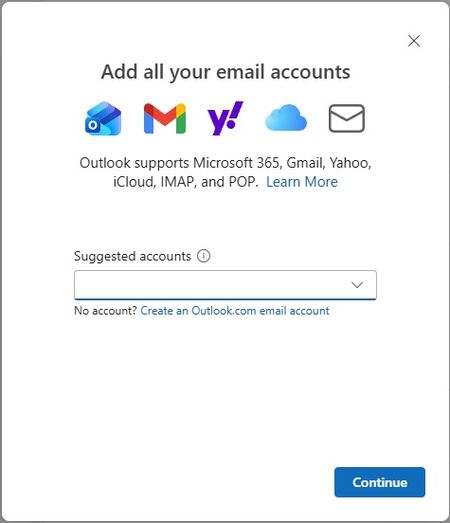
- We’re excited to announce that the new Outlook for Windows, Outlook for Mac, and Outlook for iOS and Android now support easier iCloud Mail, Calendar, and Contacts access. You no longer need to cre...Oct 30, 20253.4KViews2likes14Comments
- As technology moves forward, so do the ways we communicate. The world is rapidly changing with cloud computing, hybrid ways of working, and generative AI. To keep up with all these changes, Outlook i...Jun 24, 202510KViews2likes37Comments