Recent Discussions

deactivate the Microsoft Copilot Consumer App
Hi support .. would like to deactivate the Microsoft Copilot Consumer App while ensuring that Microsoft 365 Copilot (work/enterprise) continues to function normally for users. Here is my Questions Is it possible to disable only the Copilot Consumer App while keeping Microsoft 365 Copilot fully functional? If this is supported, what is the recommended Microsoft approach to achieve this? Are there any known limitations or potential impacts on Microsoft 365 Copilot or other Microsoft 365 services after disabling the Consumer App? Is this configuration officially supported by Microsoft? noticed that in Microsoft Defender for Cloud Apps (Cloud App Catalog), both the Copilot Consumer App and Microsoft 365 Copilot appear as Sanctioned automatically through the App Connector. Is this expected behavior, and can the Consumer App be managed independently without affecting Microsoft 365 Copilot?7Views0likes0CommentsHow Do I Secure Copilot? A Practical Guide to Protecting Your AI Assistant
Artificial intelligence has become an essential part of modern workplaces, and Microsoft Copilot is leading the way in helping organizations improve productivity. From drafting emails and summarizing meetings to generating code and analyzing documents, Copilot makes daily work faster and more efficient. However, with these powerful capabilities comes an important question: How do I secure Copilot? https://dellenny.com/how-do-i-secure-copilot-a-practical-guide-to-protecting-your-ai-assistant10Views0likes0CommentsHey Copilot Voice Function is not working
I am trying to use the "Hey, Copilot" feature in the Copilot app on my PC. It is not working because the voice assistant does not open when I say the wake phrase. I have already contacted technical support, and after going through all the troubleshooting steps, we were unable to find a solution. My microphone is working perfectly because if I launch the voice assistant manually, I can have a voice conversation without any issues. Microsoft Copilot version: 150.0.4078.96 (64-bit) Windows 11 installed "Hey, Copilot" is enabled Mic permissions are enabled Manual voice conversations work correctly Reinstalled Copilot and restarted the PC Issue: Saying "Hey, Copilot" does not activate voice mode.17Views0likes0Comments
Snippet Files Truncating Data - Excel
Dear community, Background I am looking for feedback regarding a best practice for using Microsoft Excel files as a knowledge source. My data is structured in a tabular format, stored across 3-4 columns in Excel (~500 rows, one sheet). For context, it is a simple mapping file that can be used to query about team responsibilities and who to contact for a specific topic/region/etc. I use this file in parallel with Outlook and Teams tools to escalate topics directly to individuals. I have a skill already created (contacts-responsibilities) that very clearly details the file and how the Agent should behave. Issue In the "developer" preview, I can see the Agent is identifying the correct knowledge source, but the processing technique is resulting in truncated snippet files. After multiple fail-retry loops, the Agent concludes that the data is not present in the file (which it most certainly is). Here are some of the notes the Agent returns: "the snippet seems to be limited to a certain portion of the file" "the search result only returned partial data from the spreadsheet." Ask Any suggestions on what exactly to do here? I have read that issues should only occur when you hit 1500+ rows of data. I could split my data apart, but this would mean more maintenance on my side. Thank you! Any hint is appreciated.10Views0likes0CommentsPattern for governing Copilot Studio agents before they reach production
I keep seeing the same gap across Copilot Studio deployments: agents get built and shared before anyone has answered three basic governance questions. Before I call an agent production-ready, I check: -> Who's the sponsor? Not just who built it, who's accountable for it existing. -> What's it grounded on, and who can actually read that data? A knowledge source that's technically "in scope" isn't the same as verified content people should be answering from. -> Is there an audit trail for what the agent said and to whom, if someone asks later? None of this shows up in a demo. It only shows up a few months in, when the agent's still running and nobody remembers why. I wrote a longer breakdown of this governance model, including how Microsoft Agent 365 fits into it, here: https://jpmarquez.com/blog/microsoft-agent-365-licensing-what-you-actually-buy/ Curious what pattern others are using here, especially for the sponsor/ownership question, since that's the one I see skipped most.24Views0likes0CommentsHow Sales Teams Can Close Deals Faster with Copilot in Dynamics 365
In today’s competitive sales landscape, speed is no longer just an advantage it’s a necessity. Sales teams are expected to respond quickly, personalize every interaction, manage multiple opportunities, and close deals in shorter sales cycles. However, administrative tasks, scattered customer information, and manual follow-ups often slow down even the most experienced sales professionals. https://dellenny.com/how-sales-teams-can-close-deals-faster-with-copilot-in-dynamics-365/18Views0likes0Comments
Copilot API for usage
From the microsoft admin backend it is possible to download usage from copilot, so it is possible to see how many prompts users have made etc. But i struggle to find an API that support that lookup. If have found API that show last activity date - but need an API that shows how many prompts etc has been used. I don´t want to see what is prompted of course - but just to show amount of prompts, so we can verify how much usage there is and make some automation in case copilot is not used, as license then can be removed15Views0likes0Comments
Agent response duplicated in email
Hi, I have created a Copilot Studio Flow which has 3 agents. 2 agents do some research in parallel, I catch the results in 2 different string variables and hand the variables over to a third agent. The third agent should merge both variables, format them and hand them over to "Send Email". In the email body I add the output of agent 3. The workflow itself works. But I always have the complete email body text twice in the email received by the recipients. Where is the duplicate of the agent output coming from? I have this issue also when I add the agent response of agent 1 and agent 2 directly to the "send email" node. Does anyone have an idea? Would be great to get feedback. Appreciate it. Thanks!29Views0likes0Comments
New experience workflow can't use dynamic value in Business central connector bool
Hi all As the title states I have run into an issue when trying to use the Business central connector in a new experience workflow to create a record in my sales invoice lines. I am trying to create a prototype for an agent that can create invoices in my Business central environment based on certain criteria given by my customers. To let the agent do things in Business central I am trying to create workflows for it to use as tools, but when trying to add sales lines to the invoice, I can't seem to use dynamic values in two boolean fields, it only shows a dropdown with true/false. I know I could use a condition and use the create record four times depending on the combination of the two fields, but that seems messy, especially when this was possible back in power automate flows. Has anyone experienced this and do we know if this is considered a bug or won't it get fixed?17Views0likes0CommentsCopilot Legal Agent in Microsoft Word
Can anyone tell me if the Copilot Legal Agent in Microsoft Word has been withdrawn from Frontier? Frontier is enabled and I can see other Frontier agents, MS word desktop App updated to latest build I have a Premium Copilot Licence but cannot see the agent. I previously thought I had seen it somewhere (I work across many tenants) but can no longer see anywhere.17Views0likes0Comments
Copilot in Word can't read chat attachments; Word for web file picker shows “no token obtained”
Summary of the issue I am seeing a persistent failure with Copilot attachments specifically inside Microsoft Word. Copilot in Word desktop and Word for the web can recognize an uploaded chat attachment by filename or OneDrive URL, but it cannot read the file contents. It reports the uploaded file as empty, corrupted, or in a format it cannot process. The same files are successfully read by standalone Microsoft 365 Copilot Chat using the same Microsoft account, and file uploads also work in Excel Copilot and PowerPoint Copilot. Failure started 10 days ago, with no obvious changes in settings on my end. The most useful diagnostic clue so far is that Word for the web’s Copilot attachment/file-picker path has also failed before any file was selected, showing “Something went wrong, please try again or refresh the page, no token obtained.” In Chrome, Word for the web produced a SharePoint-style error page with a correlation ID. This makes the issue look less like a bad file or local Word installation problem and more like a Word Copilot attachment-picker, OneDrive/SharePoint authorization-token, or file-handoff problem. Environment and scope Windows 11, Pro. Microsoft Word desktop: issue reproduced after updating Office and Windows. Word for the web: issue reproduced in Edge, Edge InPrivate, and Chrome. Standalone Microsoft 365 Copilot Chat / copilot.microsoft.com / m365.cloud.microsoft/chat: uploaded files can be read successfully with the same Microsoft account. Excel Copilot and PowerPoint Copilot: uploaded files work. OneDrive in Chrome: upload/download and file access work normally with the same account. Same Microsoft account used throughout. File types tested include tiny TXT files, PDFs, and DOCX files, including a complex DOCX. Copilot in Word can read the active Word document normally; the failure is limited to files uploaded as Copilot chat attachments inside Word. Observed behavior In Word desktop, Copilot chat accepts or recognizes the attachment metadata, including filename and sometimes a OneDrive URL, but when asked to read or summarize the file it says the file appears to be empty, corrupted, or in a format it cannot process. This happens even with a very small TXT test file. In Word for the web, the same general failure occurs. In one clean test, I created a brand-new blank Word document in Word for the web, opened Copilot, attached a tiny TXT file, and asked what the uploaded TXT file said. Copilot responded: “The uploaded file ingestion_test_731_1915.txt appears to be empty, corrupted, or in a format I can’t process, so I can’t read any text from it.” In another Word for the web test, clicking Copilot’s “+” attachment button and choosing either “My Files” or “Recent” opened a mostly blank window saying: “Something went wrong, please try again or refresh the page, no token obtained.” This occurred before any file was selected. In Chrome, Word for the web produced this error when trying to use the Copilot attachment flow: “Sorry, something went wrong. An unexpected error has occurred. Technical Details: Troubleshoot issues with Microsoft SharePoint Foundation.” The error included Correlation ID 64062ea2-3083-8000-a0f7-fbf4f6bb617d and Date/Time 8/4/2026 12:21:38 PM. Evidence matrix Test Result Standalone Microsoft 365 Copilot Chat / copilot.microsoft.com DOCX, PDF, and TXT uploads can be read successfully with the same account. OneDrive in Chrome Upload, download, and file access work normally. Excel Copilot Uploaded files work. PowerPoint Copilot Uploaded files work. Word desktop Copilot Attachments are recognized but reported as empty, corrupted, or unprocessable. Word for the web in Edge/InPrivate Tiny TXT attachment reported as empty, corrupted, or unprocessable. Word for the web attachment picker “No token obtained” message before file selection. Word for the web in Chrome SharePoint Foundation-style error with correlation ID 64062ea2-3083-8000-a0f7-fbf4f6bb617d. Word Copilot reading the active document Works normally. Troubleshooting already tried Updated Microsoft Office / Microsoft 365 desktop apps. Updated Windows. Restarted Word multiple times. Restarted the computer multiple times. Signed out and signed back in. Confirmed that the same Microsoft account is being used; there is only one Microsoft account involved. Toggled connected experiences off and back on, including restarts between changes. Started Word in Safe Mode. In Safe Mode, Copilot chat opened but did not activate properly; the Copilot pane appeared to cycle in the background and sub-windows were blank/unusable. Tested with a brand-new blank Word document in Word for the web. Tested in Edge, Edge InPrivate, and Chrome. Tested with very small TXT files as well as PDF and DOCX files. Confirmed OneDrive itself works normally in Chrome by uploading and accessing files successfully. Confirmed standalone Copilot and Excel/PowerPoint Copilot can process uploaded files successfully. Why this does not look like a local file or browser problem The same uploaded files work in standalone Microsoft 365 Copilot Chat, and OneDrive upload/download works normally. The issue also reproduces across Word desktop and Word for the web, across multiple browsers, and with a brand-new blank Word document. Because Word Copilot can read the active document but cannot acquire or process uploaded chat attachments, the failure appears isolated to the Word-integrated Copilot attachment picker, authorization-token acquisition, or OneDrive/SharePoint file-handoff path. Most likely failure area My current working theory is that Word-integrated Copilot is failing to obtain or pass the required SharePoint/OneDrive authorization token for Copilot chat attachments. The “no token obtained” message and the SharePoint Foundation correlation ID point toward the file-picker or backend handoff path rather than file contents. It may be account-specific, feature-flight/routing-specific, or a Microsoft-side regression affecting Word Copilot attachment handling. Request for help Has anyone seen Word Copilot attachments fail in this way while standalone Copilot, OneDrive, Excel Copilot, and PowerPoint Copilot all still work? Are there known Word Copilot attachment-picker, OneDrive/SharePoint token, or feature-routing issues that can affect only Word-integrated Copilot? If Microsoft support or engineering can trace backend logs, the most relevant correlation ID I have is 64062ea2-3083-8000-a0f7-fbf4f6bb617d from 8/4/2026 at 12:21:38 PM in Word for the web in Chrome. I would especially appreciate suggestions for anything beyond the standard local troubleshooting already tried. At this point, the pattern suggests the next useful step is probably backend investigation of the Word Copilot attachment/file-picker authorization flow rather than more file-format testing or local repair.60Views0likes0Comments
Co-Pilot in Outlook
Hello Microsoft Support, I have an active Microsoft 365 subscription with Copilot. Copilot is working successfully in Word and PowerPoint on my Mac using the same Microsoft account. However, in Outlook for Mac (version 16.110.2), Copilot displays the message: "Copilot is not supported for the account <email address>" My BTInternet email account is configured in Outlook as an IMAP account. This is also the email address associated with the Microsoft account I use to sign in to Microsoft 365. I have verified that Word and Outlook show the same signed-in Microsoft account. I reviewed Microsoft documentation indicating that Copilot access in Outlook can be be shared across connected email accounts, including certain third-party providers, when using an eligible Copilot subscription. Because of this, I would like clarification on why Copilot is unavailable for my BTInternet account and whether there is a configuration, licensing, or provisioning issue affecting my account. Could you please investigate and advise on the steps required to enable Copilot in Outlook for this account? Thank you for your assistance. Kind regards, Steve Bowen18Views0likes1Comment
Problem that copilot is unable to see all my emails in outlook
Copilot returns incomplete http://outlook.com/ email search results while Outlook Desktop and Outlook Web return complete results Product Microsoft Copilot (Windows App) Microsoft Copilot (Web) http://outlook.com/ Outlook Desktop Outlook on the Web Issue Summary Copilot is returning incomplete email search results from my http://outlook.com/ mailbox. The same mailbox searched directly in Outlook Desktop and Outlook on the Web returns complete and accurate results, but Copilot only returns a subset of the matching emails. The issue occurs in both the Copilot Windows application and Copilot on the web, suggesting the problem is not device-specific. Environment Microsoft Account Personal Microsoft account http://outlook.com/ mailbox Microsoft 365 Personal trial currently active Devices Windows laptop Completely rebuilt from scratch to troubleshoot this issue Internal storage wiped Fresh Windows installation performed All current Windows updates installed All current Microsoft 365 / Office updates installed Applications Tested Outlook Desktop (latest version) Outlook on the Web Microsoft Copilot for Windows Microsoft Copilot on the Web Account Status Same Microsoft account used for Outlook and Copilot Mailbox accessible and functioning normally Mail synchronization appears healthy Outlook search functioning correctly Problem Description On Monday 3 August 2026, my Inbox contained 12 messages. Examples included: Tesco http://amazon.co.uk/ eBay Yahoo Microsoft Account Team Microsoft 365 When I asked Copilot to list emails received on 3 August 2026, Copilot returned only a subset of those emails. Copilot was able to locate: Tesco order confirmation Tesco order amendment Microsoft 365 trial activation Microsoft account password change However, Copilot did not return several emails that were visibly present in the Inbox, including Amazon, eBay, Yahoo and other Microsoft account notifications. Expected Result Copilot should return all emails matching the requested date range, consistent with Outlook Desktop Search and Outlook Web Search. Actual Result Copilot returns only a partial subset of the matching emails despite the emails being clearly present in the mailbox. Diagnostic Testing Performed Outlook Desktop Search Result: ✅ Returns all expected emails. Outlook Web Search Result: ✅ Returns all expected emails. Copilot for Windows Result: ❌ Returns only a subset of emails. Copilot Web Result: ❌ Returns the same subset of emails. Operating System Result: ✅ Fresh Windows installation completed. Office Installation Result: ✅ Fully updated. Mailbox Access Result: ✅ Mailbox functioning normally. Why I Believe This Is a Copilot Search Service Issue The issue reproduces: Across multiple Copilot clients On a freshly rebuilt device While Outlook Desktop Search works correctly While Outlook Web Search works correctly Since both Outlook clients return complete results and both Copilot clients return incomplete results, the evidence suggests a discrepancy in the mailbox search/indexing layer used by Copilot rather than a problem with Windows, Office, Outlook indexing, or the local device. Request Please investigate: Whether Copilot is using a different mailbox index from Outlook Search. Whether my mailbox has been only partially ingested into the Copilot search service. Whether there are known issues affecting http://outlook.com/ personal accounts and Copilot email retrieval. Whether Microsoft can trigger a reindex, resynchronization, or repair of the mailbox content used by Copilot. Whether there are any diagnostic tools available to compare Outlook Search results versus Copilot Search results. Evidence Available I can provide: Screenshots showing 12 emails present in Outlook Inbox on 3 August 2026. Screenshots of Outlook Desktop search results. Screenshots of Outlook Web search results. Screenshots showing Copilot returning only a subset of those emails.37Views0likes0Comments
Copilot Studio consistent System Error issue
I have built an agent that invokes a Power Automate flow as a tool. Inside the flow, I'm using the Execute Agent and Wait activity, which calls another agent. This execution takes around 10–15 minutes to complete, after which the flow returns the result using Respond to Agent (asynchronous response). Although the flow completes successfully and the downstream agent finishes its execution, the calling agent still receives a System Error instead of the expected response. Why I'm using a Flow instead of directly connecting the agent Normally, I would connect the agent directly. However, the agent being invoked is already connected to another agent. Since agent → agent → agent chaining is not supported in Classic mode, I used a Power Automate flow as an orchestration layer to work around this limitation. Looking for someone who have faced this issue and has any solution to this.20Views0likes0CommentsMicrosoft Copilot for Project Management: A Complete Guide to Smarter Planning
Project management has always been about balancing priorities, managing deadlines, coordinating teams, and making informed decisions. As projects become increasingly complex, project managers are expected to do more with less—less time, fewer resources, and tighter budgets. Fortunately, artificial intelligence is transforming the way teams work, and Microsoft Copilot is leading that transformation. https://dellenny.com/microsoft-copilot-for-project-management-a-complete-guide-to-smarter-planning-faster-decisions-and-better-team-collaboration/42Views0likes0CommentsCopilot Studio Agent for Excel Macro Modernization — Anyone Tried This?
Anyone built a Copilot Studio agent to analyze macro-enabled Excel workbooks (.xlsm) and recommend a modernization path — e.g., migrating logic to Power Automate or rebuilding as Power BI dashboards? Curious about real-world attempts: what worked, what didn’t, and where the ROI actually showed up. Would love to compare notes before diving in myself. #CopilotStudio #Excel #PowerAutomate #PowerBI #PowerPlatform10Views0likes0CommentsIs Copilot Notebook Replacing OneNote? What I Tell Concerned Users
Copilot Notebook and OneNote both use the word notebook, so it is easy to assume that one is replacing the other. That is not what is happening. OneNote remains a useful place to capture notes, organize information, and develop content over time. Copilot Notebook serves a different purpose. It brings selected sources together so Copilot can help you work toward a specific project, topic, or outcome. You may use both tools within the same workflow. However, there are also times when Copilot Chat or SharePoint may be all you need. In my full article, I compare Copilot Notebook and OneNote, explain the licensing considerations, share workplace examples, and provide a simple way to choose the right Microsoft 365 tool for the work. https://traccreations4e.com/copilot-notebook-vs-onenote/ #MSFTOneNotePartner #traccreations4e-p26 8/3/2026Looking for ideas: Reducing "Allow" prompts when using SharePoint Knowledge
Hello community members! I'm hoping to get some advice from people who may have come across a similar challenge with their Copilot Studio "SharePoint knowledge retrieval" agents 🤞 Current setup Agent set up in Copilot Studio and published to channels - M365 Copilot and Teams Agent is connected to 4 SharePoint folders (I'm using Method#1 - see below screenshot for reference). This is essential because the documents inside the folders contain both text and image-based content. This is the only method that brings results Users have permissions to access the content in these folders Problem We are currently preparing to roll out this agent but we've hit a user experience issue that is becoming a blocker for moving forward. When a user interacts with the agent for the first time, they are asked to click "Allow" ... 4 times .. one for each of the folder that the agent is connected to This experience feels heavy for users (based on our pilot feedback) and people give up after the first or second time because they think it is not working. In spite of comms and a video about having to repeat this action until done. We want the first time experience to be as smooth as possible to drive adoption. Also, we are going to expand the solution to include more folders soon - so there is also a concern that number of consent prompts could grow further. What I've tried Used Method#2 to connect to SharePoint folders. While this didn't pop up the "Allow" prompts, as indicated earlier, this approach doesn't work because it doesn't return any results from documents as they contain both text and image content. Tried Method#1 to connect to the library (and use instructions to indicate necessary folders) - this didn't work because the method doesn't allow to connect to libraries. Note - I cannot restructure the library and put all the documents into one folder because that's the way the documents have been maintained for a long time & direct links to the folders are being used across the organization via. emails, decks etc. Looking for advice Has anyone found a way to reduce or eliminate these consent prompts? Are there any other recommendations on using SharePoint as a knowledge source that respects user permissions without these consent prompts? Does anyone know why Method#1 and Method#2 have different user experiences where the first one prompts for consent and the second doesn't?33Views1like0CommentsDeterministic way to mark generative answer output as AI-generated - AI Act
Hi all, We have a text-based RAG agent in Copilot Studio using the Azure AI Search connector as the knowledge source. It's customer-facing. We need every generated turn to carry a machine-readable marker identifying it as AI-generated, not just a visible disclaimer line. Instructing the model to append something isn't acceptable for us, because it's non-deterministic and can be prompt-injected away. Has anyone found a cleaner pattern? Like how to do it?17Views0likes0CommentsIs My Code Safe with GitHub Copilot? A Practical Guide for Developers and Businesses
Artificial intelligence has transformed software development, and one of the biggest names leading this change is GitHub Copilot. It helps developers write code faster, generate functions, explain unfamiliar code, and even suggest complete implementations based on natural language prompts. While the productivity gains are impressive, one question continues to surface among developers, engineering managers, startups, and enterprise organizations: https://dellenny.com/is-my-code-safe-with-github-copilot-a-practical-guide-for-developers-and-businesses20Views0likes0Comments





Events
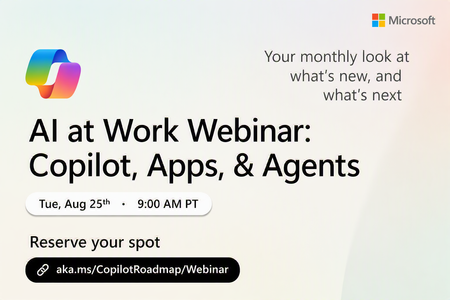
Register Here: https://aka.ms/MTC/CopilotRoadmapEvent
Keep up with the latest in Microsoft 365 Copilot, all in one place. This Roadmap webinar series is your central hub for the latest Copilot inno...
Tuesday, Aug 25, 2026, 09:00 AM PDTOnline
1like
44Attendees
0Comments
Recent Blogs
- Thirty days. Twenty-five users. One clear path to AI. For small and medium-sized businesses, AI is no longer a someday conversation, it's a right-now decision. SMB customers aren't asking whether ...Aug 05, 2026265Views0likes0Comments
- We want to inform the community that the Domain Exclusion for Microsoft 365 Copilot feature described in this post, More control over web grounding with Domain Exclusion for Microsoft 365 Copilo...Aug 04, 20261.8KViews1like0Comments