Recent Discussions

Azure VM Losing Network Connectivity after Doomain Removal
I currently have Azure VM domain joined servers running Server 2019 Std which are being upgraded via an in-place upgrade to Server 2025 Std. After the upgrade I will be un-joining from the domain and then joining a WORKGROUP to allow Entra ID joining of the servers. I have completed this on a non-critical server but upon removing from the domain the server appears to have lost network connectivity and displays a Computer Icon with a flashing cable, then eventually fails. I noticed the Ethernet displays now “Public” so I changed back to “Private” and removed “Network Level Authentication” from RDP. I also removed the Custom DNS server settings that were on the NIC in Azure Portal and set to “Virtual Network Inherited” to allow Azure DNS. Unfortunately, the same events occur time and time again with no network connectivity. I have reset the NIC and network via Powershell and CMD commands as suggested in most Google searches along with recreating the VM NIC in Azure, but still the same! Does anyone have any idea what could be causing the issue and how to resolve it as someone must have experienced similar in the past when unjoining an Azure VM from a corporate domain? I have been directing all traffic from server via the Azure FW using a Route table with a route directing all traffic via Azure FW and associating the subnets being used: Address Prefix: 0.0.0.0/0 - Next Hop type: Virtual Appliance – Next Hop IP address: <IP of Azure FW Private IP> I assume this would remain the same too? Please any advice or suggestions would be greatly appreciated? Thanks58Views0likes2CommentsInstalling and configuring Windows App on Thin Client environments
I am seeking technical guidance on accessing the new Windows App from Thin Client environments, following the end of support for the Microsoft Remote Desktop client (27 March 2026). Current Environment End-user devices: Thin Clients used by customers Thin Client OS types in use: Windows 10 IoT Enterprise, and/or Thin Clients running custom NComputing firmware Backend environment: Windows Server–based environment hosting a line-of-business application (accessed via RDP / RDS) Current Access Method Users currently connect using the Microsoft Remote Desktop (RDP) client, accessing either: A full desktop session, or Published RemoteApps via RDS This setup is functioning today but is impacted due to Remote Desktop app end of support. Issue / Challenge Microsoft is recommending migration from Remote Desktop app to the Windows App. However, during evaluation, we are facing blocking limitations on Thin Client devices, specifically: Windows App is not supported / cannot be installed on: Windows 10 IoT–based thin clients, and Thin clients running custom NComputing firmware These devices have: Limited hardware resources Restricted OS / firmware‑level constraints No support for installing modern Store / Windows App packages As a result, users cannot access the environment using Windows App, creating a risk of service disruption. What We Need : We request Microsoft’s official technical and product guidance on the following: Confirmation Is the Windows App officially supported on: Windows 10 IoT Enterprise? NComputing or other firmware‑based thin clients? Alternative Supported Options Are there supported alternatives for thin clients after Remote Desktop app end of support: Web-based access? Legacy RDP components still supported for Windows Server? Specific RDS client versions approved for IoT devices? Best‑Practice Architecture Recommended Microsoft‑supported architecture for: Thin client environments RDS / RemoteApp access Scenarios where Windows App installation is not possible Risk & Compliance Clarification Guidance on continued use of RDP clients in end-of-support but still operational mode, and Associated security or compliance implications, if temporary continuation is required. This information is critical to ensure business continuity for customers who cannot upgrade thin client hardware or firmware immediately.498Views0likes4Comments
Unable to load large delta table in azure ml studio
I am writing to report an issue that I am currently experiencing while trying to read a delta table from Azure ML. I have already created data assets to register the delta table, which is located at an ADLS location. However, when attempting to load the data, I have noticed that for large data sizes it is taking an exceedingly long time to load. I have confirmed that for small data sizes, the data is returned within few seconds, which leads me to believe that there may be an issue with the scalability of the data loading process. I would greatly appreciate it if you could investigate this issue and provide me with any recommendations or solutions to resolve this issue. I can provide additional details such as the size of the data, the steps I am taking to load the data, and any error messages if required. I'm following this document: https://learn.microsoft.com/en-us/python/api/mltable/mltable.mltable?view=azure-ml-py#mltable-mltable-from-delta-lake Using this command to read delta table using data asset URI from mltable import from_delta_lake mltable_ts = from_delta_lake(delta_table_uri=<DATA ASSET URI>, timestamp_as_of="2999-08-26T00:00:00Z", include_path_column=True)680Views0likes1Comment
AADSTS5000228 - Locked Out of Trial Tenant
I created a free trial tenant, and was immediately locked out. Upon doing research, I basically discovered that the tenant is locked due to unknown reasons, and I have to contact support. I have tried calling 4 different support numbers a total of 8 times. I have never made it through the laughable automated phone system to a real person, I eventually get hung up on for no reason. I've tried creating chats from personal accounts to basically just be told to log in with my new tenant account and submit a ticket. I can't log in, I would love to be able to log in. I am at a loss for what to do. I can't open a case. I can't call a number. I can't log in. Does anyone have any advice on how to get this taken care of? At this point, I just want to cancel the tenant so when the auto-renew comes up, it doesn't charge my card.68Views0likes1Comment
ACS Teams interop meeting chat suddenly returns 403 Forbidden on all sends since late Aug 2026
Since approximately Aug 24, 2026, every Azure Communication Services (anonymous interop) user joining Microsoft Teams meetings in our tenant gets 403 Forbidden on ALL meeting chat operations, while calling, roster, and screen-share work normally. This broke suddenly with no changes on our side. The error on both ChatThreadClient.sendMessage and sendTypingNotification is "CommunicationError" Code "Forbidden", Message "The initiator doesn't have the permission to perform the requested operation." ACS users also receive no thread messages (Teams-native participants chat with each other fine in the same meeting), and the communication-react composite shows "You are no longer in this chat thread" immediately on join - so the ACS user appears to never be attached to the meeting chat thread, even though the call roster add works. What we have verified and ruled out - Reproduces with the minimal azure/communication-react (1.32.0) CallWithChatComposite quickstart and a freshly minted ACS identity (voip+chat scopes) - not our application. - Reproduces on BOTH Graph-app-created online meetings AND a meeting created by a human organizer in the Teams desktop app with default options. - Fails on chat api-versions 2024-06-05-preview and 2025-03-15. - All CsTeamsMeetingPolicy instances have MeetingChatEnabledType = Enabled (verified via Teams PowerShell as Global Admin). - ACS federation is configured. EnableAcsUsers = True and our ACS resource's immutable ID is in AllowedAcsResources. External access policies have EnableAcsFederationAccess = True. EnableExternalAccessRestrictionsForChatParticipants and EnableMutualFederationForChatParticipants are both False. - Per-meeting allowMeetingChat = enabled. Anonymous join allowed. BlockedAnonymousJoinClientTypes empty. - User is fully admitted and call state is Connected when sends fail (not the known join-timing issue), and the failure persists for the entire meeting. Sample failing request - POST to (resource).canada.communication.azure.com /chat/threads/19%3Ameeting_...%40thread.v2/messages?api-version=2025-03-15 returns 403, Ms-Cv IGMF4wkAI0+MIaxuFQ0kJw.0, 2026-08-31 16:04:38 UTC (Canada region resource). Was there a recent service-side change or rollout to how ACS interop users are added to Teams meeting chat threads, or a new tenant/meeting setting that now gates this? Is anyone else seeing this since late August 2026? We can share tenant ID, resource ID, and additional Ms-Cv values privately with Microsoft engineers. An Azure support case is also being opened in parallel. Also posted on Microsoft Q&A - https://learn.microsoft.com/en-us/answers/questions/5990218/acs-teams-interop-meeting-chat-suddenly-returns-40113Views0likes2CommentsHow to run failed Tests in Azure DevOps
Hello I have a Test pipeline that runs Regression tests , In azure Devops once the pipeline is completed we have some Failing tests suppose Total Tests are around 500 , there are 10 tests failing , and i want to rerun those particular 10 fail tests automatically in Azure devOps Is there any way to acheive this???2.5KViews1like1Comment
Monitor a Hybrid computer shutdown in Azure Arc
Hi, I have created this alert to monitor when a Hybrid computer I have in Azure Arc is down. The computer is running but I am receiving emails. The query is not returning any values. I tried setting the threshold value to 1 but it did not work. Thank you!409Views1like2CommentsWho Can Access What? Designing RBAC and Identity in Azure
Who should be allowed to access an Azure resource? Azure makes it easy to create resources. The harder question comes afterwards: who should be allowed to access them? A Function App may need to read secrets from Key Vault. A Logic App may need to call APIs through API Management. A developer may need to deploy to Dev but have no access to Production. A CI/CD pipeline may need to deploy infrastructure without becoming an Owner of the entire subscription. This is where Azure Role-Based Access Control (RBAC) and Managed Identity become critical. In this article, I look at how to design access around people, applications and deployment pipelines, while keeping permissions as narrow as practical. The article covers: Azure RBAC and access scopes Least-privilege access Managed Identities Developer vs Production access boundaries Application identities CI/CD deployment permissions RBAC vs API authentication Privileged access and PIM Common RBAC design mistakes One of the key principles is simple: Give an identity only the permissions it actually needs. For example, if a Function App only needs to read secrets from Key Vault, giving it Contributor access to the entire Resource Group solves the problem with a much broader permission than necessary. Good RBAC design is not about assigning more permissions. It is about understanding: Who needs access? Why do they need it? What exactly do they need to do? At what scope should access be granted? How can that access be managed securely over time? I would be interested to hear how others approach RBAC and identity design in enterprise Azure environments. Full article: https://www.linkedin.com/pulse/who-can-access-what-designing-rbac-identity-azure-chethan-raj-ud6gc/56Views0likes0CommentsWho Can Access What? Designing RBAC and Identity in Azure
Who should be allowed to access an Azure resource? Azure makes it easy to create resources. The harder question comes afterwards: who should be allowed to access them? A Function App may need to read secrets from Key Vault. A Logic App may need to call APIs through API Management. A developer may need to deploy to Dev but have no access to Production. A CI/CD pipeline may need to deploy infrastructure without becoming an Owner of the entire subscription. This is where Azure Role-Based Access Control (RBAC) and Managed Identity become critical. In this article, I look at how to design access around people, applications and deployment pipelines, while keeping permissions as narrow as practical. The article covers: Azure RBAC and access scopes Least-privilege access Managed Identities Developer vs Production access boundaries Application identities CI/CD deployment permissions RBAC vs API authentication Privileged access and PIM Common RBAC design mistakes One of the key principles is simple: Give an identity only the permissions it actually needs. For example, if a Function App only needs to read secrets from Key Vault, giving it Contributor access to the entire Resource Group solves the problem with a much broader permission than necessary. Good RBAC design is not about assigning more permissions. It is about understanding: Who needs access? Why do they need it? What exactly do they need to do? At what scope should access be granted? How can that access be managed securely over time? I would be interested to hear how others approach RBAC and identity design in enterprise Azure environments. Full article: https://www.linkedin.com/pulse/who-can-access-what-designing-rbac-identity-azure-chethan-raj-ud6gc/33Views0likes0CommentsHow Should You Structure Dev, UAT, Staging and Prod in Azure?
This is one of those decisions that can look simple at the beginning of a project and become increasingly important as the environment grows. Should each environment have its own Resource Group? Should Production have a separate Subscription? Where should shared services live? How should naming, tagging and CI/CD fit into the design? There isn't one universal answer. The right structure depends on factors such as security boundaries, ownership, lifecycle, deployment processes and operational requirements. In this article, I look at: Dev, UAT, Staging and Production environment boundaries Resource Groups vs Azure Subscriptions Production isolation Naming conventions Azure tagging CI/CD considerations Blue/Green deployment considerations Common environment architecture mistakes The main idea is that environment architecture should be designed around clear operational and security boundaries rather than simply creating more Resource Groups. I would be interested to hear how others structure Dev, UAT, Staging and Production in enterprise Azure environments. Full article: https://www.linkedin.com/pulse/how-should-you-structure-dev-uat-staging-prod-azure-chethan-raj-ktfac/49Views0likes0CommentsHow should Dev, UAT, Staging and Production be structured in Azure?
This is one of those decisions that can look simple at the beginning of a project and become increasingly important as the environment grows. Should each environment have its own Resource Group? Should Production have a separate Subscription? Where should shared services live? How should naming, tagging and CI/CD fit into the design? There isn't one universal answer. The right structure depends on factors such as security boundaries, ownership, lifecycle, deployment processes and operational requirements. In this article, I look at: Dev, UAT, Staging and Production environment boundaries Resource Groups vs Azure Subscriptions Production isolation Naming conventions Azure tagging CI/CD considerations Blue/Green deployment considerations Common environment architecture mistakes The main idea is that environment architecture should be designed around clear operational and security boundaries rather than simply creating more Resource Groups. I would be interested to hear how others structure Dev, UAT, Staging and Production in enterprise Azure environments. Full article: https://www.linkedin.com/pulse/how-should-you-structure-dev-uat-staging-prod-azure-chethan-raj-ktfac/45Views0likes0Comments
Microsoft 365 business tenant blocked – AADSTS5000228 – sole Global Administrator
Please create a service request for a blocked Microsoft Entra tenant and escalate it to the Data Protection / Tenant Recovery Team. Tenant: valtechme.onmicrosoft.com Tenant ID: 80940ba0-e307-45b2-b5fd-05b9759a4594 Error: AADSTS5000228 I am the sole Global Administrator. I am posting this here, since getting microsoft support is almost impossible , via phone, email or web. Can someone please help me with this issue.264Views1like4CommentsAzure Virtual Desktop Regional host pools public preview open to all
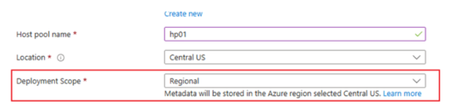
Earlier this year we announced a public preview for a new type of host pool, referred to as a "Regional" host pool. This brings enhanced resiliency and increased options for data soverignty. Today we are expanding the public preview to everyone. A new drop down box called "Deployment Scope" will appear on the Basics tab of the Create a host pool deployment, when you choose a region that supports regional host pools in preview. At this point those regions are East US 2 and Central US. Further regions will be shortly added to provide even further choice. Ultimatley every Azure region where Azure Virtual Desktop is supported will be supported. Please deploy and connect to some new Regional host pools to test this functionality. Please refer to this blog post: https://techcommunity.microsoft.com/blog/azurevirtualdesktopblog/now-in-public-preview-azure-virtual-desktop-regional-host-pools/4474598 and the Microsoft Learn documentation: https://learn.microsoft.com/en-us/azure/virtual-desktop/regional-host-pools138Views0likes0Comments
Recording call reaching GA and recording audio, video and screen share into separate files
Hello, the recording call option in Azure Communication Services is currently in public preview. When will this feature reach GA? Is there any timeline or a roadmap with that info? Additionally, is there a way to create three separate recording files: one for recording audio only, the second one recording video only, the third one recording screen share only? Is there a way to record a camera feed from just a single participant (and ignoring the rest)? Thanks!1.1KViews0likes1CommentAzure Virtual Desktop Application Group limit increase
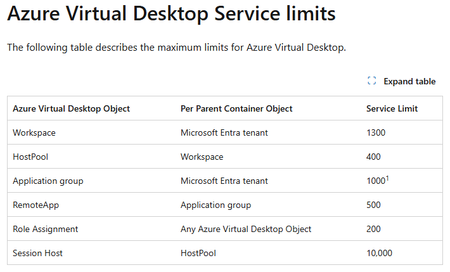
We have increased the Azure Virtual Desktop limits to allow a higher number of Application Groups per tenant. We have doubled the limit to 1000 Application groups. This enable customers with a requirement for more app groups. Customers wishing for more than 1000 will still need to open a support ticket to get this reviewed All Azure Virtual Desktop limits are documented in the full Azure subscription and service limits, quotas, and constrains document: https://learn.microsoft.com/en-us/azure/azure-resource-manager/management/azure-subscription-service-limits#azure-virtual-desktop-service-limits43Views0likes0CommentsHow to setup customer to obtain AADB2C token for an API exposed through APIM
I am setting up Azure APIM instance behind a Azure Application gateway. Developer portal will be exposed so external customers will be able to subscribe to products containing the APIs and obtain the subscription key that way. There will be approvals required for subscription. I want to setup OIDC on top of the subscription key validation. For that I believe I have to setup a Validate JWT policy on the API in APIM, using this guide below and use scopes/roles:- https://learn.microsoft.com/en-us/azure/api-management/validate-jwt-policy And seems like I will have to setup client credentials flow for customers to be able to obtain token from AADB2C, using the below KB:- https://learn.microsoft.com/en-us/azure/active-directory-b2c/client-credentials-grant-flow?pivots=b2c-custom-policy Q1 - Firstly, is that the correct way of setting it up? Secondly, with client credentials flow seems like customers will have to use the POST request (or PowerShell) like the one below to obtain the token:- https://<tenant-name>.b2clogin.com/<tenant-name>.onmicrosoft.com/<policy>/oauth2/v2.0/token But this will mean that I will have to document my B2C token endpoint in Developer portal documentation to advise customers on how to obtain token. I have 2 questions related to that:- Q2 - Is advising/advertising B2C token endpoint good practice from security point of view? Q3 - With client credentials flow, setting up the calling app APP Registration in B2C and providing related APP secret will become a manual process. This will remove the benefit of having Product/API subscriptions process automated through APIM and bring in the complexity of securely communicating the secret to customers. Is there a better way of doing this?99Views0likes1CommentBusiness Central: Slow Change Dimension
Hi folks, I need to apply a Slowly Changing Dimension (SCD) using Azure Databricks with data from an on-premise Business Central database. I want to build a medallion architecture. I am bringing the tables to the bronze level by selecting data incrementally using the field _systemModifiedAt. For building the silver level, I want to perform a Merge using the field _systemId. Is this possible? Specifically, is _systemId a unique identifier for every record in all the tables of Business Central, allowing me to apply a Merge for SCD? When a record changes in Business Central, does it produce a new record in the database table with the same _systemId but with updated information? Many thanks! Jorge.313Views0likes1Comment




Events
Recent Blogs
- Discovery Bookshelf preserves negative scientific results to guide better hypotheses. Discovery Engine navigates imprecise computational tools, adapting to real-world scientific workflows. ...Sep 07, 2026116Views0likes0Comments
- In this issue: Ace Aviator of the Month News from our product group News from our community Ace Aviator of the Month September 2026's Ace Aviator: Parth Talaviya What's yo...Sep 07, 202680Views0likes0Comments