api
84 Topics
Azure AI Gateway is now generally available: Ship faster, stay in control
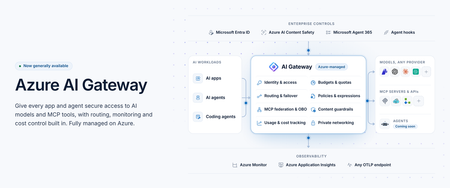
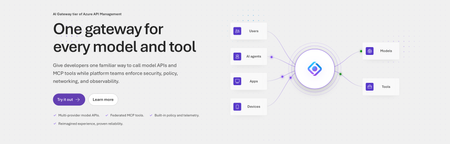
Today at Microsoft Ignite 2026, we're announcing the general availability of Azure AI Gateway, a fully managed Azure service that lets you set up a single, controlled path from your AI applications and agents to models and tools across providers. Developers build with the models and tools they choose, and platform teams manage access, enforce policies, control costs, and monitor usage from one place, without operating gateway infrastructure. Azure AI Gateway, previously in public preview as the AI Gateway tier of Azure API Management, is now a standalone product optimized for governing access to AI models and tools, with a roadmap focused entirely on AI. You can use it by itself with any app or agent, or together with Microsoft Foundry, where you build and run agents, and Microsoft Agent 365, where you manage them. Azure AI Gateway is available today in 17 Azure regions. To make it easy to get started, it offers a freemium, per-use pricing model with 10,000 free requests per gateway each month. Paid billing begins January 1, 2027. See the Regions and pricing section below for details. Why enterprise AI needs a unified governance layer Enterprise AI has moved beyond one app calling one model. Organizations use models from several providers, build agents that act through enterprise tools, and scale AI across teams. When each app manages its own credentials, routing, safety, and usage limits, governance becomes fragmented. Developers struggle to find approved models and tools, and platform teams can't see who is using what, what it costs, or which policies apply. Azure AI Gateway lets you move those controls out of individual apps and into one place, where they apply consistently to every app and agent you connect. How Azure AI Gateway works Apps and agents you connect call the gateway instead of calling each model or tool directly. On every request, the gateway authenticates the caller with Microsoft Entra ID or a gateway access key, enforces access rules and your policies, routes the request to the right model or tool, and records telemetry. Figure 1. Azure AI Gateway sits between callers and backends, governing every request that passes through it. What you can do with Azure AI Gateway Build with models and tools across providers Any model, one name: Use models from Microsoft Foundry, Azure OpenAI, OpenAI, Anthropic, Amazon Bedrock, Google Vertex AI, or any OpenAI-compatible endpoint. Apps call each model by an alias you define, so you can switch models without changing app code. Routing and failover: Route by priority, weight, or custom conditions, with configurable failover, or let Model Router (preview) choose by cost or quality. Consolidated tools: Federate MCP servers and turn OpenAPI specs, connectors, and API Management APIs into MCP tools. Multiple MCP spec versions are supported, including the latest (July 2026). The APIs you know: Call models through an OpenAI-compatible API or the Anthropic Messages API and connect agents to tools from any MCP client. Govern and observe AI interactions Access with Entra ID: Built-in roles control who can use models and tools. Provider keys and tool credentials never reach app code. Safety on every prompt: Screen prompts and responses with Azure AI Content Safety. Only approved tools: Curate and block tools at the gateway, or through Microsoft Agent 365 policies. Protection from poisoned tools (preview): Through the Microsoft Agent 365 integration, Microsoft Defender and Microsoft Purview inspect tool calls and results and block threats before an agent acts. Delegated identity: With on-behalf-of (OBO) authentication, tools act with the signed-in user’s own permissions. Every call on record: Record the caller, target, tokens, and outcome of each model and tool call, trace each call to its agent, and export the data over OpenTelemetry to Application Insights, Datadog, Splunk, Grafana Cloud, or any OTLP endpoint. Private by design: Private Link (preview) for inbound calls, VNet integration (preview) for private backends, IP filtering, and managed identity. Control AI spend as adoption scales See who spends what: Track tokens and estimated cost by user, team, app, agent, provider. Enforced budgets: Cost limits stop new requests once estimated spend reaches a budget. Fair sharing: Token and request limits keep one caller from crowding out the rest. Discover, build, and operate in your existing workflow Coding agent plugin: Developers find approved models and tools and connect their apps from their coding agent. Portal, CLI, Bicep, and REST API: Configure in the portal or with the CLI, then deploy the same setup as code from your CI/CD pipelines with Bicep or the REST API. See Azure AI Gateway in action From connecting models and MCP tools to securing access, controlling costs, and monitoring AI traffic, this demo shows how Azure AI Gateway helps you run AI applications with confidence. Extend AI governance across your Microsoft ecosystem Already using Microsoft Foundry, Microsoft Agent 365, or Azure API Management? Azure AI Gateway works with all three. Microsoft Foundry: Foundry has governance built in for its resources and projects. When AI spreads across teams, Foundry resources, subscriptions, and other providers, the gateway adds a shared layer on top. In a hub-and-spoke model, the gateway is the hub: a central platform team sets the rules once, and developers keep building in their Foundry projects, the spokes, using approved models and tools without managing credentials. Projects can share one deployment, including PTU, and fail over to another Foundry resource or provider. Foundry prompt agents can use gateway models through a model connection (preview), without code changes. Microsoft Agent 365: Agent 365 discovers the gateway’s MCP servers and lets you set tool policies. The gateway enforces those policies, alongside its own, on every tool call, with added threat protection (preview) from Defender and Purview. Regions and pricing Azure AI Gateway is available today in 17 Azure regions: East US, East US 2, East US 2 EUAP, West US, West US 2, Central US, North Central US, South Central US, Canada East, West Europe, North Europe, UK South, France Central, Sweden Central, Australia East, Japan East, and Southeast Asia. Azure AI Gateway offers a freemium, per-use pricing model with 10,000 free requests per gateway each month. Paid billing begins January 1, 2027. Monthly gateway requests Service fee Additional request charges Up to 10,000 Free None More than 10,000, up to 10 million $500 per month, per gateway, billed hourly None (includes 10 million requests) More than 10 million $500 per month, per gateway, billed hourly $20 per additional million requests, billed in increments of 10,000 requests Prices are in US dollars and may vary by region. Exact regional prices will be available when billing begins. Get started with Azure AI Gateway Create a gateway at ai.gateway.azure.com. It’s ready in about a minute and free to start. Then: Connect an existing model and give it an alias. Expose the MCP tools your agents need. Give your team access with an AI Gateway role. Set a cost limit. Point your app or agent at the gateway. Or start from your coding agent. Install the Azure AI Gateway plugin, and it finds approved models and tools and connects your app for you. Explore the documentation and quickstarts at ai.gateway.azure.com/docs.8.8KViews2likes2CommentsAzure API Management Premium v2 now supports private CNAME records
We’re excited to announce support for private CNAME records in Azure API Management Premium v2, providing greater flexibility for customers deploying API gateways in private network environments. Organizations increasingly rely on private networking to securely expose APIs to internal applications, enterprise workloads, and services connected through virtual networks. With this enhancement, customers can now use private DNS CNAME records to resolve custom gateway hostnames to their Azure API Management Premium v2 instances, simplifying DNS management and enabling more flexible private networking architectures. What's new? Azure API Management Premium v2 now supports private CNAME resolution for gateway endpoints accessed through private networking. Previously, customers configuring private DNS for Premium v2 deployments could encounter limitations when using CNAME records, requiring alternative DNS configurations to resolve gateway endpoints. With this enhancement, customers can configure private CNAME records that point to their API Management gateway hostnames, allowing internal applications to access APIs using familiar, organization-defined DNS names. Key benefits Simplified private DNS management Customers can use CNAME records within their private DNS infrastructure instead of managing direct IP address mappings for every internal gateway alias. This reduces DNS maintenance overhead and simplifies endpoint configuration. Greater flexibility for enterprise networking Organizations can align API Management gateway DNS configurations with existing enterprise DNS naming conventions, making it easier to integrate Premium v2 into established private networking environments. Improved operational efficiency Using DNS aliases helps decouple internal application configurations from underlying gateway DNS records, reducing the need for application-level changes when DNS mappings are updated. Support for private API architectures The enhancement makes it easier to deploy Premium v2 as a centralized API gateway for internal applications and services, including workloads connected through Azure virtual networks and hybrid enterprise networks with appropriate DNS resolution and network connectivity. Example scenario Consider an organization deploying Azure API Management Premium v2 to expose APIs privately to applications running within its enterprise network. The organization wants internal applications to access APIs through a consistent hostname, such as: api.contoso.com With private CNAME support, the organization can configure a DNS alias in its private DNS infrastructure: api.contoso.com. CNAME myapim.azure-api.net. Internal applications can then resolve the custom hostname through the organization's private DNS infrastructure, while the underlying gateway hostname resolves to the appropriate private endpoint address. The custom hostname must also be configured on the API Management gateway with an appropriate TLS certificate. DNS aliasing alone does not configure the gateway to accept the custom hostname. Getting started To use private CNAME records with Azure API Management Premium v2: Deploy or use an existing Azure API Management Premium v2 instance with the appropriate private networking configuration. Configure private DNS resolution for the API Management gateway endpoint. Create a private CNAME record that points your preferred internal hostname to the gateway hostname. Configure the corresponding custom gateway hostname and TLS certificate in API Management. Verify that internal clients can resolve the hostname to the expected private IP address and establish secure HTTPS connections. For more information, see the Azure API Management documentation: Azure API Management networking options Configure a custom domain name for Azure API Management Availability Private CNAME support is now available for Azure API Management Premium v2, enabling customers to simplify private DNS configurations and integrate API gateways more seamlessly into enterprise networking environments. This enhancement is part of our continued investment in Azure API Management Premium v2, helping organizations build secure, scalable, and enterprise-ready API architectures.AI Gateway tier of API Management now in public preview
Today, we are introducing the AI Gateway tier of Azure API Management, now in public preview. It gives platform teams a purpose-built experience built specifically for AI workloads - publishing and governing models and MCP servers. Controls are configured through policy cards rather than XML and expressions, and the portal experience and control plane are structured around models, MCP servers, and tools rather than APIs. (For brevity, we refer to the AI Gateway tier as AI Gateway throughout the rest of this article.) AI Gateway is built on Azure API Management, bringing proven operational capabilities to AI workloads. The resource runs in your subscription, uses your Entra tenant, and sends telemetry to destinations you control. The operating model will be familiar to existing API Management customers, but the interface is built around AI workloads. The AI Gateway tier is intended for teams that want this focused experience; other API Management tiers remain the right choice when organizations also need general-purpose API management or capabilities not included in the AI Gateway experience. A practical model for platform teams The AI Gateway gives platform teams a shared place to manage models, MCP servers, policies, and observability destinations, with access controlled through Azure RBAC. For example, a central platform group can connect a set of approved models and tools and publish them for application teams. The application teams can test those assets in the test console and build against them without routing every change through the central group. The platform group still owns the shared guardrails and can see how the assets are being used. After an asset is published, developers can create a named runtime key and begin calling the gateway immediately. Bring the models and tools you already use Most organizations don't standardize on a single model provider. Different models are selected based on quality, latency, cost, geography, or specialized capabilities. The preview supports models from Microsoft Foundry including OpenAI, Anthropic, Mistral, and other Foundry hosted models, as well as models hosted in AWS Bedrock, Google Vertex AI, OpenAI, and Anthropic. A guided wizard simplifies importing models from Microsoft Foundry. Other providers can be added by configuring a connection, with backend authentication configured as part of that connection. All published models are available under the same stable endpoint. Applications continue to use supported API formats such as OpenAI Chat Completions and Responses or Anthropic Messages directly or via SDKs. The AI Gateway extends governance beyond models to the MCP servers and tools agents use to interact with enterprise systems. You can expose an existing MCP server over SSE or Streamable HTTP, turn all or selected operations from a REST API into an MCP server by uploading its OpenAPI specification, or use more than 1,400 connector-backed tools from the Power Platform and Logic Apps library. You can also federate multiple MCP servers behind a single server, so an agent connects once and sees the tools across those servers. Backend authentication supports an API key, OAuth client credentials, managed identity, or mTLS. Governance that's built in Organizations need consistent governance across models and MCP servers without requiring every application team to implement those capabilities independently. The AI Gateway portal presents governance policies through an intuitive card-based experience rather than requiring policy XML. The same policies are expressed as JSON properties, making them easy to manage as infrastructure as code and to audit and enforce across a fleet with Azure Policy. In the public preview, those cards cover request and token rate limits, token quotas, Azure AI Content Safety, and fallback to a secondary model. Policies are applied per asset, making it clear which controls protect each model or MCP server. OpenTelemetry-based token metrics The AI Gateway emits token-usage metrics through OpenTelemetry, with attributes following GenAI and cloud semantic conventions. Metrics can be sent to Application Insights, Datadog, Splunk, Grafana Cloud, or another OTLP endpoint. The portal provides a monitoring view over Application Insights data. Better together: Microsoft Foundry and AI Gateway With AI Gateway, teams can extend the same governance controls, for example token rate limits and quotas, across models hosted in Microsoft Foundry and models hosted elsewhere. Foundry and non-Foundry models are published through gateway-managed endpoints, giving applications and agents a consistent way to access governed models regardless of where they are hosted. Foundry-hosted agents can consume curated sets of tools from Foundry toolboxes, with access to the underlying MCP servers and APIs governed through AI Gateway. Together, Microsoft Foundry and AI Gateway cover the enterprise application lifecycle: Foundry for building and running AI applications, and AI Gateway for publishing, governing, and observing models, tools, and MCP servers across your AI estate. The new AI Gateway tier will soon be available through the gateway experience in Microsoft Foundry portal. We are working toward a seamless, integrated AI Gateway experience within Foundry portal and will share more about that work separately. Available today in public preview The AI Gateway tier is available today at no cost in public preview in East US 2 and Sweden Central. Pricing will be shared separately. To provision a resource, add a model or MCP server, and make a first call click this to go to the AI Gateway tier portal and try it. If you prefer to start from code, use a sample to deploy all the required resources for a Foundry-hosted agent configured to access its model and tools through AI Gateway. We look forward to your feedback as we continue to rapidly evolve AI Gateway.9.7KViews5likes11CommentsAzure API Management Applications feature now available in public preview to all customers
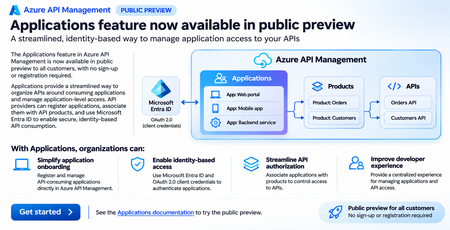
We are excited to announce that the Applications feature in Azure API Management is now available in public preview to all customers, with no sign-up or registration required. Applications introduce a streamlined, application-centric approach to managing API consumption, helping organizations simplify application onboarding, enable identity-based authentication, and manage access to APIs through Azure API Management. With this public preview, customers can explore and use the Applications feature in supported Azure API Management tiers without enrolling in a preview program or requesting access. Simplifying how applications consume APIs As organizations expand their API ecosystems, managing access for different applications, services, and development teams becomes increasingly important. Traditionally, API providers have relied on API subscriptions and subscription keys to manage access to APIs. While subscription keys provide a straightforward mechanism for identifying and controlling API consumption, enterprise applications increasingly use Microsoft Entra ID and OAuth 2.0 for secure, identity-based authentication. Organizations also need a consistent way to understand which applications consume their APIs, manage application access to API products, and simplify onboarding for application developers. The Applications feature in Azure API Management addresses these needs by introducing an application-level abstraction for API consumption. Rather than managing API access solely through subscriptions, API providers can register consuming applications, associate them with API products, and configure Microsoft Entra ID integration to support secure application authentication. This provides a more structured approach to managing API consumers while building on the existing API Management product model. What are Applications in Azure API Management? Applications represent software applications or services that consume APIs published through Azure API Management. An application can be associated with API products, which group APIs and provide a logical boundary for managing API access. With Applications, API providers can: Register API-consuming applications: Create and manage application records directly in Azure API Management, establishing a centralized inventory of applications consuming APIs. Associate applications with API products: Define which API products an application is authorized to consume, simplifying access management across related APIs. Integrate with Microsoft Entra ID: Use Microsoft Entra ID and OAuth 2.0 client credentials to support secure, identity-based authentication for machine-to-machine API communication. Manage application access centrally: Organize application registrations and their associated API products within Azure API Management, reducing the complexity of managing API consumers across multiple APIs. Applications complement the existing API Management capabilities for publishing, securing, and governing APIs, providing an additional application-centric experience for API providers and consumers. Key benefits of the Applications feature 1. Simplify application onboarding Onboarding a new application to consume enterprise APIs can involve multiple steps, including identifying the required APIs, configuring access permissions, and establishing authentication credentials. With Applications, API providers can register consuming applications directly in Azure API Management and associate them with the appropriate API products. This creates a consistent process for organizing application access and reduces the need to manage API consumption independently for every API. 2. Enable secure, identity-based API access Modern enterprise applications increasingly use OAuth 2.0 and Microsoft Entra ID for authentication rather than relying exclusively on shared API keys. Applications support integration with Microsoft Entra ID, enabling API providers to use OAuth 2.0 client credentials for application-to-application authentication. This is particularly valuable for backend services, automated workloads, and other machine-to-machine scenarios where applications access APIs without interactive user sign-in. By using Microsoft Entra ID, organizations can align API authentication with their existing enterprise identity infrastructure and security practices. 3. Streamline API authorization through products Azure API Management products provide a convenient way to group related APIs and make them available to consumers. With Applications, API providers can associate consuming applications with specific products, creating a centralized model for organizing application access. For example, an organization might publish separate products for customer information, order management, and inventory services. Different applications can be associated with the products they need, making it easier to organize API consumption according to business requirements. Combined with appropriate gateway authorization policies, this approach helps organizations manage which applications can access their APIs. 4. Improve visibility and governance of API consumers As API adoption grows, organizations need better visibility into the applications that depend on their APIs. Applications provide a centralized representation of API consumers and their relationships with API products. This helps API providers maintain a clearer inventory of consuming applications, understand application dependencies, and manage API access as applications evolve. The application-centric model also provides a foundation for more consistent governance across enterprise API ecosystems. 5. Improve the developer experience Developers consuming enterprise APIs often need to navigate multiple onboarding processes, authentication configurations, and access requirements. Applications provide a more organized approach by bringing application registration and API product associations into Azure API Management. This helps simplify the experience for application developers while giving API providers a consistent mechanism for managing access to their published APIs. How Applications work Consider an organization exposing APIs for order processing, inventory management, and customer information through Azure API Management. A backend application needs access to the order processing and inventory APIs. Using the Applications feature, the API provider can follow this workflow: Register the consuming application: Create an application record in Azure API Management to represent the backend service. Associate API products: Associate the application with the API products containing the order processing and inventory APIs. Configure application identity: Integrate the application with Microsoft Entra ID and configure OAuth 2.0 client credentials authentication. Obtain an access token: The consuming application requests an OAuth 2.0 access token from Microsoft Entra ID using its configured credentials. Call the APIs: The application sends API requests through Azure API Management, including the access token. Validate and enforce access: Azure API Management validates the token and applies the configured authorization policies before forwarding authorized requests to the backend APIs. This approach combines application registration, product-based access organization, and identity-based authentication to provide a structured model for API consumption. Public preview now open to all customers The Applications feature was previously available through a limited public preview that required customers to register for access. Starting now, the public preview is open to all customers in supported Azure API Management tiers, without any sign-up or registration requirement. Customers can explore the feature, register consuming applications, configure product associations, and evaluate Microsoft Entra ID integration directly in their API Management environments. This expanded availability enables more organizations to evaluate application-centric API access management and provide feedback as we continue to evolve the experience. Get started with Applications To start using the Applications feature: Open your Azure API Management instance in the Azure portal. Navigate to the Applications experience. Register an application that will consume your APIs. Associate the application with the appropriate API products. Configure Microsoft Entra ID integration and the required authentication and authorization policies. Test API access using the application's identity. For detailed configuration steps, supported tiers, and feature requirements, refer to the official documentation. Get started with Applications in Azure API Management Looking ahead Applications represent an important step toward simplifying how organizations onboard, secure, and govern API consumers in Azure API Management. By introducing an application-centric model alongside existing API products and policies, Azure API Management helps organizations move toward more structured, identity-based API consumption. We encourage customers to explore the public preview, evaluate Applications in their API environments, and share feedback to help shape future improvements. Learn more: Azure API Management Applications documentationAzure API Management Premium v2 now available in 35 Azure regions
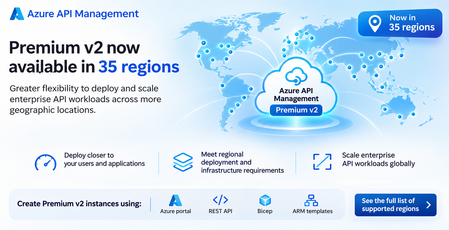
We are excited to announce that Azure API Management Premium v2 is now available in 35 Azure regions, expanding deployment options for organizations building and managing enterprise API workloads on Azure. This expansion marks another milestone in our continued investment in the Azure API Management v2 platform, making it easier for organizations to adopt Premium v2 across more geographic locations while benefiting from its enterprise-grade capabilities, modern infrastructure, and improved scalability. With broader regional availability, customers have greater flexibility to deploy API gateways closer to their applications, backend services, and users, while addressing regional infrastructure requirements and supporting their growing API ecosystems. Expanding the reach of Azure API Management Premium v2 As organizations modernize their applications and adopt cloud-native architectures, APIs have become a critical foundation for connecting applications, services, partners, and increasingly, AI-powered workloads. Enterprise customers often operate across multiple geographic locations, with applications and backend services distributed across Azure regions. Choosing where to deploy API infrastructure is an important architectural decision that can affect application performance, network connectivity, operational consistency, and regional deployment requirements. With Premium v2 now available in 35 Azure regions, organizations have more options to deploy Azure API Management in locations that align with their application architectures and business requirements. This expanded regional footprint provides several benefits: Greater deployment flexibility: Deploy Premium v2 in more Azure regions to align API infrastructure with existing applications, backend services, and enterprise cloud environments. Improved proximity to applications and users: Place API gateways closer to backend services and consumers to help reduce network latency and improve API responsiveness, depending on the network architecture. Support for regional infrastructure requirements: Choose from a broader set of Azure regions to address geographic deployment preferences, data residency considerations, and organizational infrastructure policies. Scalability for growing API workloads: Take advantage of Premium v2 capabilities to support enterprise API traffic as applications and business requirements evolve. Consistent API management across environments: Standardize API security, governance, monitoring, and lifecycle management across deployments using Azure API Management. Built for enterprise API workloads Azure API Management Premium v2 is designed for organizations that require advanced networking, scalability, and enterprise API management capabilities. Built on the v2 infrastructure, Premium v2 provides a modern platform for managing APIs while supporting enterprise scenarios that require private connectivity, network isolation, and integration with backend services hosted in Azure virtual networks. Organizations can use Premium v2 to: Secure API access: Centrally enforce authentication, authorization, rate limiting, and other API policies to protect backend services. Connect to private backend services: Use supported virtual network integration capabilities to securely connect API Management to backend services hosted in private network environments. Support private API architectures: Leverage supported networking capabilities to control API gateway connectivity and align deployments with enterprise network security requirements. Manage API traffic efficiently: Apply policies for request and response transformation, routing, caching, and traffic management. Monitor API operations: Use Azure Monitor and diagnostic capabilities to gain visibility into API traffic, performance, and operational health. The expanded regional availability makes these capabilities accessible to more organizations and workloads across Azure's global infrastructure. Deploy Premium v2 using your preferred tools Customers can create new Azure API Management Premium v2 instances in supported regions using their preferred Azure deployment and automation tools. Azure portal Create and configure Premium v2 instances through the Azure portal using a guided deployment experience. Azure REST API Programmatically provision and manage Premium v2 instances using Azure Resource Manager REST APIs, enabling integration with custom deployment and automation workflows. Bicep Define Premium v2 resources using declarative infrastructure-as-code templates. Bicep helps organizations automate deployments and maintain consistent configurations across environments. Azure Resource Manager (ARM) templates Use ARM templates to deploy Premium v2 instances as part of existing enterprise infrastructure automation and deployment pipelines. These deployment options allow organizations to incorporate Premium v2 into their existing DevOps practices, infrastructure-as-code workflows, and enterprise governance processes. Getting started with Premium v2 If you are planning a new API Management deployment or evaluating Premium v2 for your enterprise API workloads, you can get started by reviewing the supported Azure regions and selecting the location that best aligns with your application architecture. To create a Premium v2 instance: Review the Azure API Management regional availability documentation to confirm that Premium v2 is supported in your preferred region. Choose your deployment method: Azure portal, REST API, Bicep, or ARM templates. Create a new API Management instance and select the Premium v2 pricing tier. Configure networking, security, APIs, and policies based on your application's requirements. Integrate the instance into your existing API management and monitoring workflows. For organizations evaluating a migration from an existing API Management tier, review the supported feature set and networking capabilities to determine whether Premium v2 meets your requirements. What's next? We continue to invest in Azure API Management Premium v2 to support enterprise customers building modern API architectures on Azure. Expanding Premium v2 to 35 Azure regions is an important step toward making the v2 platform available to more customers, providing greater flexibility in where they deploy and manage their API workloads. We encourage customers to explore Premium v2 in their preferred Azure regions and take advantage of its modern infrastructure and enterprise API management capabilities. Learn more: View the full list of Azure API Management supported regions Explore Azure API Management documentationGenerally available: Unified Model API in Azure API Management v2 tiers
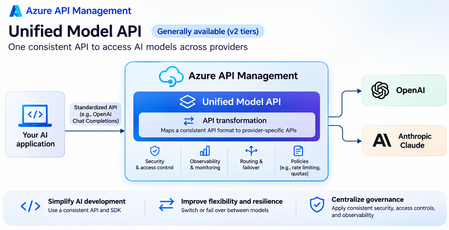
The Unified Model API in Azure API Management is now generally available in v2 tiers, enabling organizations to access and manage AI models from multiple providers through a consistent API interface. This capability simplifies the development of multi-model AI applications by abstracting provider-specific API differences and providing a unified experience for accessing supported large language models (LLMs). As organizations increasingly adopt AI models from multiple providers, developers face challenges integrating different API formats, authentication mechanisms, SDKs, and request and response structures. These differences introduce additional development and maintenance overhead, create dependencies on individual model providers, and make it difficult to switch models or implement multi-model architectures. With the Unified Model API, Azure API Management addresses these challenges by transforming requests and responses between a standardized client-facing API format and provider-specific model APIs. Developers can use a consistent interface, such as the OpenAI Chat Completions API, to interact with supported model providers, including OpenAI and Anthropic, without having to implement and maintain separate integrations for each provider. The Unified Model API also enables organizations to take advantage of Azure API Management's existing gateway capabilities to centrally secure, monitor, and govern AI traffic across model providers. With the Unified Model API, organizations can: Simplify multi-model AI development: Standardize on a single API format and compatible client SDKs to access models from different providers. Reduce provider-specific integration code, accelerate development, and simplify ongoing application maintenance. Improve model portability and flexibility: Switch between supported models and providers without requiring changes to the client-facing API contract. This enables organizations to evaluate and adopt new models based on performance, cost, availability, and evolving business requirements. Build more resilient AI applications: Use Azure API Management's backend management and routing capabilities to distribute requests across supported model backends and implement failover strategies. This helps improve application availability and reduces dependencies on a single model provider. Centralize security and governance: Apply Azure API Management policies to enforce authentication, authorization, rate limiting, and other access controls consistently across supported model providers. Organizations can manage AI model access through a centralized gateway rather than implementing security controls separately for each provider. Improve observability and operational management: Leverage Azure API Management's monitoring, logging, and diagnostics capabilities to gain visibility into AI API traffic, track operational performance, troubleshoot failures, and manage model integrations through a common platform. Accelerate adoption of new AI models: Integrate additional supported model providers behind the same standardized API interface, reducing the effort required to introduce new models into existing applications. By abstracting provider-specific differences behind a unified API and combining model interoperability with enterprise-grade API management capabilities, Azure API Management helps organizations build AI applications that are more portable, resilient, secure, and easier to govern at scale. The Unified Model API is generally available in supported Azure API Management v2 tiers. Get started: Unified Model API documentationMicrosoft Agent 365 and Azure API Management integration for MCP governance
As agents gain access to enterprise tools, organizations need consistent ways to govern what those agents can access and enforce those decisions at runtime Today, we're announcing a new integration between Microsoft Agent 365 and Azure API Management now in public preview. The integration connects centralized governance in Agent 365 with runtime enforcement for MCP servers and tools through Azure API Management for V2 and AI Gateway tiers. With this integration, AI administrators can discover and govern gateway managed MCP servers and tools from Agent 365 and application platform teams use Azure API Management, to enforce those access decisions at runtime. Microsoft Defender and Microsoft Purview add additional layers of protection by evaluating tool requests and results for threats and sensitive information risks. Centralized governance, enforced at the gateway Agent 365 and Azure API Management play complementary roles. Agent 365 defines governance intent, maintains inventory, and manages access decisions. Azure API Management enforces those decisions inline for traffic to MCP servers and tools. Together, they connect the enterprise governance experience with the infrastructure platform teams already use to manage access to business systems. Administrators can make supported access decisions from Agent 365, while enforcement happens at the gateway in the customer's Azure environment. For agents already using a configured gateway endpoint, that connection remains in place. Customers can extend governance to their existing gateway-managed tools without rearchitecting those agents or moving tools out of their Azure subscriptions. Discover tools and control what agents can do The integration brings together four key capabilities: Discover existing gateways and MCP servers. After a one-time tenant-level consent, Agent 365 discovers supported Azure API Management resources and the MCP servers they expose, removing manual registration. Maintain a centralized inventory. Administrators can find gateway-managed MCP servers in Agent 365 and inspect available metadata, bringing these assets into a shared governance experience. Control access at the right level. Block or unblock an entire MCP server. With the Azure API Management AI Gateway tier (preview) they can apply more granular controls by blocking individual tools without disabling the server. Use runtime signals for oversight. Tool activity observability on AI Gateway tier supports monitoring, auditing, and incident investigation, connecting access decisions with what happens at runtime. Add protection before tools run and before results return Controlling which tools agents can access is one part of the governance model. Organizations also need protection for information flowing through those tools . The Agent 365 tool threat protection policy (supported in the AI Gateway tier) uses Microsoft Defender and Microsoft Purview capabilities to evaluate tool requests and results for risks such as malicious content, prompt injection, and exposure of sensitive information. Platform teams can configure evaluation before tool invocation, after invocation, or at both stages. With blocking configured, pre-invocation evaluation can prevent a disallowed call from executing. Post-invocation evaluation can withhold unsafe results before they reach the agent. Build on open standards and existing investments This integration connects centralized governance with enforcement where agents access tools, while building on the infrastructure organizations already operate. MCP provides a common interface for tool access. Azure API Management provides the gateway boundary for applying policy, security, and observability. Agent 365 brings those gateway-managed assets into a centralized governance experience, with Microsoft security capabilities adding protection along the tool-call path. The goal is not to make every agent use the same runtime. It is to help organizations apply governance to tools reached through supported gateway endpoints, bringing AI administrators, platform teams, and security teams closer together, while preserving the existing architecture. Get started API Management v2 tiers support centralized MCP inventory and server-level blocking and unblocking through Agent 365.The AI Gateway tier adds more granular capabilities including individual-tool blocking, tool activity observability, and tool threat protection . Start with the Agent 365 integration guide, explore tool threat protection with Defender and Purview, and configure your gateway in the AI Gateway portal.Update network rules for the API Management service tag
To improve Azure API Management resiliency and scalability, we’re expanding our infrastructure and adding control-plane IP addresses. These addresses are included in the ApiManagement service tag. If you use VNet internal or VNET external with the classic (v1) tiers, check your network security groups (NSGs), user-defined routes (UDRs), and firewalls. Replace hard-coded API Management IP addresses with the service tag wherever supported. Make this change by November 30, 2026, to avoid disruption to management access. If network rules block connectivity to the management endpoint after that date, you may be unable to manage your API Management configuration—such as APIs, operations, and policies—from the Azure portal or CLI. This change affects management-plane traffic only. Runtime traffic, including API calls to your services, is not impacted. Find the ApiManagement tag in Microsoft’s Azure service tags overview or the latest Azure IP Ranges and Service Tags JSON download. If your firewall doesn’t support service tags, use the published list and keep your IP rules synchronized with its latest version. Don’t rely on a fixed, point-in-time IP list. During the transition, the service tag includes both existing and new addresses. For reference: Use API Management in an internal virtual network
Migrate Data Ingestion from Data Collector to Log Ingestion - Part 2
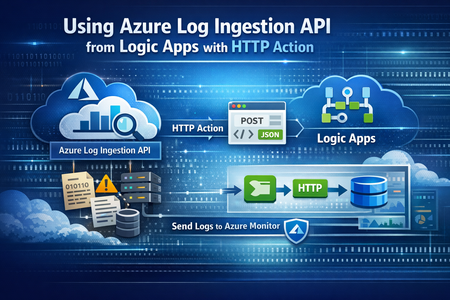
In Part1, we discussed how to use HTTP action to migrate from the deprecated Data Collector API to Log Ingestion API. However, since the deprecated Data Collector API was allowing message payload up to 30MB, some migration scenarios encountered issues; since the new Log Ingestion API has only 1MB payload limit. This applies to both HTTP action, and the preview (Log Ingestion connector) Azure Monitor service limits - Azure Monitor | Microsoft Learn When sending payload larger than 1MB, the HTTP action would fail with the error: In order to overcome this, we can chunk the array payload, before calling the Ingestion API. We need to chunk the array payload, so each produced chunk is around 800KB To do this, you can divide the size of your full payload, by the number of records it has, and this would give an average record size. Then divide 800,000 bytes with the average record size, and this will give you the chunk size. For example, if your payload size is 1,200,259 bytes, and the number of records is 2500, then the average record size is: 1,200,259 / 2,500 =~ 480 bytes To find the chunk size, we divide 800,000 bytes by 480 bytes 800,000 / 480 =~ 1666 records. So if we send around 1600 records, this should be less than 1MB. To chunk your array payload, we can use the chunk expression inside a compose action. You can use the expression below for chunking inside the compose action: After the compose action, add for-each action, and use the output of the compose action as an input: Inside the for-each, use the normal HTTP to send the logs, and in the body, choose the for-each current item356Views1like0Comments
Central pki
Has anyone implemented a centralised PKI where the Root CA is stored in Azure Key Vault and workloads can automatically obtain the Root CA when they are deployed, as well as receive updated versions when the Root CA needs to be rotated or renewed? I’m looking to implement a centralised PKI for an Azure hub-and-spoke architecture, where workloads across the spokes can automatically obtain and trust the Root CA. The workloads could include VMs, AKS, containers, App Services and Azure Functions. I’m aware that Azure Machine Configuration can be used to deploy certificates to VMs, but this is specific to VMs. What is the recommended approach for distributing the Root CA to the other Azure workload types using a consistent and automated mechanism? Ideally, I’d like the solution to be fully automated, so that new workloads receive the current Root CA during deployment and existing workloads automatically receive updated versions whenever the Root CA is rotated or renewed. I will be deploying the root ca in a key vault via terraform a project for the root ca only to update whenever is needed and then each resources to be able to get the latest root ca. Has anyone implemented something similar, or could you provide guidance on the recommended architecture and distribution mechanism?350Views0likes1Comment