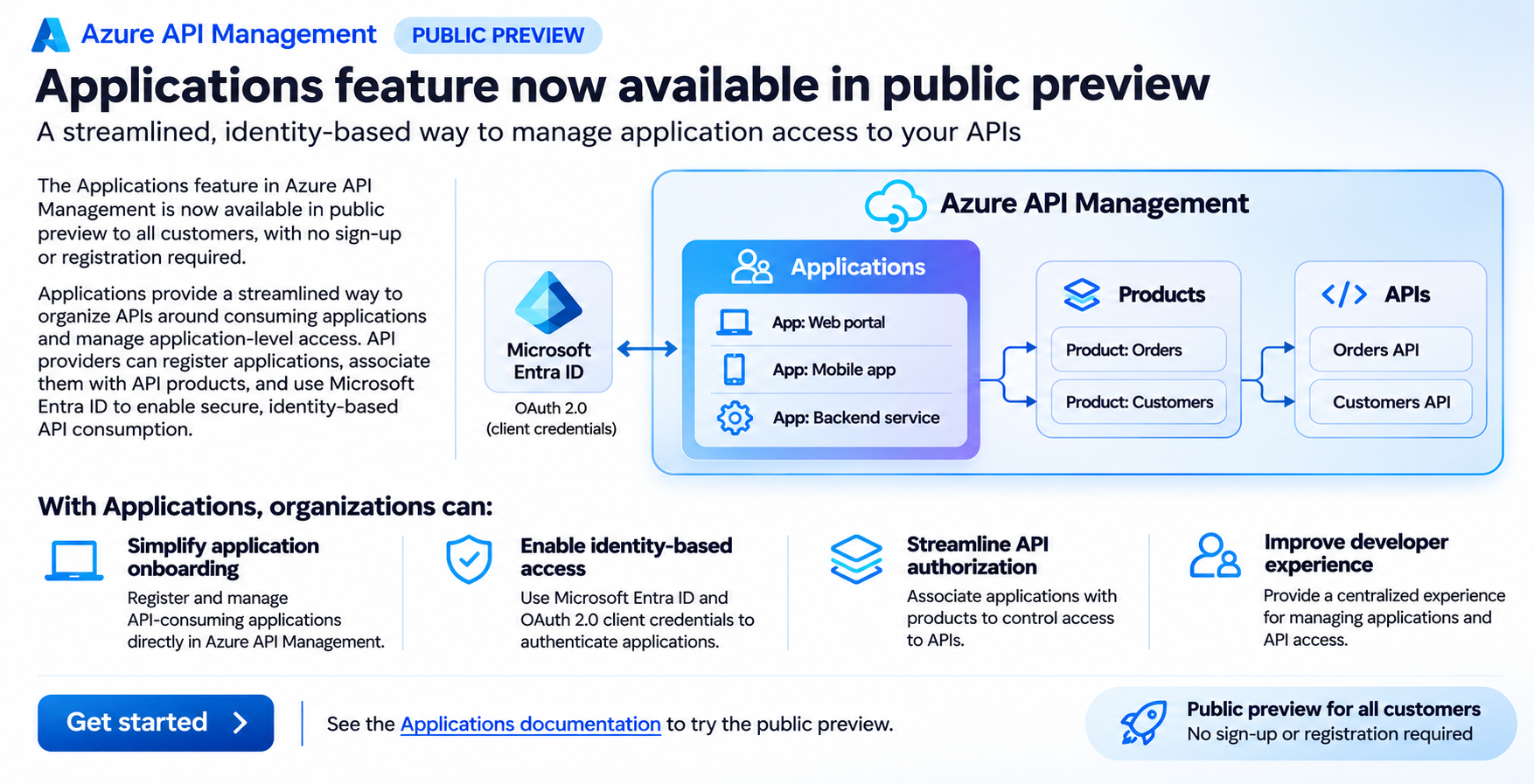
We are excited to announce that the Applications feature in Azure API Management is now available in public preview to all customers, with no sign-up or registration required.
Applications introduce a streamlined, application-centric approach to managing API consumption, helping organizations simplify application onboarding, enable identity-based authentication, and manage access to APIs through Azure API Management.
With this public preview, customers can explore and use the Applications feature in supported Azure API Management tiers without enrolling in a preview program or requesting access.
Simplifying how applications consume APIs
As organizations expand their API ecosystems, managing access for different applications, services, and development teams becomes increasingly important.
Traditionally, API providers have relied on API subscriptions and subscription keys to manage access to APIs. While subscription keys provide a straightforward mechanism for identifying and controlling API consumption, enterprise applications increasingly use Microsoft Entra ID and OAuth 2.0 for secure, identity-based authentication.
Organizations also need a consistent way to understand which applications consume their APIs, manage application access to API products, and simplify onboarding for application developers.
The Applications feature in Azure API Management addresses these needs by introducing an application-level abstraction for API consumption.
Rather than managing API access solely through subscriptions, API providers can register consuming applications, associate them with API products, and configure Microsoft Entra ID integration to support secure application authentication.
This provides a more structured approach to managing API consumers while building on the existing API Management product model.
What are Applications in Azure API Management?
Applications represent software applications or services that consume APIs published through Azure API Management.
An application can be associated with API products, which group APIs and provide a logical boundary for managing API access.
With Applications, API providers can:
- Register API-consuming applications: Create and manage application records directly in Azure API Management, establishing a centralized inventory of applications consuming APIs.
- Associate applications with API products: Define which API products an application is authorized to consume, simplifying access management across related APIs.
- Integrate with Microsoft Entra ID: Use Microsoft Entra ID and OAuth 2.0 client credentials to support secure, identity-based authentication for machine-to-machine API communication.
- Manage application access centrally: Organize application registrations and their associated API products within Azure API Management, reducing the complexity of managing API consumers across multiple APIs.
Applications complement the existing API Management capabilities for publishing, securing, and governing APIs, providing an additional application-centric experience for API providers and consumers.
Key benefits of the Applications feature
1. Simplify application onboarding
Onboarding a new application to consume enterprise APIs can involve multiple steps, including identifying the required APIs, configuring access permissions, and establishing authentication credentials.
With Applications, API providers can register consuming applications directly in Azure API Management and associate them with the appropriate API products.
This creates a consistent process for organizing application access and reduces the need to manage API consumption independently for every API.
2. Enable secure, identity-based API access
Modern enterprise applications increasingly use OAuth 2.0 and Microsoft Entra ID for authentication rather than relying exclusively on shared API keys.
Applications support integration with Microsoft Entra ID, enabling API providers to use OAuth 2.0 client credentials for application-to-application authentication.
This is particularly valuable for backend services, automated workloads, and other machine-to-machine scenarios where applications access APIs without interactive user sign-in.
By using Microsoft Entra ID, organizations can align API authentication with their existing enterprise identity infrastructure and security practices.
3. Streamline API authorization through products
Azure API Management products provide a convenient way to group related APIs and make them available to consumers.
With Applications, API providers can associate consuming applications with specific products, creating a centralized model for organizing application access.
For example, an organization might publish separate products for customer information, order management, and inventory services. Different applications can be associated with the products they need, making it easier to organize API consumption according to business requirements.
Combined with appropriate gateway authorization policies, this approach helps organizations manage which applications can access their APIs.
4. Improve visibility and governance of API consumers
As API adoption grows, organizations need better visibility into the applications that depend on their APIs.
Applications provide a centralized representation of API consumers and their relationships with API products.
This helps API providers maintain a clearer inventory of consuming applications, understand application dependencies, and manage API access as applications evolve.
The application-centric model also provides a foundation for more consistent governance across enterprise API ecosystems.
5. Improve the developer experience
Developers consuming enterprise APIs often need to navigate multiple onboarding processes, authentication configurations, and access requirements.
Applications provide a more organized approach by bringing application registration and API product associations into Azure API Management.
This helps simplify the experience for application developers while giving API providers a consistent mechanism for managing access to their published APIs.
How Applications work
Consider an organization exposing APIs for order processing, inventory management, and customer information through Azure API Management.
A backend application needs access to the order processing and inventory APIs.
Using the Applications feature, the API provider can follow this workflow:
- Register the consuming application: Create an application record in Azure API Management to represent the backend service.
- Associate API products: Associate the application with the API products containing the order processing and inventory APIs.
- Configure application identity: Integrate the application with Microsoft Entra ID and configure OAuth 2.0 client credentials authentication.
- Obtain an access token: The consuming application requests an OAuth 2.0 access token from Microsoft Entra ID using its configured credentials.
- Call the APIs: The application sends API requests through Azure API Management, including the access token.
- Validate and enforce access: Azure API Management validates the token and applies the configured authorization policies before forwarding authorized requests to the backend APIs.
This approach combines application registration, product-based access organization, and identity-based authentication to provide a structured model for API consumption.
Public preview now open to all customers
The Applications feature was previously available through a limited public preview that required customers to register for access.
Starting now, the public preview is open to all customers in supported Azure API Management tiers, without any sign-up or registration requirement.
Customers can explore the feature, register consuming applications, configure product associations, and evaluate Microsoft Entra ID integration directly in their API Management environments.
This expanded availability enables more organizations to evaluate application-centric API access management and provide feedback as we continue to evolve the experience.
Get started with Applications
To start using the Applications feature:
- Open your Azure API Management instance in the Azure portal.
- Navigate to the Applications experience.
- Register an application that will consume your APIs.
- Associate the application with the appropriate API products.
- Configure Microsoft Entra ID integration and the required authentication and authorization policies.
- Test API access using the application's identity.
For detailed configuration steps, supported tiers, and feature requirements, refer to the official documentation.
Get started with Applications in Azure API Management
Looking ahead
Applications represent an important step toward simplifying how organizations onboard, secure, and govern API consumers in Azure API Management.
By introducing an application-centric model alongside existing API products and policies, Azure API Management helps organizations move toward more structured, identity-based API consumption.
We encourage customers to explore the public preview, evaluate Applications in their API environments, and share feedback to help shape future improvements.
Learn more: Azure API Management Applications documentation

 Microsoft